
1. Product Overview
The COOAU 4MP 5G Wi-Fi Network Camera is designed for indoor monitoring, offering high-resolution video and a wide range of features to keep your home or office secure. It supports both 2.4GHz and 5GHz Wi-Fi networks for stable connectivity.
Package Contents
- COOAU 4MP 5G Wi-Fi Network Camera
- Power Adapter
- USB Cable
- Mounting Accessories (Screws, Wall Plugs)
- User Manual

Image: The COOAU 4MP 5G Wi-Fi Network Camera, power adapter, USB cable, and mounting hardware.
Camera Components
- Lens: Captures video and images.
- Indicator Light: Shows camera status (e.g., red for power on, blue for connected).
- Reset Button: Used to reset the camera to factory settings.
- SD Card Slot: For local storage of recordings (supports up to 128GB).
- Microphone: For audio input during two-way communication.
- Speaker: For audio output during two-way communication and alerts.
- Power Port: Connects to the power adapter.
Video: An ANRAN camera, similar to the COOAU 827, highlighting its lens, indicator light, reset button, and SD card slot. This video demonstrates the physical components of the camera.
2. Setup Guide
2.1 Initial Setup and App Installation
- Power On: Connect the camera to a power source using the provided USB cable and power adapter. The indicator light will turn red.
- Reset Camera: Press and hold the reset button for approximately 10 seconds until you hear a 'beep' sound and the red indicator light starts blinking slowly. This indicates the camera is ready for pairing.
- Download App: Download the dedicated COOAU app (or compatible app like ANRAN) from the App Store (iOS) or Google Play Store (Android).
- Enable Permissions: Ensure Bluetooth and Location Services are enabled on your smartphone for the app to detect the camera.
- Add Device: Open the app, tap 'Add Device' or the '+' icon. The app should automatically detect the camera ID. Tap on the detected camera ID.
- Connect to Wi-Fi: Enter your Wi-Fi network password. The camera supports both 2.4GHz and 5GHz Wi-Fi. Confirm the password and proceed.
- Confirmation: Wait for the camera to connect to Wi-Fi. Once successfully connected, the indicator light will turn blue.
Video: Step-by-step guide on connecting the camera to your smartphone via Bluetooth, including powering on, resetting, enabling Bluetooth/location, adding the device, and entering Wi-Fi credentials.
2.2 Alternative Setup: QR Code Scan
- Power On & Reset: Follow steps 1 and 2 from Section 2.1.
- Add Device (QR Code): In the app, select 'Add Device' and choose the option to scan a QR code.
- Generate QR Code: The app will generate a QR code containing your Wi-Fi information.
- Scan QR Code: Hold your smartphone with the QR code approximately 15-25 cm (6-10 inches) in front of the camera lens. The camera will scan the code.
- Confirmation: You will hear a 'beep' sound from the camera, indicating successful scanning. The camera will then connect to Wi-Fi, and the indicator light will turn blue upon successful connection.

Image: Illustrates three connection methods: LAN cable, QR code scanning, and voice connection, emphasizing ease of setup.
3. Operating Instructions
3.1 Remote Viewing and Pan/Tilt/Zoom
Once connected, you can view live footage from your camera anytime, anywhere via the app on your smartphone, iPad, or PC. The camera features a 134-degree wide-angle lens and can rotate horizontally 350 degrees and vertically 100 degrees, providing comprehensive coverage. Use the app to control the camera's movement and utilize the 8x digital zoom.

Image: A panoramic view from the COOAU 4MP camera, demonstrating its wide coverage and remote pan/tilt control via a smartphone.

Image: A person viewing the live camera feed on their smartphone, illustrating remote monitoring capabilities.
3.2 Motion Detection and Auto-Tracking
The camera is equipped with advanced detection features, including face, sound, and motion detection. You can adjust the detection sensitivity in the app. When unusual movement or sound is detected, the camera will automatically record the event and send an alert notification to your smartphone. The AI human detection lens also features auto-tracking, allowing the camera to automatically adjust its angle to follow detected movement.
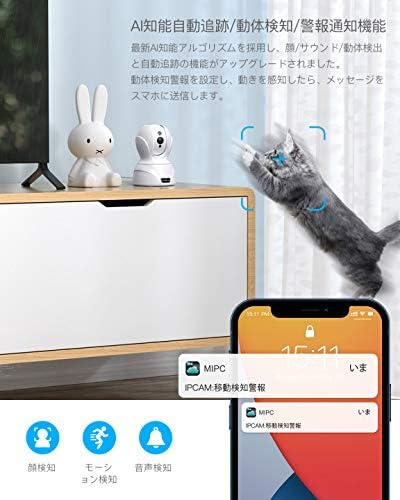
Image: The camera detecting a cat's movement and sending a notification to a smartphone, demonstrating motion detection and alert features.

Image: A smartphone screen showing a notification from the camera, indicating a motion detection alert.
Video: An aosu camera (similar to COOAU 827) demonstrating motion detection, auto-tracking, and alert notifications. It also shows app playback of recorded events.
3.3 Two-Way Audio
The camera features a built-in microphone and speaker with noise filter technology, enabling clear two-way communication. You can speak to family members, pets, or visitors through the camera using the app, even when you are away from home.
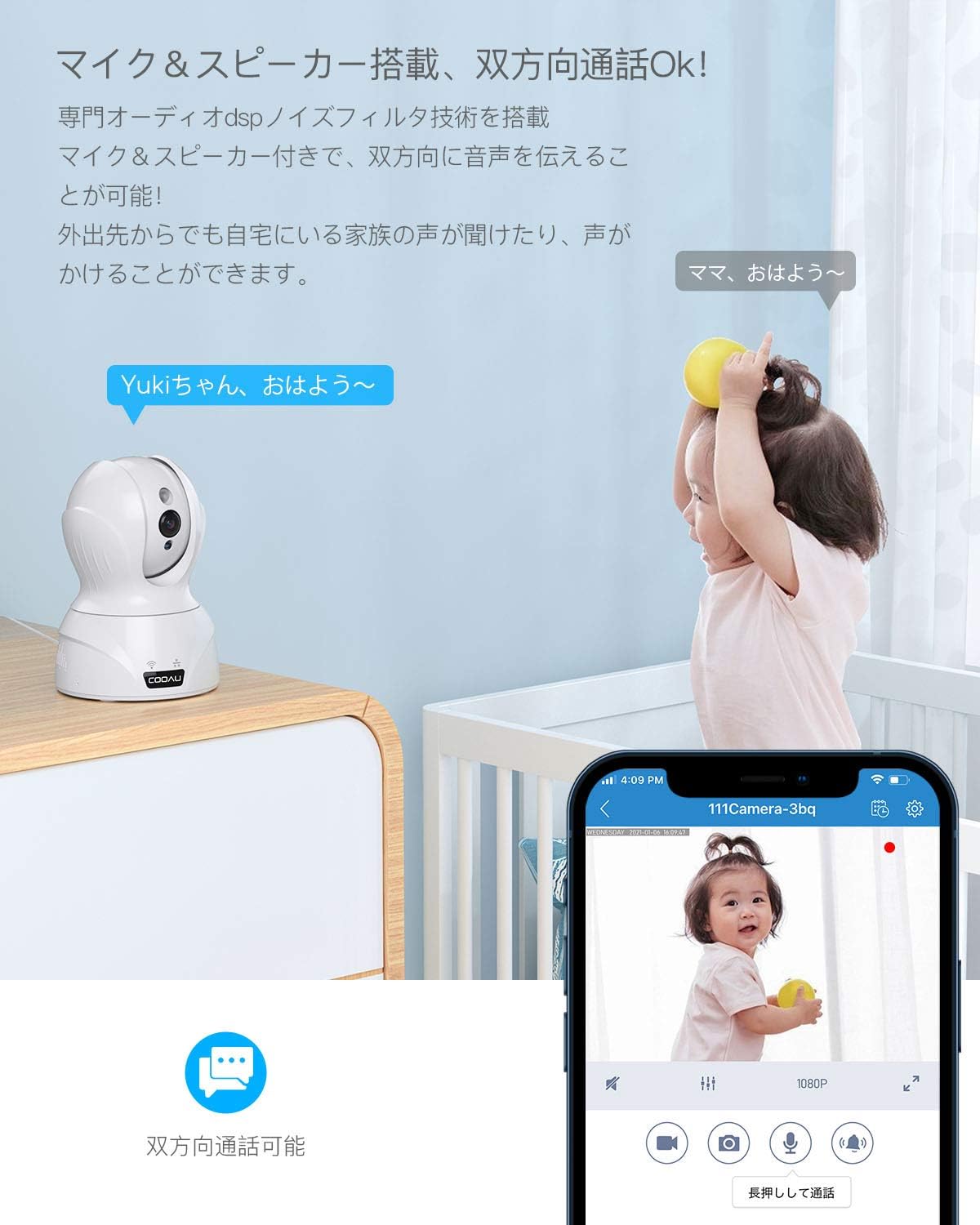
Image: A COOAU camera facilitating two-way communication between an adult on a smartphone and a child in the room.

Image: Children interacting with the camera, illustrating the two-way audio function for communication.
3.4 Night Vision
With smart IR-CUT technology and 850nm infrared LEDs, the camera automatically switches between day and night modes based on ambient light. It provides clear black-and-white images in complete darkness, with a night vision range of approximately 12 meters (39 feet).

Image: Demonstrates the camera's enhanced night vision capability, showing a clear image of a sleeping baby in a dark room.
3.5 Recording Options and Storage
The camera supports continuous recording, event-triggered recording (motion/sound detection), and scheduled recording. Recordings can be stored on a local SD card (up to 128GB) or via cloud storage (subscription may be required). The camera uses H.265 video compression for efficient storage.

Image: Illustrates the three main recording options available: continuous recording, event-triggered recording, and scheduled recording.

Image: A visual comparison demonstrating the efficiency of H.265 video compression over H.264, resulting in clearer images with less data.
3.6 Multi-Device and Family Sharing
The camera supports remote viewing and control from multiple devices (smartphones, PCs, tablets) running iOS, Android, or Mac operating systems. You can manage multiple cameras simultaneously within the app. The app also allows for secure sharing of camera access with family members by logging into the same account.

Image: A woman using a laptop with a camera feed, illustrating the camera's compatibility with various operating systems (iOS, Android, Mac, Windows).

Image: A smartphone app showing multiple camera feeds, demonstrating the ability to manage several cameras simultaneously.
4. Installation Options
The COOAU 4MP camera offers flexible installation options to suit various indoor environments. It can be placed on a table, mounted on a wall, or installed on the ceiling.

Image: Illustrates various applications for the camera, including baby monitoring, pet care, elderly supervision, home security, store surveillance, and office security.

Image: Shows the camera installed in different indoor settings, demonstrating its versatility for table placement, wall mounting, and ceiling installation.
5. Maintenance
- Cleaning: Use a soft, dry cloth to clean the camera lens and body. Avoid using harsh chemicals or abrasive materials.
- Firmware Updates: Regularly check the app for available firmware updates to ensure optimal performance and security.
- SD Card Management: If using an SD card for storage, periodically review and delete old footage to free up space. Consider formatting the SD card every few months.
- Power Supply: Ensure the camera is connected to a stable power source. Avoid frequent power interruptions.
6. Troubleshooting
| Problem | Possible Cause | Solution |
|---|---|---|
| Camera fails to connect to Wi-Fi. | Incorrect Wi-Fi password, weak signal, or incorrect Wi-Fi band. | Verify Wi-Fi password. Ensure camera is within router range. Confirm your router supports 2.4GHz or 5GHz (if using 5G Wi-Fi). Reset the camera and try again. |
| Offline status in app. | No power, Wi-Fi disconnected, or network issues. | Check power connection. Verify Wi-Fi router is working. Restart the camera and router. |
| Motion detection alerts not received. | Detection sensitivity too low, app notifications disabled, or incorrect detection zone settings. | Adjust detection sensitivity in app. Enable notifications for the app in your phone settings. Configure detection zones correctly. |
| Poor image quality. | Dirty lens, low light conditions, or network bandwidth issues. | Clean the camera lens. Ensure adequate lighting or check night vision settings. Verify stable internet connection. |
| Two-way audio not working. | Microphone/speaker muted in app, volume too low, or network delay. | Check mute settings and volume levels in the app. Ensure a stable network connection. |
If you encounter persistent issues, please refer to the support section for contact information.
7. Specifications
| Feature | Specification |
|---|---|
| Brand | COOAU |
| Model Number | 827 |
| Image Sensor Resolution | 4 MP (2602*1472P) |
| Connectivity Technology | Wired & Wireless (2.4G WiFi / 5G WiFi) |
| Indoor/Outdoor Use | Indoor |
| Compatible Devices | Smartphone, PC, Tablet (iOS, Android, Mac) |
| Power Source | Corded Electric (5V) |
| Controller Type | Amazon Alexa |
| Mounting Type | Table, Wall, Ceiling |
| Alert Type | Face Recognition, Motion Detection, Sound Detection, Alarm Notification, Auto Tracking |
| Night Vision Range | Approx. 12 meters (39 feet) |
| Digital Zoom | 8x |
| Field of View | 134 degrees (horizontal) |
| Pan/Tilt Rotation | Horizontal 350°, Vertical 100° |
| Storage | Micro SD Card (Max 128GB), Cloud Storage |
| Video Compression | MPEG-4 (H.265) |
8. Warranty and Support
This product comes with a 24-month quality warranty. We are committed to providing excellent customer support.
Contact Support
If you have any questions or require assistance, please contact us through one of the following methods:
- Official Email Address: (Please refer to your product packaging or official COOAU website for the latest email address.)
- Amazon Order History: Contact us directly through your Amazon order history for prompt assistance.
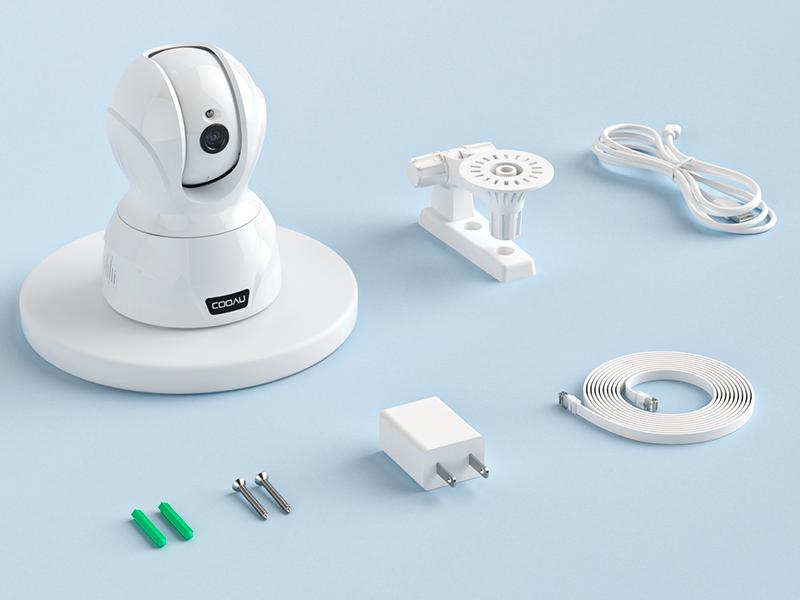
Image: Highlights COOAU's commitment to customer satisfaction with a 24-month warranty and dedicated support.


