1. Introduction
Thank you for purchasing the Topiky Bluetooth 4.1 Wireless Stereo Headset, model SPORT-BT. This manual provides detailed instructions for setting up, operating, and maintaining your headset to ensure optimal performance and longevity. Please read this manual thoroughly before use and retain it for future reference.
2. Safety Information
- Do not expose the headset to extreme temperatures, humidity, or corrosive environments.
- Avoid dropping or subjecting the headset to strong impacts.
- Do not disassemble or attempt to repair the headset yourself. This may void the warranty and cause damage.
- Keep the headset away from children and pets.
- Use only the specified charging voltage (PC USB, 5V) to prevent damage.
- Prolonged listening at high volume levels may cause hearing damage. Adjust volume to a safe level.
3. Product Overview
The Topiky SPORT-BT headset features a lightweight, behind-the-neck design with in-ear earbuds, ideal for active use. It includes integrated controls for music and call management.

Figure 3.1: Front view of the Topiky SPORT-BT Bluetooth Headset, showcasing its ergonomic design with black and green accents.

Figure 3.2: Side view of the headset, highlighting the control buttons located on the top band for easy access during use.

Figure 3.3: Close-up view of the headset's charging port, typically a micro-USB port, located on the side of the main unit.
4. Setup
4.1 Charging the Headset
Before first use, fully charge the headset. A full charge typically takes 1-2 hours.
- Connect the charging cable to the headset's USB port (refer to Figure 3.3).
- Connect the other end of the cable to a PC USB port (5V) or a compatible 110/220V 50/60Hz power adapter.
- The indicator light will show charging status (e.g., red for charging, blue for fully charged).

Figure 4.1: Illustration of the headset's battery status, indicating a built-in 150mAh rechargeable battery providing up to 30 days of standby time.
4.2 Bluetooth Pairing
To connect the headset to your mobile phone or other Bluetooth-enabled device:
- Ensure the headset is powered off. If it's on, press and hold the "Play/Pause" button for approximately 4 seconds until the blue light turns off.
- To enter pairing mode, press and hold the "Play/Pause" button for approximately 3 seconds until the blue indicator light flashes rapidly.
- On your mobile phone, activate the Bluetooth function.
- Search for Bluetooth devices and select "SPORT-BT" from the list.
- If prompted, enter the pairing code "0000".
- Once successfully paired, your phone will display "Connected".
The headset supports NFC (Near Field Communication) for easy pairing with compatible devices. Simply tap the headset to your NFC-enabled device to initiate pairing.

Figure 4.2: The headset connected to a smartphone, illustrating its capability for hands-free calls and music playback.
5. Operating Instructions
5.1 Power On/Off
- Power On: Press and hold the "Play/Pause" button for approximately 3 seconds until the blue light flashes rapidly (pairing mode) or steadily (connected).
- Power Off: Press and hold the "Play/Pause" button for approximately 4 seconds until the blue light turns off.
5.2 Call Management
- Answer a Call: Press the "Play/Pause" button once.
- Reject a Call: Press and hold the "Play/Pause" button for 2 seconds, then release.
- End a Call: Press the "Play/Pause" button once during a call.
- Redial Last Number: Double-press the "Play/Pause" button.
5.3 Music Playback
- Play/Pause: Press the "Play/Pause" button once.
- Next Track: Press the "Volume Up" button (usually a short press).
- Previous Track: Press the "Volume Down" button (usually a short press).
- Volume Up: Press and hold the "Volume Up" button.
- Volume Down: Press and hold the "Volume Down" button.
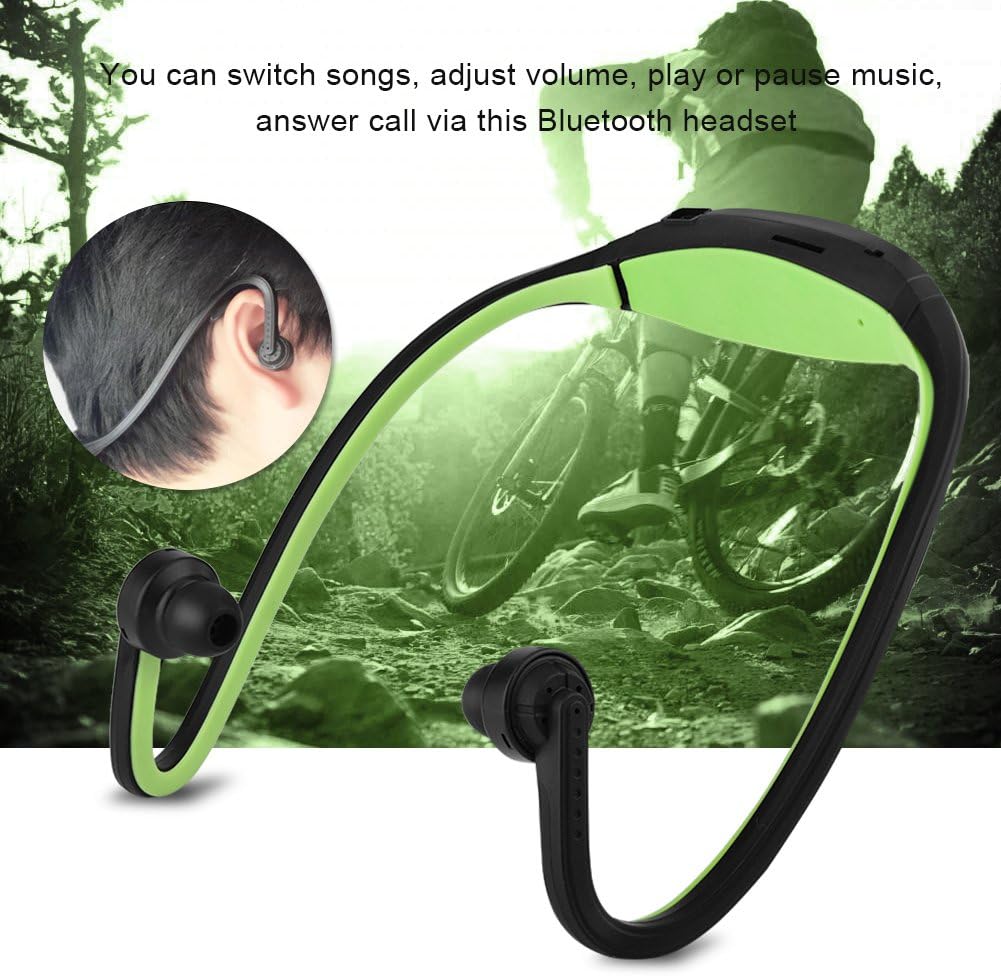
Figure 5.1: The headset being worn, demonstrating its suitability for active lifestyles, allowing users to control music and calls on the go.
5.4 TF Card Mode
The headset supports TF (MicroSD) cards up to 32GB, allowing you to play music directly without a connected device.
- Insert a TF card loaded with MP3 files into the designated slot on the headset.
- The headset will automatically switch to TF card playback mode.
- Use the "Play/Pause" and volume buttons to control music playback as described above.
6. Maintenance
- Clean the headset regularly with a soft, dry cloth. Do not use abrasive cleaners or solvents.
- Keep the charging port free of dust and debris.
- Store the headset in a cool, dry place when not in use.
- Avoid prolonged exposure to direct sunlight or high temperatures.
7. Troubleshooting
| Problem | Possible Cause | Solution |
|---|---|---|
| Headset does not power on. | Low battery. | Charge the headset for 1-2 hours. |
| Cannot pair with device. | Headset not in pairing mode; Bluetooth off on device; device too far. | Ensure headset is in pairing mode (rapid blue flashing light). Turn on Bluetooth on your device. Move device closer to headset (within 10m/30ft). |
| No sound or poor sound quality. | Volume too low; headset not connected; interference. | Adjust volume on headset and device. Re-pair the headset. Move away from sources of interference. |
| "Low battery, please charge" voice prompt interrupts music. | Battery level is critically low. | Charge the headset immediately. This is a design feature to alert you to low power. |
| Short battery life. | Battery degradation; high volume usage. | Ensure headset is fully charged. Reduce listening volume. Battery life may decrease over time with usage. |
8. Specifications
- Bluetooth Version: Bluetooth 4.1 + EDR
- Frequency Coverage: 2.402 to 2.480 GHz ISM band
- Channels: 79 channels, 1 MHz N/B
- Sensitivity: -80dBm
- Bluetooth Range: Up to 10m / 30ft
- Transmission Speed: 57 ~ 723Kbps
- Stereo Compression Rate: 44.1 / 48kHz
- NFC Support: Yes
- Audio Type: Bilateral Stereo
- Charging Power: PC USB, 5V (Input 110/220V 50/60Hz adapter compatible)
- Battery: 150mAh
- Charging Time: 1-2 hours
- Standby Time: Up to 30 days
- Material: Faux leather (earpads)
- Water Resistance: Not waterproof
- Model Number: SPORT-BT
9. Warranty & Support
Specific warranty information for the Topiky SPORT-BT headset is not provided in the product details. Please refer to the retailer's return policy or contact the seller directly for warranty details and support inquiries.
For technical assistance or customer service, please contact your point of purchase or visit the official Topiky website (if available).