1. Introduction
This manual provides comprehensive instructions for the installation, operation, and maintenance of your Power Acoustik PDN-1060HB Double DIN Car Stereo. This unit features a 10.6-inch swiveling LCD touchscreen, integrated GPS navigation, Bluetooth connectivity, DVD/CD playback, USB/SD card inputs, and MHL PhoneLink for smartphone mirroring. Please read this manual thoroughly before using the product to ensure proper function and safety.

Figure 1.1: Front view of the Power Acoustik PDN-1060HB car stereo, displaying the brand logo on its 10.6-inch screen.
2. Setup and Installation
The PDN-1060HB is designed with an ISO 2-DIN chassis for compatibility with a wide range of vehicle dashboards. Professional installation is recommended.
2.1 Included Components
- Main GPS unit
- Backup Camera
- Front Camera
- Wiring Harnesses
- GPS Antenna
2.2 Screen Attachment and Detachment
The 10.6-inch LCD touchscreen is designed to swivel and can be detached from the main unit. Exercise caution when detaching or attaching the screen. The connection points are delicate and can be damaged if not handled properly. Ensure the unit is powered off before attempting to detach or attach the screen to prevent damage to the power board or connection pins.
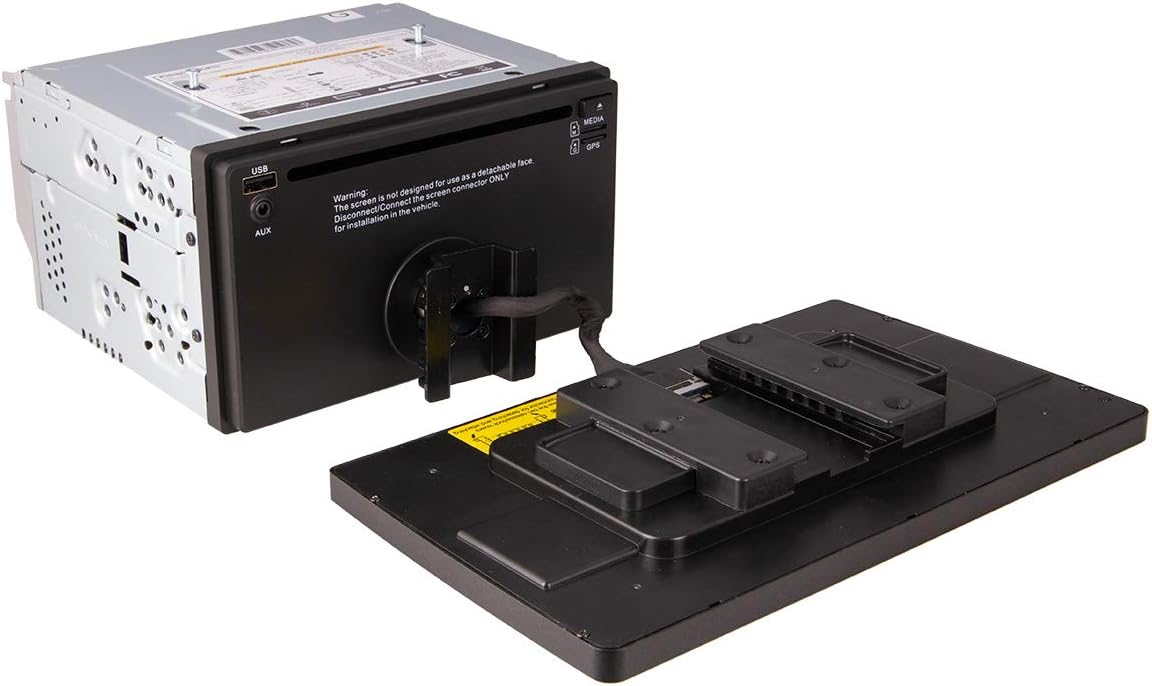
Figure 2.1: Rear view of the main unit with the 10.6-inch screen detached, showing the connection mechanism.

Figure 2.2: Side view of the Power Acoustik PDN-1060HB car stereo, illustrating the screen attached to the main unit.
2.3 Initial Power-Up and Configuration
Upon initial power-up, follow the on-screen prompts for basic setup. This may include language selection, time zone, and initial GPS configuration. Ensure the GPS antenna is installed in a location with clear sky visibility for optimal signal reception.
3. Operating Instructions
The PDN-1060HB features a SmartSense Capacitive Touchscreen for intuitive control. Physical buttons are also available on the unit for quick access to essential functions.
3.1 GPS Navigation
The unit includes built-in GPS navigation. To use, select the navigation icon from the main menu. Map data may require periodic updates to ensure accuracy and include new roads or points of interest. Refer to the manufacturer's website or support for information on map updates.

Figure 3.1: The Power Acoustik PDN-1060HB display showing the GPS navigation interface with a route highlighted.
3.2 Bluetooth Connectivity
Pair your smartphone or other Bluetooth-enabled devices to the PDN-1060HB for hands-free calling and audio streaming. Access the Bluetooth menu to search for devices and initiate pairing. The unit supports ID3 MP3 Tag Reading for track and artist information display.
3.3 DVD/CD Playback
Insert a DVD or CD into the disc slot. The unit will automatically detect the media and begin playback. Use the touchscreen controls or the remote control to navigate menus, play, pause, skip tracks, and adjust volume.
3.4 USB and SD Card Inputs
Connect USB storage devices or insert SD cards into the designated slots to play audio and video files. The unit supports various media formats. Ensure files are compatible for proper playback.
3.5 MHL PhoneLink
The MHL PhoneLink feature allows you to mirror your smartphone's display onto the 10.6-inch screen. Connect your compatible smartphone using an MHL-enabled USB cable. Follow the on-screen instructions on both the stereo and your smartphone to establish the connection. Note that video quality may vary depending on the smartphone and content being mirrored.
3.6 Audio Settings
Adjust audio output using the multi-band audio equalizer with preset options. The unit provides front and rear pre-amp audio outputs for connecting external amplifiers and 300W 4-channel MOSFET speaker outputs for direct speaker connection.
3.7 Camera Inputs
The unit supports both backup and front camera inputs. When properly installed and connected, the display will automatically switch to the corresponding camera view when the vehicle is in reverse or when the front camera is activated.
3.8 Remote Control
A remote control is included for convenient operation of various functions from a distance.
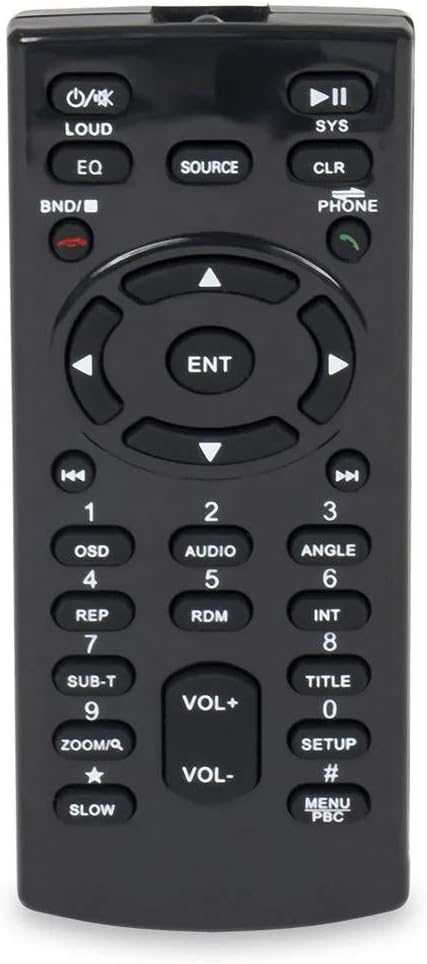
Figure 3.2: The remote control for the Power Acoustik PDN-1060HB, showing various buttons for media playback, navigation, and system settings.
4. Maintenance
To ensure the longevity and optimal performance of your PDN-1060HB, follow these maintenance guidelines:
- Screen Cleaning: Use a soft, lint-free cloth specifically designed for electronics screens. Do not use abrasive cleaners or solvents. Gently wipe the screen to remove dust and fingerprints.
- General Cleaning: Keep the unit free from dust and debris. Use a soft, dry cloth for the main chassis.
- Disc Care: Handle DVDs and CDs by their edges. Store them in their cases to prevent scratches.
- Connection Points: Periodically check all wiring connections to ensure they are secure.
5. Troubleshooting
This section addresses common issues you might encounter with your PDN-1060HB unit.
- No Power/Unit Not Responding:
- Check all power connections and fuses.
- Ensure the screen is securely attached if it was previously detached.
- GPS Signal Loss:
- Verify the GPS antenna is correctly installed and has an unobstructed view of the sky.
- Ensure the antenna cable is securely connected to the unit.
- Poor PhoneLink Video Quality:
- Video quality during PhoneLink mirroring may be limited by the source device or the connection. Ensure you are using a high-quality MHL-enabled USB cable.
- Some applications may not display optimally or at all due to compatibility or DRM restrictions.
- Weak Subwoofer Output:
- The subwoofer pre-amp output voltage may be lower than some external amplifiers require. Consider using an amplifier with higher input sensitivity or a line driver if experiencing insufficient bass output.
- Check subwoofer wiring and amplifier settings.
- Screen Issues (Dark, Unclear, Unresponsive):
- Ensure the screen is properly connected to the main unit.
- Attempt a system reset (refer to the RST button on the unit, usually a small pinhole).
- If the issue persists, contact customer support.
- CRITICAL WARNING: USB Power Board Damage:
- DO NOT unplug the 90-degree USB cable from your phone's USB cable while the radio is powered on. This action can cause a power surge that may damage the unit's power board, rendering the radio inoperable. Always power off the unit or ensure the phone is disconnected from the MHL/USB cable before physically detaching the cable from the unit.
6. Specifications
| Feature | Specification |
|---|---|
| Model Name | PDN-1060HB |
| Brand | Power Acoustik |
| Screen Size | 10.6 Inches |
| Display Resolution | 1024 x 600 |
| Human Interface Input | Touchscreen |
| Mounting Type | Dashboard Mount (Double DIN) |
| Connectivity Technology | USB, Bluetooth |
| Special Features | Android PhoneLink, GPS Navigation, DVD/CD Player, Backup Camera Input, Front Camera Input, Multi-band Audio Equalizer, Front & Rear Pre-Amp Audio Outputs, 300W 4ch. MOSFET Speaker Outputs |
| Audio Output Mode | Speaker, Stereo |
| Included Components | GPS unit, Backup Camera, Front Camera |
| Item Weight | 7 pounds |
| Manufacturer | Epsilon Electronics, Inc |
7. Warranty and Support
For warranty information and technical support, please refer to the documentation included with your product or visit the official Power Acoustik website. You may also contact Epsilon Electronics, Inc., the manufacturer, for assistance.
Manufacturer: Epsilon Electronics, Inc.
For the most up-to-date support resources, please visit: www.poweracoustik.com


