Introduction
This manual provides comprehensive instructions for the installation, operation, and maintenance of your SEBSON HF Ceiling Surface Mount Motion Detector. Please read this manual carefully before installation and use to ensure proper function and safety.

Image 1: Front view of the SEBSON HF Ceiling Surface Mount Motion Detector.
Key Features:
- High-frequency (HF) sensor for reliable motion detection.
- 360° detection angle with an adjustable range of 2 to 16 meters.
- Compatible with LED lamps and other energy-saving bulbs, up to 300W for LED and 800W for incandescent.
- Adjustable operating cycle from 10 seconds to 12 minutes.
- Adjustable ambient light sensitivity from 3 to 2000 lux.
- Surface mount design for easy ceiling installation.
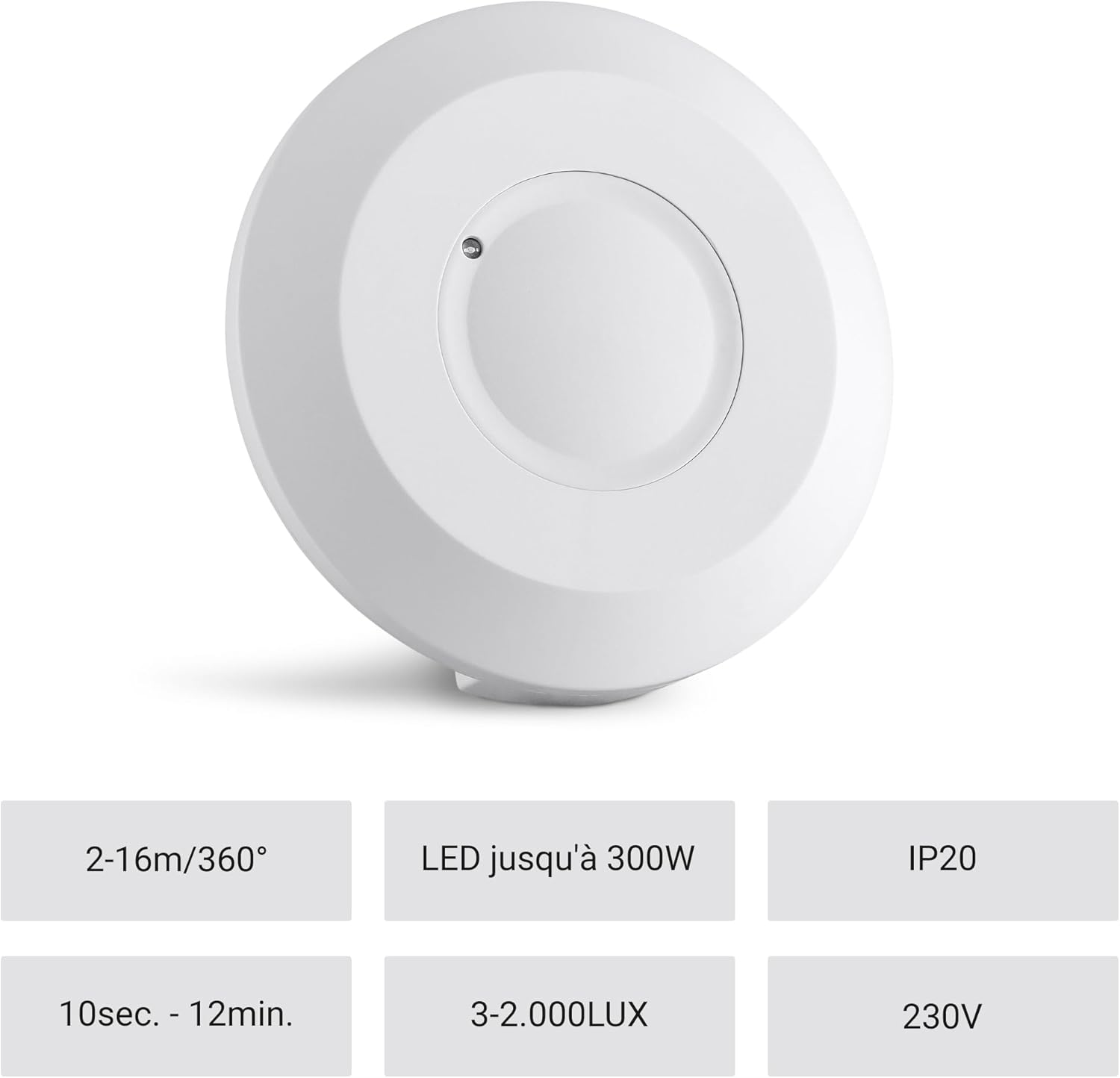
Image 2: Overview of the motion detector's key features including detection range, LED compatibility, IP rating, time adjustment, LUX adjustment, and voltage.
Safety Information
Please observe the following safety instructions to prevent personal injury and damage to the device:
- Installation must be performed by a qualified electrician in accordance with national wiring regulations.
- Disconnect power before installation, maintenance, or repair.
- Do not open the device housing. There are no user-serviceable parts inside.
- Do not expose the device to moisture, extreme temperatures, or corrosive environments.
- Ensure the load connected does not exceed the maximum wattage specified (800W incandescent, 300W LED).
Setup and Installation
Mounting Location:
The motion detector is designed for indoor ceiling surface mounting. Choose a location that provides the desired detection coverage and is free from obstructions that could block the sensor's field of view. Avoid mounting near heat sources, air conditioning vents, or areas with significant air movement, as these can cause false triggers.

Image 3: Example of a motion detector installed in a kitchen environment.
Installation Steps:
- Disconnect Power: Turn off the main power supply at the circuit breaker before beginning installation.
- Prepare Mounting Surface: Mark the drilling points on the ceiling using the detector's base as a template.
- Mount the Base: Drill holes and secure the detector's base to the ceiling using appropriate screws and anchors.
- Wire the Detector: Connect the power supply wires and the load wires to the terminal block on the back of the detector. Ensure correct polarity and secure connections. Refer to the wiring diagram below.
- Attach the Cover: Once wiring is complete, securely attach the front cover of the detector to the base.
- Restore Power: Turn the main power supply back on.

Image 4: Rear view of the motion detector, illustrating the mounting holes for ceiling installation.

Image 5: Close-up of the wiring terminals and adjustment dials on the back of the motion detector.
Operating Instructions
The SEBSON motion detector features three adjustable settings to customize its operation:
- SENS (Sensitivity/Detection Range): Adjusts the detection range from 2 to 16 meters. Turn the dial towards '+' for a wider range or towards '-' for a narrower range.
- LUX (Ambient Light Sensitivity): Determines the ambient light level at which the detector will activate the connected light. Turn towards the sun icon for activation during daylight (high lux) or towards the moon icon for activation only in darkness (low lux). The range is 3 to 2000 lux.
- TIME (Time Delay): Sets how long the connected light remains on after motion is no longer detected. Adjustable from 10 seconds to 12 minutes.
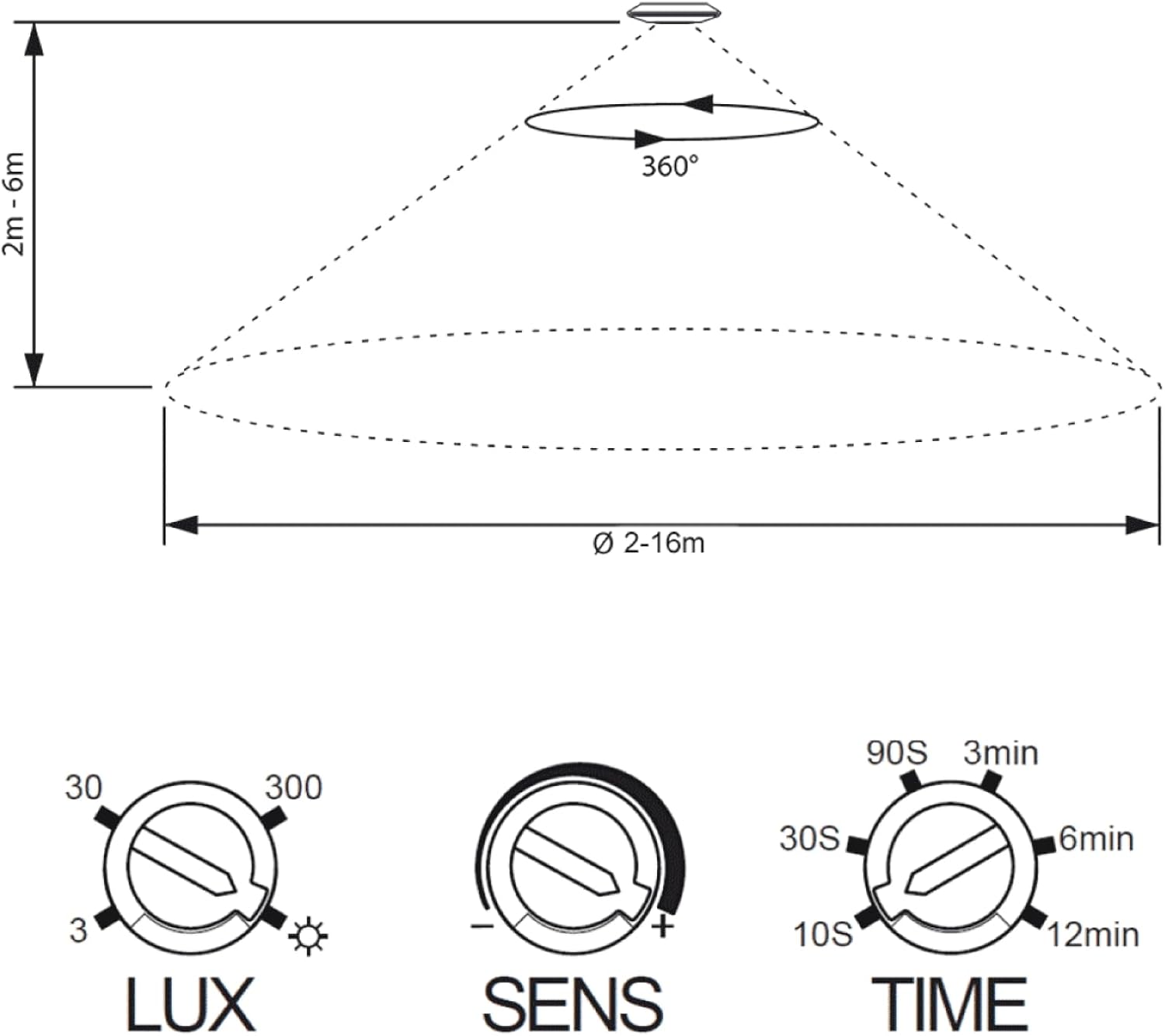
Image 6: Detailed view of the SENS, LUX, and TIME adjustment dials on the motion detector.

Image 7: Diagram illustrating the 360° detection area (2-16m range) and the functions of the LUX, SENS, and TIME adjustment dials.
Testing the Detector:
After installation, set the LUX dial to the maximum (sun icon) and the TIME dial to the minimum (10s). Walk through the detection area to verify that the light turns on when motion is detected and turns off after the set time delay. Adjust the SENS, LUX, and TIME dials to your desired settings.
Maintenance
The SEBSON motion detector requires minimal maintenance. To ensure optimal performance:
- Regularly clean the sensor lens with a soft, dry cloth to remove dust or debris that could obstruct detection.
- Do not use abrasive cleaners or solvents, as these can damage the device.
- Periodically check wiring connections for tightness and signs of wear.
Troubleshooting
| Problem | Possible Cause | Solution |
|---|---|---|
| Light does not turn on. | No power; LUX setting too low; faulty bulb; wiring error; sensor obstructed. | Check power supply; adjust LUX setting to higher sensitivity; replace bulb; verify wiring connections; clear sensor path. |
| Light stays on continuously. | Constant motion in detection area; TIME setting too long; wiring error; faulty unit. | Reduce SENS setting or clear detection area; adjust TIME setting to shorter duration; verify wiring; contact support if unit is faulty. |
| Light turns on without apparent motion. | High sensitivity (SENS); environmental factors (heat, air movement); interference from other HF devices. | Reduce SENS setting; relocate detector away from heat/air sources; check for other HF devices. |
| Detection range is too short/long. | SENS setting incorrect. | Adjust SENS dial to increase or decrease detection range. |
Specifications

Image 8: Technical drawing showing the dimensions of the SEBSON HF Motion Detector (100mm diameter, 22mm height).
| Feature | Specification |
|---|---|
| Model Number | HF_CEIL_A |
| Dimensions (L x W x H) | 10 x 10 x 2.2 cm |
| Weight | 160 grams |
| Color | White |
| Material | Plastic |
| Power Type | AC |
| Voltage | 230 Volts |
| Max. Power (Incandescent) | 800 Watts |
| Max. Power (LED) | 300 Watts |
| Installation Method | Ceiling Mount |
| Detection Coverage | 2-16m / 360° |
| Time Delay | 10 seconds - 12 minutes |
| Ambient Light Setting | 3 - 2000 Lux |
| IP Rating | IP20 (Indoor use only) |
Warranty and Support
SEBSON products are designed for quality and reliability. For warranty information or technical support, please refer to the official SEBSON website or contact your retailer. Please have your model number (HF_CEIL_A) and purchase details ready when contacting support.


