
1. Introduction
This manual provides instructions for the Easytry123 YKR-I/001E infrared replacement remote control, designed for use with DAYTEK YK-F/010 AC Air Conditioners. This remote is intended as a direct replacement for your original DAYTEK YK-F/010 remote. Please ensure your original remote matches the appearance of this replacement for optimal compatibility.
While this replacement remote aims to replicate the primary functions of your original device, some advanced or less common functions may not be fully supported. Refer to your air conditioner's original manual for specific operational details of the AC unit itself.

Figure 1: Front and back view of the Easytry123 YKR-I/001E Replacement Remote Control. The model number YKR-I/001E is visible on the back. This image displays the overall design and button layout.
2. Setup
2.1 Battery Installation
The Easytry123 YKR-I/001E remote control requires two (2) AAA batteries (not included) for operation. Follow these steps to install the batteries:
- Locate the battery compartment cover on the back of the remote control.
- Press down on the tab and slide the cover downwards to open the compartment.
- Insert two AAA batteries, ensuring the positive (+) and negative (-) terminals align correctly with the markings inside the compartment. Incorrect battery orientation can prevent the remote from functioning.
- Slide the battery compartment cover back into place until it clicks securely.
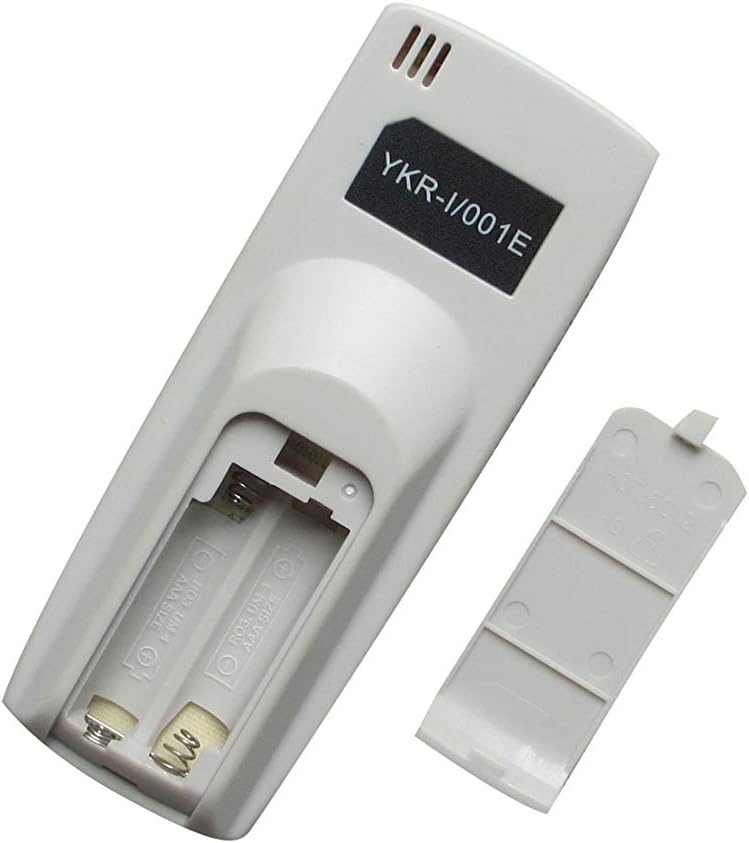
Figure 2: The battery compartment of the Easytry123 YKR-I/001E remote control shown open, with two AAA batteries inserted. This illustrates the correct placement and polarity for battery installation.
After battery installation, the remote is ready for use. No programming is typically required for this replacement infrared remote.
3. Operating Instructions
To operate your DAYTEK YK-F/010 AC Air Conditioner with the Easytry123 YKR-I/001E remote control, point the remote directly at the air conditioner's infrared receiver. Ensure there are no obstructions between the remote and the AC unit.
- Power Button: Press to turn the air conditioner ON or OFF.
- Temperature Control: Use the Up and Down arrow buttons to adjust the desired temperature.
- Mode Button: Cycle through various operating modes such as Cool, Heat, Fan, Dry, or Auto (availability depends on your specific AC unit's features).
- Fan Speed Button: Adjust the fan speed (e.g., Low, Medium, High, Auto).
- Timer Button: If supported by your AC unit, this button may allow you to set a timer for automatic power on/off.
Refer to your original DAYTEK YK-F/010 AC Air Conditioner manual for detailed explanations of each function and mode specific to your unit.
4. Maintenance
4.1 Battery Replacement
Replace batteries when the remote control's performance diminishes or if the air conditioner does not respond to commands. Always replace both batteries simultaneously with new AAA batteries. Do not mix old and new batteries, or different types of batteries.
4.2 Cleaning
To clean the remote control, gently wipe its surface with a soft, dry cloth. Do not use liquid cleaners, abrasive materials, or chemical solvents, as these can damage the remote's finish or internal components.
4.3 Storage
If the remote control will not be used for an extended period, remove the batteries to prevent leakage and potential damage to the device.
5. Troubleshooting
If you experience issues with your Easytry123 YKR-I/001E replacement remote control, consider the following:
- Remote not responding:
- Check if the batteries are inserted correctly with the correct polarity.
- Replace old batteries with new AAA batteries.
- Ensure there are no obstructions between the remote and the air conditioner's receiver.
- Confirm you are pointing the remote directly at the AC unit.
- Limited functionality:
- This is a replacement remote. While it supports primary functions, some specific or advanced features of your original remote or AC unit may not be replicated.
- Verify that your original remote looked identical to this replacement. If not, full compatibility cannot be guaranteed.
- Air conditioner not responding to specific buttons:
- Some functions may be specific to your AC model and might not be universally supported by replacement remotes.
- Consult your DAYTEK YK-F/010 AC Air Conditioner's original manual to confirm the expected behavior of specific functions.
6. Specifications
| Model: | YKR-I/001E |
| Brand: | Easytry123 |
| Compatible Devices: | DAYTEK YK-F/010 AC Air Conditioner |
| Connectivity Technology: | Infrared (IR) |
| Controller Type: | Button Control |
| Batteries Required: | 2 x AAA (not included) |
7. Support
For any questions, concerns, or issues not covered in this manual, please contact the seller directly. When contacting support, please provide your product's ASIN (B07RHRQR66) and a clear description of the issue.
Note: No specific warranty information is provided with this product. Please refer to the seller's return policy or contact them for details regarding product guarantees.