
1. Introduction
This document provides essential instructions for the use and maintenance of your Easytry123 replacement remote control for Daewoo Air Conditioner models YKR-Q/002E and YKR-Q/001E. This remote is designed as an infrared (IR) replacement. Please ensure your original remote control matches the appearance of this replacement for optimal compatibility.
Important Note:
- This is a replacement remote control. It may not offer all functions identical to your original remote.
- No complex programming is typically required for IR replacement remotes.
- Always refer to your air conditioner's original manual for detailed information on specific functions and settings.
2. Setup
2.1 Battery Installation
The remote control requires two (2) AAA batteries (not included). Follow these steps to install them:
- Locate the battery compartment on the back of the remote control.
- Slide the battery cover downwards or in the direction indicated by an arrow to open it.
- Insert two AAA batteries, ensuring the positive (+) and negative (-) terminals align correctly with the markings inside the compartment.
- Slide the battery cover back into place until it clicks securely.

Figure 2.1: Rear view of the remote control showing the battery compartment.
2.2 Initial Use
Once batteries are installed, the remote control is ready for use. Point the remote directly at the infrared receiver on your Daewoo air conditioner. Ensure there are no obstructions between the remote and the air conditioner.
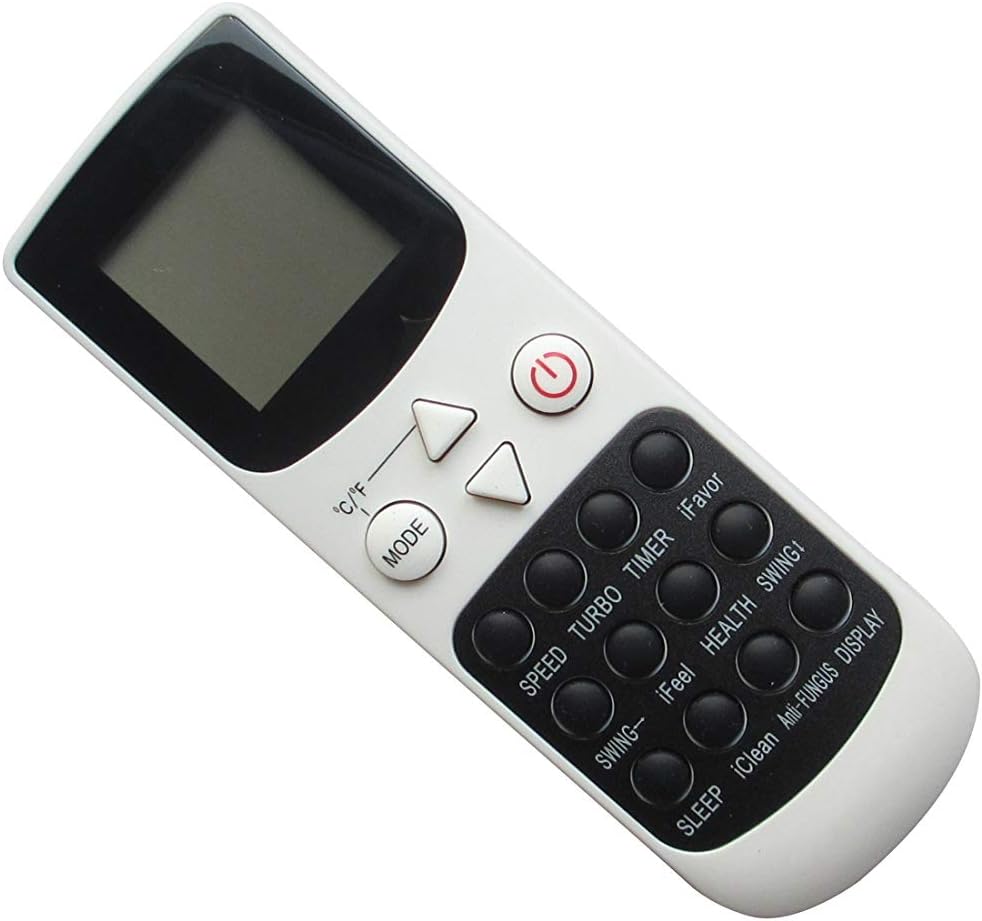
Figure 2.2: Front view of the remote control.
3. Operating Instructions
This remote control provides standard functions for operating your Daewoo air conditioner. The buttons are typically labeled for their respective functions.
- Power Button (①): Press to turn the air conditioner ON or OFF.
- Mode Button: Cycles through operating modes such as Cool, Heat, Fan, Dry, Auto.
- Temperature Adjustment (▲ / ▼): Adjusts the desired temperature setting.
- Fan Speed: Controls the fan speed (e.g., Low, Medium, High, Auto).
- Timer: Sets the ON/OFF timer for the air conditioner.
- Sleep Mode: Activates a quiet, energy-saving mode for comfortable sleep.
- Swing: Controls the louver swing direction.
- iFeel / iFavor: Specific functions that may vary by AC model. Refer to your AC manual.
- Health / Anti-Fungus / iClean / Display: Additional functions that may be supported by your specific air conditioner model.
For detailed operation of specific features, consult the original instruction manual provided with your Daewoo air conditioner, as functions may vary.
4. Maintenance
4.1 Battery Replacement
Replace batteries when the remote control's range decreases or it stops responding. Always replace both batteries at the same time with new AAA batteries. Do not mix old and new batteries, or different types of batteries.
4.2 Cleaning
Wipe the remote control with a soft, dry cloth. Do not use liquid cleaners, abrasive cleaners, or chemical solvents, as these can damage the remote's surface or internal components.
4.3 Storage
If the remote control will not be used for an extended period, remove the batteries to prevent leakage and potential damage to the remote.
5. Troubleshooting
If you encounter issues with your remote control, please refer to the following common problems and solutions:
- Remote Control Not Responding:
- Check if the batteries are inserted correctly with the correct polarity (+/-).
- Replace old batteries with new ones.
- Ensure there are no obstructions between the remote control and the air conditioner's receiver.
- Make sure you are within the effective operating range (typically up to 8 meters / 26 feet) and pointing directly at the unit.
- Some Functions Do Not Work:
- This replacement remote may not support all advanced or specific functions of your original air conditioner model.
- Verify if the function is supported by your air conditioner model by checking its original manual.
- Remote Control Does Not Power On/Off the AC:
- Confirm that this remote control is indeed compatible with your specific Daewoo air conditioner model (YKR-Q/002E or YKR-Q/001E). If your model number is not listed, it may not be compatible.
If problems persist after following these steps, please contact the seller for further assistance.
6. Specifications
| Model Number | YKR-Q/002E (Compatible with YKR-Q/001E) |
| Brand | Easytry123 |
| Connectivity Technology | Infrared (IR) |
| Power Source | 2 x AAA Batteries (not included) |
| Compatible Devices | Daewoo Air Conditioners (Specific models: YKR-Q/002E, YKR-Q/001E) |
| Controller Type | Button Control |
| Date First Available | May 7, 2019 |
| Manufacturer | Easytry123 |
7. Warranty and Support
This product is manufactured by Easytry123. For any questions, concerns, or troubleshooting assistance not covered in this manual, please contact the seller directly through your purchase platform. Please have your order details and product model number ready when contacting support.
As this is a replacement part, specific warranty terms may be provided by the seller at the time of purchase. It is recommended to retain your purchase receipt for any warranty claims.