
1. Introduction
Thank you for choosing the 5Rcom 4-Tier Tempered Glass Media Stand. This manual provides essential information for the safe assembly, operation, and maintenance of your new media stand. Please read these instructions carefully before assembly and retain them for future reference.
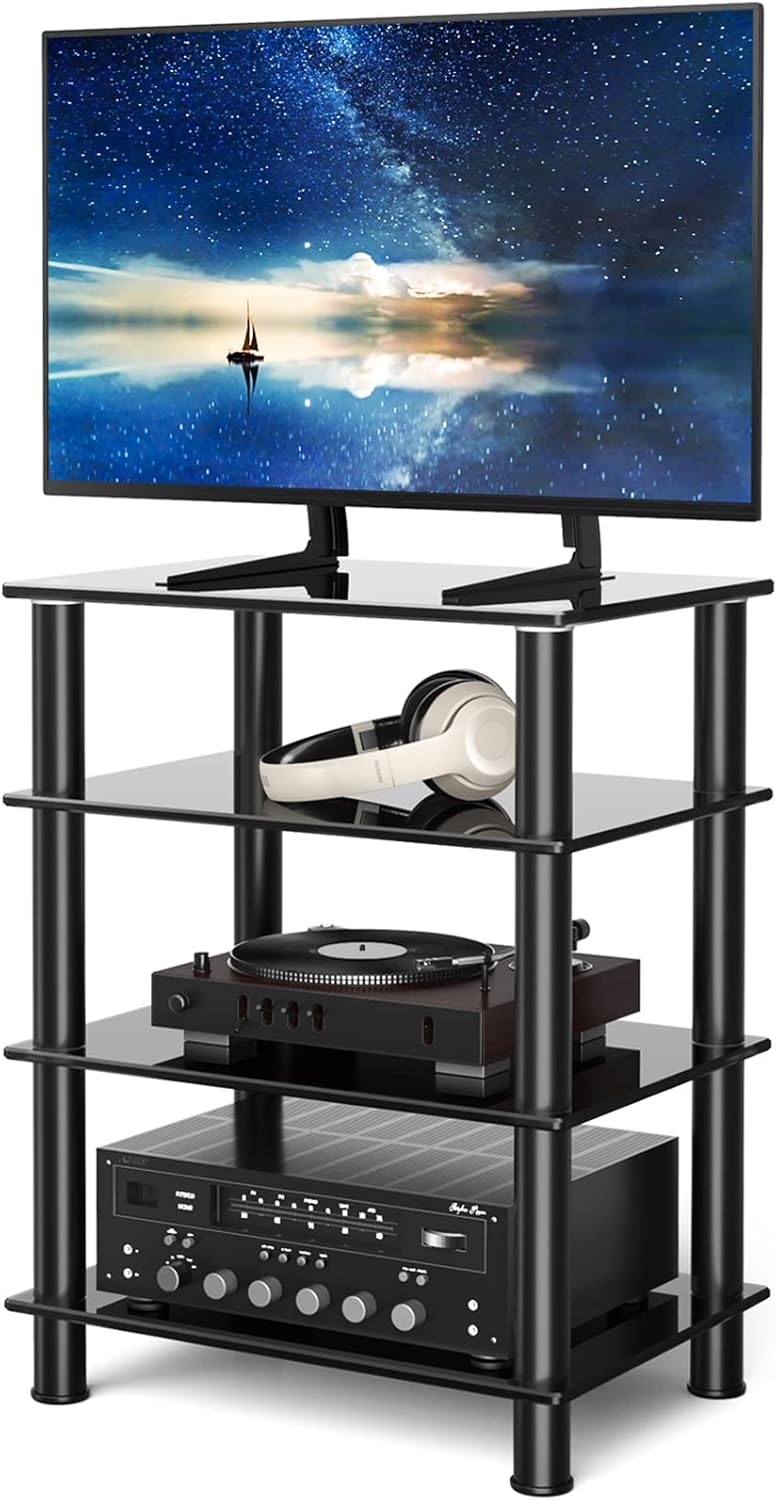
Image 1.1: The 5Rcom 4-Tier Tempered Glass Media Stand, fully assembled.
2. Safety Information
To ensure safe use of your media stand, please observe the following safety guidelines:
- Weight Capacity: Do not exceed the maximum weight limits for each shelf. The top shelf supports up to 88 lbs (40 kg). Each lower shelf supports up to 33 lbs (15 kg). Overloading can cause instability and damage.
- Stable Placement: Place the stand on a flat, level, and stable surface to prevent tipping.
- Tempered Glass: The shelves are made of tempered glass, which is strong but can break if subjected to sharp impacts. Handle with care during assembly.
- Rounded Corners: The stand features rounded corners for enhanced safety, reducing the risk of injury from sharp edges.
- Children and Pets: Keep children and pets away from the stand during assembly. Do not allow them to climb on or play with the stand once assembled.
- Assembly: Ensure all components are correctly assembled and tightened according to the instructions. Do not use power tools for tightening as this may overtighten and damage components.

Image 2.1: Product dimensions and maximum weight capacities for each shelf.


Image 2.2: Details showing the safety glass with polished edge design and thoughtful pads on the legs to protect floors.
3. Package Contents
Before beginning assembly, please verify that all parts listed below are present and undamaged. If any parts are missing or damaged, do not proceed with assembly and contact customer support.

Image 3.1: All components included in the package.
Parts List:
- Tempered Glass Shelves (4 pcs)
- Aluminum Support Poles (12 long, 4 short for feet)
- Plastic Isolation Covers/Disks (16 pcs)
- Connecting Rods/Screws (12 pcs)
- Plastic Feet (4 pcs)
4. Assembly Instructions
Assembly of this media stand is designed to be straightforward and tool-free. Follow these steps for proper setup.
- Prepare the Base: Place one tempered glass shelf on a clean, soft surface (e.g., a blanket or carpet) to prevent scratches. This will be your bottom shelf.
- Attach Feet: Screw the four plastic feet into the designated holes on the underside of the bottom glass shelf. Ensure they are hand-tightened securely.
- First Tier Assembly: Insert four connecting rods into the holes on the top side of the bottom glass shelf. Place a plastic isolation cover over each rod. Then, place four short aluminum support poles over the rods, ensuring they sit flush with the plastic covers.
- Add Second Shelf: Carefully place the second tempered glass shelf onto the top of the four short aluminum support poles, aligning the holes with the poles. Gently press down to ensure a snug fit.
- Subsequent Tiers: Repeat step 3 and 4 for the remaining shelves, using the longer aluminum support poles for the middle tiers. Ensure each tier is level and all connections are secure before adding the next.
- Top Shelf: For the final (top) shelf, insert the remaining connecting rods into the top of the last set of aluminum support poles. Place plastic isolation covers over the rods, then carefully place the top glass shelf onto these, aligning the holes. Hand-tighten all connections.
Adjustable Shelf Heights:
The stand offers three combination methods for varying shelf heights to accommodate different equipment sizes. The height of the shorter section (A) is 7.2 inches, and the taller section (B) is 9.1 inches. You can arrange the shelves to have the shorter section at the top, middle, or bottom.

Image 4.1: Three possible shelf height configurations (A=7.2", B=9.1").
5. Operating and Usage
The 5Rcom 4-Tier Media Stand is designed for organizing various audio-visual components and gaming equipment.
- Component Placement: Utilize the four spacious shelves to store sound system units, AV equipment, Blu-ray players, Xbox consoles, routers, cable boxes, game consoles, hi-fi systems, and more.
- TV Support: The top shelf is capable of supporting Plasma/LCD/LED flat TVs within its weight limit of 88 lbs (40 kg).
- Cable Management: While the stand features an open design for air circulation, consider using cable ties or sleeves (not included) to manage and organize cables for a tidy appearance and to prevent tripping hazards.

Image 5.1: The media stand accommodating various audio-visual components.
6. Maintenance
Proper care will ensure the longevity and appearance of your 5Rcom Media Stand.
- Cleaning Glass Surfaces: Use a soft, lint-free cloth and a glass cleaner to wipe down the tempered glass shelves. Avoid abrasive cleaners or scouring pads, which can scratch the glass.
- Cleaning Metal Components: Wipe aluminum support poles with a soft, damp cloth. For stubborn marks, a mild soap solution can be used, followed by drying thoroughly.
- Spills: The stand is water-resistant. In case of spills, wipe them immediately with a dry cloth to prevent water spots or potential damage.
- Regular Checks: Periodically check all connections to ensure they remain tight and secure. Retighten by hand if necessary.
7. Troubleshooting
If you encounter issues with your media stand, refer to the following common solutions:
- Stand is Wobbly:
- Ensure all connecting rods and poles are fully and securely hand-tightened.
- Verify the stand is placed on a completely flat and level surface.
- Check that the plastic feet are evenly adjusted and making full contact with the floor.
- Scratches on Floor:
- Ensure the plastic feet are properly installed on the bottom of the stand. These are designed to protect your floor.
- Avoid dragging the stand; lift it when moving.
- Missing or Damaged Parts:
- Refer to the "Package Contents" section to confirm all parts.
- Do not attempt to assemble with missing or damaged parts. Contact 5Rcom customer support for replacements.
8. Specifications
| Brand | 5Rcom |
|---|---|
| Model Number | B07RHBV8XT |
| Material | Tempered Glass, Aluminum |
| Color | Black |
| Product Dimensions (D x W x H) | 16.5" x 23.6" x 29.7" (41.9 cm x 59.9 cm x 75.4 cm) |
| Number of Shelves | 4 |
| Top Shelf Weight Capacity | 88 lbs (40 kg) |
| Lower Shelf Weight Capacity (each) | 33 lbs (15 kg) |
| Assembly Required | Yes |
| Special Feature | Water Resistant, Rounded Corners |
9. Customer Support
For any questions, missing parts, or assistance with your 5Rcom 4-Tier Tempered Glass Media Stand, please contact 5Rcom customer support. Refer to your purchase documentation or the retailer's website for contact information.
Note: Warranty information may vary by retailer and region. Please consult your purchase receipt or retailer for specific warranty details.