1. Introduction
This manual provides instructions for the safe and effective use of your vhbw replacement battery, model VHBW4062692654868. This high-performance lithium-ion battery is designed as a compatible replacement for the original DJ96-00136B and VCA-RBT20 batteries used in Samsung Navibot robot vacuum cleaners. It offers high capacity and a long lifespan, utilizing modern lithium technology without negative memory effect.
2. Safety Information
WARNING:
- Do not disassemble the battery.
- Use only with the original charger designed for your Samsung Navibot robot vacuum.
- If the battery pack is cracked or damaged, do not insert it into the charger.
- Do not incinerate the battery.
- Keep out of reach of children.
- Do not expose to high temperatures or direct sunlight.
- Avoid short-circuiting the battery terminals.
This battery complies with legal standards, including CE & RoHS, and features protection against short-circuits, overheating, and overvoltage. Each cell is tested for safety and performance.
3. Package Contents
The package contains:
- 1 x vhbw Replacement Battery (Model: VHBW4062692654868)

Image 1: The vhbw replacement battery, showing its connector for installation into the robot vacuum.
4. Setup and Installation
- Power Off: Ensure your Samsung Navibot robot vacuum cleaner is completely powered off and disconnected from its charging base or power adapter.
- Locate Battery Compartment: Turn the robot vacuum upside down. Locate the battery compartment cover, usually secured by screws.
- Remove Old Battery: Unscrew the battery compartment cover and carefully remove it. Disconnect the old battery from its connector and lift it out.
- Insert New Battery: Place the new vhbw replacement battery into the compartment. Ensure it fits snugly.
- Connect Battery: Connect the battery's cable to the corresponding port in the robot vacuum. Ensure the connection is secure.
- Close Compartment: Replace the battery compartment cover and secure it with the screws.
- Initial Charge: Place the robot vacuum on its charging base or connect it to its power adapter for an initial full charge before first use.

Image 2: Side view of the vhbw replacement battery, illustrating its compact design for easy installation.
5. Operating Instructions
The vhbw replacement battery is designed to function seamlessly with your Samsung Navibot robot vacuum. Once installed, operate your vacuum as you normally would.
- Charging: The battery recharges easily with your standard Samsung Navibot charger. Simply place the robot vacuum on its charging base.
- First Use: For optimal performance, fully charge the battery before its first use.
- Regular Use: Allow the robot vacuum to return to its charging base when its battery is low to ensure it is always ready for cleaning.
6. Maintenance
Proper maintenance can extend the life and performance of your vhbw replacement battery:
- Regular Charging: Avoid completely draining the battery frequently. Recharge it regularly.
- Storage: If storing the robot vacuum for an extended period, ensure the battery is partially charged (around 50%) and store it in a cool, dry place. Avoid storing a fully charged or completely depleted battery for long periods.
- Cleaning: Keep the battery contacts on both the battery and the vacuum clean to ensure efficient charging.
- Temperature: Operate and charge the battery within recommended temperature ranges (typically 0°C to 45°C or 32°F to 113°F) to prevent damage.
7. Troubleshooting
If you encounter issues with your vhbw replacement battery, consider the following:
- Battery Not Charging:
- Ensure the battery is correctly installed and its connector is secure.
- Verify that the charging base or power adapter is properly connected and receiving power.
- Clean the charging contacts on both the vacuum and the charging base.
- Check if the original charger is functioning correctly with another battery (if available).
- Reduced Run Time:
- Ensure the battery has been fully charged.
- Over time, all rechargeable batteries experience some capacity degradation. If the battery is old, it may be reaching the end of its lifespan.
- Check for any obstructions in the vacuum that might be causing it to work harder and consume more power.
- Vacuum Not Powering On:
- Confirm the battery is fully charged.
- Re-install the battery to ensure proper connection.
- If the battery is damaged (cracked or leaking), do not use it. Refer to the safety information.
If problems persist, consult the Samsung Navibot robot vacuum's original manual or contact customer support.
8. Specifications
| Brand | vhbw |
| Model Number | VHBW4062692654868 |
| Replaces Original Battery | DJ96-00136B, VCA-RBT20 |
| Battery Type | Lithium-Ion (Li-Ion) |
| Capacity | 3000 mAh |
| Voltage | 14.4 V |
| Energy | 43.2 Wh |
| Weight | 272 Grams |
| Reusability | Rechargeable |
| Certifications | CE, RoHS |
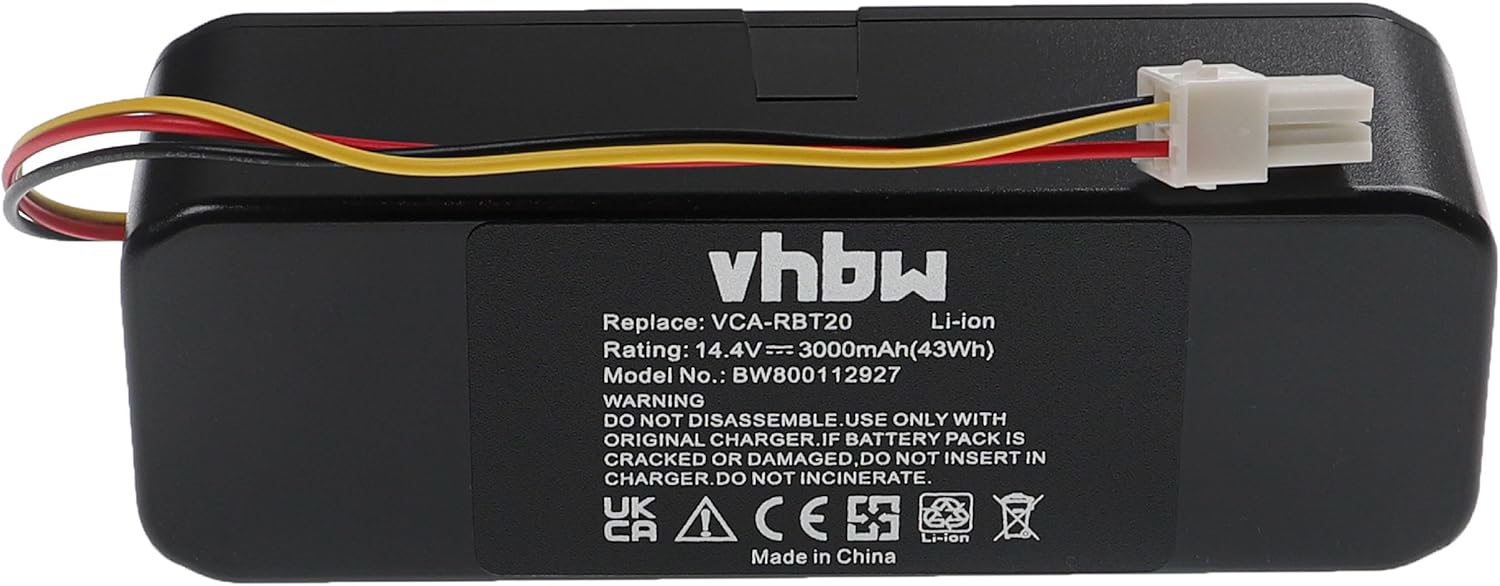
Image 3: Bottom label of the vhbw battery, displaying model number, rating, and safety warnings.
9. Warranty and Support
For warranty information or technical support regarding your vhbw replacement battery, please refer to the documentation provided with your purchase or contact your retailer. As this is a compatible replacement part, specific warranty terms may vary. Always ensure you are using the battery with compatible devices and chargers as specified in this manual.


