
Easytry123 RCS-3MVPS4E, RCS-3MVHPS4E, RCS-3MVHPS4EE, SAP-KMRV93GJ, SAP-KMRV123GJ, CAF94MR5IAA, CAF124MR5IAA, CAF184MR5IAA
User Manual
Easytry123 Replacement Remote Control for Sanyo Air Conditioners
Models: RCS-3MVPS4E, RCS-3MVHPS4E, RCS-3MVHPS4EE, SAP-KMRV93GJ, SAP-KMRV123GJ, CAF94MR5IAA, CAF124MR5IAA, CAF184MR5IAA
Introduction
This manual provides essential information for the proper setup, operation, and maintenance of your Easytry123 replacement remote control for Sanyo Air Conditioners. Please read this manual thoroughly before using the remote control to ensure optimal performance and longevity.
This remote control is designed as a direct replacement for various Sanyo A/C models, offering infrared connectivity and button-based control for your air conditioning unit.
Product Overview
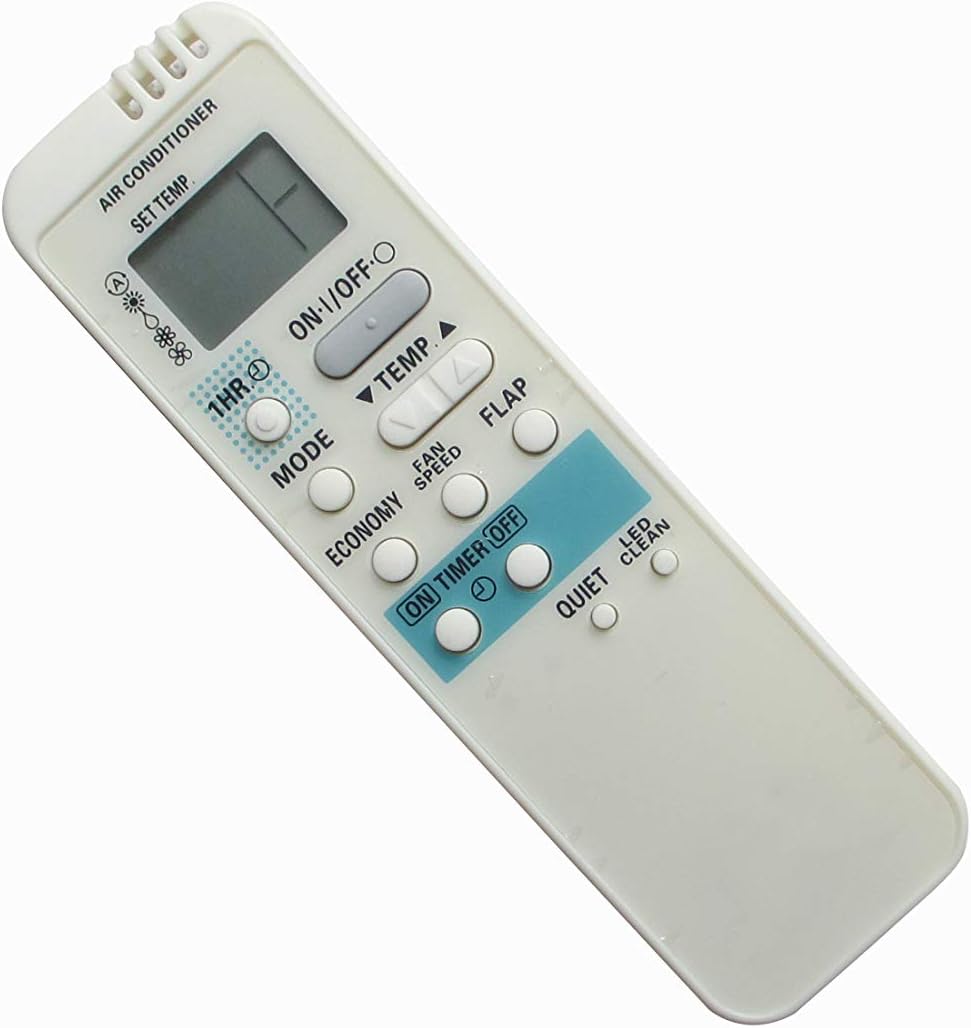
Figure 1: Front view of the remote control. This image displays the ergonomic design of the remote, featuring a clear LCD screen at the top and an array of control buttons below it, including power, mode, temperature adjustment, and fan speed.

Figure 2: Angled view of the remote control. This perspective provides a clearer look at the button arrangement and the overall compact form factor of the device.
Setup
Battery Installation
The remote control requires two (2) AAA batteries for operation. Batteries are not included with the remote control.
- Locate the battery compartment cover on the back of the remote control.
- Slide the cover downwards or press the latch to open the compartment.
- Insert two AAA batteries, ensuring the positive (+) and negative (-) terminals align correctly with the markings inside the compartment.
- Close the battery compartment cover securely until it clicks into place.
Note: Remove batteries if the remote control will not be used for an extended period to prevent leakage and damage.
Operating Instructions
Ensure the remote control is pointed directly at the infrared receiver on your Sanyo Air Conditioner unit for proper communication.
Basic Functions
- ON/OFF Button: Press this button to turn the air conditioner unit ON or OFF.
- TEMP ▲ / ▼ Buttons: Use these buttons to increase or decrease the desired temperature setting.
Mode Selection
Press the MODE button repeatedly to cycle through the available operating modes:
- Auto Mode: The unit automatically selects the operating mode (Cool, Heat, Fan, Dry) based on the room temperature.
- Cool Mode: For cooling the room.
- Dry Mode: For dehumidifying the room.
- Fan Mode: Circulates air without heating or cooling.
- Heat Mode: For heating the room (if supported by your A/C unit).
Fan Speed Adjustment
Press the FAN SPEED button to adjust the fan speed. Options typically include Auto, Low, Medium, and High.
Timer Functions
The remote control features ON TIMER and OFF TIMER functions:
- ON TIMER: Press this button to set a time for the unit to turn ON automatically. Use the TEMP ▲ / ▼ buttons to adjust the time.
- OFF TIMER: Press this button to set a time for the unit to turn OFF automatically. Use the TEMP ▲ / ▼ buttons to adjust the time.
- 1HR Button: This button may provide a quick 1-hour timer setting, depending on the specific model's functionality.
Special Functions
- FLAP Button: Controls the vertical swing of the air conditioner's louver. Press to adjust the airflow direction or activate continuous swing.
- ECONOMY Button: Activates an energy-saving mode, which may adjust temperature settings slightly to reduce power consumption.
- QUIET Button: Reduces the fan speed to a lower setting for quieter operation.
- LED CLEAN Button: This function, if present and supported by your A/C unit, may activate a self-cleaning cycle for the indoor unit's coil. Refer to your A/C unit's manual for details.
Maintenance
Cleaning the Remote Control
To clean the remote control, wipe the surface with a soft, dry cloth. For stubborn dirt, a slightly damp cloth can be used, followed by a dry cloth. Do not use abrasive cleaners, alcohol, or chemical solvents, as these can damage the surface or internal components.
Storage
Store the remote control in a cool, dry place away from direct sunlight and extreme temperatures. If storing for an extended period, remove the batteries to prevent leakage.
Troubleshooting
| Problem | Possible Cause | Solution |
|---|---|---|
| Remote control not responding. | Dead or incorrectly inserted batteries. Obstruction between remote and A/C unit. Remote out of range. | Replace batteries with new AAA batteries, ensuring correct polarity. Remove any obstructions. Move closer to the A/C unit. |
| A/C unit not responding to specific functions. | Function not supported by your specific A/C model. Infrared sensor on A/C unit is dirty or blocked. | Verify the function is available on your A/C unit. Clean the infrared sensor on the A/C unit. |
| Display on remote is dim or blank. | Low battery power. | Replace batteries. |
| Remote works intermittently. | Weak batteries. Interference from other electronic devices. | Replace batteries. Ensure no strong light sources or other infrared devices are interfering. |
Specifications
- Product Type: Replacement Air Conditioner Remote Control
- Brand: Easytry123
- Compatible Devices: Sanyo Air Conditioners (Models: RCS-3MVPS4E, RCS-3MVHPS4E, RCS-3MVHPS4EE, SAP-KMRV93GJ, SAP-KMRV123GJ, CAF94MR5IAA, CAF124MR5IAA, CAF184MR5IAA)
- Connectivity Technology: Infrared
- Controller Type: Button Control
- Special Feature: Ergonomic Design
- Power Source: 2 x AAA Batteries (not included)
- Country of Origin: China
Warranty and Support
This replacement remote control is typically covered by the seller's return and refund policy. For specific warranty details or technical support, please refer to the purchase platform or contact the seller directly. Keep your purchase receipt as proof of purchase.
For further assistance, you may also refer to the original user manual of your Sanyo Air Conditioner unit for specific functions and compatibility.
Related documentsRCS-3MVPS4E, RCS-3MVHPS4E, RCS-3MVHPS4EE, SAP-KMRV93GJ, SAP-KMRV123GJ, CAF94MR5IAA, CAF124MR5IAA, CAF184MR5IAA


Ask a question about this manual
Ask about setup, troubleshooting, compatibility, parts, safety, or missing instructions. Manuals+ will review the question and use this page’s manual context to help answer it.