
1. Introduction
This manual provides detailed instructions for the Phenyx Pro PTX-10B USB Audio Interface Mixer Bundle, covering setup, operation, maintenance, troubleshooting, and specifications for optimal live streaming, recording, and podcasting. This versatile 4-input audio mixer features a 3-band EQ, echo effects, and a built-in USB audio interface for direct connection to PC/Mac/PS4. It comes complete with a dynamic wired microphone, stereo headphones, and an XLR cable, making it suitable for live streaming, home recording, YouTube video production, and podcasting.
2. Safety Instructions
- Read these instructions thoroughly before operating the device.
- Keep this manual for future reference.
- Do not use this apparatus near water.
- Clean only with a dry cloth.
- Do not block any ventilation openings. Install in accordance with the manufacturer's instructions.
- Do not install near any heat sources such as radiators, heat registers, stoves, or other apparatus (including amplifiers) that produce heat.
- Protect the power cord from being walked on or pinched, particularly at plugs, convenience receptacles, and the point where they exit from the apparatus.
- Only use attachments/accessories specified by the manufacturer.
- Unplug this apparatus during lightning storms or when unused for long periods.
- Refer all servicing to qualified service personnel. Servicing is required when the apparatus has been damaged in any way, such as power-supply cord or plug is damaged, liquid has been spilled or objects have fallen into the apparatus, the apparatus has been exposed to rain or moisture, does not operate normally, or has been dropped.
3. Package Contents
The Phenyx Pro PTX-10B bundle includes everything you need for immediate audio production:
- 1 x PTX-10B Audio Mixer
- 1 x Dynamic Wired Microphone
- 1 x XLR Cable (for microphone)
- 1 x Stereo Headphone
- 1 x USB Cable
- 1 x Power Adapter
- 1 x User Manual (this document)
- 1 x Carrying Case (for convenient transport and storage)
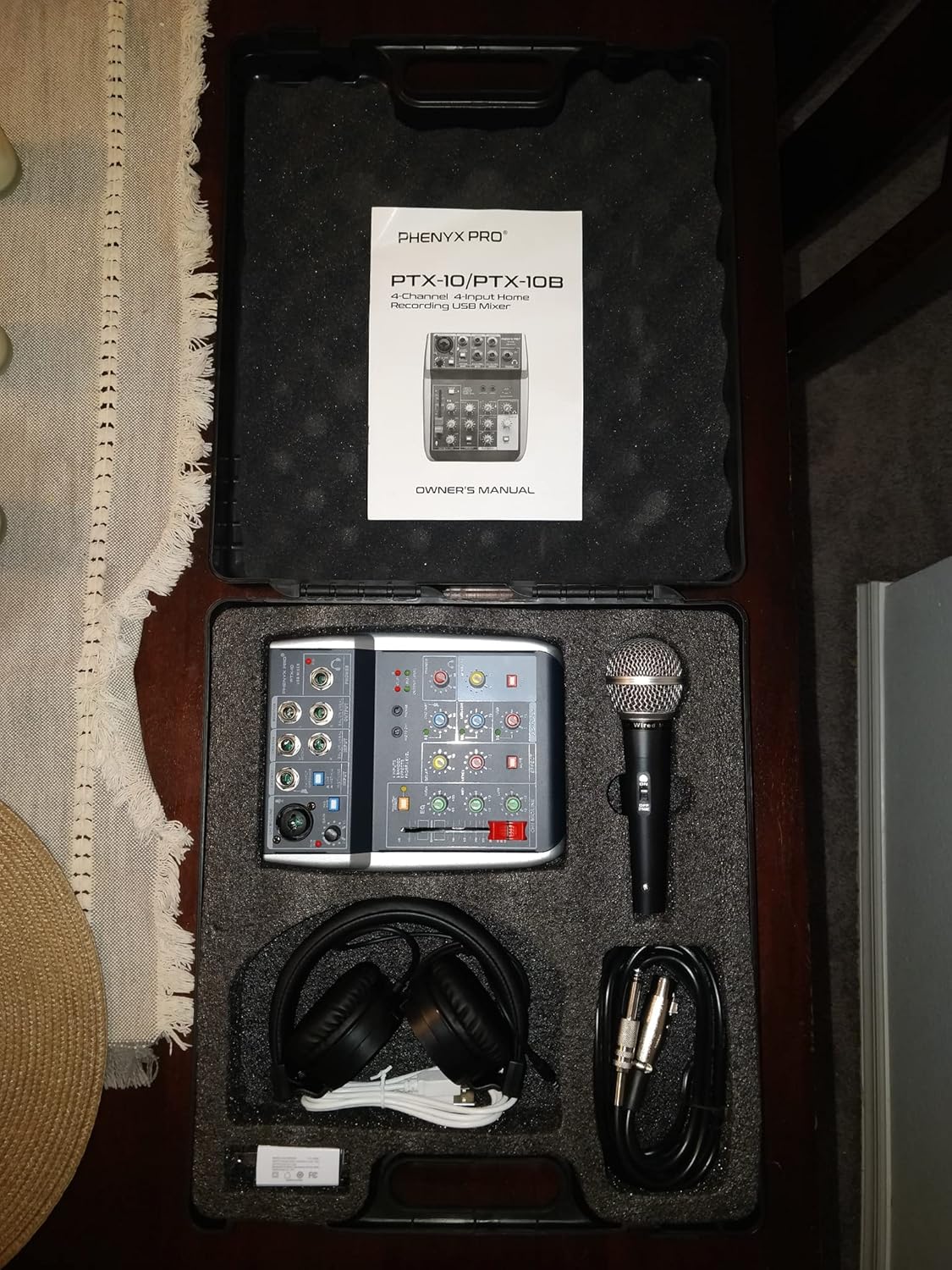
Figure 3.1: All items included in the Phenyx Pro PTX-10B USB Audio Interface Mixer Bundle.
4. Product Overview: Controls and Connections
The PTX-10B mixer is designed for intuitive control over your audio. Below is a detailed look at its various inputs, outputs, and control features.
4.1 Top Panel Controls

Figure 4.1: Top view of the Phenyx Pro PTX-10B mixer, highlighting the 4-input audio mixer layout.
- CH1 Mic/Line Input: Combo jack for XLR microphones or 1/4" line/instrument inputs. Features Gain control and a PAD switch.
- CH2 Inst Input: 1/4" input for instruments.
- CH3-CH4 Mono/Stereo Input: 1/4" inputs for mono or stereo sources.
- Monitor Output: 1/4" outputs for connecting to studio monitors.
- Phones Output: 1/4" headphone jack for monitoring.
- 3.5mm Mic Input: Auxiliary 3.5mm input for microphones.
- 3.5mm Headphone Output: Auxiliary 3.5mm output for headphones.
4.2 Detailed Controls

Figure 4.2: Detailed view of the Phenyx Pro PTX-10B mixer's EQ, effects, and volume controls.
- Phantom Power (+48V): Switch to enable phantom power for condenser microphones on CH1.
- EQ (3-Band): High, Mid, and Low controls for adjusting the tonal balance of CH1.
- Delay/Echo Effects: Controls for adding delay and echo to CH1.
- Level Knobs: Individual level controls for each channel (CH1, CH2, CH3-CH4).
- Phones Volume Knob: Adjusts the output volume for headphones.
- Monitor Output Volume Knob: Adjusts the overall monitor output level.
- Mute Buttons: Mute controls for individual channels and outputs.
- USB Playback Volume: Control for the volume of audio played back via USB.
4.3 Rear Panel Connections

Figure 4.3: Rear view of the Phenyx Pro PTX-10B mixer, showing the USB connection for computer interface.
- USB to Computer Port: Connects the mixer to your PC, Mac, or PS4 for audio interface functionality and power.
- EXT DC IN 5V (500mA): External power input for the included power adapter.
5. Setup
Follow these steps to set up your Phenyx Pro PTX-10B mixer for recording or live streaming:
- Power Connection: Connect the mixer to a power source using either the provided USB cable to your computer or the power adapter to a wall outlet. The USB connection can also power the mixer.
- Microphone Connection: Connect the dynamic microphone to the CH1 Mic/Line input using the supplied XLR cable. If using a condenser microphone, ensure +48V Phantom Power is enabled.
- Headphone Connection: Plug the stereo headphones into the 1/4" Phones output or the 3.5mm Headphone Output.
- Computer Connection: Connect the mixer to your computer (PC/Mac) using the USB cable. This enables the mixer to function as an audio interface.
- Software Configuration: On your computer, open your preferred audio software (e.g., Audacity, GarageBand, Pro Tools, Logic Pro X). Select "USB Audio CODEC" as both the input and output device in your software's audio settings.
- Initial Level Setting: Set all channel level knobs and the main monitor/phones volume to their lowest settings before starting.
Video 5.1: An unboxing and initial setup review of the PTX-10B mixer, demonstrating how to connect the components.
6. Operating Instructions
Once your mixer is set up, follow these guidelines for optimal operation:
- Adjusting Input Gain: Slowly increase the GAIN knob for CH1 until the signal is strong but not clipping (indicated by the CLIP LED).
- Setting Channel Levels: Gradually raise the individual LEVEL knobs for each active channel to achieve your desired mix balance.
- Using the 3-Band EQ: Use the HIGH, MID, and LOW knobs on CH1 to fine-tune the tone of your microphone or instrument.
- Applying Echo Effects: Adjust the DELAY and LEVEL knobs in the EFFECT section to add echo to CH1.
- Monitoring Audio: Use the PHONES volume knob to control your headphone listening level. Adjust the MONITOR volume knob for external speakers.
- USB Playback: If playing audio from your computer via USB, adjust the USB playback volume knob to blend it with your live inputs.
- Recording: Initiate recording in your chosen audio software. The mixer will send the combined audio signal to your computer.
Video 6.1: An official Phenyx Pro video demonstrating the features and controls of the audio recording mixer.
7. Media Integration
Visual aids and video demonstrations are provided to enhance your understanding of the Phenyx Pro PTX-10B mixer.
7.1 Product Images

Figure 7.1: The Phenyx Pro PTX-10B functions as a USB audio interface, compatible with Mac OS, Windows, Linux, and PS4. It can be powered via USB, allowing for recording, editing, monitoring, and playback of high-quality audio.

Figure 7.2: The bundle includes a metal-built wired vocal dynamic microphone for clear sound production and reliable performance, along with an XLR cable. Also included are dynamic stereo headphones with an over-ear design, cushioning, and adjustable headband for comfortable, long-hour listening and monitoring.

Figure 7.3: A close-up view of the Phenyx Pro PTX-10B mixer's controls and inputs.

Figure 7.4: An overview of the Phenyx Pro USB Audio Mixer, highlighting its compact design and various applications.

Figure 7.5: Key features of the small USB audio mixer, including clean sound, music creation, noise reduction, PC connectivity, portability, all-in-one design, and support.

Figure 7.6: Professional recording function with 24bit/192KHz high sampling rate, capturing delicate changes in audio. Wide compatibility with Mac systems and various software like Pro Tools, Logic Pro X, GarageBand, Adobe Audition, and Audacity.

Figure 7.7: All-in-one mobile mixing solution, empowering content creation with included headphones and wired microphones. Can be powered by PC/iPad/Power Bank for mobile mixing anywhere.

Figure 7.8: Features a +48V phantom power switch on CH.1 to support condenser microphones. Essential audio interface for personal mixing and easy music recording.

Figure 7.9: The mixer includes echo effects and is suitable for various applications such as gaming, podcasting, YouTube videos, music recording, studio streaming, and outdoor entertainment events.
8. Maintenance
To ensure the longevity and optimal performance of your Phenyx Pro PTX-10B mixer, follow these maintenance guidelines:
- Cleaning: Use a soft, dry cloth to clean the exterior of the mixer. Avoid using liquid cleaners or solvents, as they may damage the finish or internal components.
- Storage: When not in use, store the mixer and its accessories in the provided carrying case to protect them from dust, moisture, and physical damage.
- Cable Care: Handle all cables with care. Avoid sharp bends, kinks, or excessive pulling, which can damage the internal wiring.
- Ventilation: Ensure the mixer has adequate ventilation during operation to prevent overheating. Do not block any ventilation openings.
9. Troubleshooting
If you encounter issues with your PTX-10B mixer, refer to the following common problems and solutions:
| Problem | Possible Cause | Solution |
|---|---|---|
| No sound output from headphones/monitors. | Incorrect input/output selection in software; low volume levels; loose connections. |
|
| Static noise or humming. | Ground loop; interference; faulty cable; high gain setting. |
|
| Microphone not working (condenser mic). | +48V Phantom Power not enabled. | Press the +48V PHANTOM POWER button on CH1 to activate it. |
| Intermittent audio or connection issues. | Loose cable connection; driver issue; incompatible USB port. |
|
10. Specifications
- Brand: Phenyx Pro
- Model Number: PTX-10B
- Number of Channels: 4
- Connectivity Technology: USB
- Power Source: Corded Electric (or USB powered)
- Output Connector Type: 3.5mm headphone jack, 1/4" headphone jack, 1/4" monitor outputs
- Audio Input: XLR, 1/4" (Instrument/Line), 3.5mm (Mic)
- Item Weight: 5 Pounds
- UPC: 609378313653
11. Warranty and Support
Phenyx Pro products come with a 12-month manufacturer assurance. For any troubleshooting, replacement of discontinuous/defective parts, or general inquiries, please contact Phenyx Pro customer service. Refer to the official Phenyx Pro website or your purchase documentation for specific contact details.