
Introduction
This manual provides instructions for the proper use and maintenance of your replacement remote control for various Sanyo Air Conditioner models. Please read this manual thoroughly before operating the remote control to ensure optimal performance and longevity.

Figure 1: Front view of the remote control, showing all buttons and the LCD screen.
Setup
Battery Installation
The remote control requires two (2) AAA batteries for operation. Follow these steps to install the batteries:
- Locate the battery compartment cover on the back of the remote control.
- Slide the cover downwards or in the direction indicated by an arrow to open it.
- Insert two AAA batteries, ensuring the positive (+) and negative (-) ends align correctly with the markings inside the compartment.
- Slide the battery cover back into place until it clicks securely.
Note: Remove batteries if the remote control will not be used for an extended period to prevent leakage and damage.
Operating Instructions
Button Functions
Familiarize yourself with the functions of each button on your remote control:
- ON/I/OFF: Press to turn the air conditioner unit ON or OFF.
- TEMP ▲ / ▼: Press the ▲ button to increase the temperature setting, and the ▼ button to decrease it.
- MODE: Press repeatedly to cycle through available operating modes:
- AUTO: Automatically selects the operating mode based on the room temperature.
- COOL: Provides cooling.
- DRY: Reduces humidity in the room.
- FAN: Circulates air without heating or cooling.
- HEAT: Provides heating (if supported by your AC unit).
- FAN SPEED: Press to adjust the fan speed (e.g., Auto, Low, Medium, High).
- FLAP: Controls the vertical swing of the air conditioner's louver. Press to start or stop the swing, or to set the louver at a desired angle.
- ECONOMY: Activates or deactivates the energy-saving mode. This mode typically adjusts temperature settings to reduce power consumption.
- 1HR (Timer): Likely a quick timer setting, possibly for 1 hour of operation or delay. Consult your AC unit's manual for specific functionality.
- ON TIMER / OFF TIMER: Used to set a specific time for the air conditioner to turn ON or OFF automatically.
- Press ON TIMER to set the desired power-on time.
- Press OFF TIMER to set the desired power-off time.
- Use the TEMP ▲ / ▼ buttons to adjust the time.
- QUIET: Activates a low-noise operation mode, reducing fan speed and compressor activity for quieter performance.
- LED CLEAN: This button may activate a self-cleaning function for the indoor unit's coil or turn off the display LED lights. Refer to your specific AC unit's manual for details.
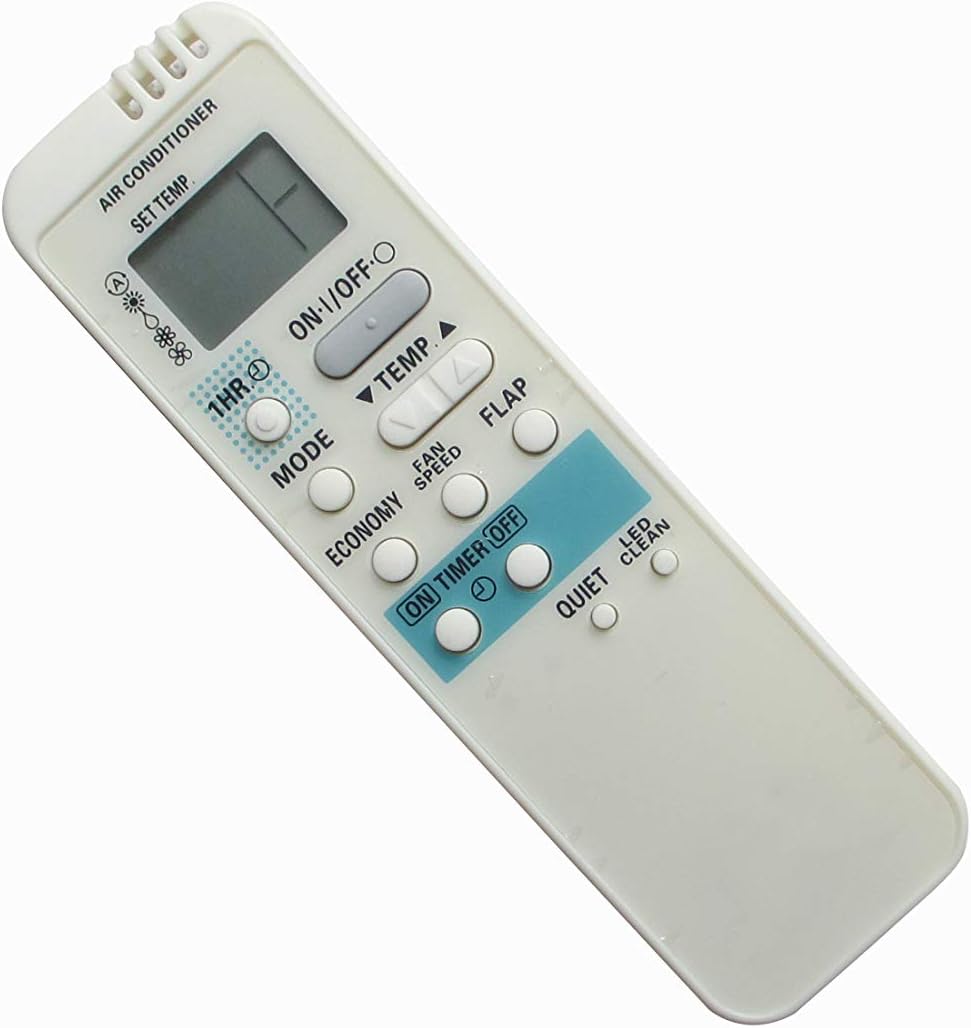

Figure 2: Angled views of the remote control, providing additional perspective on its design and button placement.
Maintenance
Cleaning the Remote Control
To maintain the remote control's appearance and functionality:
- Wipe the surface with a soft, dry cloth.
- For stubborn dirt, dampen the cloth slightly with water and a mild detergent, then wipe dry immediately.
- Do not use abrasive cleaners, alcohol, or benzene, as these can damage the surface.
Battery Replacement
Replace batteries when the remote control's range decreases or if the display becomes dim. Follow the battery installation steps outlined in the "Setup" section.
Troubleshooting
If the remote control is not functioning as expected, consider the following:
- No response from AC unit:
- Check if the batteries are installed correctly and have sufficient charge. Replace if necessary.
- Ensure there are no obstructions between the remote control and the AC unit's infrared receiver.
- Verify that the remote control is pointed directly at the AC unit.
- Confirm that the AC unit is powered on and plugged into an electrical outlet.
- Limited range:
- Replace the batteries.
- Ensure no strong light sources (e.g., direct sunlight, fluorescent lights) are interfering with the infrared signal.
- Incorrect function:
- This is a replacement remote. While designed for compatibility, some advanced or unique functions of your original AC remote may not be supported. Refer to the original AC unit's manual for specific features.
- Ensure the remote control model matches the compatible models listed in this manual.
Specifications
| Product Type | Replacement AC Remote Control |
| Brand | Easytry123 |
| Compatible Devices | Sanyo Air Conditioners (Specific models listed in title) |
| Connectivity Technology | Infrared (IR) |
| Controller Type | Button Control |
| Power Source | 2 x AAA Batteries (not included) |
| Special Feature | Ergonomic design |
Warranty and Support
As this is a replacement product, warranty and support are typically provided by the seller or manufacturer of the replacement remote control, Easytry123. Please refer to your purchase documentation or contact the seller directly for information regarding warranty coverage, returns, or technical assistance.
For specific operational details of your Sanyo Air Conditioner unit, please consult the original user manual provided with your AC system.


