
JBL JBLT120TWS
JBL TUNE 120TWS True Wireless In-Ear Headphones User Manual
1. Introduction
This manual provides comprehensive instructions for the JBL TUNE 120TWS True Wireless In-Ear Headphones. It covers setup, operation, maintenance, and troubleshooting to ensure optimal performance and user experience. The JBL TUNE 120TWS offers a cord-free audio experience with powerful JBL Pure Bass sound, delivered by a 5.8mm driver. Designed for comfort and convenience, these earbuds come with a portable charging case providing up to 16 hours of total battery life. Intuitive controls and voice assistant access enhance usability.
2. Important Safety Information
- Hearing Safety: To prevent possible hearing damage, do not listen at high volume levels for long periods.
- Driving Safety: Do not use headphones while driving or cycling, as this may create a hazard.
- Charging: Use only the provided charging cable and case. Ensure the charging port is dry before connecting.
- Water Resistance: The product is water-resistant, but not waterproof. Avoid submerging in water.
- Disposal: Dispose of batteries and electronic components responsibly according to local regulations.
3. What's in the Box
- JBL TUNE 120TWS Headphones (Left and Right Earbuds)
- Charging case
- USB Charging Cable
- 3 sets of Ear tips (S, M, L)

Image: JBL TUNE 120TWS product packaging, illustrating the included earbuds, charging case, USB cable, and ear tips.
4. Product Overview
4.1 Earbuds
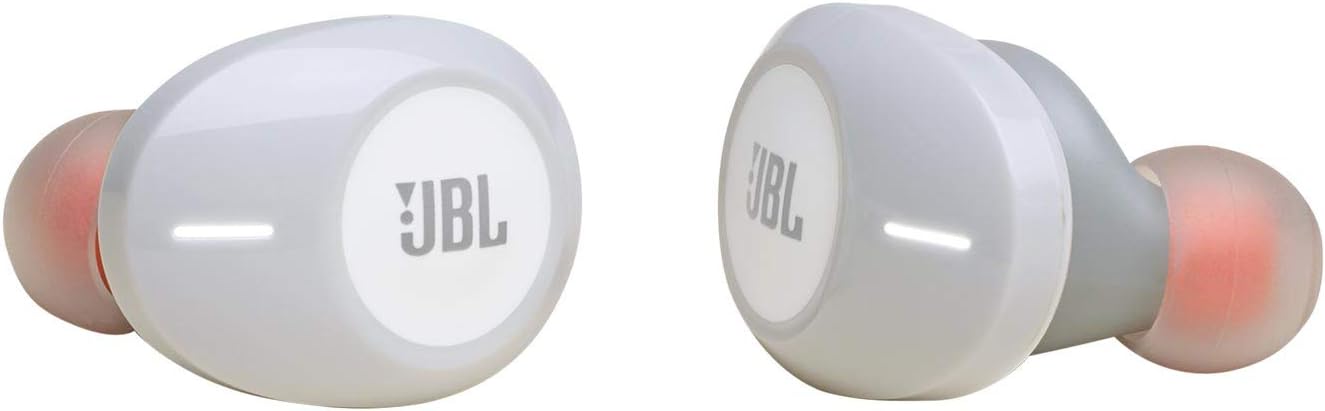
Image: Front view of the JBL TUNE 120TWS white true wireless earbuds, showcasing their sleek design.
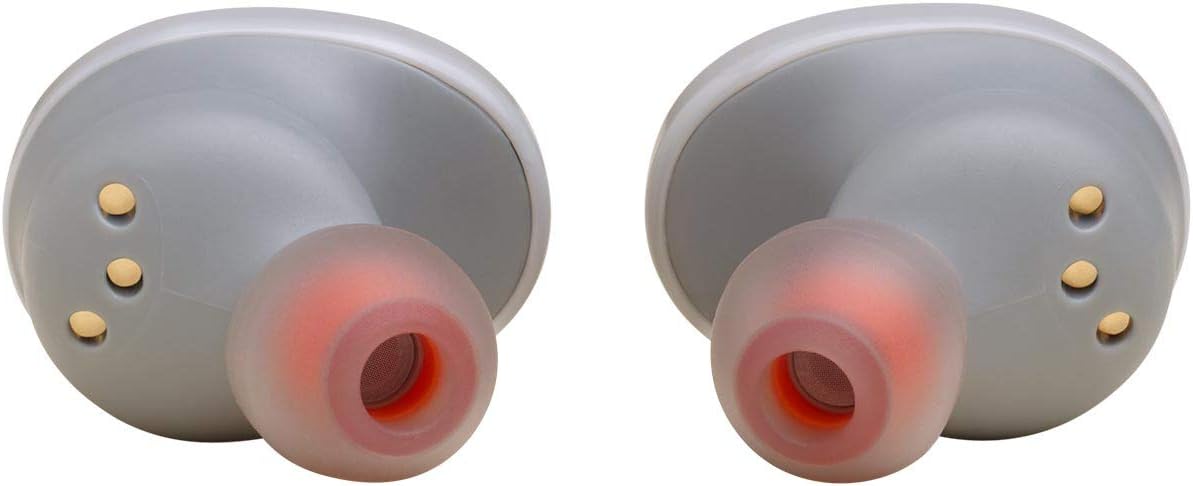
Image: Rear view of the JBL TUNE 120TWS white true wireless earbuds, highlighting the charging contacts and ear tips.
- JBL Pure Bass Sound: Equipped with a 5.8mm driver for powerful audio.
- True Wireless Design: Freedom from wires for music and calls.
- Integrated Microphone: For stereo hands-free calls.
- Intuitive Controls: Buttons on each earpiece for managing music and calls, and accessing voice assistant.
- Ergonomic Fit: Designed for long-lasting comfort.
4.2 Charging Case

Image: The JBL TUNE 120TWS white charging case shown open with both earbuds securely placed inside.

Image: The JBL TUNE 120TWS white charging case in a closed position, displaying its compact and smooth exterior.
- Portable Design: Compact and elegantly designed for easy carrying.
- Extended Battery Life: Provides up to 12 additional hours of charge, totaling 16 hours with earbuds.
- Quick Charge: 15 minutes of charging provides 1 extra hour of playback.
5. Setup
5.1 Charging the Earbuds and Case
- Place the earbuds into the charging case. Ensure they are properly seated.
- Connect the USB charging cable to the charging port on the case and to a power source.
- The LED indicators on the case will show the charging status. A full charge takes approximately 2 hours.
5.2 Pairing with a Bluetooth Device
- Open the charging case. The earbuds will automatically enter pairing mode.
- On your device (smartphone, tablet, etc.), enable Bluetooth.
- Search for "JBL TUNE 120TWS" in the list of available Bluetooth devices.
- Select it to connect. Once connected, a confirmation sound will play, and the LED on the earbuds may change.
- If pairing fails, close the case, wait 5 seconds, and repeat the steps.
6. Operating Instructions
6.1 Basic Controls
- Power On: Open the charging case. Earbuds power on automatically.
- Power Off: Place earbuds back into the charging case and close the lid.
- Play/Pause: Single tap on either earbud.
- Next Track: Double tap the right earbud.
- Previous Track: Double tap the left earbud.
- Volume Control: Adjust volume directly from your connected device.
6.2 Phone Calls
- Answer/End Call: Single tap on either earbud.
- Reject Call: Press and hold either earbud for 2 seconds.
6.3 Voice Assistant
- Activate Voice Assistant: Triple tap on either earbud to activate your device's voice assistant (e.g., Siri, Google Assistant).
7. Maintenance
- Cleaning: Regularly clean the earbuds and charging case with a soft, dry cloth. Avoid using harsh chemicals.
- Ear Tips: Remove and clean ear tips periodically with mild soap and water. Ensure they are completely dry before reattaching.
- Charging Contacts: Gently wipe the charging contacts on both the earbuds and the case to ensure proper connection.
- Storage: When not in use, store the earbuds in their charging case to protect them and maintain battery life.
8. Troubleshooting
| Problem | Solution |
|---|---|
| Earbuds not pairing. |
|
| No sound or low volume. |
|
| Earbuds not charging. |
|
| Voice assistant not responding. |
|
9. Specifications
| Feature | Detail |
|---|---|
| Brand | JBL |
| Model Name | JBL TUNE 120TWS |
| Connectivity Technology | Bluetooth |
| Wireless Communication Technology | Bluetooth |
| Bluetooth Version | 5.0 |
| Bluetooth Range | 10 Meters |
| Audio Driver Type | Dynamic Driver |
| Audio Driver Size | 5.8 Millimeters |
| Frequency Response | 20 Hz - 20000 Hz |
| Impedance | 14 Ohm |
| Noise Control | Passive Noise Cancellation |
| Battery Life (Earbuds) | Up to 4 hours |
| Battery Life (with Charging Case) | Up to 16 hours |
| Charging Time | 2 Hours |
| Item Weight | 2.56 ounces (72.5 grams) |
| Water Resistance Level | Water Resistant |
| Control Type | Voice Control |
| Included Components | Headphone, Cable, Charging case, 3 Ear tips |
10. Warranty and Support
JBL products are designed to provide years of reliable service. For detailed warranty information specific to your region and product, please refer to the warranty card included in your product packaging or visit the official JBL support website.
For technical support, FAQs, and additional resources, please visit the JBL Support Website.
Related documentsJBLT120TWS


Ask a question about this manual
Ask about setup, troubleshooting, compatibility, parts, safety, or missing instructions. Manuals+ will review the question and use this page’s manual context to help answer it.