1. Product Overview
The Hansgrohe iBox Universal Plus Rough-in Valve (model 01850181) is a foundational component for concealed shower and tub installations. It provides a universal platform for various Hansgrohe trim kits, allowing for flexible design and future upgrades without disturbing the in-wall plumbing.

Image 1.1: The Hansgrohe iBox Universal Plus Rough-in Valve. This image displays the green plastic housing of the rough-in valve with its internal brass components and connection points, designed for in-wall installation.
This valve is designed for durability and ease of installation, featuring 3/4-inch inlet and outlet connections. It is compatible with a wide range of Hansgrohe shower and tub trim sets.
2. Setup and Installation
Proper installation of the iBox Universal Plus Rough-in Valve is crucial for optimal performance and longevity. It is recommended that installation be performed by a qualified plumber or experienced installer.
2.1 Pre-Installation Considerations
- Ensure all necessary tools and materials are available before beginning installation.
- Verify that the wall cavity is sufficient to accommodate the valve's dimensions (approximately 4.75 x 4.27 x 4.25 inches).
- Familiarize yourself with local plumbing codes and regulations.
2.2 Installation Steps
- Mounting the iBox: Securely mount the iBox rough-in valve within the wall cavity according to the manufacturer's instructions provided with the physical product. Ensure it is level and at the correct depth relative to the finished wall surface.
- Connecting Water Lines: Connect the hot and cold water supply lines to the designated inlets on the iBox. The valve features 3/4-inch FNPT inlet connections.
- Connecting Outlet Lines: Connect the outlet lines to the showerhead, hand shower, or other desired fixtures. The valve features 3/4-inch FNPT outlet connections.
- Securing Fittings: When working with copper fittings, it is advisable to tighten fittings with the iBox secured, potentially using a vice. A threaded section of 3/4-inch pipe can be used to hold the box in a vice during this process.
- Soldering Precautions: If soldering, avoid soldering within 4 inches of the iBox to prevent damage to the plastic components from excessive heat.
- Leak Testing: After all connections are made, perform a thorough leak test before closing the wall.

Image 2.1: The Hansgrohe iBox Universal Plus Rough-in Valve with a protective cover. This view shows the valve with a temporary cover in place, which protects the internal mechanism during the rough-in phase of plumbing installation.
3. Operating Principles and System Configurations
The iBox Universal Plus Rough-in Valve serves as the core component for various shower system configurations. The specific operation (e.g., temperature and flow control, diverter functions) is determined by the trim kit installed over the iBox.
3.1 Single-Function Shower System
In a single-function setup, the iBox controls water flow and temperature to a single shower outlet, typically a showerhead or a hand shower.

Image 3.1: Diagram illustrating a 1-Function shower system with the iBox. This image shows the iBox installed in a wall, connected to hot (red) and cold (blue) water lines, and supplying water to a single shower fixture (e.g., a hand shower) via a purple pipe.
3.2 Two-Function Shower System
A two-function system allows for control over two shower outlets, such as a main showerhead and a hand shower, often with a diverter mechanism integrated into the trim kit.
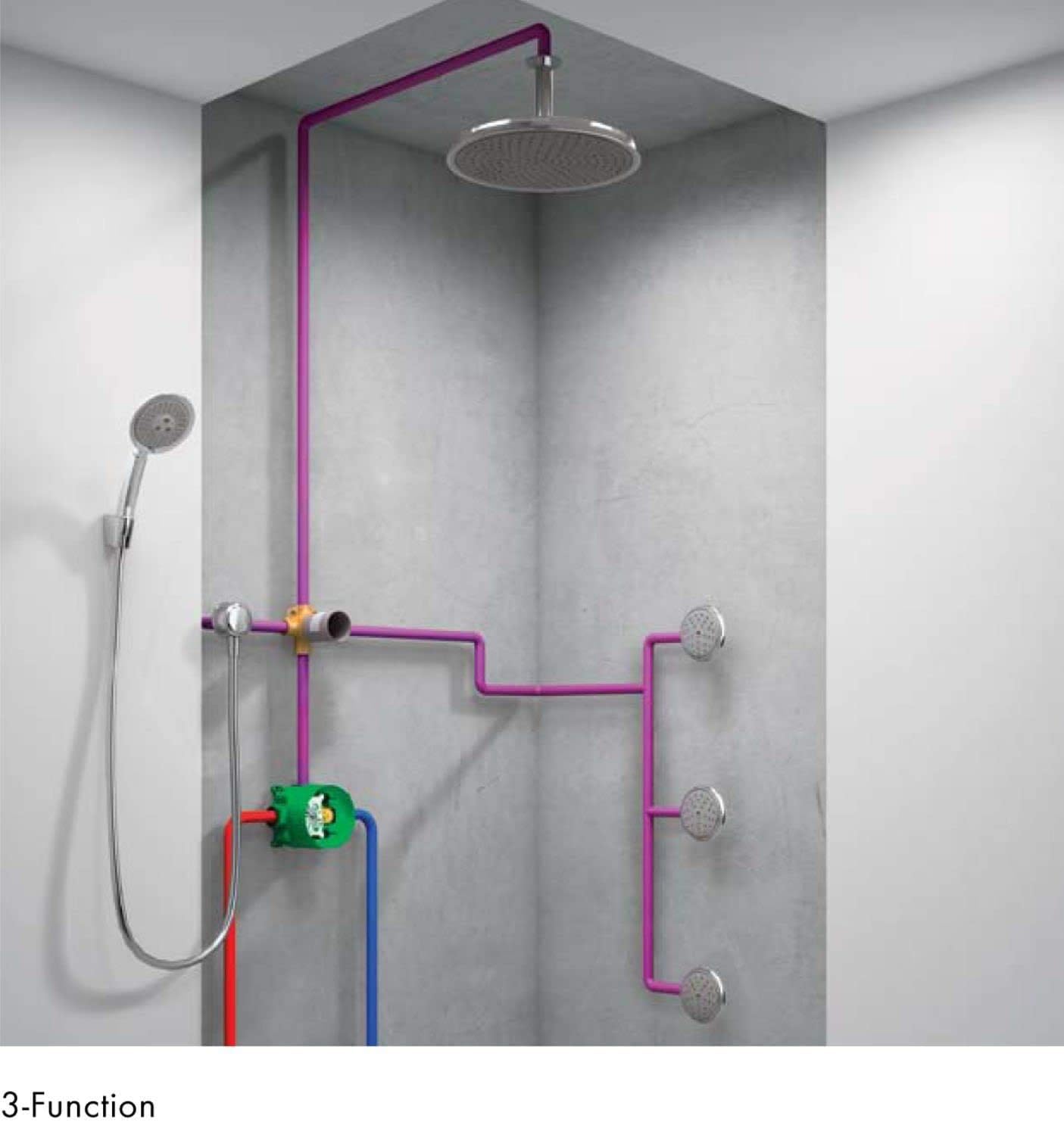
Image 3.2: Diagram illustrating a 2-Function shower system with the iBox. This image depicts the iBox connected to hot and cold water, supplying water to both an overhead showerhead and a hand shower, indicating a system with two distinct water outlets.
3.3 Multi-Function Shower System
For more complex shower systems, the iBox can support multiple outlets, including overhead showers, hand showers, and body jets, depending on the specific trim and additional diverter valves used.

Image 3.3: Diagram illustrating a 3-Function shower system with the iBox. This image shows a more elaborate setup where the iBox, connected to water supplies, feeds an overhead shower, a hand shower, and multiple body jets, demonstrating its versatility for complex shower designs.

Image 3.4: Internal water flow diagram of the Hansgrohe iBox. This image provides a cutaway view of the iBox, showing the internal pathways and how water is directed through the valve, highlighting its engineering for efficient water distribution.

Image 3.5: Hansgrohe iBox compatibility with various trim kits. This image illustrates the iBox as a central hub, with lines extending to various styles of Hansgrohe shower trim plates, handles, and shower components, emphasizing its universal compatibility.
4. Maintenance
The Hansgrohe iBox Universal Plus Rough-in Valve is designed for long-term reliability and typically requires minimal maintenance once installed. As it is a concealed component, routine user maintenance is not generally applicable.
- For any issues related to water flow or temperature control, the problem is usually with the external trim kit or cartridge, not the iBox itself.
- If professional inspection or service is required, ensure that the service technician is familiar with Hansgrohe products and concealed valve systems.
5. Troubleshooting
Since the iBox is a rough-in valve, most operational issues stem from the trim kit or the water supply rather than the iBox itself. If you experience problems, consider the following:
- No Water Flow or Low Pressure: Check main water supply, ensure shut-off valves are fully open, and inspect the trim kit's cartridge for obstructions or wear.
- Inconsistent Water Temperature: Verify hot and cold water supply lines are correctly connected. If the issue persists, the problem may lie with the thermostatic or pressure-balancing cartridge within the trim kit.
- Leaks: Leaks from behind the wall after installation indicate an issue with the plumbing connections to the iBox. This requires immediate attention from a qualified plumber.
For persistent issues, it is recommended to consult a professional plumber or contact Hansgrohe customer support.
6. Specifications
Key technical specifications for the Hansgrohe 01850181 iBox Universal Plus Rough-in Valve:
| Specification | Detail |
|---|---|
| Brand | Hansgrohe |
| Model Number | 01850181 |
| Material | Brass (internal components), Plastic (housing) |
| Product Dimensions (L x W x H) | 4.75 x 4.27 x 4.25 inches |
| Item Weight | 1 pound |
| Inlet Connection Size | 0.75 Inches |
| Inlet Connection Type | FNPT |
| Outlet Connection Size | 0.75 Inches |
| Outlet Connection Type | FNPT |
| Exterior Finish | Not applicable (concealed component) |
| Certifications | ANSI B16.11, ASME B16.34, ASSE, CE, CSA, ISO 9001, MSS SP 25, MSS SP 72, MSS SP 80, NSF, ULC, UPC, WaterSense |
7. Warranty Information
For specific warranty details regarding the Hansgrohe 01850181 iBox Universal Plus Rough-in Valve, please refer to the official warranty documentation provided with your purchase or visit the official Hansgrohe website. Warranty terms typically cover manufacturing defects and may vary based on region and product type.
8. Customer Support
If you require further assistance, have questions about installation, or need to troubleshoot an issue, please contact Hansgrohe customer support. You can find contact information and additional resources on the official Hansgrohe website: www.hansgrohe-usa.com.


