
1. Important Safety Information
Please read all instructions carefully before using the Human Touch Super Novo Massage Chair. Retain this manual for future reference.
- Ensure a recline clearance of at least 2 inches (5 cm) behind the chair to prevent damage to the chair and surrounding area during operation.
- Do not allow children or pets to play on or around the massage chair.
- Always unplug the chair from the power outlet when not in use or before cleaning.
- If you experience any discomfort during a massage, discontinue use immediately.
- Consult a physician before using the chair if you have pre-existing medical conditions.
2. Setup and Installation
2.1 Unpacking and Placement
Carefully remove the massage chair from its packaging. It is recommended to have at least two people for unpacking and moving the chair due to its weight and size.
- Place the chair on a level, stable surface.
- Ensure adequate space around the chair, especially behind it for reclining, as noted in the safety information.
- Avoid placing the chair in direct sunlight or near heat sources.
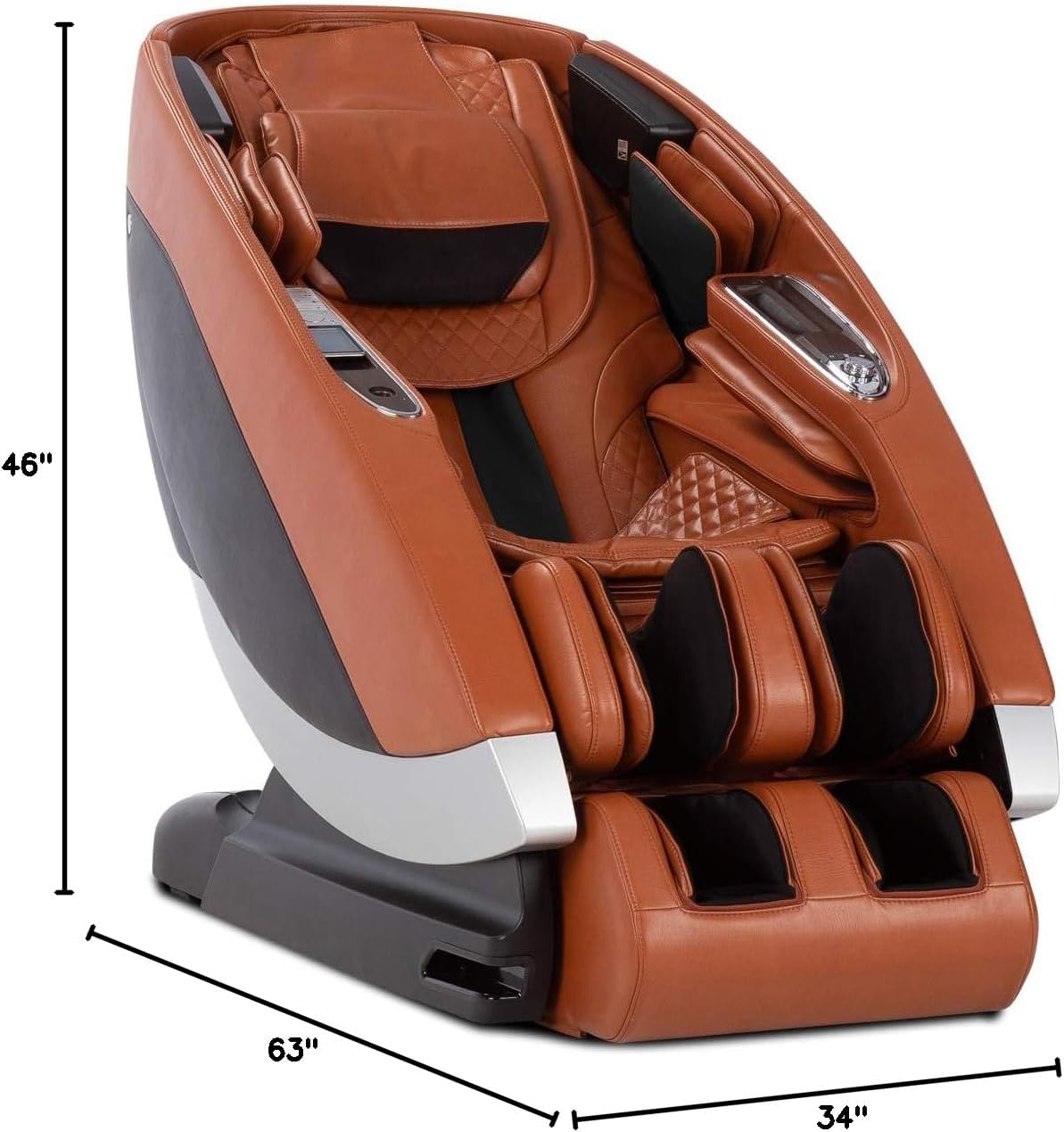
Image: The Human Touch Super Novo Massage Chair with its dimensions labeled: 63 inches deep, 34 inches wide, and 46 inches high.
2.2 Power Connection
Connect the power cord to the chair's power inlet and then plug it into a grounded electrical outlet. Ensure the power cord is not pinched or obstructed.
3. Operating Instructions
3.1 Basic Operation and Remote Control
The Super Novo Massage Chair features an advanced interface with fingertip controls for easy management of its functions.
- Power On/Off: Use the dedicated power button on the control panel or remote to turn the chair on or off.
- Recline Position: Adjust the chair's recline angle using the recline controls.
- Auto Programs: Select from a variety of pre-programmed massage sessions.
- Heat Settings: Activate or adjust the Dual-Lumbar Heat feature for soothing warmth.
- Speaker Volume: Control the volume of the integrated Altec Lansing sound system.
- Return to Upright: Use the designated button to return the chair to its initial upright position.

Image: A close-up view of the remote control for the Human Touch Super Novo Massage Chair, displaying various buttons for power, recline, massage programs, and settings.
3.2 Smart Features with Alexa
The Super Novo is designed with Alexa voice recognition, allowing for hands-free control and personalized massage experiences. Refer to the separate Alexa integration guide for detailed setup and command instructions.
3.3 Massage Programs and Techniques
The chair offers 38 wellness programs and various massage techniques:
- 3D and 4D Programs: These programs simulate the touch of a professional masseuse with variable speed and massage strokes.
- S- and L-Track System: Provides comprehensive massage coverage from your shoulders and spine down to your thighs.
- Cloud Touch Acupressure: Targeted air cells apply pressure to key healing points and gently manipulate the body for stretching and muscle relief.
- Dual-Lumbar Heat: Delivers therapeutic heat to the lower back area to soothe muscles and relieve tension.

Image: A woman with her eyes closed, relaxing in the reclined Human Touch Super Novo Massage Chair, demonstrating a typical use scenario.
3.4 Audio System
The integrated Altec Lansing Premium sound system allows you to play music or ambient sounds during your massage. Connect your device via Bluetooth (refer to the Bluetooth pairing guide) or use the chair's pre-loaded nature sounds.

Image: A close-up shot of the Altec Lansing speaker integrated into the side panel of the Human Touch Super Novo Massage Chair.
4. Maintenance and Care
Regular maintenance ensures the longevity and optimal performance of your massage chair.
- Cleaning: Wipe the chair's surfaces with a soft, damp cloth. Avoid using abrasive cleaners or solvents.
- Upholstery Care: For specific upholstery cleaning instructions, refer to the care tag or contact Human Touch customer service.
- Storage: If storing the chair for an extended period, unplug it and cover it to protect it from dust.
5. Troubleshooting
If you encounter issues with your Human Touch Super Novo Massage Chair, refer to the following common solutions:
| Problem | Possible Cause | Solution |
|---|---|---|
| Chair does not power on. | Power cord not connected; outlet not functioning; main power switch off. | Ensure power cord is securely plugged in. Test the outlet with another device. Check the main power switch on the chair. |
| Massage function is weak or inconsistent. | Incorrect program selected; user position incorrect; internal mechanism issue. | Select a different massage program or adjust intensity settings. Ensure you are seated correctly. If the issue persists, contact customer support. |
| Remote control or app not responding. | Batteries low (remote); app not paired; software glitch. | Replace remote batteries. Re-pair the app with the chair. Restart the chair and the app. |
| Unusual noises during operation. | Loose components; foreign object obstruction; normal operational sounds. | Inspect for any visible obstructions. Some mechanical sounds are normal. If noises are loud or unusual, discontinue use and contact support. |
For issues not listed here, or if solutions do not resolve the problem, please contact Human Touch Customer Support.
6. Specifications
| Feature | Detail |
|---|---|
| Brand | Human Touch |
| Model Name | Human Touch Super Novo Massage Chair |
| Item Model Number | 100-SNOVO-024 |
| Color | Saddle |
| Product Dimensions (D x W x H) | 63" x 34" x 46" |
| Item Weight | 320 pounds |
| Maximum Weight Recommendation | 285 Pounds |
| Back Style | Continuous |
| Special Feature | Arm Rest, Cushion Availability |
| Included Components | Massage Chair |
| Fill Material | Foam |
| Reclining Position Count | 2 or more |
| UPC | 045915072186 |
7. Warranty Information
The Human Touch Super Novo Massage Chair comes with a manufacturer's warranty. Please refer to the warranty card included with your purchase for specific terms, conditions, and registration details. You may also visit the official Human Touch website for the most current warranty information.
8. Customer Support
For technical assistance, service requests, or any questions regarding your Human Touch Super Novo Massage Chair, please contact Human Touch Customer Service directly.
- Online Support: Visit the Human Touch Store or their official website.
- Contact Information: Refer to your product documentation for phone numbers and email addresses.


