
1. Introduction
Thank you for choosing the K&F CONCEPT KF34.009V1 86.6-inch Aluminum Photography Light Stand. This manual provides essential information for the safe and effective use of your new equipment. Please read it thoroughly before operation and retain it for future reference.
This light stand is designed for supporting various photographic equipment, including reflectors, softboxes, flash units, strobe lights, and umbrellas. Its lightweight aluminum alloy construction and foldable design make it suitable for both studio and on-location use.
2. Safety Information
- Always ensure the light stand is placed on a stable, level surface before mounting any equipment.
- Do not exceed the maximum load capacity of 8.8 lbs (4 kg). Overloading can cause instability and damage to equipment.
- When using large or heavy equipment, or in windy conditions, always use sandbags or other counterweights for additional stability.
- Ensure all locking mechanisms are securely tightened before leaving the stand unattended.
- Keep hands and fingers clear of moving parts when adjusting the stand to prevent pinching.
- Avoid exposing the stand to extreme temperatures or corrosive environments.
3. Package Contents
Verify that all items are present in your package:
- K&F CONCEPT KF34.009V1 Light Stand
- Storage Bag
4. Setup Instructions
4.1 Unfolding the Light Stand
- Remove the light stand from its storage bag.
- Gently pull the legs outwards until they are fully extended. The tripod-style base is designed for easy folding and unfolding.
- Adjust the leg angles by pressing the red quick-release buckles located at the top of each leg. This allows for three different leg angles to optimize stability on various surfaces.
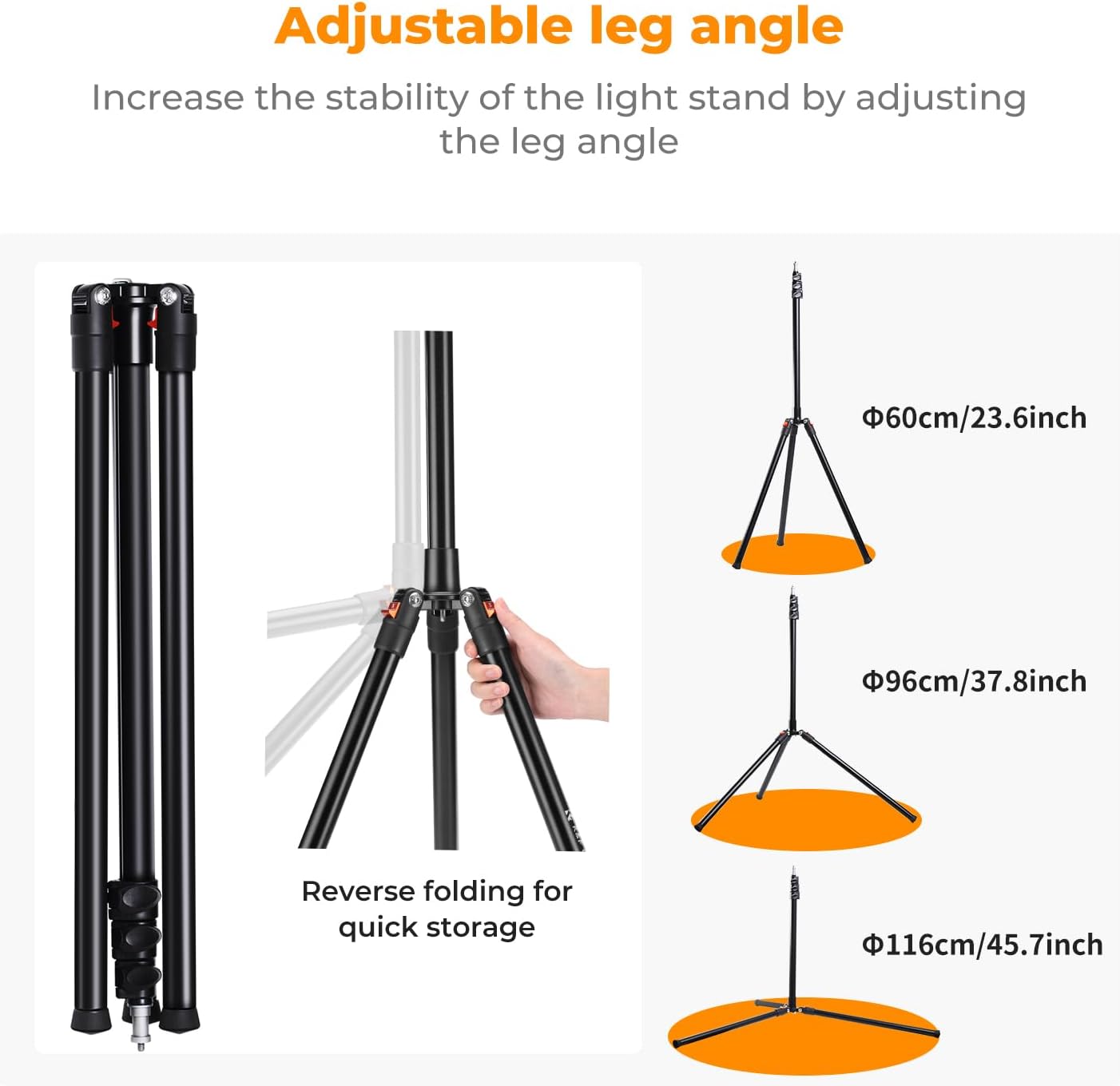
The light stand features an exclusive tripod base that can be easily folded for transport and storage. Its folded length is 21.7 inches (55 cm).

4.2 Extending the Center Column
- Loosen the quick-release flip-locks on each section of the center column.
- Extend the column sections to your desired height.
- Securely tighten all quick-release flip-locks to prevent the column from collapsing.

The light stand can reach a maximum height of 86.6 inches (2.2 meters).
4.3 Attaching Equipment
The light stand features a 1/4-inch screw tip on the stem, making it compatible with a wide range of photographic equipment.
- Align your equipment (e.g., flash, softbox, camera) with the 1/4-inch screw tip.
- Carefully screw the equipment onto the tip until it is secure. Do not overtighten.


4.4 Enhancing Stability
For increased stability, especially with heavier loads or in outdoor environments, utilize the integrated sandbag hook.
- Locate the hook at the base of the center column.
- Attach a sandbag or other suitable counterweight to the hook.


5. Operating the Light Stand
5.1 Adjusting Height
To adjust the height, loosen the quick-release flip-locks on the center column, extend or retract the sections to the desired height, and then firmly tighten the locks. The quick-release design allows for rapid height adjustments.

5.2 Adjusting Leg Angles
The legs can be set at three different angles to increase stability or adapt to uneven terrain. Press the red quick-release buckles on each leg to change its angle. Ensure the legs are locked into one of the three positions for optimal stability.
5.3 Versatile Applications
The light stand is designed for various photographic scenarios:
- Low-Angle Shots: Adjust the legs to the widest angle and lower the center column for stable low-angle photography.
- High-Angle Shots: Extend the center column to its maximum height for elevated perspectives.
- Pet-Friendly Photography: The adjustable height allows for comfortable shooting at pet level.


5.4 Official Product Videos
Watch these official videos from K&F Concept for visual guidance on setting up and using your light stand:
Video: KF34.009 Photographic Lighting Stands. This video demonstrates the general features and usage of the light stand.
Video: K&F Concept 78.75 Inch Light Stand. This video showcases the light stand's capabilities and ease of use.
6. Maintenance
- Clean the light stand regularly with a soft, dry cloth. Avoid using abrasive cleaners or solvents.
- Inspect all locking mechanisms and joints periodically for wear and tear.
- Store the light stand in its provided storage bag in a dry, cool place when not in use to protect it from dust and damage.
7. Troubleshooting
7.1 Stand Instability
- Issue: The stand feels wobbly or unstable.
- Solution: Ensure all leg angles are locked into position. Verify that the quick-release flip-locks on the center column are fully tightened. Use sandbags or counterweights, especially with heavy equipment or in windy conditions.
7.2 Difficulty Adjusting Height
- Issue: The center column sections are difficult to extend or retract.
- Solution: Ensure the quick-release flip-locks are fully loosened. Check for any debris or obstructions in the column sections. Do not force adjustments; if resistance is met, re-check the locks and pathways.
8. Specifications
| Feature | Specification |
|---|---|
| Brand | K&F CONCEPT |
| Model Number | KF34.009V1 |
| Material | Aluminum |
| Maximum Height | 86.6 inches (2.2 meters) |
| Minimum Height | 21.6 inches |
| Folded Length | 21.7 inches (55 cm) |
| Maximum Load Capacity | 8.8 lbs (4 kg) |
| Item Weight | 1.6 ounces (Note: This weight seems unusually low for a light stand of this size and material. Please refer to product packaging for accurate weight.) |
| Leg Diameter | 26 millimeters |
| Mounting Screw | 1/4 inch |
9. Warranty and Support
Information regarding product warranty and customer support is not available in the provided data. Please refer to the product packaging or the official K&F CONCEPT website for details on warranty coverage and how to contact customer service for assistance.


