
WALI CS303S
WALI Floating Entertainment Center Shelves
Model: CS303S
Brand: WALI
Introduction
This user manual provides detailed instructions for the installation, operation, and maintenance of your WALI Floating Entertainment Center Shelves, Model CS303S. Designed to optimize your entertainment space, this 3-shelf system offers a sleek and functional solution for organizing your media devices.

Image: The WALI Floating Entertainment Center Shelves (CS303S) in silver, showcasing three tempered glass shelves holding a cable box, remote, game controller, books, and a game console. This image illustrates the product's capacity and aesthetic integration with various media devices.
Important Safety Information
Please read and understand all instructions before installation and use. Failure to follow these instructions may result in personal injury or property damage.
- Ensure the shelf is securely mounted to the wall using appropriate hardware for your wall type.
- Do not exceed the maximum weight limit of 17.6 lbs (8 kg) per shelf. Overloading can cause the shelves to detach from the wall, leading to damage or injury.
- Keep children and pets away from the installation area during assembly.
- Regularly check the mounting hardware for tightness and ensure the shelves remain stable.
Package Contents
Verify that all components are present and undamaged before beginning assembly. If any parts are missing or damaged, please contact WALI customer support.

Image: An exploded diagram showing all individual components included in the WALI Floating Entertainment Center Shelves package. This includes three glass shelves, two wall plates, three glass holders, various bolts (M5X6, M5X12), connect pieces, plastic covers, plastic bushes, decorative covers, ST5.5x50 screws, a 3mm allen key, and concrete anchors. This visual aid helps users identify and verify all parts before assembly.
| Component | Quantity |
|---|---|
| Glass Shelf | 3 |
| Wall Plate | 2 |
| Glass Holder | 3 |
| M5X6 Bolt | 1 |
| Connect Piece | 3 |
| Plastic Cover | 6 |
| Plastic Bush | 3 |
| M5X12 Bolt | 9 |
| Decorative Cover | 4 |
| ST5.5x50 Screw | 6 |
| 3mm Allen Key | 1 |
| Concrete Anchor | 6 |
Specifications
| Feature | Detail |
|---|---|
| Model Number | CS303S |
| Number of Shelves | 3 |
| Shelf Material | Strengthened Tempered Glass |
| Shelf Dimensions (Each) | 15 inches (W) x 11 inches (D) |
| Shelf Thickness | 0.19 inches |
| Weight Capacity (Per Shelf) | Up to 17.6 lbs (8 kg) |
| Overall Product Dimensions | 11"D x 15"W x 23"H |
| Installation Type | Wall Mount |
| Cable Management | Built-in on wall plate |
| Finish Type | Glossy (Aluminum frame) |
| Assembly Required | Yes |
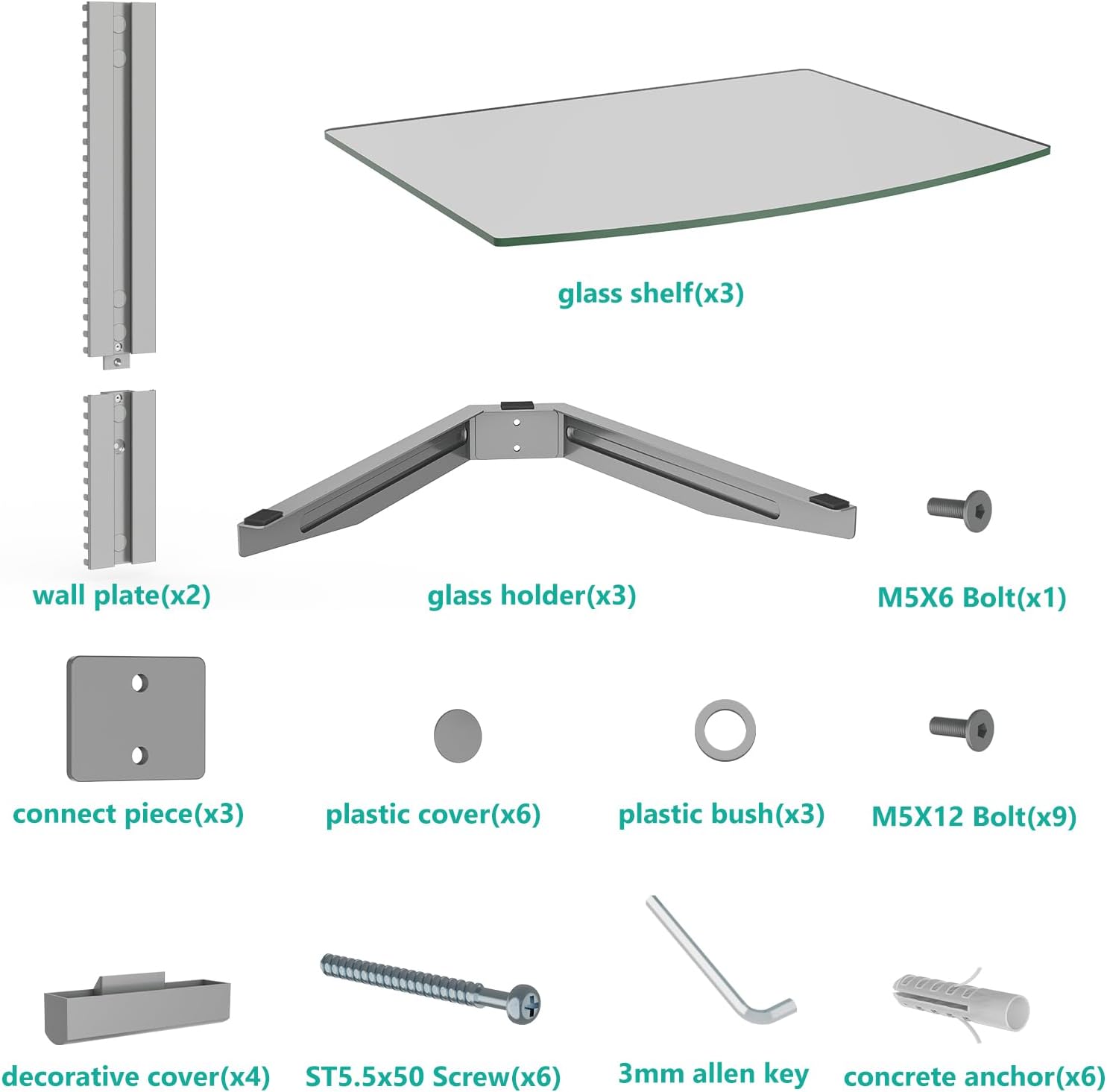
Image: A detailed diagram illustrating the product dimensions of the WALI Floating Entertainment Center Shelves. It shows the width (15 inches), depth (11 inches), overall height (22.8 inches), shelf thickness (0.19 inches), and the maximum weight capacity per shelf (17.6 lbs). This image provides critical measurements for planning installation.
Setup and Installation
1. Pre-Installation
- Tools Required: Pencil, Level, Drill, Phillips Head Screwdriver, Stud Finder (recommended).
- Wall Type: Ensure your wall can support the weight of the shelves and your devices. For drywall, it is highly recommended to mount into wall studs. For concrete or brick walls, use the provided concrete anchors.
- Location: Choose a location that is clear of electrical wires, plumbing, and other obstructions. Consider the height relative to your TV for optimal viewing and accessibility.
2. Mounting the Wall Plates
- Position the two wall plates on the desired location on the wall. Use a level to ensure they are perfectly aligned vertically.
- Mark the drilling points through the holes on the wall plates with a pencil.
- Drill pilot holes at the marked points. The size of the drill bit will depend on your wall type and the screws/anchors being used.
- Insert concrete anchors if mounting into concrete or brick.
- Secure the wall plates to the wall using the provided ST5.5x50 screws. Ensure they are firmly attached.
3. Assembling and Attaching Shelves
- Attach the glass holders to the wall plates. The height of each shelf is adjustable.
- Place the tempered glass shelves onto the glass holders. Ensure they are seated securely.
- Use the plastic bushes and M5X12 bolts to secure the glass shelves to the glass holders.
- Install the decorative covers over the mounting points for a clean finish.

Image: A visual representation of the adjustable shelf feature of the WALI Floating Entertainment Center Shelves. The image shows how the shelves can be moved up and down along the wall plate to customize the spacing between them, providing flexibility for various device sizes. A close-up inset highlights the mechanism for adjusting and securing the shelf height.
4. Cable Management
The WALI CS303S features a built-in cable management system to keep your cables organized and out of sight.
- Route your device cables through the channels on the back of the wall plates.
- Ensure cables are not pinched or excessively bent.
- This system helps maintain a clean and tidy appearance for your entertainment setup.

Image: A detailed view of the integrated cable management system within the WALI Floating Entertainment Center Shelves. The image shows cables neatly routed through the central column, highlighting how the design helps conceal wires for a clean aesthetic. An inset provides a close-up of the cable channels.
Operating Instructions
Once installed, the WALI Floating Entertainment Center Shelves are ready for use.
- Carefully place your DVD players, cable boxes, game consoles, or other TV accessories onto the tempered glass shelves.
- Distribute the weight evenly across each shelf to prevent undue stress on the mounting points.
- Remember the maximum weight capacity of 17.6 lbs (8 kg) per shelf. Do not exceed this limit.
- Adjust the height of the shelves as needed to accommodate different device sizes or to achieve your desired aesthetic.
Maintenance
To ensure the longevity and appearance of your WALI Floating Entertainment Center Shelves, follow these simple maintenance guidelines:
- Cleaning: Wipe the glass shelves and aluminum frame with a dry, soft cloth. For stubborn marks on glass, a glass cleaner can be used, but avoid abrasive cleaners that may scratch the surface.
- Inspection: Periodically check all screws and mounting points to ensure they remain tight and secure. Re-tighten if necessary.
- Weight Limit: Always adhere to the 17.6 lbs (8 kg) per shelf weight limit.
Troubleshooting
If you encounter any issues with your WALI Floating Entertainment Center Shelves, consider the following common solutions:
- Shelves appear wobbly or loose:
- Ensure all mounting screws securing the wall plates to the wall are tight.
- Verify that the bolts securing the glass shelves to the glass holders are tightened.
- Confirm that the wall type is suitable for the installation method used.
- Difficulty adjusting shelf height:
- Ensure the locking mechanism for the adjustable arms is disengaged before attempting to move the shelf.
- Check for any obstructions or debris in the adjustment channels.
- Cables are not neatly hidden:
- Re-route cables through the designated cable management channels on the wall plate.
- Ensure no cables are outside the channels or obstructing the decorative covers.
If these steps do not resolve your issue, please contact WALI customer support for further assistance.
Warranty Information
WALI provides a 10-year warranty for the Floating Entertainment Center Shelves (Model CS303S). This warranty covers defects in materials and workmanship under normal use. Please retain your proof of purchase for warranty claims.
For detailed warranty terms and conditions, or to initiate a warranty claim, please refer to the official WALI website or contact customer support.
Customer Support
For any questions, technical assistance, or support regarding your WALI Floating Entertainment Center Shelves, please contact our dedicated customer support team.
- Online Support: Visit the official WALI website for FAQs, product registration, and support resources.
- Email Support: Responses typically within 12 hours.
- Phone Support: Available 7 days a week (check WALI website for specific hours and contact numbers).
Please have your product model number (CS303S) and purchase information ready when contacting support.
Related documentsCS303S


Ask a question about this manual
Ask about setup, troubleshooting, compatibility, parts, safety, or missing instructions. Manuals+ will review the question and use this page’s manual context to help answer it.