
Introduction
This manual provides comprehensive instructions for the Canyon CNS-SW71BB Smartwatch. Please read this guide thoroughly before using the device to ensure proper operation and to maximize its features. Keep this manual for future reference.
Product Overview
The Canyon CNS-SW71BB is a versatile smartwatch designed for fitness tracking and daily connectivity. It features a durable metal case, an IP68 waterproof rating, and a comprehensive set of sensors for various activities.
Key Features:
- Two interchangeable straps: a metal strap with a magnetic buckle and a TPU strap.
- Durable metal watch case with IP68 waterproof rating for full protection.
- Integrated multi-sport sensors for activity tracking.
- Incoming call notifications.
- Weather display.
- Wireless charging capability.
- Bluetooth connectivity for smartphone pairing.
Components:
The package includes:
- Canyon CNS-SW71BB Smartwatch
- Metal strap with magnetic buckle
- TPU strap
- Wireless charging cable
- User Manual

Image: Product packaging for the Canyon CNS-SW71BB Smartwatch, showing the watch face, included straps, and key features listed on the side.
Setup
1. Initial Charging:
Before first use, fully charge the smartwatch. Connect the wireless charging cable to a USB power source and place the smartwatch on the charging pad. The watch display will indicate charging status.
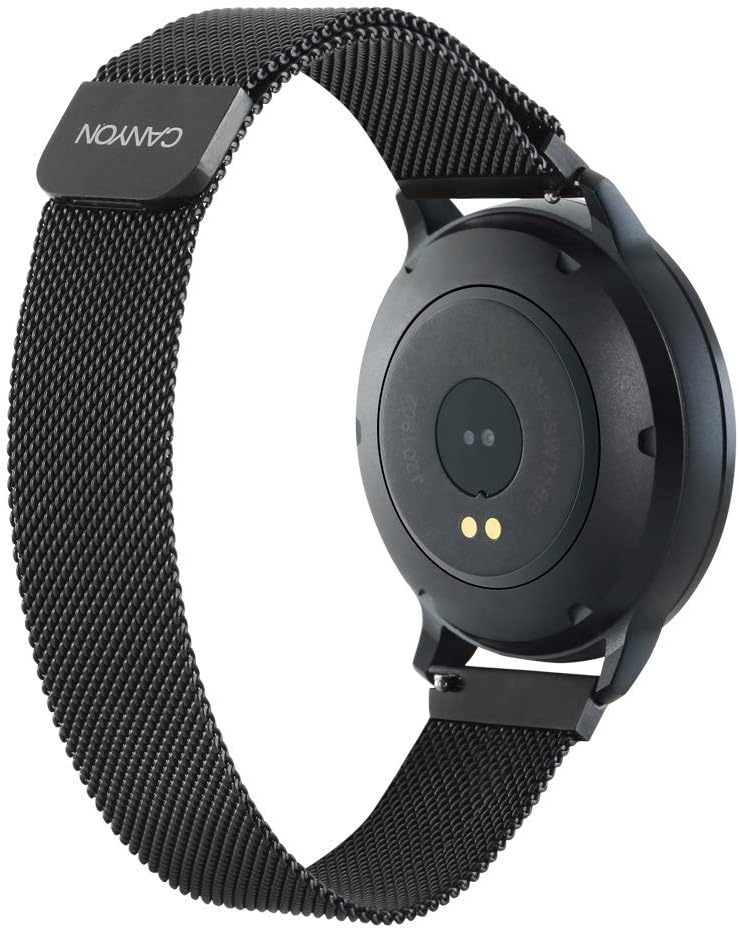
Image: Rear view of the Canyon CNS-SW71BB Smartwatch, highlighting the optical sensors and charging contacts on the back of the watch face.
2. App Installation:
Download and install the "Canyon Fit" application on your smartphone. The app is available on both iOS and Android app stores. Search for "Canyon Fit" and follow the installation prompts.
3. Device Pairing:
- Ensure Bluetooth is enabled on your smartphone.
- Open the Canyon Fit application.
- Follow the in-app instructions to search for and connect to your CNS-SW71BB smartwatch.
- Confirm the pairing request on both your smartphone and the smartwatch.
4. Strap Installation:
The smartwatch comes with two interchangeable straps. To change a strap, locate the quick-release pins on the underside of the strap where it connects to the watch case. Slide the pin to detach the strap and attach the desired strap by aligning the pins and releasing them into the watch lugs.

Image: The Canyon CNS-SW71BB Smartwatch fitted with a black and yellow/green TPU strap, demonstrating the interchangeable strap feature.
Operating Instructions
Once paired, your Canyon CNS-SW71BB smartwatch can track various activities and provide notifications.

Image: Front view of the Canyon CNS-SW71BB Smartwatch display, showing fitness metrics such as steps, distance, calories burned, and heart rate.
Basic Navigation:
The smartwatch typically features a touchscreen display and one or more physical buttons. Swipe across the screen to navigate through different menus and functions. Press the physical button(s) to return to the home screen or access specific features.
Fitness Tracking:
The smartwatch automatically tracks steps, distance, and calories burned. To initiate a specific workout mode (e.g., running, cycling), navigate to the multi-sport section on the watch or through the Canyon Fit app. The watch utilizes its integrated sensors to monitor your activity.
Notifications:
When connected to your smartphone, the smartwatch will display incoming call alerts and notifications from selected applications. Manage notification settings within the Canyon Fit app.
Weather Display:
Access current weather information directly on your smartwatch. Ensure the watch is connected to your smartphone and the Canyon Fit app has location permissions enabled to receive accurate weather data.
Music Control:
Control music playback on your smartphone directly from the smartwatch. This feature allows you to play, pause, skip tracks, and adjust volume without needing to access your phone.
Camera Remote:
Use the smartwatch as a remote shutter button for your smartphone's camera. Activate this feature through the Canyon Fit app and then use the watch to capture photos.
Maintenance
Cleaning:
Regularly clean your smartwatch and straps. Wipe the watch face and case with a soft, damp cloth. For the straps, follow the manufacturer's recommendations based on the material (metal or TPU). Avoid using harsh chemicals or abrasive materials.
Water Resistance:
The Canyon CNS-SW71BB Smartwatch has an IP68 waterproof rating, meaning it is protected against dust ingress and can withstand immersion in water up to 1.5 meters for up to 30 minutes. It is suitable for daily use, including hand washing and light rain. However, it is not recommended for diving, hot showers, or prolonged submersion in hot water, as steam and high temperatures can compromise the seals.
Troubleshooting
- Watch not turning on: Ensure the watch is fully charged. Connect it to the wireless charger and check for charging indicators.
- Cannot pair with smartphone:
- Verify Bluetooth is enabled on your smartphone.
- Ensure the Canyon Fit app is installed and running.
- Restart both the smartwatch and your smartphone.
- Check if the watch is already paired with another device.
- Inaccurate fitness data:
- Ensure the watch is worn snugly on your wrist.
- Update the Canyon Fit app to the latest version.
- Calibrate the watch through the app if an option is available.
- Notifications not appearing:
- Check notification settings in the Canyon Fit app and your smartphone's system settings.
- Ensure the watch is connected via Bluetooth.
Specifications
| Feature | Detail |
|---|---|
| Model Name | CNS-SW71BB |
| Brand | CANYON |
| Display Size | 1.22 Inches |
| Connectivity Technology | Bluetooth |
| Wireless Communication Standard | Bluetooth |
| Special Features | Wireless Charging, Multi-sport Sensors, Call Notification, Weather Display |
| Compatible Devices | Smartphone |
| Water Resistance Level | IP68 (Waterproof) |
| Battery | Rechargeable (1 included) |
| Color | Black |
| Shape | Round |
| Manufacturer | Canyon |
| Software Updates Guaranteed Until | Information not available |
| Spare Parts Availability | Information not available |
Warranty and Support
For warranty information and technical support, please refer to the official Canyon website or contact their customer service. Details regarding specific warranty periods and support channels are typically provided with your purchase documentation or on the manufacturer's website.
Product support and updates may be available through the Canyon Fit application.


