1. Product Overview
The Frigidaire FGMV17WNVF is an over-the-range microwave oven designed for efficient food preparation. It features a 1.7 cubic foot capacity and a SmudgeProof Stainless Steel finish. Key functionalities include an Effortless Clean Interior for easy maintenance, Sensor Cooking to automatically adjust power and time, and Cooktop LED Lighting for improved visibility.
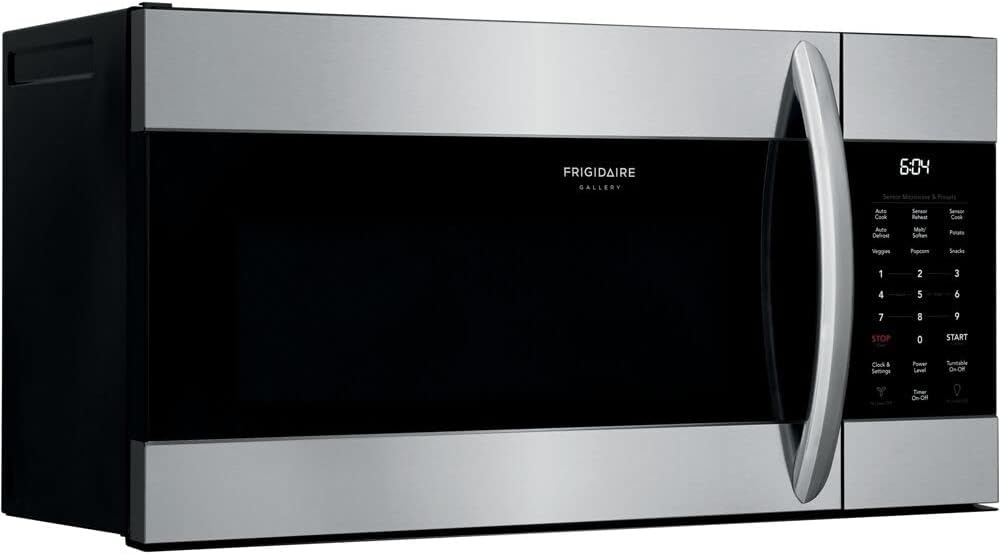
Figure 1: Front view of the Frigidaire FGMV17WNVF microwave oven.
2. Specifications
| Feature | Detail |
|---|---|
| Brand | Frigidaire |
| Model Number | FGMV17WNVF |
| Capacity | 1.7 Cubic Feet |
| Wattage | 1000 watts |
| Installation Type | Over-the-Range |
| Material | Stainless Steel |
| Product Dimensions (D x W x H) | 15.03" x 29.88" x 16.41" |
| Microwave Interior Height | 9 7/16 inch |
| Microwave Interior Width | 20 15/16 inch |
| Microwave Interior Depth | 14 13/32 inch |
| Turntable Diameter | 13 59/100 inch |
| Special Features | Turntable, Sensor Cooking, Cooktop LED Lighting, Effortless Reheat |

Figure 2: Dimensions of the Frigidaire FGMV17WNVF microwave oven.
3. Setup and Installation
This Frigidaire microwave oven is designed for over-the-range installation. It is recommended to consult a qualified installer or refer to the detailed installation guide provided with the product for proper setup. Ensure adequate clearance and ventilation as specified in the full installation manual.
3.1 Unpacking
- Carefully remove all packaging materials and accessories.
- Inspect the microwave oven for any damage, such as dents or a broken door. Do not operate if damaged.
- Ensure the turntable and turntable support are included.
3.2 Mounting
The microwave comes with a mounting bracket for secure installation above your range. Follow the specific instructions in the comprehensive installation manual for drilling pilot holes and securing the unit to the wall and upper cabinet.
4. Operating Instructions
The control panel offers various functions for cooking and convenience.
4.1 Basic Cooking
- Time Cook: Enter desired cooking time using the number pad, then press START.
- Quick Start: For 1-3 minutes of cooking at 100% power, simply press the corresponding number (1, 2, or 3). The microwave will start immediately.
- +10 Sec / +30 Sec: Press these buttons to add 10 or 30 seconds to the cooking time during operation, or to quickly start cooking for that duration.
- Power Level: Adjust the microwave power level by pressing the "Power Level" button and selecting a number from 1 (lowest) to 10 (highest).
4.2 Sensor Cooking & Presets
Utilize the Sensor Cooking feature for automatic adjustments to power levels and cooking times based on food moisture. Pre-programmed settings are available for common items:
- Popcorn: Optimized for popping popcorn.
- Potato: Ideal for baking potatoes.
- Beverage: Heats drinks to an optimal temperature.
- Melt/Soften: For melting butter, chocolate, or softening cream cheese.
- Reheat: Efficiently reheats various dishes.
- Defrost w/Time: Defrosts food based on a set time.
- Veggies: Cook fresh or frozen vegetables.
- Snacks: Pre-programmed for various snack items.
4.3 Convenience Features
- Cooktop LED Lighting: Press the light bulb icon to illuminate your cooktop. Multiple brightness settings (High/Low/Off) may be available.
- Ventilation Fan: Activate the fan to remove cooking odors and steam. Press the fan icon to cycle through fan speeds (High/Low/Off).
- Turntable On-Off: The turntable can be turned on or off as needed, useful for accommodating larger dishes.
- Clock & Settings: Access various settings including clock adjustment, control lock, volume, and filter reset.
5. Maintenance
5.1 Cleaning the Interior
The microwave features an Effortless Clean Interior. For routine cleaning:
- Remove the glass turntable and turntable support for easy cleaning. These parts are often dishwasher-safe.
- Wipe the interior surfaces with a soft cloth and mild detergent.
- For stubborn stains, place a bowl of water with lemon slices inside and microwave for a few minutes to loosen residue before wiping.
5.2 Cleaning the Exterior
Wipe the exterior surfaces, including the SmudgeProof Stainless Steel, with a soft, damp cloth. Avoid abrasive cleaners or scouring pads that could scratch the finish.
5.3 Filter Maintenance
The microwave is equipped with filters for the ventilation system. Refer to your full product manual for instructions on how to access, clean, or replace these filters. Regular maintenance ensures optimal performance of the ventilation system.
6. Troubleshooting
If you encounter issues with your microwave, try the following basic troubleshooting steps:
- No Power: Check if the microwave is properly plugged into a grounded outlet. Verify the circuit breaker has not tripped.
- Microwave Not Heating: Ensure the door is securely closed. Check if the cooking time and power level are correctly set.
- Turntable Not Rotating: Make sure the turntable is correctly placed on its support and that the support is properly seated. Remove any obstructions.
- Unusual Noises: Verify that all internal components, such as the turntable and rack, are correctly positioned and not interfering with each other.
- Error Codes: If an error code appears on the display, consult the detailed troubleshooting section in your complete user manual for specific solutions.
For persistent problems, contact Frigidaire customer support or a certified service technician.
7. Warranty and Support
For detailed warranty information, including coverage periods and terms, please refer to the warranty card included with your product or visit the official Frigidaire website. For technical support, service requests, or to order replacement parts, please contact Frigidaire customer service using the contact information provided in your product documentation.


