
1. Introduction
Thank you for choosing the hygger Horizon 8 Gallon LED Glass Aquarium Kit. This manual provides essential information for the proper setup, operation, and maintenance of your new aquarium. Please read these instructions carefully before use to ensure optimal performance and the well-being of your aquatic life.
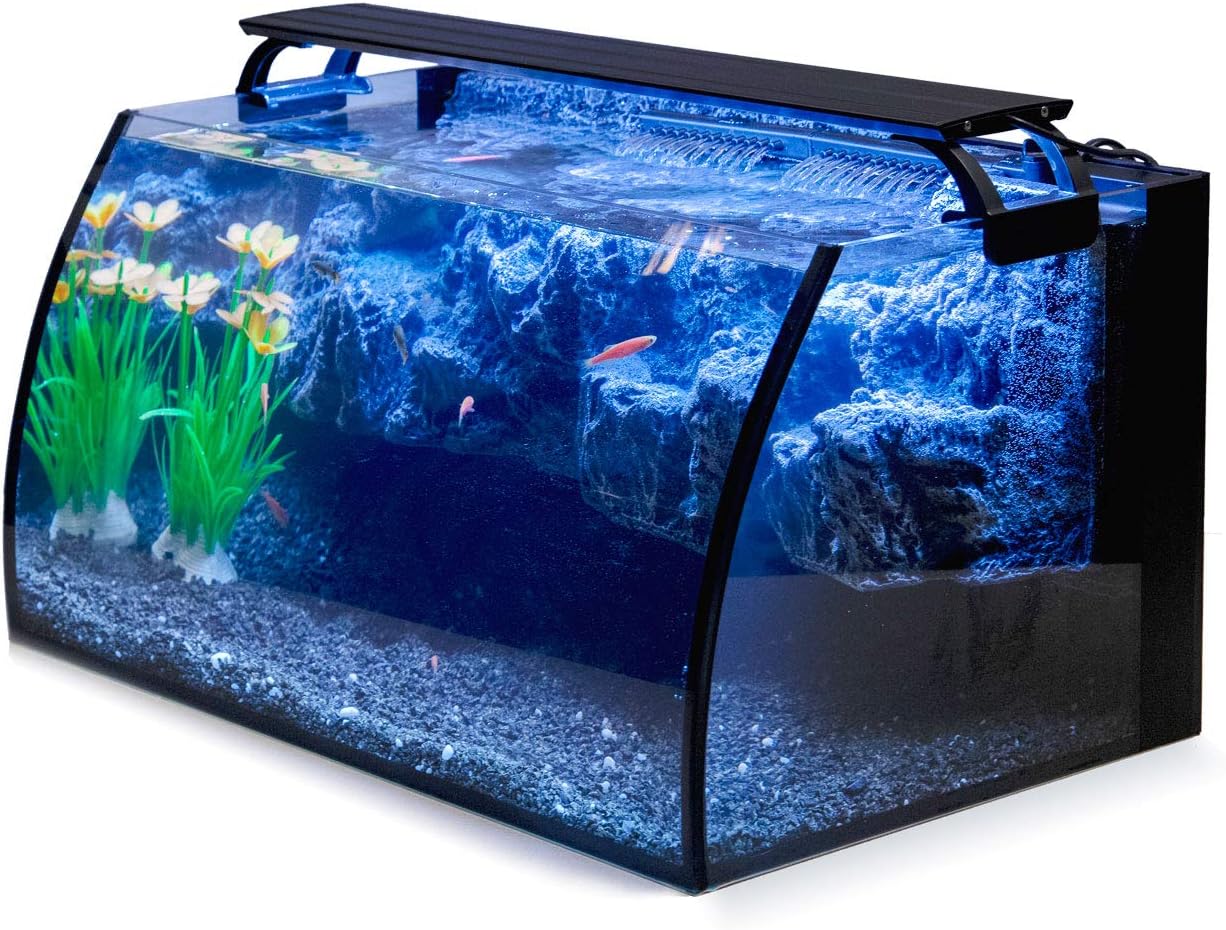
Image 1: The hygger Horizon 8 Gallon LED Glass Aquarium Kit, showcasing its curved design and integrated lighting.
2. Product Components
Your hygger Horizon 8 Gallon LED Glass Aquarium Kit includes the following components:
- One (1) 8-gallon glass aquarium with an undetachable 3D rockery background decor.
- One (1) 7W 110GPH internal power filter pump.
- One (1) 18W colored LED aquarium light with extendable brackets and a digital controller.
3. Setup Instructions
3.1 Unpacking and Inspection
Carefully unpack all components. Inspect the glass tank and all accessories for any damage. The tank is packaged with multi-layer poly foam for protection during shipping. If any damage is found, please contact the seller immediately with photographic evidence.
3.2 Placement
Place the aquarium on a sturdy, flat, and level surface capable of supporting approximately 68 pounds when filled. A cushion pad is pre-attached to the bottom of the tank to prevent sliding.
3.3 Tank Preparation
Rinse the inside of the glass tank and the 3D rockery background with clean water. Do not use soap or detergents, as these can be harmful to aquatic life. The 3D rockery background is undetachable and provides a natural aesthetic; you may plant aquatic grass on it if desired.
3.4 Filter Installation
Assemble the 7W 110GPH internal power filter pump according to the diagram below. The filter features a 2-stage filtration system in the upper part and a water pumping system in the bottom part. Secure the filter inside the tank using the provided suction cups. Ensure the filter is positioned to operate effectively even in low water levels.

Image 2: Detailed view of the 7W 110GPH internal power filter, showing its components and water line indicator.
Note: The filter's flow may be too strong for very small fish (less than 2 inches). Consider not running the filter continuously or adjusting the flow if housing such fish.
3.5 LED Light Installation
Attach the extendable brackets to the 18W LED aquarium light. Place the light securely on top of the aquarium. The length of the light can be adjusted from 0 to 19 inches to fit the tank's width.

Image 3: The 18W LED aquarium light with its digital controller and extendable brackets.
3.6 Filling the Tank
Add substrate (gravel or sand) and any desired decorations. Slowly fill the tank with dechlorinated water. The total tank volume is 8 gallons, but due to the undetachable 3D background, it can hold approximately 6 gallons of water.
3.7 Initial Startup
Once the tank is filled and all components are in place, plug in the filter and LED light. Allow the filter to run for several hours to ensure proper circulation and initial filtration. Begin the aquarium cycling process before introducing fish.
4. Operating Instructions
4.1 LED Light Operation
The LED light features an external digital controller for easy adjustments:
- Lighting Time: Set the lighting duration to 3, 6, or 12 hours.
- Brightness Levels: Adjust brightness from 100% down to 10% (5 levels in total).
- Light Modes: Cycle through three distinct light modes: White LEDs, Blue+White+Red LEDs, and Red+Blue LEDs.

Image 4: Comparison of day and night lighting modes in the aquarium.
4.2 Filter Operation
The internal power filter operates continuously once plugged in. It includes a water flow control knob to adjust the intensity of the water circulation. Adjust as needed for your specific aquatic inhabitants.
5. Maintenance
5.1 Regular Cleaning
Regularly clean the interior glass surfaces to prevent algae buildup. The undetachable 3D rockery background may also accumulate algae and should be cleaned periodically. Avoid using abrasive materials that could scratch the glass.
5.2 Filter Media Replacement
The filter utilizes a 2-stage filtration system. Periodically check and replace the carbon and polyfiber floss filter media to maintain water clarity and quality. The frequency of replacement depends on the bioload of your aquarium.
5.3 Water Changes
Perform regular partial water changes (e.g., 25% weekly or bi-weekly) to remove nitrates and replenish essential minerals. Always use dechlorinated water that matches the temperature of your aquarium water.
6. Troubleshooting
- Cloudy Water: Ensure filter media is clean and properly installed. Avoid overfeeding. Perform a partial water change.
- Weak Filter Flow: Check for blockages in the filter intake or impeller. Clean the filter media.
- Algae Growth: Reduce lighting duration or intensity. Ensure proper water parameters and nutrient levels.
- Fish Stress: Check water temperature, pH, and ammonia/nitrite/nitrate levels. Ensure proper tank cycling was completed before adding fish.
7. Specifications
| Feature | Specification |
|---|---|
| Model Number | HGH906 |
| Tank Dimensions (L x W x H) | 19" x 11.8" x 9.6" |
| Total Tank Volume | 8 Gallons |
| Usable Water Capacity | Approx. 6 Gallons (due to 3D background) |
| Material | Glass |
| Item Weight (empty) | 21.6 pounds (9.8 Kilograms) |
| Filter Power | 7W |
| Filter Flow Rate | 110 GPH |
| LED Light Power | DC12V/18W |
| LED Light Adjustment | 0-19 inch extendable brackets, 3/6/12H timer, 5 brightness levels, 3 color modes |

Image 5: Visual representation of the tank's dimensions and capacity.
8. Warranty and Support
This hygger product comes with a 1-Year Warranty. If you encounter any issues or have questions regarding your aquarium kit, please contact the seller directly for assistance. In case of a broken tank upon delivery, please take a photo and send it to the seller immediately for resolution.


