
1. Introduction
The OEMTOOLS OEM24883 24-inch oscillating fan is engineered to deliver powerful airflow and efficient cooling for various large spaces, including garages, workshops, and industrial facilities. This wall-mounted fan features a high-performance motor capable of generating up to 6500 CFM, ensuring comprehensive air circulation. Its 90-degree oscillation function evenly distributes air, providing optimal ventilation. The fan includes a 3-speed motor for adjustable airflow intensity and durable aluminum blades for long-lasting performance. Designed for reliability, the enclosed motor offers protection against dust and moisture, extending the fan's lifespan. The wall-mountable design conserves floor space, making it an ideal cooling solution for demanding commercial and industrial environments.
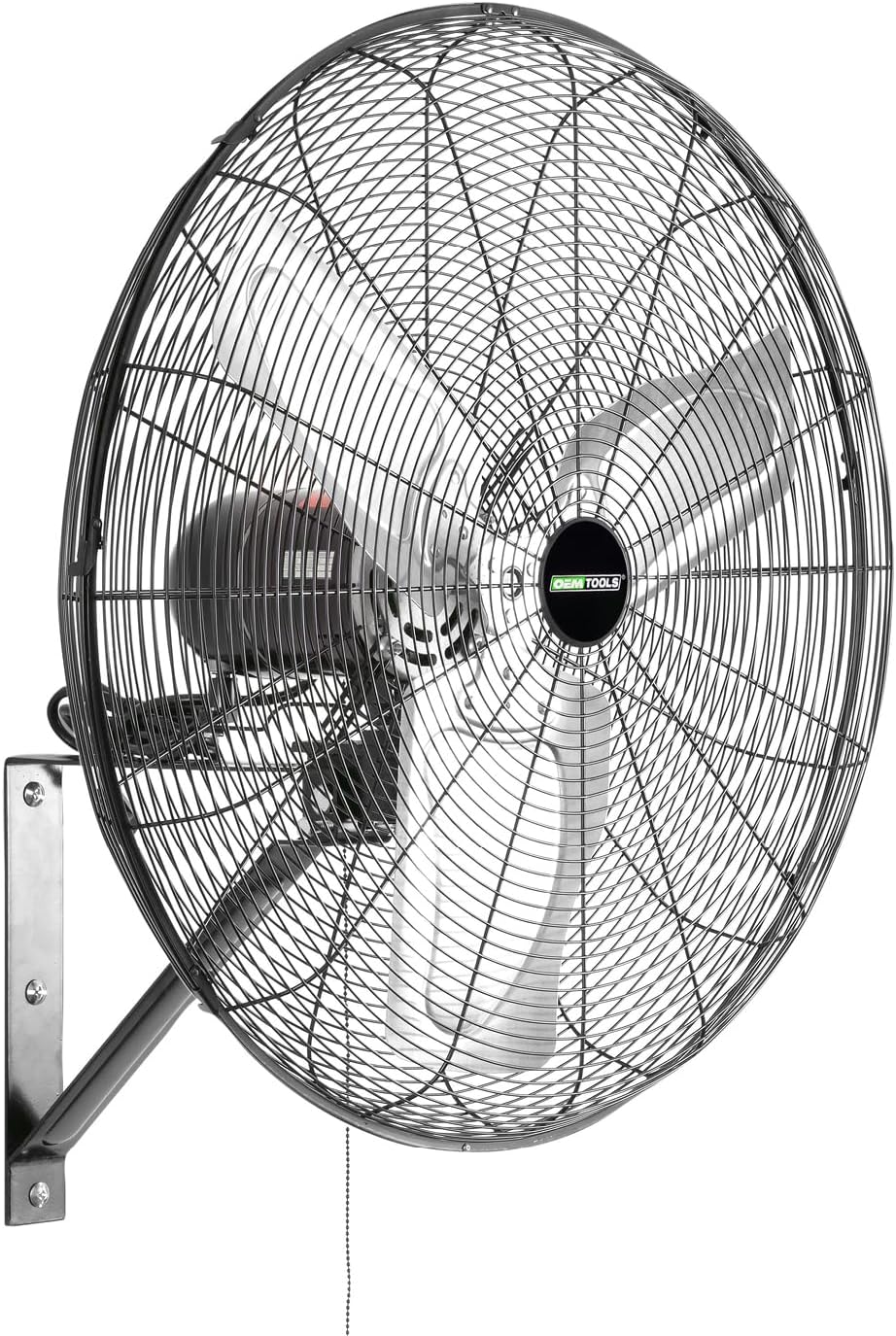
Image: OEMTOOLS 24-Inch Wall Mount Oscillating Fan, showcasing its robust design.
2. Safety Information
WARNING: This product contains chemicals known to the State of California to cause cancer and birth defects or other reproductive harm. Always follow all safety precautions and instructions provided in this manual.
- Ensure the fan is securely mounted to a sturdy wall structure.
- Do not operate the fan with damaged blades or a damaged power cord.
- Keep hands, hair, clothing, and loose objects away from moving parts.
- Unplug the fan from the power outlet before cleaning or performing any maintenance.
- Do not use this fan in areas where flammable liquids or gases are stored or present.
- The fan is designed for indoor use.
3. Product Overview
Features
- High-Capacity Airflow: Delivers powerful airflow with a capacity of 6500 CFM, ideal for cooling large spaces.
- 90° Oscillation: Distributes air evenly across wide areas for optimal ventilation.
- Adjustable 3-Speed Motor: Customize airflow volume to match cooling needs.
- Durable Design: Constructed with 3 heavy-duty aluminum blades and a high-efficiency motor for long-term performance.
- Space-Saving Wall-Mountable Design: Frees up valuable floor space.
- 6-Foot UL-Listed Power Cord: Provides flexible installation options.
- Enclosed Motor: Protects against dust and moisture for extended lifespan.
Specifications
| Specification | Value |
|---|---|
| Brand | OEMTOOLS |
| Model Name | OEM24883 |
| Product Dimensions | 10"D x 28.25"W x 28.25"H |
| Item Weight | 30.5 Pounds |
| Air Flow Capacity | 6500 Cubic Feet Per Minute |
| Number of Blades | 3 |
| Blade Length | 24 Inches |
| Number of Power Levels | 3 |
| Switch Type | Pull Chain |
| Control Method | Touch |
| Power Source | Corded Electric |
| Voltage | 120 |
| Wattage | 190 watts |
| Noise Level | 74 Decibels |
| Indoor/Outdoor Usage | Indoor |
| Specification Met | UL |
4. Setup and Installation
The OEMTOOLS 24-inch wall mount fan is designed for straightforward assembly and installation. Follow these steps carefully:
- Unpack Components: Carefully remove all parts from the packaging. Verify that all components listed in the product manual are present.
- Mount the Wall Bracket: Select a sturdy wall location, preferably into a wall stud or solid masonry, to securely mount the fan bracket. Use appropriate fasteners (not included) for your wall type. Ensure the bracket is level and capable of supporting the fan's weight.
- Attach Fan Motor to Bracket: Align the fan motor assembly with the wall bracket. Secure it using the provided bolts, washers, and nuts. Ensure all connections are tight to prevent wobbling.
- Install Fan Blades: Carefully attach the aluminum fan blades to the motor shaft. Ensure they are properly seated and secured according to the instructions.
- Attach Fan Grills: Secure the rear grill to the motor housing, ensuring it aligns correctly. Then, attach the front grill, making sure all clips are fastened and the security screw is tightened.
- Connect Power: Plug the 6-foot UL-listed power cord into a standard North American 120V electrical outlet.
Image: Illustration of the fan's easy assembly and wall-mountable design.
Installation Video
Video: Official OEMTOOLS video demonstrating the installation process for the 24-inch wall mount fan.
5. Operating Instructions
The OEMTOOLS 24-inch wall mount fan offers simple controls for customized airflow.
- Power On/Off: The fan is operated using a pull chain. Pull the chain once to turn the fan on to its lowest speed setting.
- Adjust Speed: Continue pulling the chain to cycle through the three available speed settings (Low, Medium, High). Pulling the chain after the highest speed will turn the fan off.
- Oscillation Control: The fan features a 90-degree oscillation function to distribute air across a wider area. This feature is typically controlled by a separate switch or button on the motor housing, or it may be integrated into the pull chain mechanism. Refer to the markings on your specific unit for precise control.

Image: Visual representation of the fan's three-speed motor settings.
Operation Video
Video: A demonstration of the OEMTOOLS 24-inch wall mount fan in operation, including its 90-degree oscillation.
6. Maintenance
Regular maintenance ensures optimal performance and longevity of your OEMTOOLS fan.
- Cleaning: Periodically clean the fan blades and grills to prevent dust buildup, which can reduce efficiency. Always unplug the fan before cleaning. Use a soft, damp cloth to wipe surfaces. Do not use abrasive cleaners or immerse the fan in water.
- Motor Care: The fan features an enclosed motor designed to protect against dust and moisture. No lubrication is required for the motor.
- Storage: If storing the fan for an extended period, ensure it is clean and dry. Store it in a cool, dry place away from direct sunlight and extreme temperatures.
7. Troubleshooting
If you encounter issues with your OEMTOOLS fan, refer to the following common troubleshooting tips:
- Fan Does Not Turn On:
- Ensure the power cord is securely plugged into a working electrical outlet.
- Check the circuit breaker or fuse box for tripped breakers or blown fuses.
- Verify that the pull chain has been operated correctly to cycle through speeds.
- Reduced Airflow:
- Clean any dust or debris from the fan blades and grills.
- Ensure the fan is set to the desired speed setting.
- Unusual Noise or Vibration:
- Check for any loose parts or obstructions around the fan blades.
- Ensure the fan is securely mounted to the wall bracket.
- Oscillation Not Working:
- Check the oscillation control switch/button to ensure it is engaged.
- Ensure there are no obstructions preventing the fan head from moving freely.
If problems persist after attempting these troubleshooting steps, please contact OEMTOOLS customer support for further assistance.