
Introduction
The GermGuardian AC4200W True HEPA Filter Air Purifier is designed to improve indoor air quality by capturing allergens and reducing odors. This 13-inch tower unit is suitable for small to medium-sized rooms, circulating air multiple times per hour to maintain a cleaner environment. It features a multi-stage filtration system including a True HEPA filter and an activated carbon filter.
Safety Information
WARNING: Statements regarding dietary supplements have not been evaluated by the FDA and are not intended to diagnose, treat, cure, or prevent any disease or health condition. This product may expose you to chemicals known to the State of California to cause cancer or birth defects or other reproductive harm. For more information, go to www.p65warnings.ca.gov.
Product Features
- 360-Degree True HEPA Filter: Reduces up to 99.97% of dust, pollen, pet dander, mold spores, and other allergens as small as 0.1 microns.
- Activated Carbon Filter: Helps reduce unwanted odors from pets, smoke, cooking fumes, and more.
- Energy Star Certified: Efficiently circulates air 1x per hour in rooms up to 510 Sq. Ft. and 4.8x per hour in rooms up to 105 Sq. Ft. CADR ratings: Dust (76), Pollen (77), Smoke (68).
- Compact Tower Design: Easy-to-use 13-inch tower, ideal for small spaces.
- User-Friendly Controls: Features 4 speeds, an 8-hour timer, and a filter change indicator.

Image: GermGuardian AC4200W True HEPA Filter Air Purifier.
Setup
- Unpack the Unit: Carefully remove the air purifier from its packaging.
- Filter Installation: The filter is typically pre-installed. To access the filter compartment, gently press outwards on the front panel of the unit. The panel will swing open. Ensure the combination filter (FLT4200) is correctly seated inside.
- Close the Front Panel: Gently push the front panel back into place until it clicks securely. The unit will not operate if the panel is not properly closed.
- Placement: Place the air purifier on a flat, stable surface in the desired room. Ensure there is adequate space around the unit for proper airflow.
- Plug In: Plug the 6-foot power cord into a standard 120V AC electrical outlet.

Image: Front panel opened to reveal the combination filter. The filter is easily accessible for replacement.
Operating Instructions
The control panel is located on the top of the unit, featuring touch-sensitive buttons for various functions.

Image: Top view of the control panel with buttons for power, speed, timer, UV mode, and night light/HEPA reset.
- Power On/Off: Press the On/Off button to turn the unit on or off.
- Fan Speed: Press the Speed button to cycle through the 4 fan speeds: 1 (low), 2 (medium), 3 (high), and Turbo. Speed 1 is ultra-quiet for sleep mode.
- Timer: Press the Timer button to set the unit to operate for 2, 4, or 8 hours. The unit will automatically turn off after the selected time.
- UV Mode: Press the UV Mode button to activate or deactivate the UV-C light, which helps kill airborne germs.
- Night Light/HEPA Reset: Press the Night Light button to turn the night light on or off. Hold this button for 5 seconds to reset the HEPA filter indicator after replacing the filter.

Image: Diagram illustrating the 360-degree HEPA and Activated Carbon filtration process, capturing dust, allergens, and reducing odors.
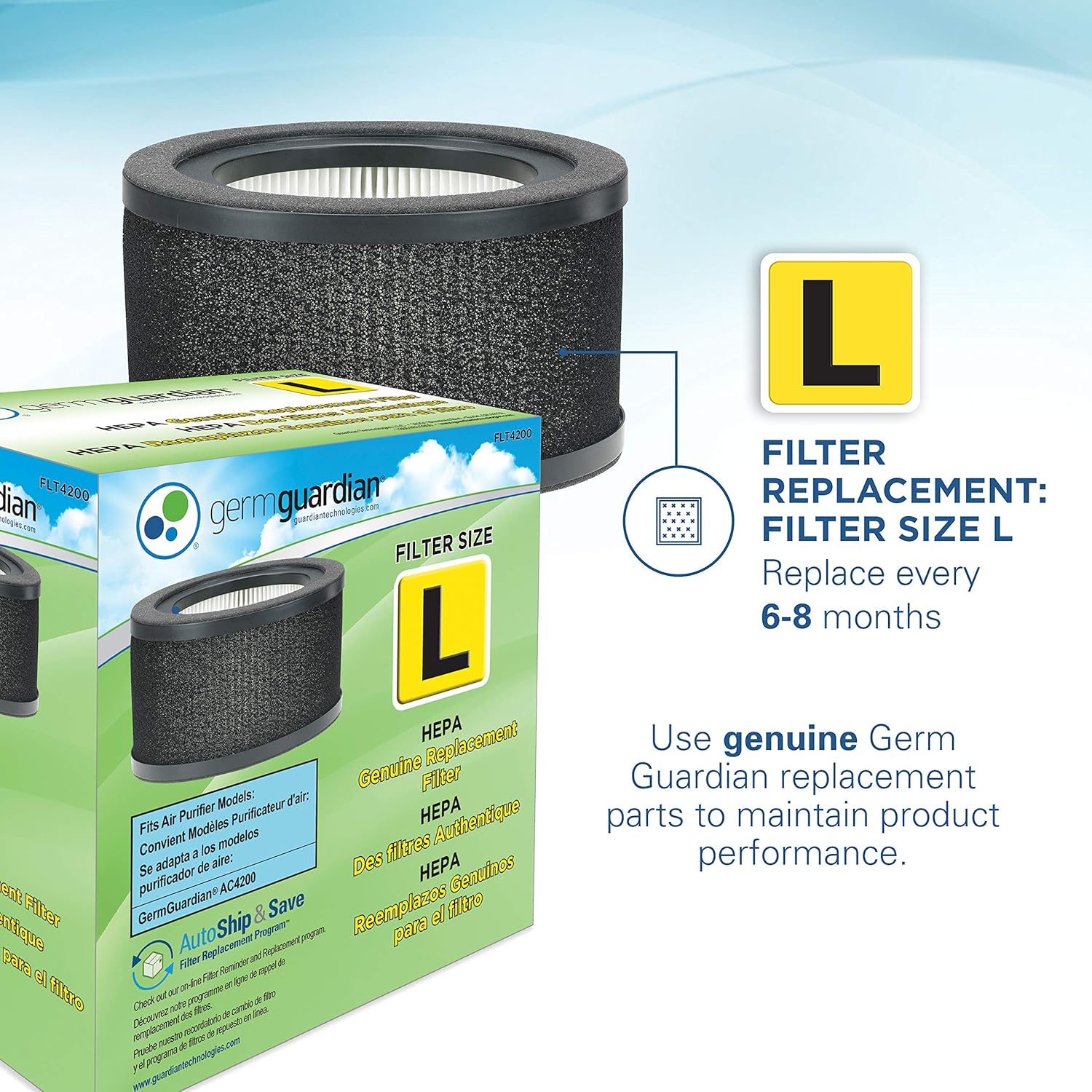
Image: Clean Air Delivery Rate (CADR) values for Smoke (68), Dust (76), and Pollen (77), indicating the unit's filtration efficiency.
Video: Official product video demonstrating the features and operation of the GermGuardian AC4200W Air Purifier.
Maintenance
Regular filter replacement is crucial to maintain optimal performance of your GermGuardian Air Purifier.
- Filter Lifespan: It is recommended to replace the combination filter (FLT4200) every 6-8 months, depending on usage. The activated carbon pre-filters (FLT42CB4) should also be replaced regularly.
- Filter Change Indicator: The unit features an indicator light that will illuminate when it's time to replace the filter. After replacing the filter, hold the Night Light/HEPA Reset button for 5 seconds to reset the indicator.
- Genuine Filters: Always use Genuine GermGuardian Technologies replacement filters to ensure proper fit and performance.

Image: Genuine GermGuardian Filter L (FLT4200) replacement filter, recommended for maintaining product performance.
Troubleshooting
- Unit Not Turning On: If the unit does not power on after filter replacement, ensure the front panel is securely closed. The unit has a safety mechanism that prevents operation if the panel is not properly seated.
- Reduced Airflow/Efficiency: If you notice a decrease in airflow or purification efficiency, it may be time to replace the filter. Check the filter change indicator.
Specifications
| Feature | Detail |
|---|---|
| Product Dimensions | 9.17"D x 9.17"W x 13.5"H |
| Item Model Number | AC4200W |
| Weight | 6.55 Pounds |
| Manufacturer | Guardian Technologies |
| Color | White |
| Floor Area Coverage | Up to 510 Square Feet |
| Certifications | CARB Certified, Energy Star Certified |

Image: GermGuardian AC4200W Air Purifier with detailed dimensions (9.17"D x 9.17"W x 13.5"H).
Warranty & Support
For product support or warranty information, please refer to the official GermGuardian website or contact Guardian Technologies customer service. Extended protection plans are available for purchase:
- 3-Year Protection Plan
- 4-Year Protection Plan
- Complete Protect (monthly subscription covering eligible purchases)


