Introduction
Thank you for choosing the Volkano Resonance Series Dual Dynamic Driver Wireless Earphones. These earphones are designed for an immersive audio experience with powerful dual-driver technology, sweatproof design, and convenient features for an active lifestyle. This manual provides essential information for the safe and optimal use of your device.
What's in the Box
- Volkano Resonance Series Wireless Earphones
- Protective Carry Case
- USB Micro Charge Cable
- 6 sets of ear tips (assorted sizes)
- Instruction Manual (this document)

Figure 1: Included accessories, featuring the hard carry case, USB charging cable, and multiple ear tip sizes.
Specifications
| Bluetooth Version | 4.2 |
| Chip | CSR 8635 |
| Profiles | HFP / HSP / A2DP / AVRCP |
| Operating Distance | 10 meters |
| IP Rating | IPX5 (Water and Splash Resistant) |
| Frequency Response | 20 Hz – 20 kHz |
| Sensitivity | 95 dB +/- 2 dB |
| Driver | 6 mm x 2 (Dual Dynamic Drivers) |
| Impedance | 16 ohms +/- 15% |
| Battery Capacity | 60 mAh |
| Charge Time | +/- 1.5 Hours |
| Playback Time | 2 – 4 Hours |
| Power Requirement | 5 V DC, 0.06 A |

Figure 2: Dual-driver technology for enhanced audio clarity and bass.
Setup
1. Charging the Earphones
Before first use, fully charge your earphones. Connect the supplied USB Micro charge cable to the charging port on the earphones and to a standard USB power source (e.g., computer USB port or USB wall adapter). The indicator light will show charging status and turn off or change color when fully charged. A full charge takes approximately 1.5 hours.
Figure 3: USB Micro charging cable for power input.
2. Selecting Ear Tips
For optimal sound quality and a secure fit, choose the ear tips that best suit your ears. The package includes 6 sets of ear tips in assorted sizes. Experiment with different sizes to find the most comfortable and secure fit that creates a good seal in your ear canal.
Figure 4: Assorted ear tip sizes for personalized comfort and fit.
3. Bluetooth Pairing
- Ensure the earphones are fully charged and turned off.
- Press and hold the multi-function button on the in-line control until the LED indicator flashes red and blue, indicating pairing mode.
- Activate Bluetooth on your device (smartphone, tablet, etc.) and search for available devices.
- Select "Volkano Resonance" (or similar name) from the list of found devices.
- Once paired, the LED indicator will flash blue slowly, and you will hear an audible confirmation.
Note: The earphones will automatically attempt to reconnect to the last paired device when powered on.
Operating Instructions
Power On/Off
- Power On: Press and hold the multi-function button for approximately 3 seconds until the LED indicator flashes blue and you hear a power-on tone.
- Power Off: Press and hold the multi-function button for approximately 3 seconds until the LED indicator flashes red and you hear a power-off tone.
Music Playback
- Play/Pause: Press the multi-function button once.
- Next Track: Press and hold the Volume Up (+) button.
- Previous Track: Press and hold the Volume Down (-) button.
Volume Control
- Increase Volume: Press the Volume Up (+) button once.
- Decrease Volume: Press the Volume Down (-) button once.
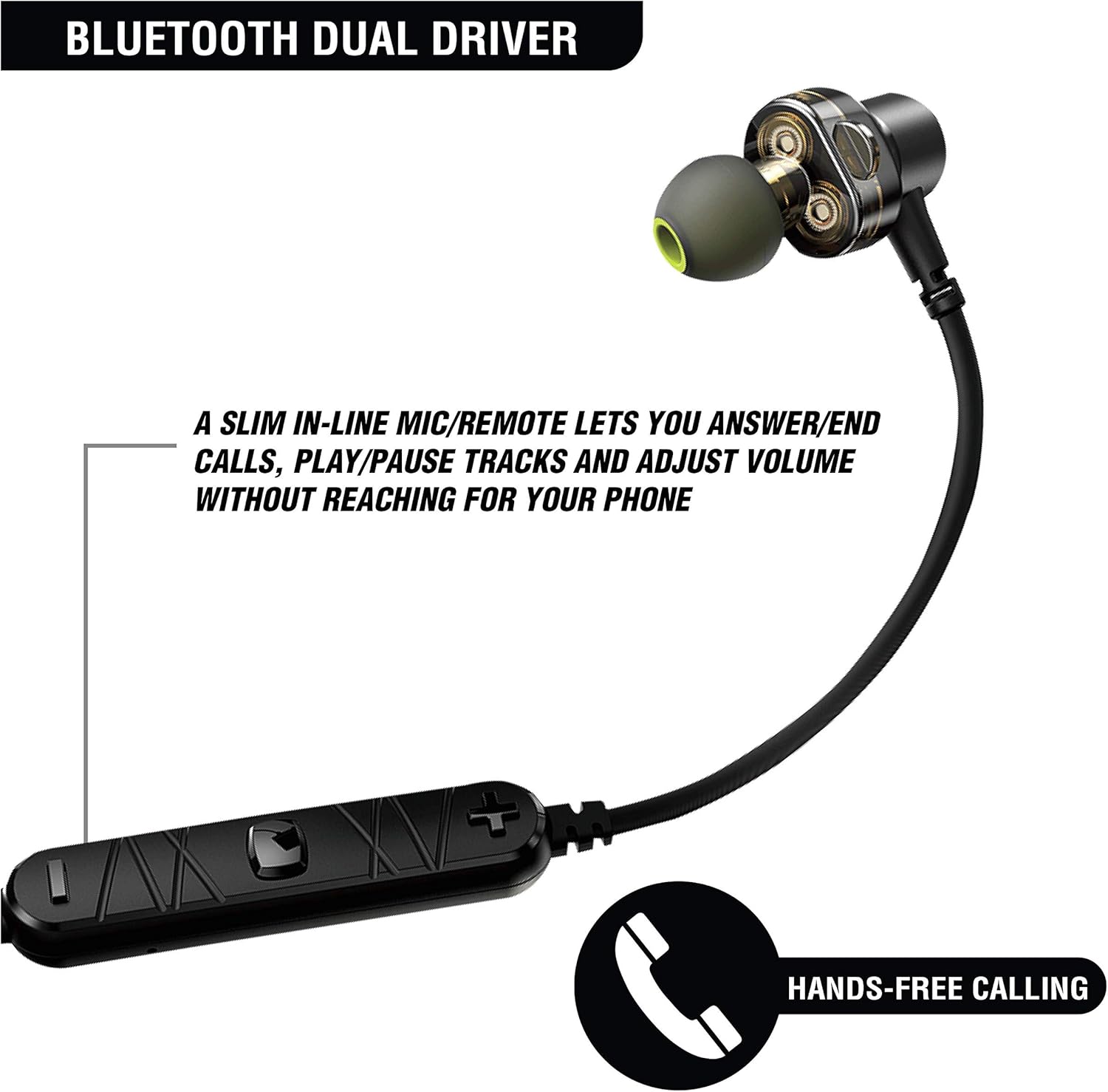
Figure 5: In-line controls for audio and call management.
Call Management
- Answer/End Call: Press the multi-function button once.
- Reject Call: Press and hold the multi-function button for approximately 2 seconds.
- Redial Last Number: Double-press the multi-function button.
Magnetic Cable Management
The earbuds feature magnets that allow them to attach to each other back-to-back. This helps prevent tangling and allows you to wear them securely around your neck when not in use.

Figure 6: Magnetized earbuds for convenient storage and wear.
Maintenance
- Cleaning: Gently wipe the earphones and ear tips with a soft, dry cloth. Do not use abrasive cleaners or solvents.
- Storage: When not in use, store the earphones in the provided protective carry case to prevent damage and tangling.
- Water Resistance: The earphones are IPX5 water and splash resistant. This means they can withstand light rain and sweat. Do not submerge them in water or expose them to heavy water jets. Ensure the charging port cover is securely closed.

Figure 7: IPX5 water resistance for protection against sweat and splashes.
Troubleshooting
| Problem | Solution |
| Earphones do not power on. | Ensure the earphones are fully charged. Connect them to a power source using the USB cable. |
| Cannot pair with device. |
|
| No sound or low volume. |
|
| Intermittent connection. |
|
Warranty and Support
The Volkano Resonance Series Wireless Earphones come with a 1-year warranty from the date of purchase. This warranty covers manufacturing defects and ensures trouble-free support.
For technical support, warranty claims, or any questions regarding your product, please contact Volkano customer service. Refer to the contact information provided on the product packaging or the official Volkano website for the most up-to-date support details.
Please retain your proof of purchase for warranty purposes.


