
ACTIVESHOP Marathon Handy 700 2in1
Saeyang Marathon Handy 700 Electric Nail File User Manual
Professional Manicure & Pedicure E-Filer Machine
Introduction
Thank you for choosing the Saeyang Marathon Handy 700 Electric Nail File. This professional-grade machine is designed for efficient and precise manicure and pedicure applications, suitable for both salon professionals and aspiring technicians. Please read this manual thoroughly before operating the device to ensure safe and optimal performance.
The Marathon Handy 700 offers advanced features such as a powerful 50,000 RPM motor, 100W drilling power, and a convenient foot pedal for hands-free operation. Its hermetically sealed handpiece design ensures reduced noise during use, providing a more comfortable experience for both the operator and clients.

Figure 1: Saeyang Marathon Handy 700 Electric Nail File, showing the main control unit, the foot pedal for speed control, and the handpiece with its dedicated stand.
Important Safety Instructions
- Always disconnect the power cord before cleaning or performing maintenance.
- Do not operate the device with wet hands or near water.
- Keep the device away from heat sources and direct sunlight.
- Use only original Saeyang accessories and replacement parts.
- Ensure proper ventilation during operation.
- Do not attempt to disassemble or repair the unit yourself. Contact qualified service personnel.
- Keep out of reach of children.
Product Components
The Saeyang Marathon Handy 700 system includes the following main components:
- Main Control Unit
- Handpiece (Micromotor)
- Foot Pedal
- Handpiece Stand
- Power Cord

Figure 2: Overview of all components included with the Saeyang Marathon Handy 700 system, showing the main unit, handpiece, foot pedal, and handpiece stand.
Setup Instructions
- Unpacking: Carefully remove all components from the packaging. Inspect for any damage.
- Placement: Place the main control unit on a stable, flat, and dry surface. Ensure there is adequate ventilation around the unit.
- Connect Handpiece: Connect the handpiece cable to the "MOTOR A" or "MOTOR B" port on the back of the main control unit. Ensure the connection is secure.

Figure 3: Rear panel of the control unit, highlighting the connection ports for the handpiece (Motor A/B) and the foot pedal.
- Connect Foot Pedal (Optional): If using the foot pedal for speed control, connect its cable to the "FOOT PEDAL" port on the back of the main control unit.
- Power Connection: Plug the power cord into the power inlet on the back of the main control unit, then plug the other end into a suitable electrical outlet (220V).
- Handpiece Stand: Place the handpiece in its designated stand when not in use.
Operating Instructions
Control Panel Overview

Figure 4: Detailed view of the control panel, showing the digital display, speed control dial, and function buttons.
- Power Switch: Located on the front right side of the unit. Flip to ON (green light) to power on the device.
- Digital Display: Shows the current rotation speed (RPM).
- Speed Control Dial: Rotate clockwise to increase speed, counter-clockwise to decrease.
- FWD/REV Button: Toggles the rotation direction of the handpiece (Forward/Reverse).
- HAND/FOOT Button: Switches between hand control (speed adjusted by dial) and foot pedal control.
- AUTO CRUISE Button: Activates the Auto-Cruise function, maintaining a set speed without continuous pedal pressure.
Basic Operation
- Power On: Turn on the main power switch. The digital display will light up.
- Insert Bit: Ensure the handpiece is locked before inserting or removing a bit. Insert the desired nail bit firmly into the chuck of the handpiece. Twist to secure if applicable.
- Select Control Mode:
- Hand Mode: Press the HAND/FOOT button until "HAND" is indicated (or corresponding icon). Adjust speed using the Speed Control Dial.
- Foot Mode: Press the HAND/FOOT button until "FOOT" is indicated (or corresponding icon). Speed will be controlled by the foot pedal.
- Adjust Speed:
- In Hand Mode, rotate the Speed Control Dial to achieve the desired RPM (up to 50,000 RPM).
- In Foot Mode, press the foot pedal to increase speed. The Auto-Cruise function can be used to maintain a set speed.
- Change Rotation Direction: Press the FWD/REV button to switch between forward and reverse rotation as needed for different applications.
- Begin Work: Carefully apply the rotating bit to the nail surface.
- Power Off: After use, turn the Speed Control Dial to minimum, then flip the main power switch to OFF. Disconnect from power outlet if storing for extended periods.

Figure 5: The handpiece resting on its dedicated stand, ready for use or storage.
Maintenance
Regular maintenance ensures the longevity and optimal performance of your Saeyang Marathon Handy 700.
Cleaning
- Control Unit: Wipe the exterior of the control unit with a soft, dry cloth. Do not use abrasive cleaners or solvents.
- Handpiece: After each use, clean the handpiece exterior. Periodically, clean the chuck area to remove dust and debris. Refer to the handpiece-specific manual for detailed cleaning instructions if available.
- Bits: Clean and sterilize nail bits according to standard hygiene practices after each client.
Storage
- Store the device in a cool, dry place, away from direct sunlight and moisture.
- Always place the handpiece in its stand when not in use to prevent damage.
Service
The Saeyang Marathon Handy 700 is designed for easy repair and maintenance. For any issues beyond basic cleaning, it is recommended to contact authorized service centers or the manufacturer for professional assistance. Do not attempt to open the main control unit or handpiece for internal repairs, as this may void your warranty and cause further damage.
Troubleshooting
| Problem | Possible Cause | Solution |
|---|---|---|
| Unit does not power on. |
|
|
| Handpiece not rotating. |
|
|
| Excessive noise or vibration from handpiece. |
|
|
| Speed inconsistent or fluctuating. |
|
|
If the problem persists after attempting these solutions, please contact customer support.
Technical Specifications
| Feature | Specification |
|---|---|
| Model Name | Marathon Handy 700 2in1 |
| Manufacturer | Saeyang |
| Brand | ACTIVESHOP |
| Maximum Rotation Speed | 50,000 RPM |
| Drilling Power | 100 W |
| Torque | 7.8 Ncm |
| Voltage | 220 Volts |
| Power Source | Electric Cable |
| Item Dimensions (L x W x H) | 23.2 x 232 x 13.7 cm |
| Item Weight | 5 Kilograms |
Warranty & Support
Warranty Information
The Saeyang Marathon Handy 700 comes with a hassle-free warranty. For specific warranty terms and conditions, please refer to the documentation provided with your purchase or contact the seller/manufacturer directly. This warranty typically covers manufacturing defects and ensures easy repair or maintenance of your device.
Customer Support
For technical assistance, troubleshooting, or service inquiries, please contact your point of purchase or the official Saeyang customer support. Ensure you have your product model number (Marathon Handy 700 2in1) and purchase details ready when contacting support.
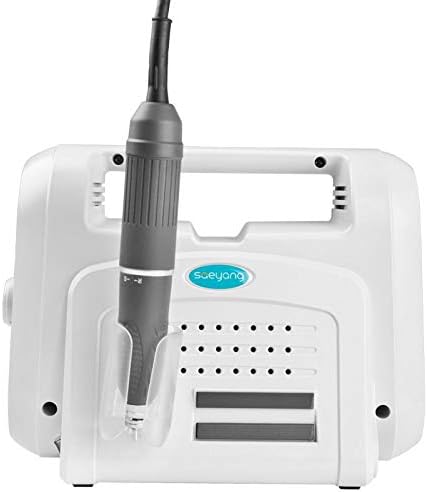
Figure 6: An example of the Saeyang handpiece, which may include an authenticity hologram. Always ensure your product is genuine for warranty validity and optimal performance.
Related documentsMarathon Handy 700 2in1


Ask a question about this manual
Ask about setup, troubleshooting, compatibility, parts, safety, or missing instructions. Manuals+ will review the question and use this page’s manual context to help answer it.