
1. Introduction
This manual provides detailed instructions for the proper use and maintenance of your Traceable Calibrated Thermohygrometer with RS-232. This device is designed for accurate measurement of temperature and humidity, featuring microprocessor-based technology for easy calibration and an RS-232 output for data communication. For optimal performance and longevity, please read these instructions thoroughly before operation.
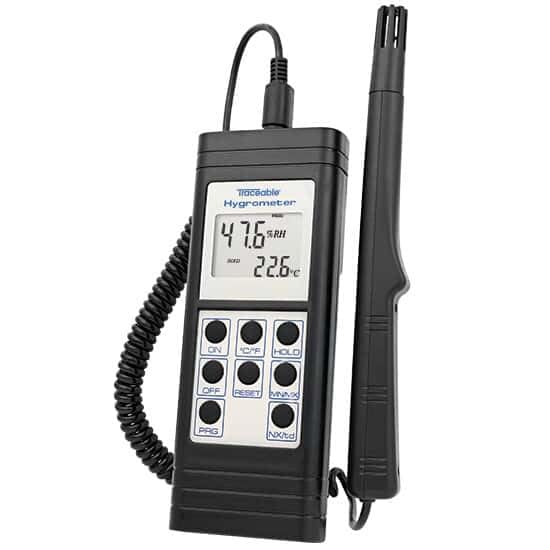
Image 1: The Traceable Calibrated Thermohygrometer. The device features a digital display showing humidity and temperature, with several control buttons below. A probe is connected via a coiled cable.
2. Features
- Accurately measures temperature and relative humidity.
- Includes a NIST-Traceable certificate from an A2LA accredited calibration laboratory (1750.01), ensuring measurement accuracy.
- Microprocessor-based design facilitates quick and straightforward calibration procedures.
- Equipped with RS-232 output for data transmission to compatible systems.
3. What's in the Box
Upon unpacking, verify that the following items are present:
- Traceable Calibrated Thermohygrometer unit
- Humidity/Temperature Probe
- NIST-Traceable Calibration Certificate
- Instruction Manual
4. Setup
- Battery Installation: Open the battery compartment (typically on the back of the unit) and insert the required batteries, observing correct polarity.
- Probe Connection: Connect the humidity/temperature probe to the designated port on the main unit. Ensure a secure connection.
- Initial Power On: Press the ON button to power on the device. The display should illuminate and show initial readings.
- Unit Selection (if applicable): If your model allows, select your preferred temperature unit (Celsius or Fahrenheit) using the °C/°F button.
- Placement: Position the thermohygrometer in the environment where measurements are required. Ensure the probe is exposed to the air and not obstructed.
5. Operating Instructions
5.1 Basic Operation
- Power ON/OFF: Press the ON button to turn the unit on. Press the OFF button to turn it off.
- Reading Display: The display will show current relative humidity (RH%) and temperature (°C/°F).
- Temperature Unit: Toggle between Celsius (°C) and Fahrenheit (°F) by pressing the °C/°F button.
- Data Hold: Press the HOLD button to freeze the current readings on the display. Press again to release.
- Minimum/Maximum Readings: Press the MIN/MAX button to view the minimum and maximum temperature and humidity readings recorded since the last reset. Press repeatedly to cycle through MIN, MAX, and current readings.
- Reset MIN/MAX: While viewing MIN/MAX readings, press the RESET button to clear the stored minimum and maximum values.
5.2 RS-232 Output
The device is equipped with an RS-232 port for connecting to a computer or data logger. This allows for real-time data acquisition and analysis. Refer to the specific software or interface instructions for your data collection system for details on establishing communication and data transfer protocols.

Image 2: A hand in a blue glove interacting with a Traceable device, demonstrating typical laboratory use. This image illustrates the practical application of Traceable instruments in a controlled environment.
6. Maintenance
- Cleaning: Wipe the unit and probe with a soft, damp cloth. Do not use abrasive cleaners or solvents.
- Battery Replacement: Replace batteries when the low battery indicator appears on the display. Ensure proper battery type and polarity.
- Storage: When not in use for extended periods, remove the batteries and store the device in a cool, dry place away from direct sunlight and extreme temperatures.
- Recalibration: Due to the nature of humidity sensors, periodic recalibration is recommended to maintain accuracy. Refer to the NIST-Traceable certificate for recommended recalibration intervals.
7. Troubleshooting
| Problem | Possible Cause | Solution |
|---|---|---|
| No display or faint display | Dead or weak batteries; incorrect battery installation. | Replace batteries with new ones, ensuring correct polarity. |
| Inaccurate readings | Sensor contamination; need for recalibration; probe not properly connected. | Clean the probe gently; perform recalibration; ensure probe is securely connected. |
| RS-232 communication failure | Incorrect cable; software settings mismatch; port issue. | Verify cable connection and type; check software communication settings (baud rate, parity); try a different USB/serial port. |
8. Specifications
| Parameter | Value |
|---|---|
| Model Number | B07R5N7QYS |
| Manufacturer | COLE-PARMER |
| Calibration | NIST-Traceable (A2LA accredited 1750.01) |
| Interface | RS-232 |
| Date First Available | April 29, 2019 |
9. Warranty and Support
For warranty information and technical support, please contact the manufacturer, Cole-Parmer, or your authorized distributor. Keep your purchase receipt and NIST-Traceable certificate for reference.
Manufacturer: COLE-PARMER
Brand: TRACEABLE
For further assistance, visit the Traceable Brand Store on Amazon.