
Retevis RT29 (FA9140AX2-J9131AX2)
Retevis RT29 Heavy Duty Two Way Radio User Manual
Model: RT29 (FA9140AX2-J9131AX2) | Brand: Retevis
1. Introduction
This manual provides essential information for the safe and efficient operation of your Retevis RT29 Heavy Duty Two Way Radio. The RT29 is designed for robust, long-range communication, featuring a 3200mAh battery, IP54 water resistance, and a durable build suitable for various professional and outdoor environments. Please read this manual thoroughly before using the product.

Figure 1.1: Retevis RT29 Two Way Radio package contents.
2. What's in the Box
Upon opening your Retevis RT29 package, please verify that all the following items are included:
- 2x RT29 Two Way Radio and Antenna
- 2x Battery (3200mAh Lithium Ion)
- 2x Desktop Charger and Adapter
- 2x Belt clip
- 4x Screw (for belt clip attachment)
- 2x G shape headsets
- 1x User Manual

Figure 2.1: Detailed view of the Retevis RT29 package contents.
3. Product Features
The Retevis RT29 radio offers a range of features designed for reliable and efficient communication:
- High Power Output: Provides strong signal penetration for long-distance communication, even through buildings.
- Extended Battery Life: Equipped with a 3200mAh Lithium Ion battery, offering over 24 hours of typical use and up to 250 hours of standby time.
- Durable Construction: Sturdy body design meets military standards for fall and friction resistance, ensuring longevity.
- IP54 Rating: Offers protection against dust ingress and splashing water from any direction.
- Pre-set Channels with CTCSS/DCS: Channels are pre-configured with Continuous Tone-Coded Squelch System (CTCSS) and Digital-Coded Squelch (DCS) to minimize interference from unwanted transmissions.
- Secure Call Function: Each channel includes a secure call feature to prevent irrelevant signals and ensure private communication.
- VOX (Voice Operated Exchange): Allows for hands-free operation by voice activation. Requires computer programming for direct use.
- G-Shape Headsets: Included for comfortable wear and clear audio in noisy environments.
- CHIRP Software Support: Compatible with CHIRP programming software for advanced customization.

Figure 3.1: Illustration of the RT29's ultra-long battery life.

Figure 3.2: Visual representation of the RT29's fall-resistant design.

Figure 3.3: The RT29's IP54 water resistance in action.

Figure 3.4: Depiction of the RT29's long-range communication capability.
4. Setup Guide
Follow these steps to prepare your Retevis RT29 radio for first use:
- Install the Battery:
- Align the battery pack with the grooves on the back of the radio.
- Slide the battery upwards until it clicks into place. Ensure it is securely fastened.
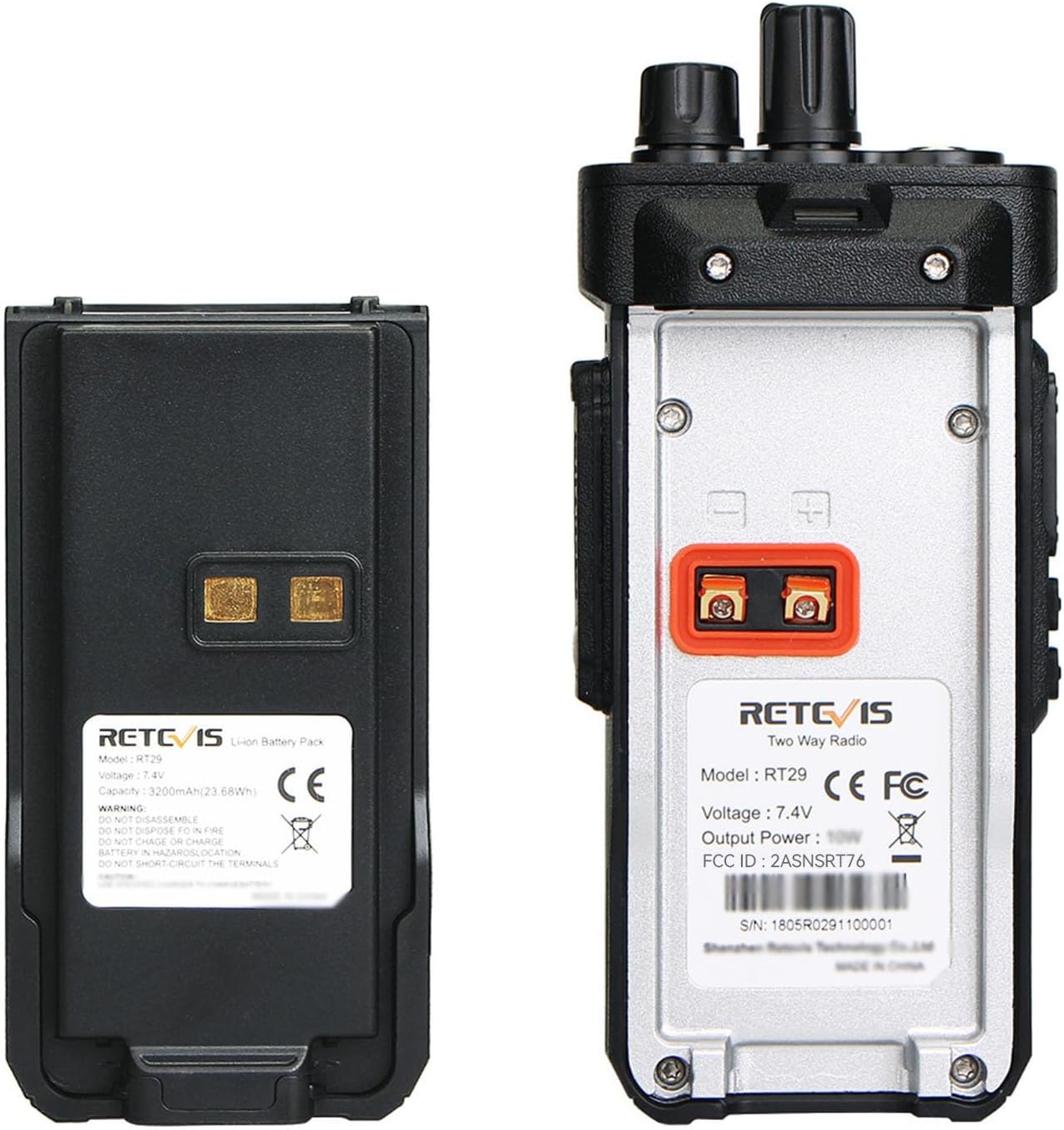
Figure 4.1: Battery and radio back panel for installation reference.
- Attach the Antenna:
- Screw the antenna clockwise into the connector on the top of the radio until it is firm. Do not overtighten.
- Charge the Battery:
- Place the radio (with battery installed) into the desktop charger.
- Connect the adapter to the charger and plug it into a power outlet.
- The charging indicator light will typically show red while charging and turn green when fully charged. For optimal battery performance, fully charge and then fully drain the battery twice before regular use.
- Attach the Belt Clip:
- Align the belt clip with the screw holes on the back of the radio.
- Secure it with the provided screws.
- Connect the Earpiece:
- Insert the earpiece plug into the audio jack on the side of the radio. Ensure it is fully inserted for proper function.
5. Operating Instructions
Understanding the basic functions of your RT29 radio will ensure effective communication:
- Power On/Off:
- Rotate the Power/Volume knob (top-left on the radio) clockwise to turn the radio on. You will hear a power-on tone.
- Rotate the knob counter-clockwise until it clicks to turn the radio off.
- Adjust Volume:
- After powering on, continue rotating the Power/Volume knob clockwise to increase the volume, and counter-clockwise to decrease it.
- Select a Channel:
- Rotate the Channel Selector knob (top-right on the radio) to choose one of the 16 available channels.
- Ensure all radios intended for communication are set to the same channel.
- Transmit (Talk):
- Press and hold the Push-to-Talk (PTT) button on the side of the radio.
- Speak clearly into the microphone, holding the radio approximately 2-3 inches from your mouth.
- Release the PTT button to stop transmitting and listen for a response.
- Receive (Listen):
- When not transmitting, the radio is in receive mode. You will hear incoming transmissions on the selected channel.
- VOX Function (Hands-Free):
- The VOX function allows you to transmit by speaking into the microphone without pressing the PTT button.
- To enable or adjust VOX sensitivity, the radio must be connected to a computer and programmed using the appropriate software. Refer to the programming section for more details.
- Secure Call (CTCSS/DCS):
- The RT29 uses CTCSS/DCS tones to filter out unwanted conversations on the same frequency. This ensures that you only hear transmissions from radios configured with the same tone settings.
- These are pre-set on the channels. For custom settings or to communicate with other brands, programming via computer is required.

Figure 5.1: The secure call feature of the RT29 radio.
6. Maintenance
Proper care and maintenance will extend the life and performance of your RT29 radio:
- Cleaning: Use a soft, damp cloth to wipe the radio's surface. Do not use harsh chemicals or abrasive cleaners. Ensure the charging contacts and accessory ports are clean and dry.
- Battery Care:
- Avoid overcharging or completely draining the battery frequently.
- Store the battery in a cool, dry place when not in use.
- If the radio will not be used for an extended period, remove the battery.
- Storage: Store the radio in a dry, dust-free environment away from direct sunlight and extreme temperatures.
- Water Resistance: While the RT29 has an IP54 rating, it is water-resistant, not waterproof. Avoid submerging the radio in water. Ensure all port covers are securely closed to maintain water resistance.
7. Troubleshooting
If you encounter issues with your RT29 radio, refer to the following common problems and solutions:
| Problem | Possible Cause | Solution |
|---|---|---|
| Radio does not power on | Battery is not installed correctly or is depleted. | Ensure battery is securely installed. Charge the battery fully. |
| Cannot communicate with other radios | Radios are on different channels or have incompatible CTCSS/DCS settings. | Verify all radios are on the same channel. If communicating with other brands, custom programming may be required to match CTCSS/DCS tones. Contact Retevis support for firmware if needed. |
| Short communication range or poor audio quality | Obstructions (buildings, terrain), low battery, or antenna not properly attached. | Move to an area with fewer obstructions. Ensure battery is charged. Check antenna connection. |
| VOX function not working | VOX is not enabled or sensitivity is too low. | VOX settings need to be changed via computer programming. Refer to the programming software manual. |
| Radio is wet or exposed to dust | Port covers were open or exposure exceeded IP54 rating. | Immediately power off the radio and remove the battery. Allow it to dry completely before attempting to use again. Ensure all port covers are sealed during use. |

Figure 7.1: The RT29 supports CHIRP software for advanced programming.
8. Specifications
| Feature | Detail |
|---|---|
| Model Number | FA9140AX2-J9131AX2 |
| Item Weight | 2.9 pounds |
| Product Dimensions | 5.9 x 2.3 x 1.5 inches (Radio body) |
| Battery Type | Lithium Ion |
| Battery Capacity | 3200mAh |
| Voltage | 7.4 Volts (DC) |
| Number of Channels | 16 |
| Water Resistance Level | IP54 (Water resistant) |
| Special Features | 3200mAh Large capacity battery, Drop Resistant, Military grade, Emergency alarm, High power long range |
| Color | Black |

Figure 8.1: Physical dimensions of the Retevis RT29 radio.
9. Warranty Information
Retevis provides the following warranty for the RT29 Two Way Radio:
- Radio Body: 3-year warranty from the date of purchase.
- Accessories (Battery, Charger, Earpiece, etc.): 1-year warranty from the date of purchase.
- Return Policy: 30 days no-reason return policy.
Beyond the Warranty Period: Maintain service is still offered. Buyers are responsible for corresponding costs. The process is designed to be hassle-free.
10. Customer Support
For any questions, technical assistance, or warranty claims, please contact Retevis customer support. We aim to respond within 12 hours.
- Contact Method: Please reach out to us via Amazon's messaging system.
- Programming Assistance: If you need to communicate with other brands of walkie-talkies and require specific firmware or programming guidance, please contact us.
Related documentsRT29 (FA9140AX2-J9131AX2)


Ask a question about this manual
Ask about setup, troubleshooting, compatibility, parts, safety, or missing instructions. Manuals+ will review the question and use this page’s manual context to help answer it.