
1. Introduction
The Douk Audio Nobsound MC103 Pro is a passive 1-input, 3-output stereo XLR audio switch designed for managing multiple audio outputs from a single source. This device allows users to connect one stereo XLR audio source to three different amplifiers or audio systems, facilitating easy comparison or selection between them without reconnecting cables. Its passive design ensures no impact on sound quality, making it suitable for high-fidelity audio setups.
2. Product Features
- 1-Input, 3-Output Configuration: Supports one stereo XLR input and three stereo XLR outputs, allowing connection to multiple audio devices.
- Passive Design: Operates without power, ensuring no signal degradation or introduction of noise, preserving the original audio quality.
- High-Quality Construction: Features an all-aluminum shell for effective shielding against external noise and enhanced durability.
- Gold-Plated XLR Ports: Provides reliable electrical connections and minimizes signal attenuation.
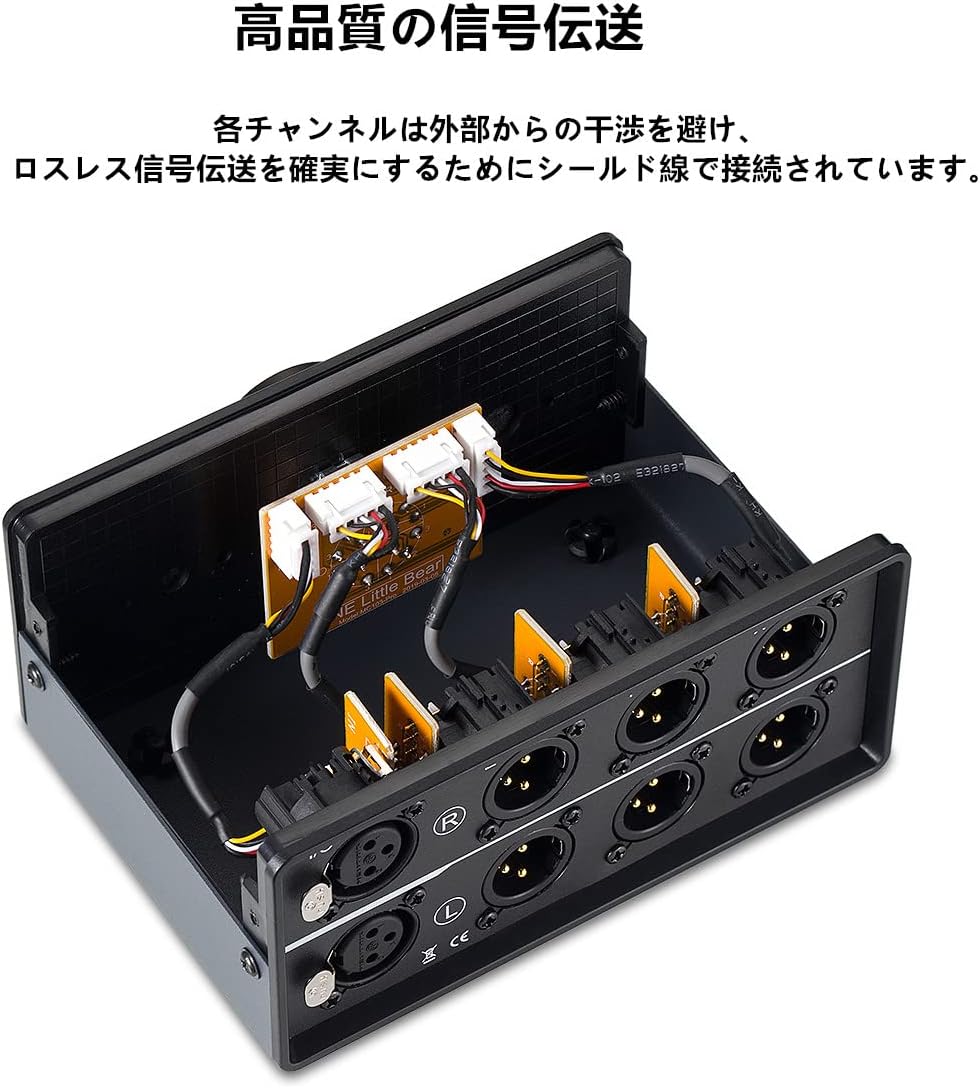
- Shielded Internal Wiring: Each channel is connected with shielded wire to prevent interference and ensure lossless signal transmission.
- Compact Size: Exquisite and mini-sized design for easy placement and portability.
- Smooth Selector Knob: Equipped with silver-plated contacts for smooth and precise switching between outputs.
3. Setup Instructions
Follow these steps to correctly set up your Nobsound MC103 Pro audio switch:
- Identify Connections: Locate the 'I/O' (Input/Output) ports on the rear panel for your single audio source and the 'X', 'Y', 'Z' output ports for your three destination devices.
- Connect Audio Source: Connect your stereo XLR audio source (e.g., DAC, CD player) to the 'I/O' input ports on the rear of the MC103 Pro. Ensure correct left (L) and right (R) channel connections.
- Connect Output Devices: Connect your three stereo XLR output devices (e.g., amplifiers, powered speakers) to the 'X', 'Y', and 'Z' output ports. Maintain correct left (L) and right (R) channel orientation for each output.
- Placement: Place the MC103 Pro on a stable, flat surface. Its compact size allows for flexible placement within your audio setup.


4. Operating Instructions
Operating the Nobsound MC103 Pro is straightforward:
- Power On Devices: Ensure all connected audio source and output devices are powered on and functioning correctly.
- Select Output: Use the large rotary knob on the front panel to select your desired output channel. The knob is labeled 'X', 'Y', and 'Z' corresponding to the output ports. Rotate the knob to align the indicator with the chosen output.
- Audio Playback: Once an output is selected, audio from your source will be routed to the corresponding connected device.

5. Maintenance
To ensure the longevity and optimal performance of your MC103 Pro:
- Cleaning: Use a soft, dry cloth to clean the exterior. Avoid abrasive cleaners or solvents.
- Environment: Keep the device in a dry, dust-free environment. Avoid exposure to extreme temperatures, humidity, or direct sunlight.
- Connections: Periodically check all XLR cable connections to ensure they are secure and free from corrosion.
- Handling: Handle the unit with care. While robust, dropping or subjecting it to strong impacts can cause internal damage.
6. Troubleshooting
If you encounter issues with your MC103 Pro, consider the following:
- No Sound:
- Ensure all XLR cables are securely connected to both the source, the MC103 Pro, and the output devices.
- Verify that the selector knob is correctly pointing to the desired output (X, Y, or Z).
- Check the power and volume levels of your audio source and output devices.
- Test with different cables to rule out faulty wiring.
- Distorted Sound:
- Ensure all connections are firm and free from loose contacts.
- Verify that the audio source is providing a clean signal.
- Check for any external interference sources near the unit or cables.
- Intermittent Audio:
- Inspect XLR cables for damage or loose pins.
- Ensure the selector knob is fully engaged in one position.
7. Specifications
| Model Number | GFJ721-3M |
| Product Dimensions | 4.13 x 5.83 x 2.72 inches (105 x 148 x 69 mm) |
| Item Weight | 1.46 pounds (662 grams) |
| Connector Type | XLR |
| Compatible Devices | Microphone Preamps, Powered Speakers with XLR input, Professional Audio Mixers |
| Color | Black |
| Manufacturer | Nobsound |

8. Official Product Video
9. Warranty and Support
Douk Audio products typically come with a standard manufacturer's warranty covering defects in materials and workmanship. For specific warranty details, duration, and to initiate a support request, please refer to the warranty card included with your product or visit the official Douk Audio website. Keep your purchase receipt as proof of purchase.
For technical assistance, troubleshooting beyond this manual, or general inquiries, please contact Douk Audio customer support through their official channels.