
Introduction
Thank you for choosing the Noval N-40-TN Rechargeable 40 Kg Scale. This manual provides essential information for the safe and efficient operation, maintenance, and troubleshooting of your new scale. Please read this manual thoroughly before using the device and keep it for future reference.
Safety Instructions
- Do not overload the scale beyond its maximum capacity of 40 kg.
- Place the scale on a stable, flat, and level surface to ensure accurate readings.
- Avoid exposing the scale to extreme temperatures, direct sunlight, or high humidity.
- Keep the scale away from strong electromagnetic fields.
- Do not immerse the scale in water or other liquids.
- Use only the specified power adapter for charging.
- Keep out of reach of children.
Package Contents
Please check the package for the following items:
- Noval N-40-TN Rechargeable 40 Kg Scale Unit
- Stainless Steel Weighing Pan
- Power Adapter/Charging Cable
- User Manual (this document)
Product Overview
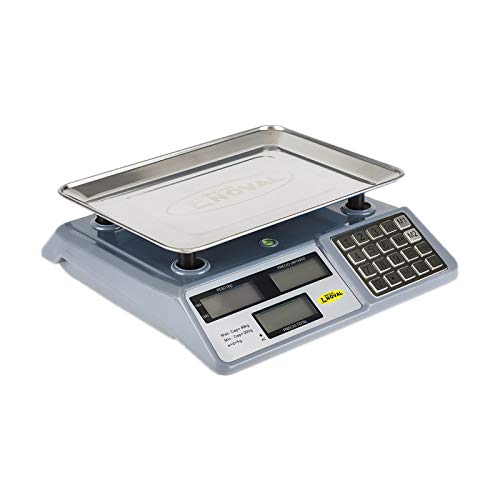
Figure 1: Front view of the Noval N-40-TN scale, showing the main unit with the stainless steel weighing pan attached. The display panel and keypad are visible on the right side.
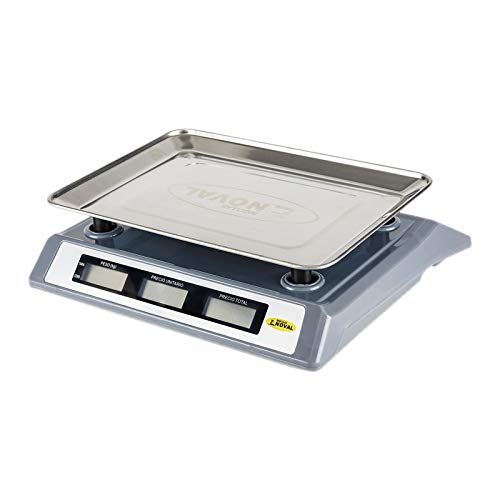
Figure 2: Side view of the Noval N-40-TN scale, highlighting its compact design and the elevated weighing pan for easy placement of items.
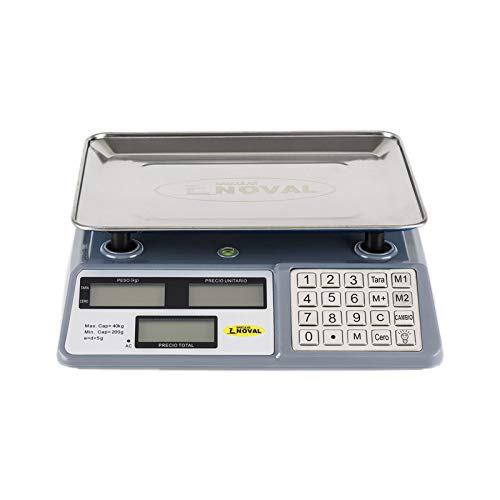
Figure 3: Top-down view of the Noval N-40-TN scale, clearly showing the three display windows (Weight, Unit Price, Total Price) and the full numeric keypad with function buttons like Tare, Zero, M1, M2, M, C, and Cambio.
Components:
- Weighing Pan: Stainless steel platform for placing items to be weighed.
- Display Panel: Features three LCD screens for displaying Weight (PESO), Unit Price (P.UNITARIO), and Total Price (PRECIO TOTAL).
- Keypad: Numeric keys (0-9) and function keys for various operations.
- Power Input: Port for connecting the AC power adapter for charging and continuous operation.
Setup
- Unpacking: Carefully remove all components from the packaging. Retain packaging for future storage or transport.
- Pan Installation: Place the stainless steel weighing pan securely onto the scale's support posts. Ensure it sits flat and stable.
- Initial Charging: Before first use, connect the power adapter to the scale's power input port and plug it into a suitable electrical outlet. Allow the scale to charge for at least 8-10 hours. The 'AC' indicator on the display will illuminate when connected to power.
- Placement: Position the scale on a firm, level, and vibration-free surface. Avoid placing it near air vents, fans, or direct sunlight, which can affect accuracy.
Operating Instructions
Power On/Off:
- To turn on the scale, press the [ON/OFF] button (location may vary, typically on the front or side).
- To turn off the scale, press and hold the [ON/OFF] button until the display turns off.
Basic Weighing:
- Ensure the scale displays '0.000' in the Weight (PESO) window. If not, press the [Cero] button to zero the scale.
- Carefully place the item to be weighed onto the center of the weighing pan.
- Read the weight displayed in the 'PESO' window.
Tare Function:
The Tare function allows you to subtract the weight of a container, so only the net weight of the contents is measured.
- Place the empty container on the weighing pan. The scale will display its weight.
- Press the [Tara] button. The 'PESO' display will return to '0.000'.
- Add the items to be weighed into the container. The scale will now display only the weight of the items.
- To clear the tare, remove the container and press [Tara] again, or turn the scale off and on.
Unit Price and Total Price Calculation:
- Place the item on the weighing pan. The weight will be displayed in the 'PESO' window.
- Using the numeric keypad, enter the unit price (e.g., price per kilogram) into the scale. The entered value will appear in the 'P.UNITARIO' (Unit Price) window.
- The 'PRECIO TOTAL' (Total Price) window will automatically calculate and display the total cost based on the weight and unit price.
Memory Functions (M1, M2, M):
These buttons allow you to store and recall frequently used unit prices.
- To Store a Unit Price: Enter the desired unit price using the numeric keypad. Press and hold [M1], [M2], or [M] until a confirmation beep or display change occurs.
- To Recall a Unit Price: Simply press [M1], [M2], or [M]. The stored unit price will appear in the 'P.UNITARIO' window.
Clear (C) Button:
Press the [C] button to clear any entered unit price or incorrect input from the display.
Change (Cambio) Button:
This function is typically used in retail settings to calculate change. After a total price is displayed, enter the amount paid by the customer, then press [Cambio]. The display will show the change due.
Maintenance
- Cleaning: Wipe the scale surface and weighing pan with a soft, damp cloth. Do not use abrasive cleaners, solvents, or immerse the unit in water. Ensure the scale is dry before storage or next use.
- Battery Care: To prolong battery life, avoid completely draining the battery frequently. Recharge the scale when the low battery indicator appears. If storing for an extended period, charge the battery every 3 months to prevent deep discharge.
- Storage: Store the scale in a cool, dry place, away from direct sunlight and extreme temperatures.
- Calibration: This scale is factory calibrated. If you suspect accuracy issues, consult a qualified technician for recalibration. Do not attempt to calibrate it yourself unless you have proper equipment and training.
Troubleshooting
| Problem | Possible Cause | Solution |
|---|---|---|
| Scale does not turn on. | Low battery or no power connection. | Connect the power adapter and charge the battery. Ensure the power outlet is working. |
| Inaccurate readings. | Scale not on a level surface, pan not seated correctly, or external interference. | Place on a stable, level surface. Re-seat the weighing pan. Avoid vibrations or drafts. Press [Cero] before weighing. |
| Display shows "Lo" or similar. | Low battery. | Recharge the scale's battery. |
| Display shows "Err" or overload message. | Scale is overloaded. | Remove the item immediately. Do not exceed the maximum capacity of 40 kg. |
Specifications
- Model: N-40-TN
- Brand: OBI
- Maximum Capacity: 40 Kilograms (40 kg)
- Minimum Capacity: 200 grams (0.2 kg)
- Division (e): 5 grams (0.005 kg)
- Power Source: Rechargeable Battery & AC Power
- Units of Measurement: Kilograms (kg)
Warranty and Support
This product is manufactured by OBI. For specific warranty terms and conditions, please refer to the warranty card included with your purchase or contact your retailer. Please note that spare parts availability in the EU is guaranteed for 1 year from the date of purchase.
For technical support, service, or inquiries, please contact your local distributor or the point of purchase. Keep your purchase receipt as proof of purchase for warranty claims.
For general inquiries, you may visit the OBI official website or contact their customer service department (contact details not provided in this manual).