
BSIDE BSIDE ZT-M1 Auto/Manual Digital
BSIDE ZT-M1 Digital Multimeter
User Instruction Manual
Introduction
This manual provides detailed instructions for the safe and effective operation of your BSIDE ZT-M1 Auto/Manual Digital Multimeter. This device is designed for precise electrical measurements, featuring an 8000-count triple display, V.F.C converter, and various measurement modes including voltage, current, resistance, capacitance, frequency, and temperature. Please read this manual thoroughly before use and keep it for future reference.
Safety Information
Always observe safety precautions when using electrical testing equipment. Failure to do so may result in injury or damage to the device or equipment under test.
- Do not exceed the maximum input values specified for each measurement range.
- Ensure the test leads are properly connected and the function switch is set to the correct range before making any measurements.
- Exercise extreme caution when working with live circuits. Avoid contact with bare wires or terminals.
- Do not use the multimeter if it appears damaged or if the test leads are frayed or broken.
- Replace batteries promptly when the low battery indicator appears to ensure accurate readings.
- Keep the device dry and clean. Do not expose it to extreme temperatures or humidity.
Product Overview and Components
The BSIDE ZT-M1 Multimeter comes with essential accessories for various testing needs.
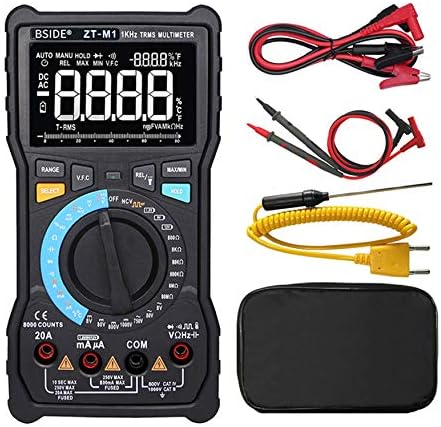
Figure 1: The BSIDE ZT-M1 Digital Multimeter shown with its complete set of accessories, including standard test leads (red and black), alligator clip adapters, a K-type thermocouple temperature probe, and a protective carrying pouch.
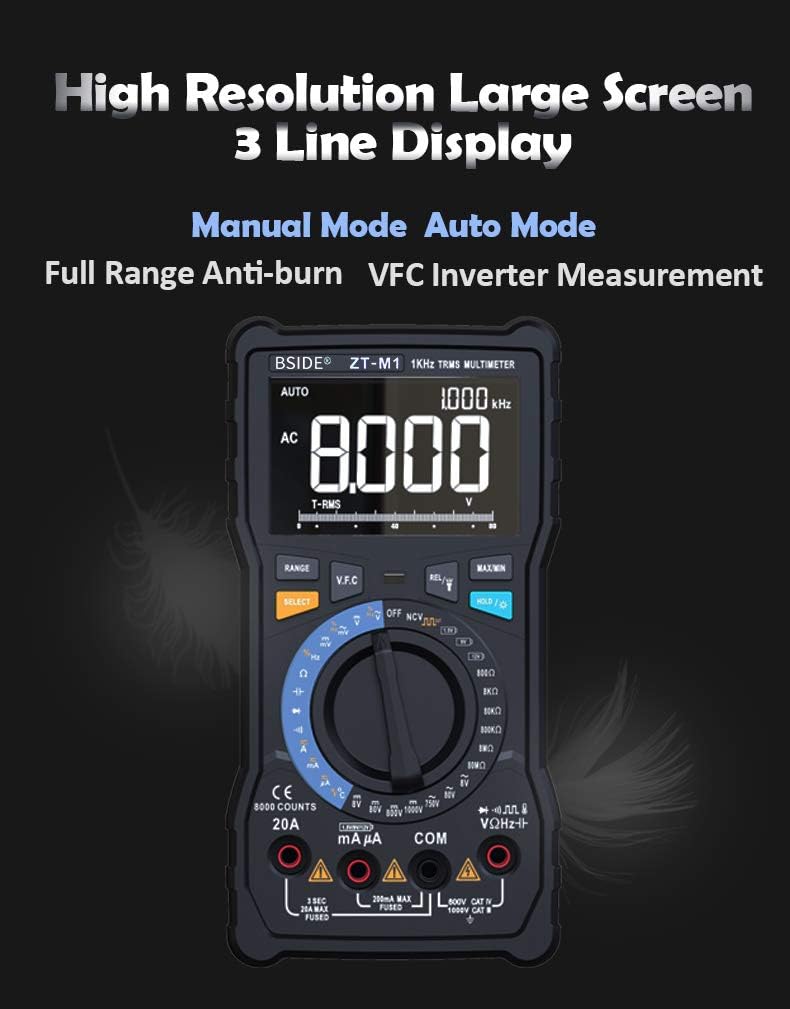
Figure 2: A detailed view of the multimeter's high-resolution, 3-line display. This display can show multiple readings simultaneously, such as AC voltage, frequency, and an analog bar graph, enhancing readability and data interpretation.

Figure 3: Key physical features of the multimeter. This includes a convenient back probe holder for secure storage, an integrated flashlight for illumination in dark environments, and a robust protective case designed to shield the device from impacts and abrasions.
Setup
Battery Installation
The BSIDE ZT-M1 is powered by standard batteries (not specified in input, assuming common type like AA/AAA or 9V). To install or replace batteries:
- Ensure the multimeter is turned off and disconnect all test leads.
- Locate the battery compartment cover on the back of the device.
- Use a screwdriver (if required) to open the compartment.
- Insert new batteries, observing the correct polarity (+/-) as indicated inside the compartment.
- Close the battery compartment cover securely.
Connecting Test Leads
Always connect the black test lead to the "COM" (Common) jack. Connect the red test lead to the appropriate input jack based on the measurement type:
- For Voltage, Resistance, Capacitance, Frequency, Diode, and Continuity measurements: Connect the red lead to the "VΩHz" jack.
- For Current measurements (mA/µA): Connect the red lead to the "mAµA" jack.
- For High Current measurements (A): Connect the red lead to the "20A" jack.
- For Temperature measurements: Connect the K-type thermocouple probe to the designated temperature input jacks (usually marked with temperature symbols).
Operating Instructions
Power On/Off and Mode Selection
Turn the rotary switch to the desired measurement function to power on the multimeter. To turn off the multimeter, rotate the switch to the "OFF" position. The device features both Auto and Manual ranging modes.

Figure 4: Illustration of the multimeter's rotary switch, highlighting the distinct Auto Mode and Manual Mode sections. Auto mode automatically selects the correct measurement range, while Manual mode allows the user to select a specific range for precise control.
Measurement Functions
- DC Voltage (V/mV): Rotate the switch to the DC Voltage position. Connect test leads in parallel with the circuit or component. Ranges: 800.0mV, 8.000V, 80.00V, 800.0V, 1000V.
- AC Voltage (V/mV): Rotate the switch to the AC Voltage position. Connect test leads in parallel. Ranges: 800.0mV, 8.000V, 80.00V, 800.0V, 750V. Features True RMS measurement.
- DC Current (A/mA/µA): Rotate the switch to the DC Current position. Connect test leads in series with the circuit. Ranges: 800.0µA, 8.000mA, 80.00mA, 800.0mA, 8.000A, 20.00A.
- AC Current (A/mA/µA): Rotate the switch to the AC Current position. Connect test leads in series. Ranges: 800.0µA, 8.000mA, 80.00mA, 800.0mA, 8.000A, 20.00A. Features True RMS measurement.
- Resistance (Ω): Rotate the switch to the Resistance position. Ensure the circuit is de-energized. Connect test leads across the component. Ranges: 800.0Ω, 8.000kΩ, 80.00kΩ, 800.0kΩ, 8.000MΩ, 80.00MΩ.
- Capacitance (F/nF/mF): Rotate the switch to the Capacitance position. Ensure capacitors are discharged before testing. Ranges: 9.999nF, 99.99nF, 999.9nF, 9.999µF, 99.99µF, 999.9µF, 9.999mF, 99.99mF.
- Frequency (Hz): Rotate the switch to the Frequency position. Ranges: 9.999Hz, 99.99Hz, 999.9Hz.
- Duty Cycle: Available in conjunction with Frequency measurement. Range: 1%~99%.
- Temperature (°C/°F): Rotate the switch to the Temperature position. Connect the K-type thermocouple. Ranges: -20°C to 1000°C (-4°F to 1832°F).
- Diode Test: Rotate the switch to the Diode position. Used to check the forward voltage drop of a diode.
- Continuity Test: Rotate the switch to the Continuity position. An audible beep indicates continuity (low resistance).
- Square Wave Output: The multimeter can generate a square wave signal. Frequencies: 50Hz~5000Hz.
Special Functions
- Data Hold: Press the "HOLD" button to freeze the current reading on the display. Press again to release.
- Backlight: The display features a backlight for improved visibility in low-light conditions. (Activation method not specified, assuming a dedicated button or automatic).
- V.F.C (Variable Frequency Converter) Measurement: This function allows for accurate measurement of the output voltage of variable frequency drives (VFDs) or inverters.
- Battery Test: The multimeter includes a dedicated function for testing battery voltage.
- Auto Power Off: To conserve battery life, the multimeter will automatically power off after a period of inactivity.
- Low Battery Indication: An icon on the display will indicate when the battery level is low and requires replacement.
- Flashlight: An integrated flashlight assists in illuminating the test area, especially useful in dark environments.

Figure 5: The multimeter's capability to display temperature in both Celsius and Fahrenheit, along with an analog bar graph. Below, it demonstrates the V.F.C function, showing its ability to accurately measure the output voltage from an inverter, which is crucial for industrial applications.
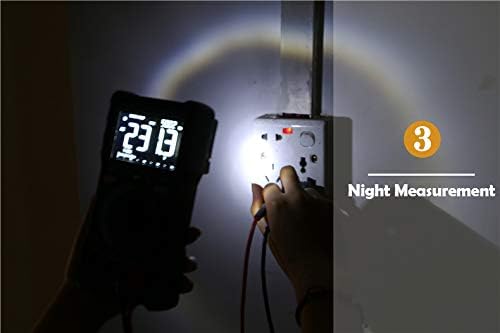
Figure 6: The multimeter's built-in flashlight in use, providing illumination for making measurements in dimly lit or dark conditions, such as inspecting a wall socket at night.
Maintenance
Cleaning
Wipe the case with a damp cloth and mild detergent. Do not use abrasives or solvents. Ensure the device is completely dry before use.
Battery Replacement
When the low battery indicator appears, replace the batteries as described in the "Setup" section. Remove batteries if the device will not be used for an extended period to prevent leakage.
Storage
Store the multimeter in a cool, dry place, away from direct sunlight and extreme temperatures. Utilize the provided protective case for enhanced durability and protection.
Troubleshooting
If you encounter issues with your BSIDE ZT-M1 Multimeter, refer to the following common problems and solutions:
- No Display/Power On: Check battery installation and ensure batteries are not depleted.
- Inaccurate Readings: Verify test lead connections, ensure the correct function and range are selected. Check battery level.
- "OL" or Overload Indication: The measured value exceeds the selected range. Switch to a higher range or use auto-ranging mode.
- No Continuity Beep: Ensure the circuit is de-energized. Check test leads for damage.
- Display Flickering: Low battery may cause display instability. Replace batteries.
Specifications
Detailed technical specifications for the BSIDE ZT-M1 Digital Multimeter:
| Parameter | Value/Range |
|---|---|
| Display | 8000 Counts, 3-Line Triple Display |
| Ranging | Auto/Manual |
| Material | ABS/PVC |
| Update Rate | 3 times/second |
| True RMS | Yes |
| DC Voltage (V) | 800.0mV / 8.000V / 80.00V / 800.0V / 1000V (±0.5%+3) |
| AC Voltage (V) | 800.0mV / 8.000V / 80.00V / 800.0V / 750V (±1.0%+3) |
| DC Current (A) | 800.0µA / 8.000mA / 80.00mA / 800.0mA / 8.000A / 20.00A (±1.2%+3) |
| AC Current (A) | 800.0µA / 8.000mA / 80.00mA / 800.0mA / 8.000A / 20.00A (±1.5%+3) |
| Resistance (Ω) | 800.0Ω / 8.000kΩ / 80.00kΩ / 800.0kΩ / 8.000MΩ (±0.5%+3), 80.00MΩ (±1.5%+3) |
| Capacitance (F) | 9.999nF (±5.0%+5), 99.99nF / 999.9nF / 9.999µF / 99.99µF / 999.9µF (±2.0%+5), 9.999mF / 99.99mF (±5.0%+5) |
| Frequency (Hz) | 9.999Hz / 99.99Hz / 999.9Hz (±0.1%+2) |
| Duty Cycle | 1%~99% (±0.1%+2) |
| Temperature | -20°C ~ 1000°C / -4°F ~ 1832°F (±2.5%+5) |
| Diode Test | Yes |
| Continuity Test | Yes |
| Square Wave Output | 50Hz~5000Hz |
| V.F.C Converter | Yes |
| Data Hold | Yes |
| Backlight | Yes |
| Battery Test | Yes |
| Low Battery Indication | Yes |
| Auto Power Off | Yes |
Warranty Information
Specific warranty details for the BSIDE ZT-M1 Multimeter are not provided in this manual. Please refer to the product packaging or the manufacturer's official website for warranty terms and conditions.
Customer Support
For technical assistance, troubleshooting beyond this manual, or inquiries regarding your BSIDE ZT-M1 Multimeter, please contact the retailer or manufacturer directly. Contact information is typically available on the product packaging or the official BSIDE website.
Related documentsBSIDE ZT-M1 Auto/Manual Digital


Ask a question about this manual
Ask about setup, troubleshooting, compatibility, parts, safety, or missing instructions. Manuals+ will review the question and use this page’s manual context to help answer it.