
1. Safety Instructions
Always observe basic safety precautions when using this power tool to reduce the risk of fire, electric shock, and personal injury.
- Wear Eye Protection: Always wear safety glasses or goggles that comply with applicable standards.
- Wear Respiratory Protection: Use a dust mask or respirator, especially when sanding materials that produce fine dust.
- Secure Workpiece: Always clamp or otherwise secure the workpiece to prevent movement during sanding.
- Maintain a Firm Grip: Hold the sander firmly with both hands during operation.
- Keep Work Area Clean: Cluttered areas invite accidents. Ensure your workspace is well-lit and free of debris.
- Avoid Overreaching: Maintain proper footing and balance at all times.
- Disconnect Power: Always remove the battery pack before making any adjustments, changing accessories, or storing the tool.
- Use Correct Sanding Disc: Ensure the sanding disc is the correct size (125mm) and type for the material being sanded.
- Dust Extraction: Utilize the dust collection system to minimize airborne dust.
2. Product Overview
The DEWALT DCW210N-XJ is an 18V XR Brushless Random Orbital Sander designed for efficient and comfortable sanding. Its brushless motor provides extended runtime and durability.
2.1. Key Features
- Brushless Motor: For increased efficiency, power delivery, and tool longevity.
- 18V XR System: Compatible with DEWALT 18V XR Lithium-Ion battery packs (sold separately).
- Variable Speed Control: Adjustable oscillating speed from 8,000 to 12,000 orbits per minute (OPM).
- Ergonomic Design: Comfortable body grip areas and counter-balance for lower vibration and reduced fatigue.
- Efficient Dust Management: Features a dust skirt and built-in dust extraction port for direct connection to the included dust bag or an external extraction system.
- Electronic Brake: Reduces stopping time of the sanding pad for increased safety.
2.2. Components

An annotated diagram illustrating the main parts of the DEWALT DCW210N-XJ sander, including the speed control dial, on/off switch, dust bag, dust bag collar, dust port, and sanding pad.
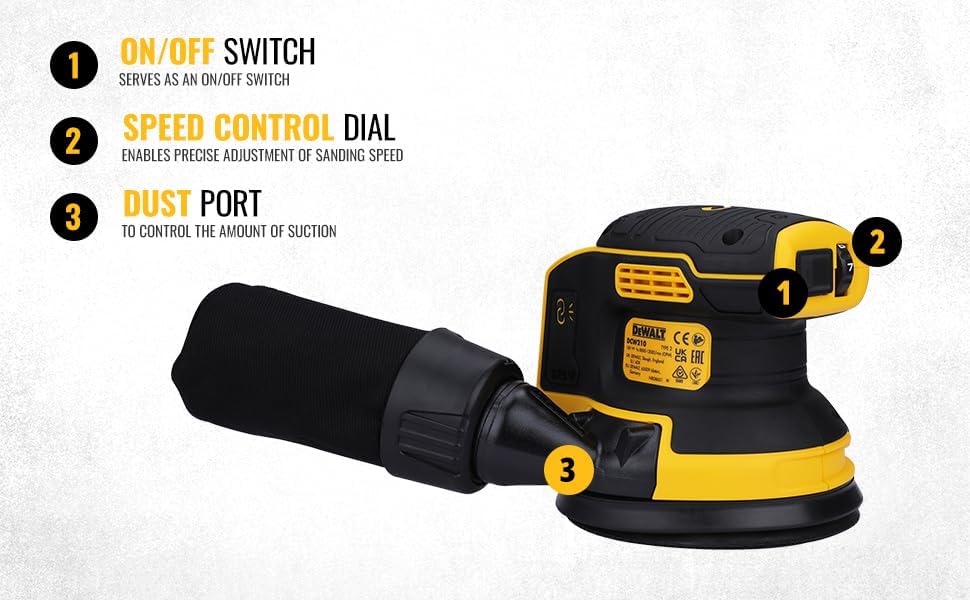
- On/Off Switch: Activates and deactivates the sander.
- Speed Control Dial: Adjusts the oscillating speed of the sanding pad.
- Dust Port: Connection point for the dust bag or an external dust extraction system.
- Dust Bag: Collects sanding debris during operation.
- Sanding Pad: The circular base where sanding discs are attached.
- Dust Bag Collar: Secures the dust bag to the dust port.

The DEWALT DCW210N-XJ Cordless Sander, featuring a brushless motor and 18V power, shown with its dust collection bag.

The DEWALT DCW210N-XJ sander displayed alongside its detachable dust collection bag, illustrating the separate components.
3. Setup
Before operating the sander, ensure it is properly assembled and prepared.
3.1. Attaching the Battery Pack
- Ensure the sander's On/Off switch is in the 'OFF' position.
- Align the battery pack with the battery port on the sander.
- Slide the battery pack into the port until it clicks securely into place.
- To remove, press the battery release button and slide the battery pack out.
3.2. Attaching the Sanding Disc

A detailed view of the sander's 125mm sanding pad, illustrating its hook-and-loop attachment system for sanding discs and the integrated holes for efficient dust extraction.
- Ensure the sander is disconnected from its power source (battery removed).
- Select a 125mm sanding disc appropriate for your application.
- Align the holes on the sanding disc with the holes on the sanding pad.
- Press the sanding disc firmly onto the hook-and-loop surface of the pad.
3.3. Attaching the Dust Bag

A close-up of the DEWALT dust bag, which collects sanding debris, featuring the DEWALT logo and a warning label.

A detailed view of the sander's dust port, designed for connection to the included dust bag or an external dust extraction system.
- Align the dust bag collar with the dust port on the sander.
- Push the dust bag firmly onto the dust port until it is securely attached.
- Alternatively, connect a compatible external dust extraction system to the dust port.
4. Operating Instructions
Follow these steps for safe and effective operation of your DEWALT sander.
4.1. Powering On and Off

A detailed shot of the speed control dial, allowing users to adjust the oscillation rate, and the main On/Off switch for the DEWALT DCW210N-XJ sander.
- To turn the sander ON, slide the On/Off switch to the 'I' (ON) position.
- To turn the sander OFF, slide the On/Off switch to the 'O' (OFF) position. The electronic brake will quickly stop the sanding pad.
4.2. Adjusting Speed

This image provides a closer look at the operational controls of the sander: the On/Off switch, the speed control dial for adjusting sanding intensity, and the dust port for extraction.
- The speed control dial is located on the top of the sander.
- Rotate the dial to select the desired oscillating speed (8,000-12,000 OPM). Lower speeds are suitable for fine finishing, while higher speeds are for faster material removal.
4.3. Sanding Techniques

A user demonstrating the DEWALT DCW210N-XJ sander in use on a wooden workpiece, emphasizing the importance of personal protective equipment like a respirator and safety glasses.
- Ensure the workpiece is securely fastened.
- Place the sander flat on the workpiece before turning it on.
- Apply light, even pressure. Allow the sander to do the work; excessive pressure can reduce efficiency and damage the workpiece or tool.
- Move the sander in overlapping circular or back-and-forth motions across the surface.
- For best results, progress through different grit sizes, starting with coarser grits for material removal and finishing with finer grits for a smooth surface.
5. Maintenance
Regular maintenance ensures optimal performance and extends the life of your sander.
5.1. Cleaning
- Always remove the battery pack before cleaning.
- Use a soft brush or compressed air to clean dust and debris from the ventilation openings and around the sanding pad.
- Do not use solvents or harsh chemicals, as these can damage plastic parts.
5.2. Dust Bag Management
- Empty the dust bag frequently to maintain effective dust collection.
- To empty, detach the dust bag from the sander and shake out the contents.
- Periodically clean the dust bag with a vacuum cleaner to remove fine particles embedded in the fabric.
5.3. Sanding Pad Replacement
- If the hook-and-loop surface of the sanding pad wears out and no longer holds sanding discs securely, the pad may need replacement.
- Refer to the service manual or contact DEWALT customer support for instructions on replacing the sanding pad.
6. Troubleshooting
This section addresses common issues you might encounter with your sander.
| Problem | Possible Cause | Solution |
|---|---|---|
| Sander does not start | Battery not inserted correctly or discharged. On/Off switch not engaged. | Ensure battery is fully charged and properly inserted. Check On/Off switch position. |
| Poor dust collection | Dust bag full or clogged. Dust port not properly connected. Sanding disc holes not aligned. | Empty and clean dust bag. Ensure dust bag/extraction system is securely attached. Verify sanding disc holes align with pad holes. |
| Excessive vibration | Damaged sanding pad or unbalanced sanding disc. | Inspect sanding pad for damage. Replace sanding disc. |
| Sanding disc detaches easily | Worn hook-and-loop on sanding pad or disc. | Replace sanding disc. If problem persists, replace sanding pad. |
7. Specifications
Technical data for the DEWALT DCW210N-XJ 18V XR BL Cordless Random Orbital Sander.

This image highlights the core specifications of the DEWALT DCW210N-XJ sander, including its 18V voltage, adjustable orbits per minute (OPM) from 8000 to 12000, and a weight of 0.93 kg.
| Feature | Specification |
|---|---|
| Model | DCW210N-XJ |
| Voltage | 18V |
| Power Source | Battery Powered (Lithium-Ion) |
| Oscillating Speed | 8,000 - 12,000 OPM (Orbits Per Minute) |
| Oscillating Diameter | 2.6 mm |
| Sanding Pad Size | 125 mm (5 inches) |
| Item Weight | 1.2 kg (2.64 lbs) |
| Product Dimensions | 8.7 x 6.26 x 5.63 inches |
| Grit Type (Included) | Medium (Grit Number: 100) |
8. Warranty & Support
DEWALT provides comprehensive customer support and warranty services for its products.
8.1. Customer Care Contact
This image provides DEWALT's Total Care customer support details, including a phone number (1800-203-0644), email (SBD-CUSTOMER.COMMUNICATIONS@SBDINC.COM), and a WhatsApp QR code for direct messaging.
- Phone: 1800-203-0644 (Monday-Saturday, 09:00 AM - 06:00 PM IST, except government holidays)
- Email: SBD-CUSTOMER.COMMUNICATIONS@SBDINC.COM
- WhatsApp: +91 96060 55835
- Service Network: Over 500 authorized service centers available.
8.2. Warranty Information
For detailed warranty terms and conditions, please refer to the warranty card included with your product or visit the official DEWALT website. Keep your proof of purchase for warranty claims.


