
1. Introduction
Thank you for choosing the Dynasonic Dynapro 15 Portable Active Speaker. This powerful audio system is designed for versatility and portability, featuring Bluetooth connectivity, USB/SD card playback, FM radio, and microphone inputs. Please read this manual carefully before operating the device to ensure proper use and to maximize its performance and lifespan.
2. Safety Information
- Power Source: Use only the specified charging cable and power adapter. Ensure the power supply voltage matches the requirements indicated on the speaker.
- Battery Safety: The speaker contains a built-in lithium-ion battery. Do not expose to extreme temperatures, direct sunlight, or fire. Do not attempt to replace the battery yourself.
- Water and Moisture: Keep the speaker away from water, rain, and excessive humidity to prevent electric shock or damage.
- Ventilation: Ensure adequate ventilation around the speaker. Do not block ventilation openings.
- Cleaning: Disconnect the power before cleaning. Use a soft, dry cloth. Do not use liquid cleaners or aerosols.
- Servicing: Do not attempt to repair the speaker yourself. Refer all servicing to qualified personnel.
- Volume Levels: Prolonged exposure to high volume levels can cause permanent hearing damage. Adjust volume to a safe level.
3. Package Contents
Please check that all the following items are included in your package:
- Dynasonic Dynapro 15 Portable Active Speaker
- Wireless Microphone
- Headset Microphone
- Remote Control
- Charging Cable

Image: Included accessories, featuring a wireless handheld microphone and a wired headset microphone.
4. Product Overview
The Dynapro 15 is designed for ease of use and portability, featuring a robust cabinet, integrated wheels, and a retractable trolley handle for convenient transport.
Front View
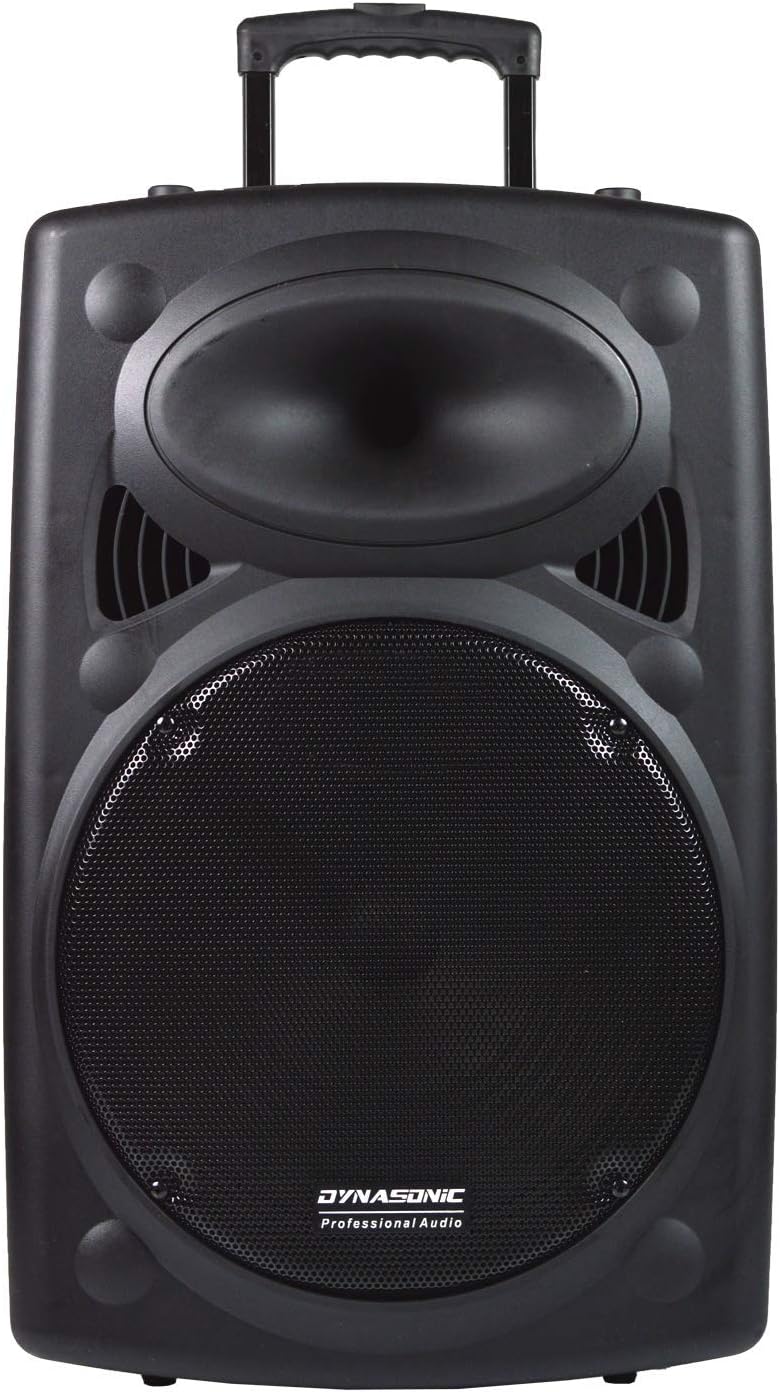
Image: Front view of the Dynasonic Dynapro 15 speaker, highlighting the speaker grille and horn tweeter.
Front View with Handle Extended

Image: Front view of the speaker with the trolley handle extended for transport.
Side View

Image: Side view of the speaker, illustrating its integrated wheels and side handle for easy mobility.
Rear Panel Controls

Image: Rear panel of the speaker, showing the control interface with inputs for USB, SD card, microphones, and audio adjustments.

Image: Close-up of the media playback section on the rear panel, indicating USB and SD card slots.
5. Setup
- Unpacking: Carefully remove the speaker and all accessories from the packaging. Retain packaging for future transport or storage.
- Initial Charge: Before first use, fully charge the speaker's internal battery. Connect the charging cable to the speaker's power input and plug it into a suitable power outlet. The charging indicator will show the charging status.
- Positioning: Place the speaker on a stable, flat surface. Ensure there is sufficient space around the unit for proper ventilation.
6. Operating Instructions
6.1 Power On/Off
Locate the power switch on the rear panel of the speaker. Flip the switch to the 'ON' position to power on the unit. Flip it to 'OFF' to power off.
6.2 Bluetooth Connection
- Power on the speaker. The display will indicate 'Bluetooth Mode' or similar.
- Enable Bluetooth on your mobile device (smartphone, tablet, laptop).
- Search for available Bluetooth devices. Select 'DYNAPRO 15' from the list.
- Once connected, the speaker will confirm with an audible prompt, and you can begin playing audio from your device.
6.3 USB/SD Playback
- Insert a USB flash drive or SD/MMC card into the corresponding slot on the rear panel.
- The speaker will automatically switch to USB/SD mode and begin playing compatible audio files (e.g., MP3).
- Use the playback controls (Play/Pause, Next, Previous) on the rear panel or remote control to manage your music.
6.4 FM Radio
- Extend the antenna on the rear panel for better reception.
- Press the 'Mode' button to switch to FM radio mode.
- Press and hold the Play/Pause button to initiate an automatic scan for available radio stations. The speaker will save detected stations.
- Use the Next/Previous buttons to navigate through the saved stations.
6.5 Microphone and Instrument Input
- Connect the wireless microphone receiver or a wired microphone/instrument (e.g., guitar) to the designated MIC IN or INSTRUMENT IN ports on the rear panel.
- Adjust the 'MIC.PRI' (Microphone Priority) knob to control the microphone volume relative to other audio sources.
- Use the 'ECHO' knob to add an echo effect to the microphone input.
6.6 TWS (True Wireless Stereo) Function
The Dynapro 15 supports True Wireless Stereo, allowing two Dynapro 15 speakers to connect wirelessly for a stereo sound experience.
- Ensure both Dynapro 15 speakers are powered on and in Bluetooth mode, but not yet connected to any device.
- On one speaker, press and hold the 'TWS' button (if available, or a combination of buttons as indicated in a specific model's manual) until you hear a pairing tone.
- The two speakers will attempt to pair with each other. Once successfully paired, they will indicate a stereo connection.
- Connect your mobile device to one of the paired speakers via Bluetooth as described in section 6.2. Audio will now play in stereo through both speakers.
6.7 Audio Adjustment
Use the dedicated knobs on the rear panel to fine-tune your audio:
- BASS: Adjusts the low-frequency output.
- TREBLE: Adjusts the high-frequency output.
- ECHO: Controls the echo effect for microphone inputs.
- VOLUME: Master volume control for all audio sources.
7. Maintenance
- Cleaning: Wipe the speaker's exterior with a soft, dry cloth. Do not use abrasive cleaners, waxes, or solvents.
- Storage: When not in use for extended periods, store the speaker in a cool, dry place, away from direct sunlight and extreme temperatures.
- Battery Care: To prolong battery life, avoid fully discharging the battery frequently. Recharge the battery periodically if the speaker is stored for a long time.
- Transportation: Utilize the integrated wheels and trolley handle for moving the speaker to prevent damage.
8. Troubleshooting
| Problem | Possible Cause | Solution |
|---|---|---|
| Speaker does not power on. | Battery is discharged. Power switch is off. | Charge the battery. Ensure the power switch is in the 'ON' position. |
| No sound output. | Volume is too low. Incorrect input mode selected. Audio source not playing. | Increase the master volume. Select the correct input mode (Bluetooth, USB, SD, FM). Ensure your audio source is playing. |
| Bluetooth connection fails. | Speaker is not in pairing mode. Device is too far. Interference. | Ensure speaker is in Bluetooth mode. Move device closer to speaker. Avoid obstacles and other wireless devices. |
| Microphone not working. | Microphone is off. Volume is too low. Incorrect port used. | Ensure microphone is powered on. Increase microphone volume (MIC.PRI knob). Connect to the correct MIC IN port. |
| Poor FM radio reception. | Antenna not extended. Weak signal. | Fully extend the FM antenna. Try repositioning the speaker or antenna. |
9. Specifications
| Feature | Specification |
|---|---|
| Model | DYNAPRO 15 |
| Brand | DYNASONIC |
| Mounting Type | Floor |
| Power Source | Battery Powered |
| Material | Wood |
| Item Weight | 14 kg |
| Number of Channels | 2 |
| Audio Input | Wireless microphone, USB/SD card reader, Bluetooth, FM radio, microphone and instrument input |
| Product Dimensions (LxWxH) | 45 x 65 x 135 cm |
| Batteries | 1 Lithium-ion battery (included) |
| Additional Features | Bluetooth |
| Output Power (Max) | 800 Watt |
| Amplifier Type | Active |
| Connectivity Technology | Bluetooth, USB |
| Compatible Devices | Laptop, Smartphone, Tablet |
10. Warranty and Support
The Dynasonic Dynapro 15 Portable Active Speaker comes with a standard manufacturer's warranty. Please refer to the warranty card included in your package for specific terms and conditions, including the warranty period and coverage details.
For technical support, troubleshooting assistance, or warranty claims, please contact your retailer or the Dynasonic customer service department. Contact information can typically be found on the product packaging or the official Dynasonic website.