1. Introduction
The Radiolink R12DSE is a compact and lightweight 2.4Ghz 12-channel micro RC receiver designed for various remote-controlled aircraft, including FPV racing drones, quadcopters, and helicopters. It features DSSS and FHSS hybrid spread spectrum technology for enhanced anti-interference performance and offers real-time telemetry capabilities.
This manual provides detailed instructions for the proper setup, operation, and maintenance of your R12DSE receiver to ensure optimal performance and longevity.

Image 1.1: The Radiolink R12DSE Micro RC Receiver, showing its compact design and connection ports.
2. Product Features
- Control Distance: Up to 4000 meters in air, utilizing DSSS and FHSS hybrid spread spectrum for robust anti-interference.
- Signal Output: Supports SBUS and PPM signal output, compatible with most flight controllers.
- Telemetry: Built-in real-time data transmission for signal strength and receiver voltage. Advanced telemetry with PRM-03 module for model voltage, speed, GPS data, and more.
- Size & Weight: Super mini size (1.2 x 0.47 inches) and lightweight (2.5g / 0.08oz).
- Binding: Quick 1-second binding process.
- Protection: Anti-polarity protection circuit prevents damage from incorrect power connection.
- Compatibility: Compatible with Radiolink AT series transmitters (AT10II, AT10, AT9S Pro, AT9S, AT9).
3. Setup
3.1 What's in the Box
- R12DSE Receiver x 1
- Telemetry Module PRM-03 Connect Cable x 1
- Packing Bag x 1
3.2 Receiver Overview

Image 3.1: Diagram showing the binding button, coaxial cable, and antenna of the R12DSE receiver. The antenna should be kept as straight as possible for optimal performance.
3.3 Binding Process
- Power on your Radiolink transmitter and navigate to the binding menu.
- Connect the R12DSE receiver to a power source (3-6V DC). Ensure correct polarity; the receiver has built-in protection against reverse polarity.
- Press and hold the BIND button on the R12DSE receiver.
- The receiver's LED indicator will flash rapidly, indicating it is in binding mode.
- Initiate the binding process on your transmitter.
- Once successfully bound, the receiver's LED will turn solid red. The binding process typically takes approximately 1 second.
3.4 Signal Output Configuration (SBUS/PPM)
The R12DSE receiver supports both SBUS and PPM signal outputs. The receiver indicator LED is red by default. All twelve channels respond simultaneously within 3ms. This compatibility extends to almost all flight controllers, making it suitable for racing drones.

Image 3.2: An oscilloscope display illustrating the SBUS/PPM signal output waveform, demonstrating the 4096-level resolution and 0.25us servo output.
3.5 Transmitter Channel Selection
To utilize all 12 channels of the R12DSE receiver, ensure your compatible Radiolink transmitter is configured correctly. Go to the SYSTEM menu on your transmitter and select CH-SELECT to 12CH.

Image 3.3: Screenshots of Radiolink AT9/AT9S/AT9S Pro and AT10/AT10II transmitter displays, showing the 'CH-SELECT-12CH' option in the system menu for full 12-channel operation.
4. Operating
4.1 Real-time Built-in Telemetry
The R12DSE receiver includes a built-in data transmission function. Signal strength and receiver voltage information will be displayed directly on the main screen of compatible Radiolink transmitters (AT10II, AT10, AT9S Pro, AT9S, AT9). The RSSI value will also be displayed in the RECEIVE menu without requiring external sensors.
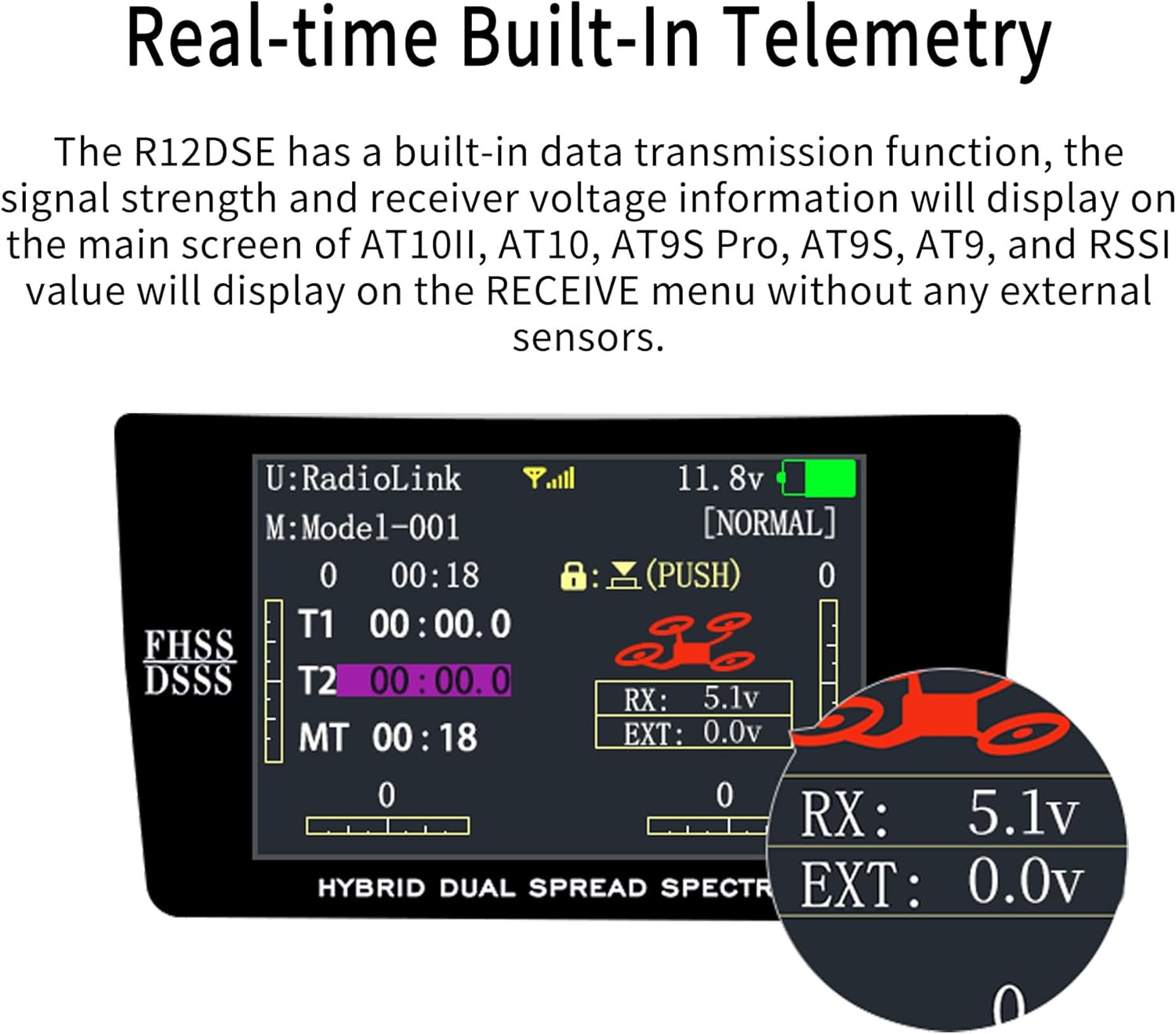
Image 4.1: A Radiolink transmitter screen displaying real-time telemetry data, including receiver voltage (RX: 5.1v) and external voltage (EXT: 0.0v).
4.2 Advanced Telemetry with PRM-03 Module
When the R12DSE is paired with the optional Telemetry Module PRM-03 and a compatible flight controller (such as PIX6, PIXHAWK, CrossRace Pro, CrossRace, CrossFlight, Mini Pix, APM, TURBO PiX), a wider range of telemetry data becomes available. This includes model voltage, speed, rise, throttle, longitude, latitude, altitude, GPS coordinates, RSSI, flight mode, yaw, roll, pitch, and distance. This information will be displayed on the RECEIVE menu of your AT10II, AT10, AT9S Pro, AT9S, or AT9 transmitter.

Image 4.2: Illustration of the R12DSE receiver connected to a PRM-03 telemetry module and a CrossFlight flight controller, with a corresponding transmitter display showing detailed flight data.
4.3 Applicable Aircraft Models
The R12DSE receiver is suitable for a variety of RC aircraft, including fixed-wing airplanes, racing drones, and quadcopters, due to its compact size, lightweight design, and versatile signal output options.

Image 4.3: Examples of various RC aircraft, including fixed-wing planes and multi-rotor drones, that are compatible with the R12DSE receiver.
5. Maintenance
To ensure the longevity and reliable performance of your Radiolink R12DSE receiver, follow these general maintenance guidelines:
- Keep Clean: Regularly inspect the receiver for dust, dirt, or debris. Use a soft, dry brush or compressed air to gently clean the unit.
- Protect from Moisture: Avoid exposing the receiver to moisture or extreme humidity. If it gets wet, disconnect power immediately and allow it to dry completely before re-applying power.
- Secure Connections: Ensure all wire connections are secure and free from damage. Loose connections can lead to intermittent signal loss.
- Antenna Placement: Maintain proper antenna placement. Keep the antenna elements as straight as possible and away from carbon fiber or metal parts that can shield the signal.
- Power Supply: Always use a stable power supply within the specified voltage range (3-6V DC). The built-in anti-polarity protection helps prevent damage from incorrect connections, but consistent proper connection is recommended.
6. Troubleshooting
If you encounter issues with your R12DSE receiver, consider the following troubleshooting steps:
- Receiver Not Binding:
- Ensure the transmitter and receiver are in close proximity during the binding process.
- Verify that the transmitter is in binding mode and the receiver's LED is flashing.
- Check the power supply to the receiver (3-6V DC) and ensure correct polarity.
- Confirm that your transmitter is a compatible Radiolink AT series model.
- Intermittent Signal Loss or Reduced Range:
- Inspect antenna placement. Ensure antennas are not bent, cut, or obstructed by carbon fiber or metal components.
- Check for sources of interference in the operating environment (e.g., Wi-Fi routers, other 2.4Ghz devices).
- Verify the power supply to the receiver is stable and sufficient.
- Ensure the transmitter's antenna is fully extended and oriented correctly.
- No Telemetry Data Displayed:
- Confirm your transmitter model supports telemetry display (AT10II, AT10, AT9S Pro, AT9S, AT9).
- For advanced telemetry, ensure the PRM-03 module is correctly connected to both the receiver and the flight controller.
- Check all connections for security and proper orientation.
- Receiver LED Not Illuminating:
- Verify the power connection to the receiver.
- Check for any physical damage to the receiver or its components.
For further assistance, refer to the support section below.
7. Specifications
| Feature | Specification |
|---|---|
| Model Number | R12DSE |
| Product Dimensions | 1.2 x 0.47 x 0.47 inches (30.5 x 11.9 x 11.9 mm) |
| Item Weight | 0.16 ounces (4.5 grams) |
| Input Voltage | 3-6V DC |
| Channels | 12 Channels |
| Signal Output | SBUS & PPM |
| Control Distance | Up to 4000 meters (air) |
| Frequency | 2.4Ghz (DSSS & FHSS) |
| Resolution | 4096-level |
| Servo Output | 0.25us |
| Manufacturer Recommended Age | 14 years and up |
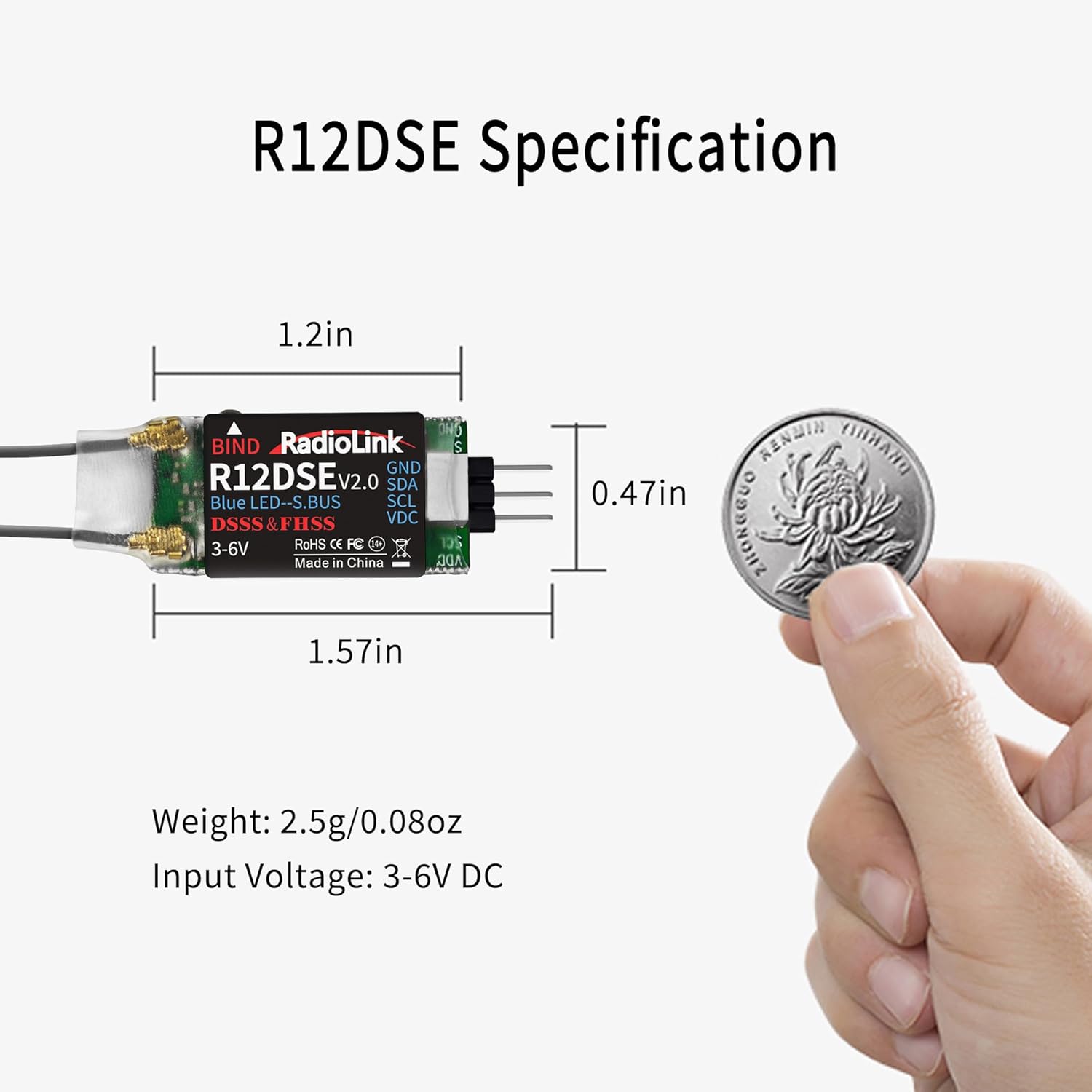
Image 7.1: Detailed specifications of the R12DSE receiver, including dimensions and weight, shown alongside a coin for size comparison.
8. Warranty and Support
8.1 Warranty Information
Radiolink products are manufactured to high-quality standards. For specific warranty terms and conditions, please refer to the official Radiolink website or contact customer support directly. Keep your proof of purchase for warranty claims.
8.2 Customer Support
For technical support, troubleshooting assistance, or any inquiries regarding your Radiolink R12DSE receiver, please contact Radiolink's after-sales service. You can find support resources on the Radiolink Direct store or through their online user instructions and FAQ troubleshooting files.
Visit the official Radiolink store for more information: Radiolink Store


