
USARMT AKB74475401
USARMT AKB74475401 TV Remote Control User Manual
For LG Smart TVs
1. Introduction
This manual provides essential instructions for the setup, operation, and maintenance of your USARMT AKB74475401 TV Remote Control. This remote is designed to be compatible with a wide range of LG Smart TV models, offering a direct replacement experience without complex programming.
2. Product Overview
The USARMT AKB74475401 remote control is a standard infrared (IR) remote designed for ease of use with compatible LG Smart TVs. It features a familiar button layout for intuitive navigation and control of your television functions.
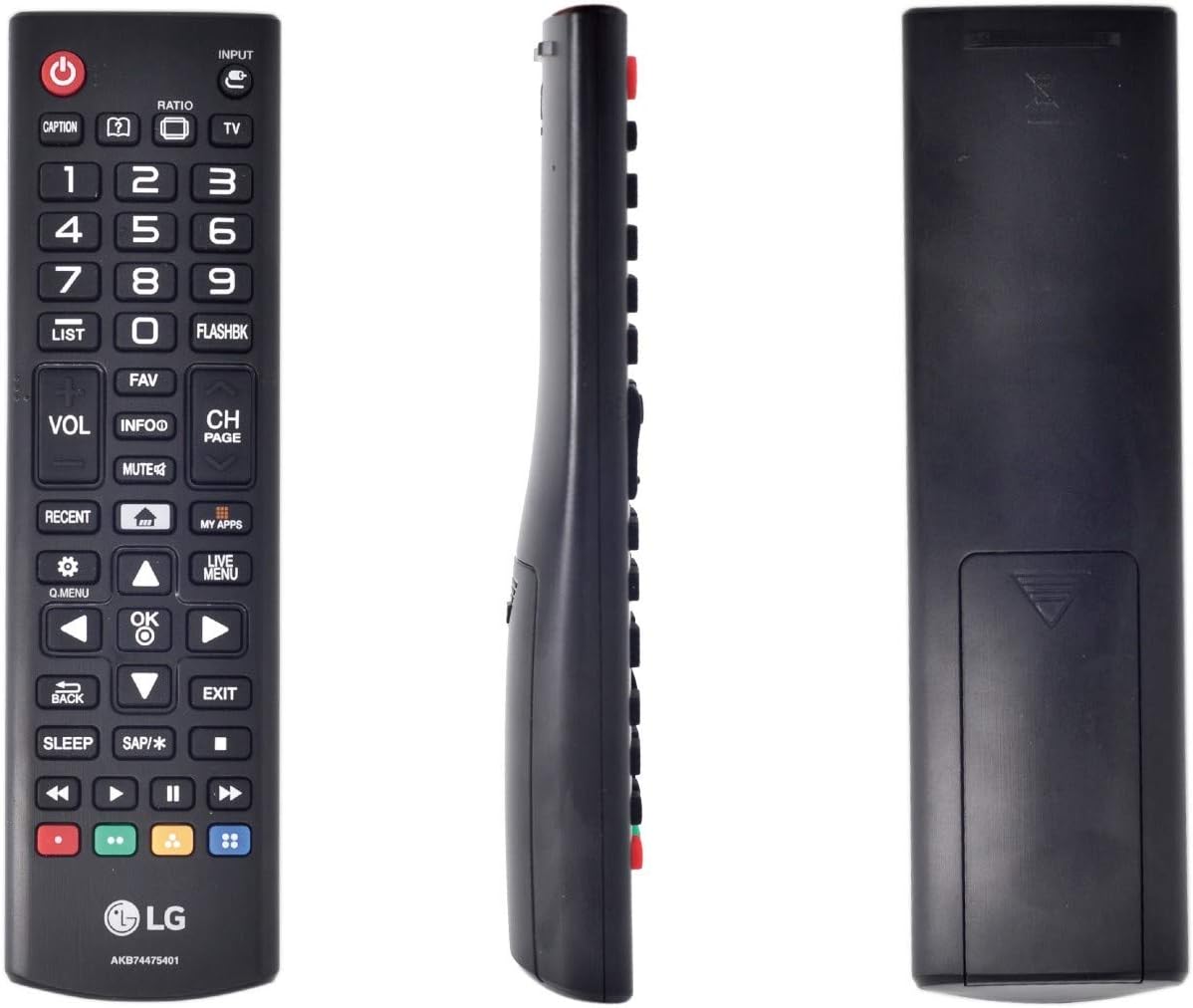
Figure 2.1: Front view of the USARMT AKB74475401 TV Remote Control, showing all buttons and layout.

Figure 2.2: Side view of the USARMT AKB74475401 TV Remote Control, illustrating its ergonomic design.
Button Functions (General)
- Power Button (●): Turns the TV on or off.
- Input Button: Selects video input sources (HDMI, AV, etc.).
- Number Buttons (0-9): Direct channel selection.
- VOL +/-: Adjusts volume level.
- CH PAGE +/-: Changes TV channels.
- MUTE: Mutes or unmutes TV audio.
- Navigation Pad (Up, Down, Left, Right, OK): Navigates menus and confirms selections.
- BACK: Returns to the previous screen or menu.
- EXIT: Exits the current menu or application.
- Q.MENU: Accesses the Quick Menu for common settings.
- MY APPS: Opens the applications menu.
- Color Buttons (Red, Green, Yellow, Blue): Special functions depending on the TV application or content.
- Playback Controls (Play, Pause, Stop, Rewind, Fast Forward): Controls media playback.
3. Setup
3.1 Battery Installation
- Locate the battery compartment on the back of the remote control.
- Slide the battery cover downwards or press the latch and lift to open.
- Insert two AAA batteries (not included), ensuring the positive (+) and negative (-) terminals align correctly with the markings inside the compartment.
- Replace the battery cover by sliding it back into place until it clicks securely.
3.2 Initial Use
This remote control is preprogrammed and does not require any setup or programming. Once batteries are correctly installed, it is ready for immediate use with compatible LG Smart TVs.
4. Operating Instructions
Point the remote control directly at your LG Smart TV. Ensure there are no obstructions between the remote and the TV's infrared receiver. Press the desired button to perform the corresponding function.
- Power On/Off: Press the Power button once.
- Channel Selection: Use the CH PAGE +/- buttons to cycle through channels, or enter a channel number directly using the Number Buttons.
- Volume Adjustment: Use the VOL +/- buttons.
- Accessing Menus: Press the Q.MENU or LIVE MENU buttons to access TV settings and options. Use the Navigation Pad to move through options and OK to select.
- Smart TV Features: Use the MY APPS button to access installed applications.
5. Compatibility
The USARMT AKB74475401 remote control is compatible with numerous LG Smart TV models, including but not limited to:
24LF4820, 24LF4820BU, 24LF4820-BU, 24LF4820WU, 24LF4820-WU, 32LF595B, 32LF595BUB, 32LF595B-UB, 40LF6300, 40LF6300UA, 40LF6300-UA, 40UF7700, 40UF7700UB, 40UF7700-UB, 42LF6500, 42LF6500UB, 42LF6500-UB, 43LF5900, 43LF5900UB, 43LF5900-UB, 43LF6300, 43LF6300UA, 43LF6300-UA, 43UF6400, 43UF6400UA, 43UF6400-UA, 43UF640T, 43UF640TTA, 43UF640T-TA, 43UF6430, 43UF6430UB, 43UF6430-UB, 43UF6800, 43UF6800UA, 43UF6800-UA, 43UF6900, 43UF6900UC, 43UF6900-UC, 43UF7300, 43UF7300UT, 43UF7300-UT, 43UF7590, 43UF7600, 43UF7600-UJ, 43UF7700, 43UF7700UB, 43UF7700-UB, 49LF5900, 49LF5900UB, 49LF5900-UB, 49LF6300, 49LF6300UA, 49LF6300-UA, 49UF6400, 49UF6400UA, 49UF6400-UA, 49UF640T, 49UF640TTA, 49UF640T-TA, 49UF6430, 49UF6430UB, 49UF6430-UB, 49UF6490, 49UF6490UB, 49UF6490-UB, 49UF6800, 49UF6800UA, 49UF6800-UA, 49UF6900, 49UF6900UC, 49UF6900-UC, 49UF7300, 49UF7300UT, 49UF7300-UT, 49UF7590, 49UF7600, 49UF7600-UJ, 49UF7700, 49UF7700UB, 49UF7700-UB, 50LF6500, 50LF6500UB, 50LF6500-UB, 50UF8300, 50UF8300A, 50UF8300UA, 50UF8300-UA, 55EF9500, 55EF9500UA, 55EF9500-UA, 55EG9100, 55EG9200, 55EG9200UA, 55EG9200-UA, 55EG9600, 55EG9600UA.
6. Troubleshooting
6.1 Remote Not Responding
- Check Batteries: Ensure batteries are inserted correctly with the correct polarity (+/-). Replace old or depleted batteries with new ones.
- Line of Sight: Make sure there are no objects blocking the path between the remote control and the TV's infrared receiver.
- Distance: Operate the remote within a reasonable distance from the TV.
6.2 Specific Buttons Not Working
- Clean Contacts: If certain buttons are unresponsive, gently clean the remote's surface and buttons. Avoid using harsh chemicals.
- Battery Check: Even if some buttons work, low battery power can affect the functionality of others. Replace batteries.
7. Specifications
| Feature | Detail |
|---|---|
| Brand | USARMT |
| Model Number | AKB74475401 |
| Compatible Devices | LG Smart Televisions |
| Connectivity Technology | Infrared (IR) |
| Special Feature | Ergonomic Design |
| Max Number of Supported Devices | 1 (Television) |
| Product Dimensions | 1.5 x 0.5 x 7 inches |
| Item Weight | 3 ounces |
8. Maintenance
- Cleaning: Wipe the remote control with a soft, dry cloth. For stubborn dirt, slightly dampen the cloth with water. Do not use abrasive cleaners or solvents.
- Battery Care: Remove batteries if the remote will not be used for an extended period to prevent leakage. Dispose of used batteries responsibly according to local regulations.
- Storage: Store the remote in a cool, dry place away from direct sunlight and extreme temperatures.
9. Warranty and Support
Specific warranty information for the USARMT AKB74475401 remote control is not provided in this manual. For warranty claims, technical support, or further assistance, please refer to the product packaging or contact the retailer or manufacturer directly. Keep your purchase receipt as proof of purchase.
Ask a question about this manual
Ask about setup, troubleshooting, compatibility, parts, safety, or missing instructions. Manuals+ will review the question and use this page’s manual context to help answer it.