
HoneyGuaridan SW28
Contents
HoneyGuardian SW28 Smart Cat Water Fountain Instruction Manual
Model: SW28
Introduction
Thank you for choosing the HoneyGuardian SW28 Smart Cat Water Fountain. This advanced pet hydration system features a 2.5L capacity, innovative maglev pump technology, dual-band Wi-Fi connectivity for app control, and a dual-power system including a built-in battery for uninterrupted operation. This manual provides detailed instructions for setup, operation, maintenance, and troubleshooting to ensure optimal performance and the well-being of your pet.

Image: The HoneyGuardian SW28 Smart Cat Water Fountain, showcasing its sleek design and transparent water tank.
Product Features
- Smart APP Monitoring: Connects to dual-band Wi-Fi (2.4G/5G Hz) for remote management via the "HGsmart" app (iOS & Android).
- Innovative Maglev Pump: Features a fully isolated power system, preventing debris buildup and wire hazards common with conventional submersible pumps.
- Three Smart Modes:
- Smart Sensing Mode: Automatically dispenses water for 1 minute when a pet approaches.
- Continuous Flow Mode: Provides constant water flow (requires power connection).
- Intermittent Cycling Mode: Cycles 30 seconds of flow and 60 seconds of pause (requires power connection).
- 2.5L Ultra-Quiet Design: Large capacity reduces refill frequency, and operates at <23dB for a peaceful environment. Transparent tank allows for easy water level monitoring.
- Smart Light Alerts: LED indicator provides visual cues for operational status: Green (normal), Red (low water), Blue (low battery).
- Triple Filtration System: Includes high-density cotton floss, activated carbon, and ion exchange resin to purify water, remove odors, and soften water quality.
- Dual-Power Hydration System: Built-in 2000mAh lithium battery provides up to 15 days of operation. An included adapter allows for simultaneous battery charging and power, ensuring continuous water supply.

Image: The HoneyGuardian fountain highlighting its 2.5L capacity, quiet operation (<23dB), and visible water tank.

Image: A visual comparison illustrating the innovative maglev pump technology of the HoneyGuardian fountain against a conventional submersible pump, emphasizing safety and maintenance benefits.
What's in the Box
Please check the package contents upon unboxing:
- HoneyGuardian SW28 Cat Water Fountain (Main Unit)
- Water Tank
- Filter Element (Pre-installed or separate)
- Power Adapter
- Instruction Manual
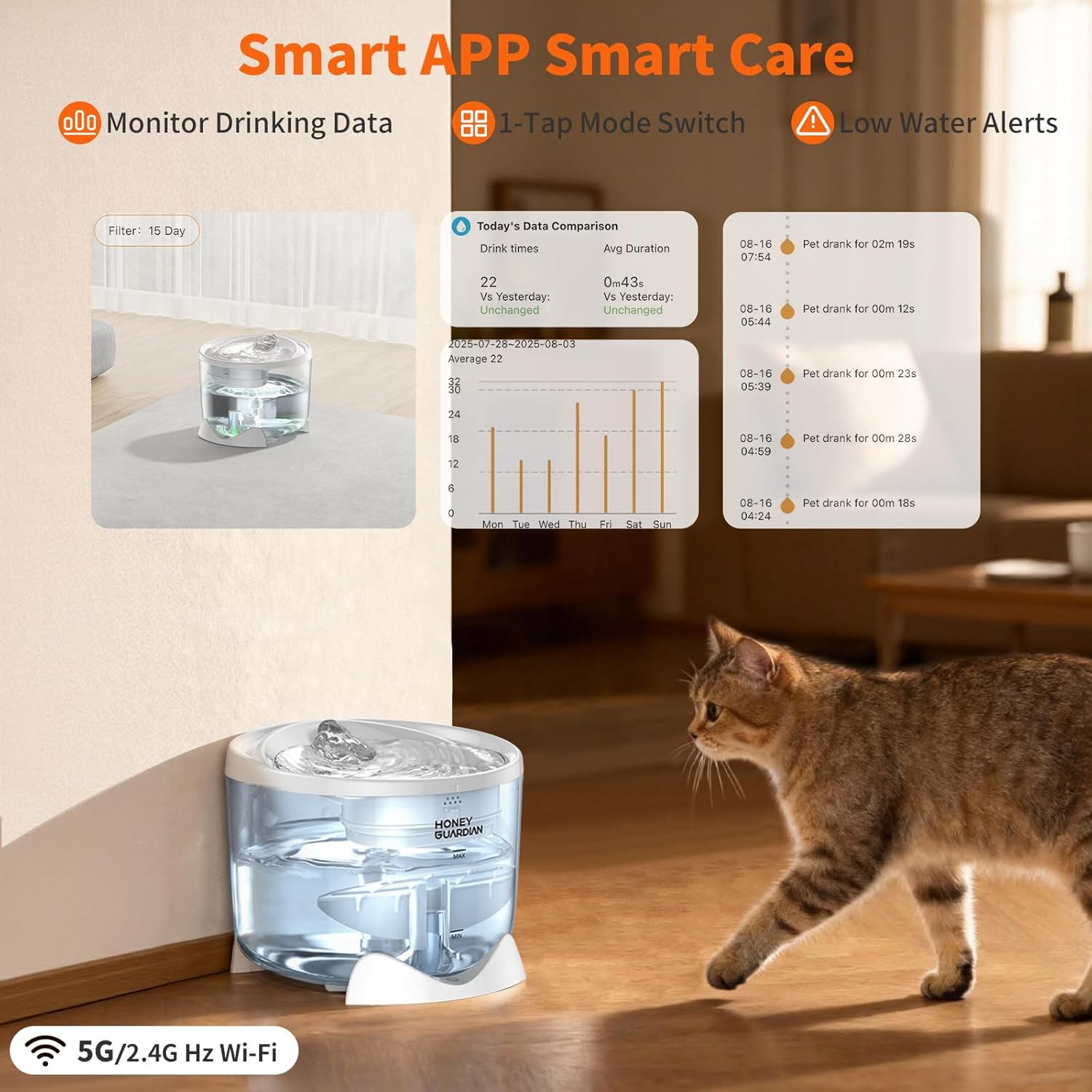
Image: An exploded view of the HoneyGuardian SW28 fountain, showing its various components for assembly.
Setup Instructions
- Unpack Components: Carefully remove all parts from the packaging.
- Rinse Filter: Rinse the filter element thoroughly under running water for several minutes to remove any loose carbon dust.
- Assemble Filter: Place the rinsed filter into its designated slot in the fountain's top tray. Ensure it is seated correctly.
- Fill Water Tank: Fill the water tank with clean tap water up to the MAX line. Do not overfill.
- Assemble Fountain: Place the top tray onto the water tank, ensuring it is securely aligned.
- Power On:
- For battery-only operation: Ensure the internal battery is charged. The fountain will operate in Smart Sensing Mode.
- For continuous power: Connect the power adapter to the fountain and plug it into a wall outlet. This enables all three operating modes and charges the internal battery.
- App Connection (Optional): Download the "HGsmart" app from your device's app store. Follow the in-app instructions to connect your fountain to your 2.4G/5G Hz Wi-Fi network for smart monitoring and control.

Image: Illustration of the dual-power system, showing the internal 2000mAh lithium battery and the option for external power adapter connection.
Operating Modes
The HoneyGuardian SW28 offers three distinct operating modes, easily switchable with a single button on the device or via the "HGsmart" app.
- Smart Sensing Mode (Unplugged): In this mode, the fountain remains dormant until a pet approaches. A sensor detects movement, activating water flow for 1 minute. This mode is ideal for conserving battery life when the fountain is not continuously plugged in.
- Continuous Flow Mode (Plug-in): When connected to power, this mode provides a constant stream of water. This is suitable for pets who prefer continuous access to fresh water.
- Intermittent Cycling Mode (Plug-in): Also requiring a power connection, this mode cycles water flow for 30 seconds, followed by a 60-second pause. This balances water freshness with energy efficiency.

Image: A diagram illustrating the three smart flow modes: Sensor Mode (unplugged), Continuous Mode (plug-in), and Intermittent Mode (plug-in), with their respective flow patterns.
Smart Light Alerts
The built-in LED indicator provides clear visual cues regarding the fountain's status:
- Green Light: Indicates normal operation.
- Red Light: Triggers a low-water alert. Refill the water tank immediately.
- Blue Light: Warns of low battery. Connect the power adapter to charge the fountain.

Image: The HoneyGuardian fountain displaying its smart light alerts, showing the different colors (Green, Red, Blue) and their corresponding meanings for operational status, low water, and low battery.
Maintenance
Regular cleaning and filter replacement are crucial for maintaining water quality and extending the life of your fountain.
Cleaning the Fountain
- Unplug and Disassemble: Always unplug the fountain from the power source before cleaning. Disassemble the top tray, filter, and water tank.
- Clean Components: Wash all parts (except the main base with electronics) with mild soap and water. Rinse thoroughly to remove any soap residue.
- Clean Pump: The maglev pump is designed for low maintenance. Periodically check for any debris and rinse it. Avoid using abrasive materials.
- Dry and Reassemble: Ensure all parts are completely dry before reassembling the fountain.
Filter Replacement
The triple filtration system requires regular filter replacement to ensure optimal water purification. It is recommended to replace the filter every 2-4 weeks, depending on the number of pets and water quality.
- Remove the old filter element from the top tray.
- Rinse the new filter element (ASIN: B0G4C923MC) under running water for several minutes.
- Place the new filter into the designated slot.
- Refill the water tank and reassemble the fountain.

Image: A visual representation of the HoneyGuardian fountain's triple filtration system, detailing the layers of high-density cotton, activated carbon, and ion exchange resin.
Troubleshooting
| Problem | Possible Cause | Solution |
|---|---|---|
| No water flow | Low water level; Power disconnected; Pump clogged; Filter clogged. | Refill water; Check power connection; Clean pump; Replace filter. |
| Fountain is noisy | Low water level; Debris in pump; Improper assembly. | Refill water; Clean pump; Reassemble fountain correctly. |
| App connectivity issues | Incorrect Wi-Fi password; Router too far; Network interference. | Verify Wi-Fi password; Move fountain closer to router; Restart router and fountain. Ensure 2.4G/5G Hz network is used. |
| Red light (low water) persists after refilling | Water level sensor obstruction or malfunction. | Ensure water level is above MIN line. Clean the sensor area. If issue persists, contact support. |
| Blue light (low battery) persists after charging | Charging cable/adapter issue; Battery malfunction. | Check power adapter and cable connection. Ensure power outlet is functional. If issue persists, contact support. |
Specifications
- Model Number: SW28
- Capacity: 2.5 Liters (approx. 84 oz)
- Noise Level: ≤23dB
- Battery: 2000mAh Lithium Battery (up to 15 days operation)
- Wi-Fi Connectivity: Dual-band (2.4G/5G Hz)
- Material: Acrylonitrile Butadiene Styrene (ABS)
- Dimensions (L x W x H): Approximately 8.27 x 8.11 x 6.65 inches
- Item Weight: 0.88 Kilograms (1.94 Pounds)
- Filtration System: High-density cotton floss, Activated carbon, Ion exchange resin
Safety Information
- For indoor use only.
- Always unplug the fountain before cleaning or performing maintenance.
- Keep the power adapter and cable away from water and pets to prevent damage or electrical hazards.
- Do not allow pets to chew on the power cord.
- Ensure the fountain is placed on a stable, level surface to prevent tipping.
- Do not operate the fountain without water.
- Keep out of reach of children during assembly and maintenance.
Warranty and Support
For warranty information, product registration, or technical support, please refer to the official HoneyGuardian website or contact their customer service directly. Please have your model number (SW28) and purchase date available when contacting support.
Contact Information: Please visit HoneyGuaridan Store on Amazon for more information or to find contact details.
Documents and downloads
Ask a question about this manual
Ask about setup, troubleshooting, compatibility, parts, safety, or missing instructions. Manuals+ will review the question and use this page’s manual context to help answer it.