
1. Introduction
The LAUNCH CRP129E Elite OBD2 Scanner is a professional diagnostic tool designed for comprehensive vehicle system analysis and maintenance reset functions. This manual provides essential information for the safe and effective operation of your device.
Key features include:
- Multi-System Diagnostics: Engine, Transmission, ABS, SRS.
- 8 Reset Services: Oil Reset, Electronic Parking Brake (EPB) Reset, Tire Pressure Monitoring System (TPMS) Reset, Steering Angle Sensor (SAS) Calibration, Battery Management System (BMS) Reset, Throttle Adaptation, Diesel Particulate Filter (DPF) Regeneration, and Injector Coding.
- Full OBD2 Functions: Read/Clear Codes, Live Data, I/M Readiness, O2 Sensor Test, On-Board Monitor Test, EVAP Test, Vehicle Information, DTC Lookup.
- AutoVIN Technology for quick vehicle identification.
- One-Click Wi-Fi Updates for lifetime free software.
- 5-inch HD Touchscreen display.
- Support for over 90 car brands and 100,000 car models (1996-2025).
2. Safety Information
Before operating this device, please read and understand all safety warnings and precautions. Failure to do so may result in injury or damage to the device or vehicle.
- Always perform automotive testing in a safe environment.
- Wear eye protection that meets ANSI standards.
- Keep clothing, hair, hands, tools, test equipment, etc., away from all moving or hot engine parts.
- Operate the vehicle in a well-ventilated work area; exhaust gases are poisonous.
- Put the transmission in PARK (for automatic transmission) or NEUTRAL (for manual transmission) and make sure the parking brake is engaged.
- Keep a fire extinguisher suitable for gasoline/chemical/electrical fires nearby.
- Do not connect or disconnect any test equipment while the ignition is on or the engine is running.
- Keep the diagnostic tool dry, clean, free from oil, water, or grease. Use a mild detergent on a clean cloth to clean the exterior of the tool, when necessary.
3. Setup
3.1 Package Contents
Verify that all items are present in the package:
- 1 x LAUNCH CRP129E Elite Unit
- 1 x OBDII Diagnostic Cable
- 1 x DC 5V Charging Cable
- 1 x Carrying Bag
- 1 x User Manual

Image: LAUNCH CRP129E Elite package contents.
3.2 Charging the Device
The CRP129E Elite is equipped with a 6100 mAh rechargeable battery. Before first use, fully charge the device using the provided DC 5V charging cable and a compatible power adapter (not included). Connect the charging cable to the device's charging port and then to a power source.
The device can operate for over 10 hours on a full charge.
3.3 Initial Power On and Wi-Fi Setup
- Press and hold the power button to turn on the device.
- Follow the on-screen prompts to select your preferred language. The device supports 11 languages including English, Spanish, French, German, Italian, Russian, Polish, Japanese, and Korean.
- Navigate to the 'Settings' menu and select 'Wi-Fi'.
- Choose your Wi-Fi network and enter the password to connect. A stable internet connection is required for software updates and certain online features.
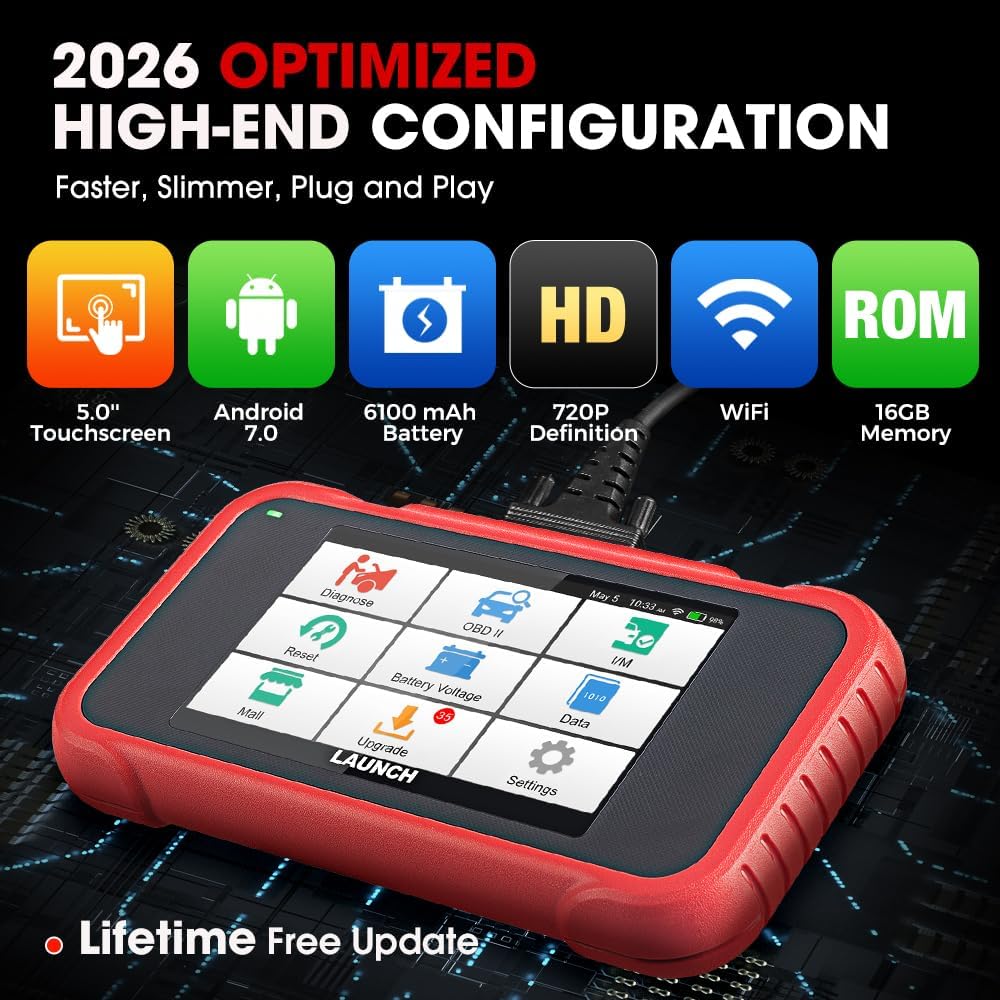
Image: LAUNCH CRP129E Elite device highlighting its optimized configuration.
3.4 Software Updates
The CRP129E Elite offers lifetime free software updates via Wi-Fi. It is recommended to update the software regularly to ensure compatibility with the latest vehicle models and to access new features and bug fixes.
- Ensure the device is connected to Wi-Fi.
- From the main menu, tap 'Upgrade' or 'Update'.
- Select the available updates and follow the on-screen instructions. Ensure the device has sufficient battery or is connected to power during the update process.

Image: Smart diagnostic features including Wi-Fi update.
4. Operating Instructions
4.1 Connecting to the Vehicle
- Locate the vehicle's 16-pin Data Link Connector (DLC), usually under the dashboard on the driver's side.
- Turn the vehicle's ignition to the 'ON' position (engine off).
- Connect the OBDII diagnostic cable to the vehicle's DLC and to the CRP129E Elite unit.
- The device will automatically power on or prompt you to do so.
4.2 System Diagnostics
The CRP129E Elite can diagnose four core vehicle systems: Engine, Transmission, Anti-lock Braking System (ABS), and Supplemental Restraint System (SRS/Airbag).
- From the main menu, select 'Diagnose'.
- The device will attempt to automatically identify the vehicle via AutoVIN (for 2006+ vehicles). If AutoVIN fails, you may need to manually select the vehicle make, model, and year.
- Choose the system you wish to diagnose (e.g., Engine, ABS).
- The scanner will read Diagnostic Trouble Codes (DTCs) and display relevant data.

Image: 4-System Diagnostic capability.
4.3 Reading and Clearing Diagnostic Trouble Codes (DTCs)
- Read Codes: After selecting a system, choose 'Read Codes' to view current, pending, and historic DTCs. The device includes a built-in DTC library for detailed explanations.
- Clear Codes: After performing necessary repairs, select 'Clear Codes' to erase DTCs from the vehicle's computer. Ensure the ignition is on and the engine is off before clearing codes. Clearing codes will turn off the Malfunction Indicator Lamp (MIL).
4.4 Live Data Stream
Monitor real-time data parameters from the vehicle's sensors and modules. This function is crucial for diagnosing intermittent problems and verifying repairs.
- Select 'Live Data' from the diagnostic menu.
- You can view data in text or graphical format. The device supports 4-in-1 live data graphing for easy comparison of multiple parameters.
- Data can be recorded, played back, and captured for later analysis.

Image: Live data graphing and diagnostic report features.
4.5 Reset Functions
The CRP129E Elite offers 8 specialized reset services. Note that function availability may vary by vehicle model.
- Oil Reset: Resets the oil life system after an oil change.
- Electronic Parking Brake (EPB) Reset: Deactivates and reactivates the brake control system to facilitate brake pad replacement.
- Tire Pressure Monitoring System (TPMS) Reset: Resets tire pressure values after tire rotation, sensor replacement, or tire change.
- Steering Angle Sensor (SAS) Calibration: Calibrates the steering angle sensor after replacement or alignment.
- Battery Management System (BMS) Reset: Registers the new battery to the ECU after replacement.
- Throttle Adaptation: Initializes the throttle actuators to the default state after cleaning or replacement.
- Diesel Particulate Filter (DPF) Regeneration: Clears particulate matter from the DPF filter to stabilize filter performance.
- Injector Coding: Codes new injector numbers to the ECU for accurate fuel injection control.

Image: Overview of 8 Hot Services.
4.6 OBD2 Full Functions
The CRP129E Elite supports all 10 OBD2 test modes, helping you ensure your vehicle is ready for emissions testing.
- Read Codes
- Clear Codes
- I/M Readiness
- DTC Lookup
- Live Data
- On-Board Monitor Test (Mode $6)
- Freeze Frame
- EVAP Test (Mode $8)
- O2 Sensor Test
- Vehicle Information

Image: 10 OBD2 Full Functions.
4.7 Diagnostic Report
After completing a diagnostic session, the device can generate an automatic diagnostic report. This report can be saved to the cloud, shared, downloaded, and printed for further analysis or record-keeping.
5. Maintenance
- Cleaning: Use a soft, damp cloth to clean the device. Avoid abrasive cleaners or solvents.
- Software Updates: Regularly update the device software via Wi-Fi to ensure optimal performance and access to the latest vehicle data and functions.
- Battery Care: To prolong battery life, avoid fully discharging the battery frequently. Store the device in a cool, dry place when not in use.
- Storage: Store the device and its accessories in the provided carrying bag to protect them from dust and damage.
6. Troubleshooting
6.1 Common Issues and Solutions
- Device does not power on: Ensure the battery is charged. If connected to the vehicle, verify the OBDII connection is secure and the vehicle's ignition is on.
- Communication error with vehicle:
- Check that the OBDII cable is securely connected to both the device and the vehicle's DLC.
- Verify the vehicle's ignition is in the 'ON' position.
- Ensure the vehicle is OBDII compliant (most vehicles 1996 and newer).
- Try diagnosing a different vehicle to rule out a vehicle-specific issue.
- Incompatibility issues: Not all functions or vehicle models are universally supported. If you encounter incompatibility, provide your vehicle's model, year, and VIN to technical support for assistance.
- Software update failure: Ensure a stable Wi-Fi connection and sufficient battery charge. Restart the device and try the update again.
6.2 Technical Support
For any technical issues or questions, please contact the LAUNCH technical support team:
- Email: kingbolen05@hotmail.com
- Online response: 24/7
7. Specifications
| Brand | LAUNCH |
| Model | CRP129E (Creader Professional 129E V3) |
| Operating System | Android 7.0 |
| Screen Size | 5 inches (720P HD Touchscreen) |
| Battery | 6100 mAh rechargeable battery |
| Internal Memory | 16GB |
| Dimensions (L x W x H) | 27.3 x 8.2 x 22.1 cm (10.75 x 3.23 x 8.7 inches) |
| Supported Languages | English, Spanish, French, German, Italian, Russian, Polish, Japanese, Korean, etc. (11 languages) |
| Vehicle Coverage | 72+ global car brands (1996-2025), including 12V passenger cars, light trucks, SUVs, minivans. (Does not support 24V heavy trucks). |
| GTIN / UPC | 884508005268, 884508005275 |

Image: Rear view of the LAUNCH CRP129E Elite with product details.
8. Warranty and Support
LAUNCH provides comprehensive support for the CRP129E Elite OBD2 Scanner:
- Warranty: 5-year commitment.
- Returns & Replacement: 60-day return and replacement policy.
- Technical Assistance: Lifetime technical support.
- Online Support: 24/7 online response for inquiries.
For support, please contact: kingbolen05@hotmail.com


