
1. Introduction
This manual provides instructions for the safe and effective installation, operation, and maintenance of the John Deere Category 1 3-Point Hitch Kit, model BUC10169. This kit is designed to facilitate the attachment of rear-mounted equipment to compatible John Deere tractors, enhancing their versatility for various agricultural and landscaping tasks.
2. Safety Information
Always read and understand all safety warnings and instructions before operating any equipment. Failure to follow these instructions may result in serious injury or death.
- Ensure the tractor is turned off and the parking brake is engaged before performing any installation or maintenance.
- Wear appropriate personal protective equipment (PPE), including safety glasses and gloves, during installation and operation.
- Be aware of pinch points and moving parts during operation of the hitch and attached implements.
- Front weights may be needed to stabilize steering when using rear-mounted implements. Refer to your tractor's operator manual for specific recommendations.
- The depth stop must be locked up when transporting attachments to prevent accidental lowering during transit.
- Keep bystanders clear of the work area during operation.
3. Package Contents
The John Deere Category 1 3-Point Hitch Kit (BUC10169) includes all necessary components for assembly and attachment to your tractor. Before beginning installation, carefully unpack all items and verify that all parts are present and undamaged. Refer to the parts list provided with your kit for a complete inventory.
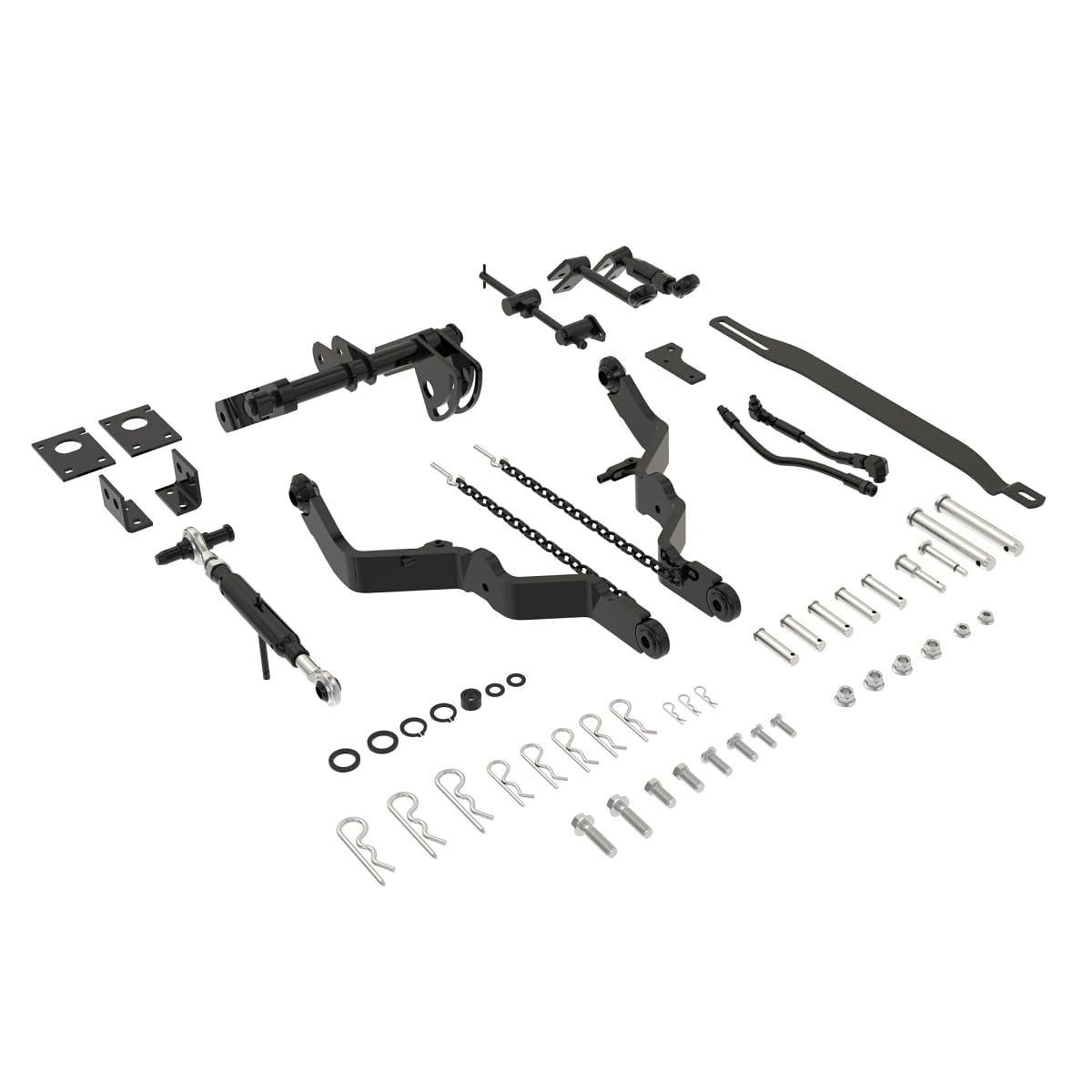
Image: The John Deere Category 1 3-Point Hitch Kit, showing its main components including the hitch arms and adjustment mechanisms.
4. Installation
4.1 Attaching the 3-Point Hitch Kit
The 3-point hitch provides a convenient means of attaching rear-mounted equipment to the tractor. Follow these steps for proper installation:
- Position the tractor on a level surface and engage the parking brake. Turn off the engine and remove the key.
- Carefully align the hitch components with the tractor's designated mounting points.
- Securely fasten all bolts and pins according to the torque specifications outlined in your tractor's service manual. Ensure all connections are tight and secure.
- Connect any necessary hydraulic lines (if applicable) ensuring a secure fit and checking for any leaks after connection.
4.2 Compatibility
This John Deere Category 1 3-Point Hitch Kit (BUC10169) is compatible with the following John Deere tractor models:
- X465, X475, X485, X485SE, X495
- X575, X585, X585SE, X595, X595SE
- X700, X720, X720SE, X724, X728, X728SE, X729
- X740, X744, X748, X748SE, X749
The kit is also compatible with 60-inch 7-Iron™ Mower decks.
Note: Front weights may be needed to stabilize steering when using rear-mounted implements. Consult your tractor's operator manual for specific guidance and recommendations.
5. Operation
5.1 Raising and Lowering Equipment
The hitch is raised and lowered using the tractor's hydraulic control lever. Ensure the tractor is running and the hydraulic system is engaged.
- Start the tractor engine and ensure the hydraulic system is operational.
- Use the hydraulic control lever to smoothly raise or lower the attached implement to the desired working height.
5.2 Leveling and Tilting Equipment
The right screw-type draft arm height adjuster makes it easy to level or tilt three-point-hitch-mounted equipment for optimal performance.
- Adjust the screw-type mechanism on the right draft arm to achieve the desired level or tilt for the implement.
- Ensure the implement is stable and correctly positioned before beginning operation.
5.3 Depth Stop Adjustment
The hitch is equipped with a depth stop that works independently of the tractor's mower cut height adjustment, offering added convenience and versatility.
- Adjust the depth stop to limit how far the implement can be lowered into the ground.
- Important: The depth stop must be locked up when transporting attachments to prevent accidental lowering during transit, which could cause damage or injury.
6. Maintenance
Regular maintenance ensures the longevity, reliability, and safe operation of your 3-point hitch kit. Perform the following checks periodically:
- Periodically inspect all pins, bolts, and connections for wear, damage, or looseness. Tighten fasteners to specifications as necessary.
- Lubricate pivot points and moving parts according to your tractor's maintenance schedule or as needed, using appropriate lubricants.
- Clean the hitch components regularly to prevent dirt, debris, and corrosion buildup.
- Check hydraulic lines (if applicable) for leaks, cracks, or other signs of damage. Replace damaged lines immediately.
7. Troubleshooting
7.1 Hitch Not Raising/Lowering
- Check the tractor's hydraulic fluid level and ensure it is within the recommended range.
- Ensure the hydraulic control lever is fully engaged and functioning correctly.
- Inspect hydraulic lines for kinks, blockages, or damage that could impede fluid flow.
7.2 Implement Not Level
- Adjust the right screw-type draft arm height adjuster to correct the implement's level.
- Verify that the implement itself is correctly attached to the hitch and not damaged or bent.
For further assistance or issues not covered here, contact John Deere customer support or an authorized John Deere dealer.
8. Specifications
- Model: BUC10169
- Type: Category 1 3-Point Hitch Kit
- Product Dimensions: 30 x 11.4 x 8.7 inches
- Item Weight: 65.7 pounds
- Manufacturer: John Deere
9. Warranty and Support
For detailed warranty information regarding your John Deere Category 1 3-Point Hitch Kit (BUC10169), please refer to the official John Deere website or contact your authorized John Deere dealer. It is recommended to keep your purchase receipt for any warranty claims.
For additional product information, support, or to locate a dealer, you can visit the John Deere Store online.


