
Introduction
Thank you for choosing the Himigo LED Desk Lamp HM01CA NEW. This manual provides essential information for the safe and efficient operation of your new desk lamp. Designed with eye-caring LED technology, this lamp offers versatile lighting options, including stepless dimming, multiple color modes, and convenient features like a USB charging port, touch controls, memory function, and an auto-off timer. Please read this manual thoroughly before use and retain it for future reference.
Safety Information
- Ensure the power adapter and cable are not damaged before use.
- Do not disassemble or modify the lamp. This may cause damage or electric shock.
- Keep the lamp away from water or other liquids to prevent electric shock.
- Avoid placing the lamp in high-temperature or high-humidity environments.
- Clean the lamp with a soft, dry cloth. Do not use abrasive cleaners or solvents.
- Unplug the lamp from the power source before cleaning or if it will not be used for an extended period.
Package Contents
Please check the package for the following items:
- Himigo LED Desk Lamp
- Charging Line (USB cable)
- Instruction Manual (this document)
- Power Adapter
Product Overview
The Himigo LED Desk Lamp features a sleek, modern design with an adjustable arm and head for optimal light positioning. The base includes a touch-sensitive control panel and a USB charging port.
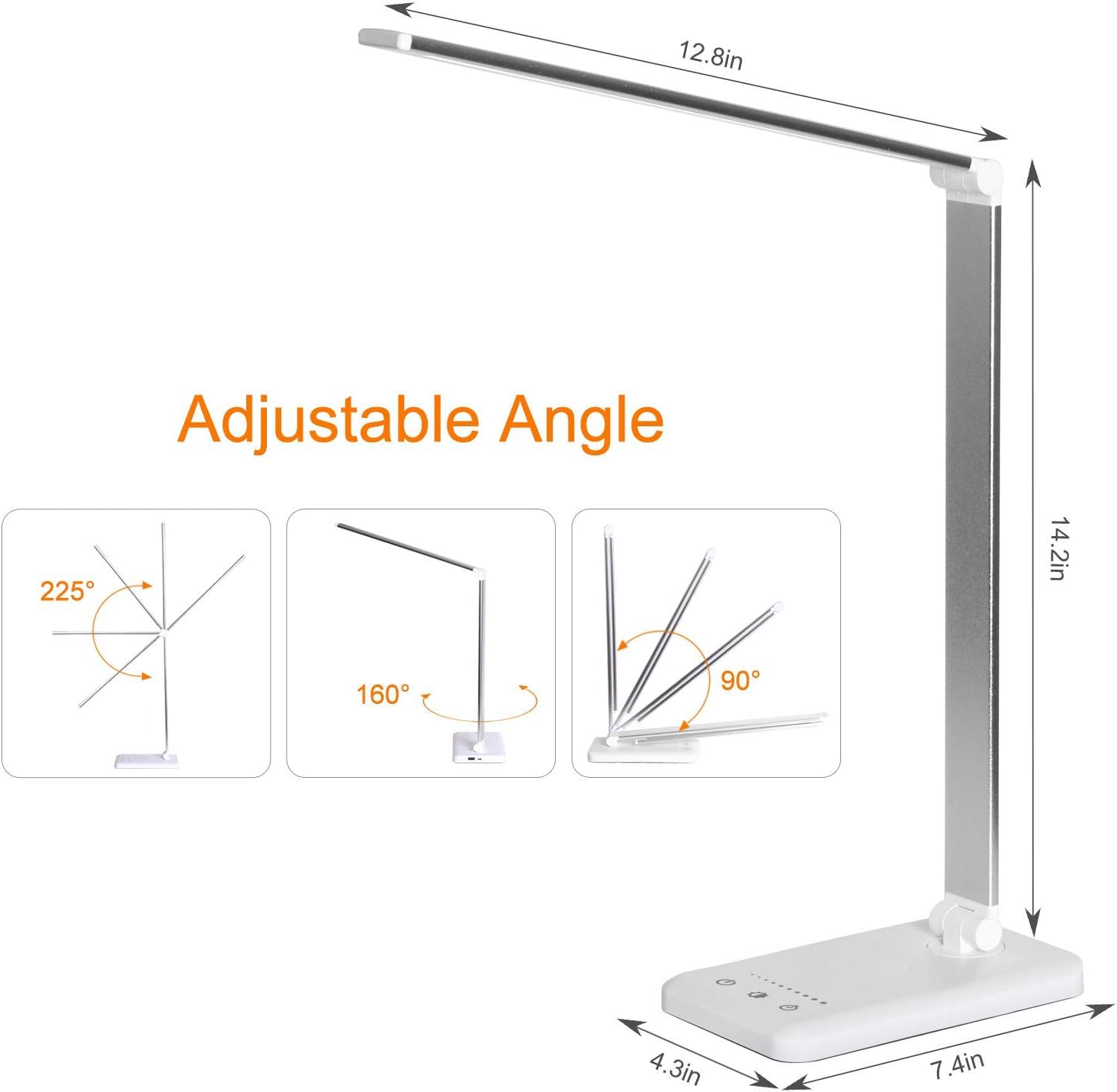
Figure 1: The lamp's adjustable arm and head allow for various lighting angles, including 225° flexibility in the arm and 80° rotation at the base axis.

Figure 2: Illustration of the lamp's 5 distinct color temperatures and 5 brightness levels, providing a light for all occasions.
Setup
- Unpack: Carefully remove all components from the packaging.
- Position: Place the lamp base on a stable, flat surface such as a desk or table.
- Connect Power: Insert the small end of the charging line into the power input port on the back of the lamp base. Connect the larger end of the charging line to the provided power adapter, then plug the adapter into a standard wall outlet.
- Adjust: Adjust the lamp arm and head to your desired position. The lamp features a 225° flexible arm and an 80° base axis for optimal positioning.
Operating Instructions
The Himigo LED Desk Lamp features a touch-sensitive control panel on its base for easy operation.

Figure 3: The control panel offers Night Light Function, 30/60-Minute Timer, and a feature to Save Your Favorite Illumination settings.
- Power On/Off: Tap the power icon (⏻) on the touch control panel to turn the lamp on or off.
- Brightness Adjustment (Stepless Dimming): Slide your finger along the brightness control bar on the base to adjust the light intensity. This allows for stepless dimming from minimum to maximum brightness.
- Color Mode Selection: Tap the mode icon (M) to cycle through the 5 available color temperature modes (e.g., warm white, natural white, cool white).
- Timer Function: Tap the timer icon (L) to activate the auto-off timer. Each tap cycles between 30-minute and 60-minute settings. The lamp will automatically turn off after the selected duration.
- Memory Function: The lamp is equipped with a memory function that recalls your last used brightness and color mode settings when turned back on.
- USB Charging Port: The lamp includes a USB-A charging port on the back of the base. Connect your USB-compatible devices (e.g., smartphone, tablet) to this port for convenient charging while the lamp is powered on.
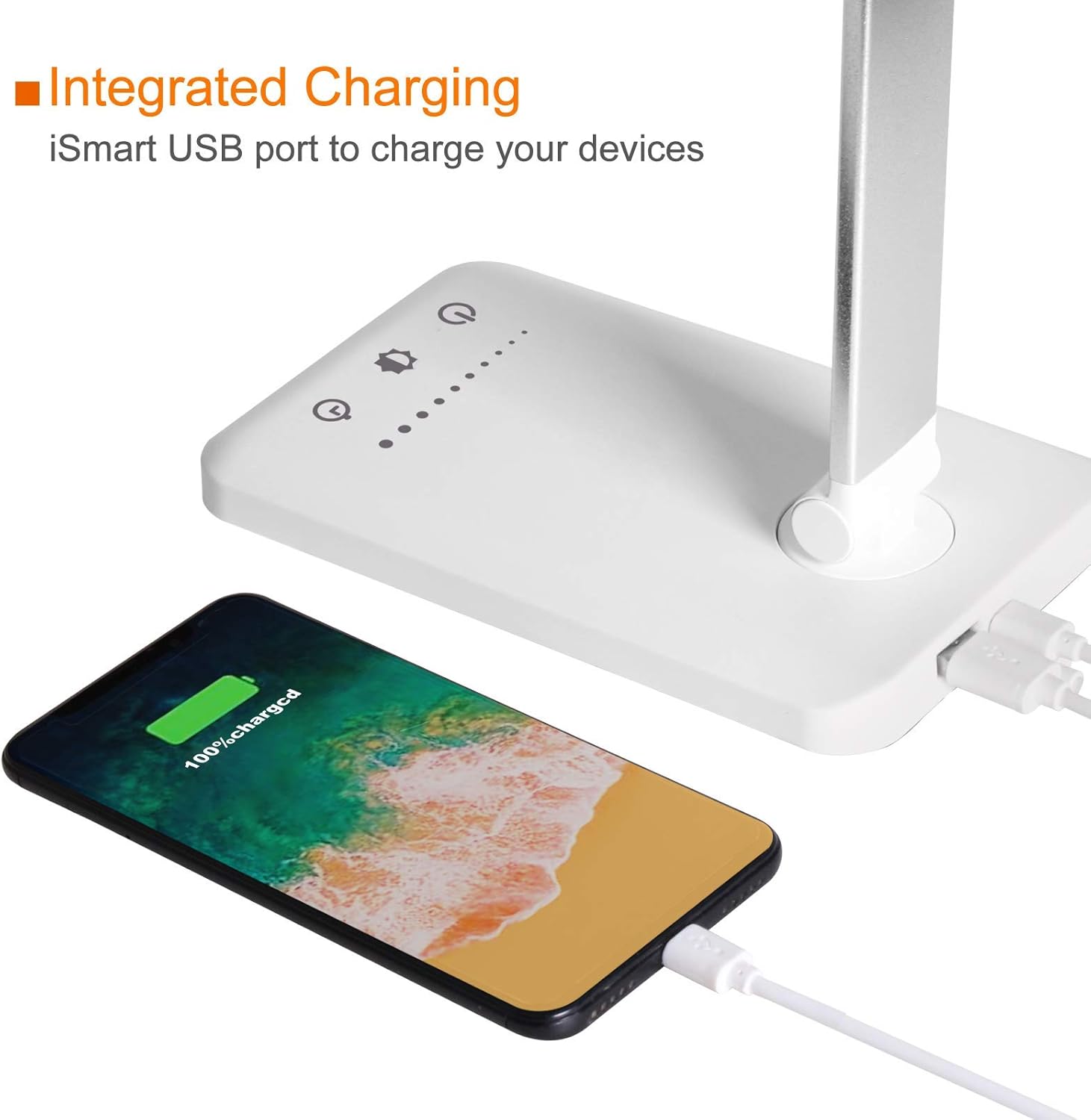
Figure 4: The integrated USB port allows for convenient charging of your devices directly from the lamp's base.
Maintenance
- Cleaning: Ensure the lamp is unplugged before cleaning. Use a soft, dry, lint-free cloth to wipe down the lamp's surfaces. Do not use liquid cleaners, sprays, or abrasive materials.
- Storage: If storing the lamp for an extended period, ensure it is clean and dry. Fold the lamp into its compact position and store it in a cool, dry place away from direct sunlight.
Troubleshooting
| Problem | Possible Cause | Solution |
|---|---|---|
| Lamp does not turn on. | Power cable not properly connected or power outlet issue. | Check if the power cable is securely plugged into the lamp and the wall outlet. Try a different outlet. |
| Light flickers. | Unstable power supply or loose connection. | Ensure the power connection is stable. Try plugging into a different power source. If flickering persists, contact customer support. |
| USB charging port not working. | Lamp not powered on or device incompatibility. | Ensure the lamp is turned on. Check if your device is compatible with USB-A charging. Try a different USB cable. |
| Cannot adjust brightness/color. | Control panel unresponsive. | Ensure your finger is making full contact with the touch-sensitive controls. Unplug the lamp for 30 seconds and plug it back in to reset. |
Specifications
| Feature | Detail |
|---|---|
| Model Number | HM01CA NEW |
| Brand | Himigo |
| Light Source Type | LED |
| Wattage | 6 watts |
| Brightness | 450 Lumens |
| Voltage | 5 Volts |
| Control Method | Touch-sensitive control |
| Special Features | 30/60 min Auto Timer, 5 Lighting Modes & 5 Brightness, Dimmable, Foldable & Portable, USB Powered |
| Product Dimensions | 7.09"D x 12.8"W x 14.2"H |
| Item Weight | 1.63 pounds |
| Material | Aluminum, Plastic |
| Cable Length | 1 Meter |
| Room Type | Office |
| Indoor/Outdoor Usage | Indoor |
Warranty and Support
The Himigo LED Desk Lamp HM01CA NEW comes with a 12-month warranty. For any quality problems or technical assistance, please contact Himigo customer support. You can typically find contact information on the product packaging or the official Himigo website. Please have your model number (HM01CA NEW) and proof of purchase ready when contacting support.