
Important Safety Instructions
WARNING: Read all safety warnings and instructions. Failure to follow the warnings and instructions may result in electric shock, fire, and/or serious injury.
- Always wear eye protection when operating this tool. Safety glasses or goggles are essential.
- Wear long pants, long sleeves, and sturdy footwear to protect against debris.
- Keep bystanders, children, and pets at least 50 feet (15 meters) away from the operating area.
- Inspect the area before operation. Remove any objects that could be thrown by the cutting line.
- Do not operate in wet conditions. Avoid using the tool in rain or damp environments.
- Ensure the extension cord is suitable for outdoor use and in good condition. Prevent cord disconnection using the cord retention system.
- Disconnect the tool from the power supply before making any adjustments, cleaning, or when not in use.
- Do not overreach. Maintain proper footing and balance at all times.
- Never operate the tool without the guard in place.
Package Contents
Verify that all items listed below are included in your package:
- 1 x BLACK+DECKER ST8600 13" String Trimmer/Edger
- 1 x AF-100 Spool (pre-installed or separate)
- 1 x Guard
- 1 x Auxiliary Handle
Assembly and Setup
The BLACK+DECKER ST8600 requires minimal assembly before first use.
1. Attaching the Guard
- Align the guard with the slots on the trimmer head.
- Push the guard firmly until it clicks into place. Ensure it is securely fastened.
- Use a Phillips head screwdriver to secure any provided screws through the guard into the trimmer head.
2. Attaching the Auxiliary Handle
- Loosen the knob on the auxiliary handle.
- Slide the handle onto the shaft to a comfortable operating position.
- Tighten the knob securely to lock the handle in place.

This image displays the complete BLACK+DECKER ST8600 string trimmer and edger, showcasing its orange and black design with the auxiliary handle and guard attached.
Operating Instructions
1. Connecting to Power
- Ensure the trimmer is switched off.
- Plug a suitable outdoor extension cord into the trimmer's power inlet.
- Utilize the cord retention system by looping the extension cord through the designated slot on the handle to prevent accidental disconnection during operation.
- Plug the extension cord into a grounded outdoor outlet.
2. Starting and Stopping
- To start: Press the trigger switch.
- To stop: Release the trigger switch.
3. Trimming Operation
- Hold the trimmer firmly with both hands.
- Maintain a comfortable distance from the cutting head.
- Swing the trimmer from side to side, cutting small amounts of grass with each pass.
- Avoid hitting hard objects, as this can damage the line and the tool.
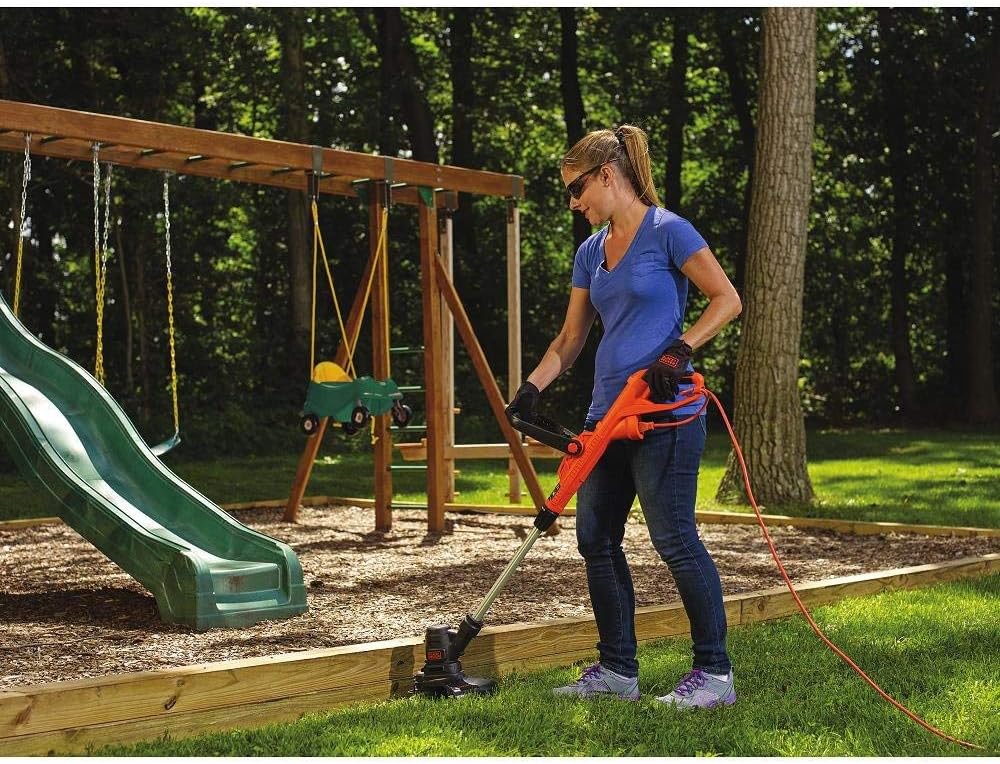
A person is shown operating the BLACK+DECKER ST8600 string trimmer in a grassy area, demonstrating its use for trimming around obstacles and utilizing the cord retention system.
4. Edging Operation
- To convert to edger mode, rotate the trimmer head 180 degrees. Refer to your specific model's mechanism for rotation.
- Position the edger guide wheel along the edge of the pavement or garden bed.
- Walk slowly, guiding the trimmer along the desired edge.

This image shows a person using the BLACK+DECKER ST8600 in edger mode, creating a clean line along a garden bed.

A close-up view of the BLACK+DECKER ST8600 trimmer head, illustrating its function as an edger along a paved surface.

The trimmer head of the BLACK+DECKER ST8600 is shown precisely edging along a wooden landscape border, demonstrating its versatility.
5. Automatic Feed Spool (AFS)
The AFS system automatically feeds new trimmer line as needed when the existing line wears down. There is no need to bump the head to advance the line.
6. Adjustable Height and Pivoting Handle
- The shaft length can be adjusted to suit your height for comfortable operation. Loosen the collar, adjust, and retighten.
- The auxiliary handle can be pivoted to various positions for optimal balance and control. Loosen the handle knob, adjust, and retighten.

A user holds the BLACK+DECKER ST8600, with the 13-inch cutting width clearly visible on the guard, indicating the tool's cutting capacity and demonstrating the adjustable handle.
Maintenance
Regular maintenance ensures optimal performance and extends the life of your tool.
1. Cleaning
- WARNING: Disconnect the power cord before cleaning.
- Clean the tool with a damp cloth and mild soap. Do not use harsh chemicals or abrasive cleaners.
- Remove any grass clippings or debris from the guard and air vents to prevent overheating.
2. Replacing the Trimmer Line Spool
- WARNING: Disconnect the power cord.
- Press the tabs on the spool cap and remove it.
- Remove the empty spool.
- Insert a new BLACK+DECKER AF-100 replacement spool, ensuring the line is threaded through the eyelet.
- Replace the spool cap, ensuring it clicks securely into place.
3. Storage
- Store the tool in a dry, secure location out of reach of children.
- Avoid storing in direct sunlight or extreme temperatures.
Troubleshooting
If your BLACK+DECKER ST8600 is not operating correctly, consult the table below for common issues and solutions.
| Problem | Possible Cause | Solution |
|---|---|---|
| Tool does not start. | No power supply; loose connection; faulty switch. | Check power outlet and extension cord. Ensure connections are secure. If problem persists, contact service. |
| Trimmer line does not feed automatically. | Spool empty; line tangled; debris in feed mechanism. | Replace spool. Disconnect power and clear any tangles or debris from the spool area. |
| Motor runs but line does not spin. | Spool not installed correctly; line broken inside head. | Disconnect power. Reinstall spool correctly. Replace spool if line is broken. |
| Excessive vibration. | Damaged cutting line; loose components. | Replace cutting line. Check all fasteners and tighten if necessary. |
Specifications
| Feature | Detail |
|---|---|
| Brand | BLACK+DECKER |
| Model | ST8600 |
| Power Source | Corded Electric |
| Motor Amperage | 5 Amp |
| Cutting Width | 13 Inches |
| Assembly Required | Yes |
| Product Dimensions | 8 x 36 x 4 inches |
| Item Weight | 6.44 pounds |
| UPC | 723548801136 |
Warranty and Support
BLACK+DECKER products are manufactured to high quality standards. For specific warranty information, please refer to the warranty card included with your product or visit the official BLACK+DECKER website.
If you require assistance with your product, have questions about its operation, or need to order replacement parts, please contact BLACK+DECKER customer support. Contact details can typically be found on the product packaging or the official brand website.