
Introduction
This manual provides detailed instructions for the setup, operation, maintenance, and troubleshooting of your Logitech G604 LIGHTSPEED Gaming Mouse. Designed for versatility and high-performance, the G604 features advanced wireless technology and a highly accurate sensor to enhance your gaming and productivity experience.
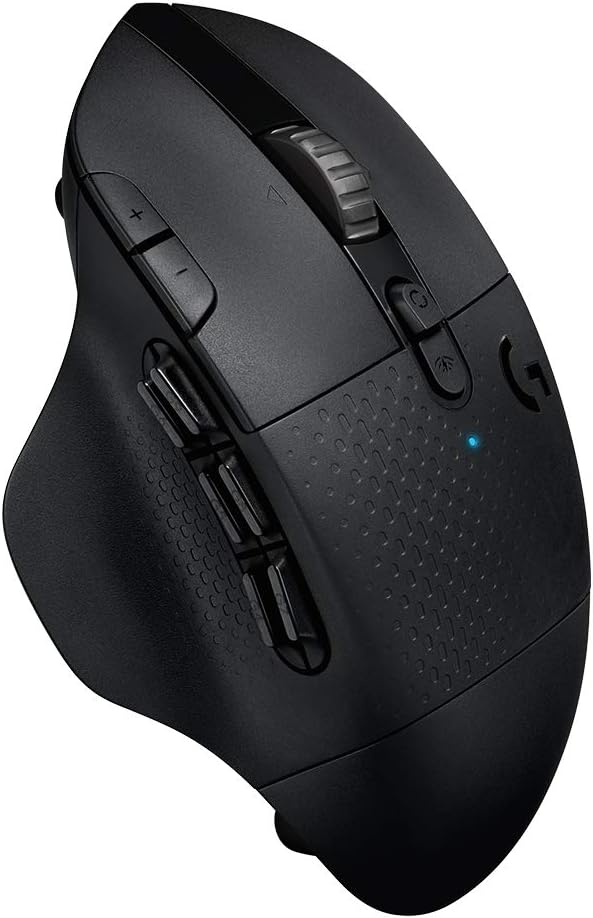
Image: The Logitech G604 LIGHTSPEED Gaming Mouse, showcasing its ergonomic design and multiple buttons.
Setup
Package Contents
- Logitech G604 LIGHTSPEED Gaming Mouse
- LIGHTSPEED USB Receiver
- USB Receiver Extender Cable
- 1 AA Battery (pre-installed)
Battery Installation
The G604 mouse requires one AA battery for operation. The battery compartment is located on the underside of the mouse. To install or replace the battery:
- Gently lift the top cover of the mouse.
- Insert one AA battery into the compartment, ensuring correct polarity (+/-).
- Replace the top cover, ensuring it clicks securely into place.

Image: The underside of the Logitech G604 mouse with the battery compartment open, showing the placement of a single AA battery.
Connecting Your Mouse
The G604 offers two connectivity modes: LIGHTSPEED Wireless and Bluetooth. You can switch between these modes using the button located near the scroll wheel.
LIGHTSPEED Wireless Connection
- Turn on the mouse using the power switch on the underside.
- Insert the LIGHTSPEED USB receiver into an available USB port on your computer. For optimal signal strength, use the included extender cable to position the receiver closer to the mouse.
- Ensure the mouse is set to LIGHTSPEED mode (indicated by a blue LED). The mouse should automatically connect.
Bluetooth Connection
- Turn on the mouse using the power switch on the underside.
- Press the connectivity mode button near the scroll wheel to switch to Bluetooth mode (indicated by a flashing blue LED).
- On your computer or device, navigate to Bluetooth settings and select "Logitech G604" from the list of available devices to pair.

Image: A close-up of the Logitech G604 mouse showing the dual connectivity switch, allowing users to toggle between LIGHTSPEED and Bluetooth wireless modes.
Software Installation (Logitech G HUB)
To unlock the full potential of your G604 mouse, including programmable controls and advanced sensor settings, download and install the Logitech G HUB software from the official Logitech website. This software allows for extensive customization of button assignments, DPI settings, and more.
Operating Your Mouse
Programmable Controls
The G604 features 15 programmable controls, including 6 thumb buttons. These can be customized using the Logitech G HUB software to perform various functions, macros, or key binds, enhancing your control in games and applications.

Image: The Logitech G604 mouse highlighting its 15 programmable controls, including the six distinct thumb buttons on the side.
HERO 25K Sensor
Equipped with the revolutionary HERO 25K sensor, the G604 provides exceptional tracking accuracy (up to 25,600 DPI) and class-leading power efficiency. This sensor ensures precise and responsive cursor movement without smoothing, filtering, or acceleration.

Image: The underside of the Logitech G604 mouse, emphasizing the HERO 25K sensor and its advanced capabilities.
Dual-Mode Hyperfast Scroll Wheel
The durable metal scroll wheel offers dual-mode functionality: hyperfast and ratcheted scrolling. A button behind the scroll wheel allows you to toggle between these modes. Hyperfast mode enables rapid scrolling through long documents or web pages, while ratcheted mode provides precise, click-by-click scrolling.

Image: A side view of the Logitech G604 mouse, highlighting its hyperfast metal scroll wheel and the button to switch between scrolling modes.
Maintenance
Cleaning
To maintain optimal performance and hygiene, regularly clean your mouse. Use a soft, lint-free cloth slightly dampened with water or a mild cleaning solution. Avoid harsh chemicals or abrasive materials. Ensure no liquid enters the mouse's internal components.
Battery Replacement
When the mouse's performance degrades or the battery indicator (if available) signals low power, replace the AA battery as described in the "Battery Installation" section. The efficient HERO sensor allows for up to 240 hours of gaming in LIGHTSPEED mode or up to 5.5 months in Bluetooth mode on a single AA battery.
Troubleshooting
Connectivity Issues
- Mouse not responding: Ensure the mouse is powered on and the battery is correctly installed. Check the connectivity mode (LIGHTSPEED or Bluetooth) matches your intended connection.
- LIGHTSPEED connection lost: Ensure the USB receiver is securely plugged into a working USB port. Try using the extender cable to bring the receiver closer to the mouse. Re-pair the mouse using the Logitech G HUB pairing tool if necessary.
- Bluetooth connection issues: Ensure Bluetooth is enabled on your device. Remove the mouse from your device's paired Bluetooth list and attempt to re-pair it.
Software Not Recognizing Mouse
- Ensure Logitech G HUB software is up to date.
- Restart your computer and the mouse.
- Try connecting the mouse to a different USB port.
- If the device fails to pair or is unresponsive, it may have an incompatible firmware. Connect the mouse via a USB cable (if applicable, though G604 is wireless) and check for firmware updates through Logitech G HUB.
Specifications
| Feature | Detail |
|---|---|
| Brand | Logitech G |
| Model Number | 910-005622 |
| Connectivity Technology | Bluetooth, LIGHTSPEED Wireless |
| Movement Detection Technology | Optical (HERO 25K Sensor) |
| Max DPI | 25,600 DPI |
| Programmable Controls | 15 (including 6 thumb buttons) |
| Battery Life | Up to 240 hours (LIGHTSPEED), 5.5 months (Bluetooth) |
| Power Source | 1 AA Battery (included) |
| Item Weight | 8.8 ounces |
| Product Dimensions | 1.77 x 3.14 x 5.11 inches |
| Hardware Platform | Mac, PC |
Warranty and Support
Warranty Information
The Logitech G604 LIGHTSPEED Gaming Mouse comes with a 2 Years Limited Hardware Warranty. Please retain your proof of purchase for warranty claims.
Customer Support
For further assistance, technical support, or warranty inquiries, please visit the official Logitech G support website or contact their customer service. You can find detailed support resources, FAQs, and driver downloads on their website.


