1. Introduction
This manual provides essential information for the safe and effective use of your Pioneer FH-8500DVS 6.8-inch Display Audio System. Please read it thoroughly before installation and operation, and keep it for future reference.
The FH-8500DVS is a 2DIN display audio system offering a wide range of media playback options and smartphone integration. Key features include Apple CarPlay, Android Auto, CD/DVD playback, USB connectivity, Bluetooth, AUX input, and a built-in DSP for enhanced audio control.

Image 1.1: Front view of the Pioneer FH-8500DVS Display Audio System.
2. Safety Information
Always prioritize safety. Improper installation or operation can lead to accidents or injury. Observe the following precautions:
- Do not operate the system in a way that distracts you from driving.
- Ensure proper wiring and connections to prevent electrical shorts or damage.
- Consult a professional for installation if you are unsure about any steps.
- Keep the volume at a level that allows you to hear outside traffic sounds.
- Avoid exposing the unit to extreme temperatures or moisture.
3. Package Contents
Verify that all items are present in the package:
- Pioneer FH-8500DVS Main Unit
- Code Unit (1 pc)
- Mounting Screws (1 set)
- USB Connection Cable (1.5m) (1 pc)
- Hands-Free Calling Microphone (1 pc)
- Remote Control (1 pc)
- Instruction Manual (this document)
- Warranty Card

Image 3.1: Pioneer FH-8500DVS product packaging, showing the unit and included accessories.
4. Setup
4.1 Installation
The FH-8500DVS is designed for 2DIN installation. Ensure your vehicle has a compatible mounting space. Professional installation is recommended.
- Connect the power and speaker wires according to the wiring diagram provided in the separate installation guide.
- Secure the main unit using the supplied mounting screws.
- Connect the USB cable, hands-free microphone, and any other external devices.
4.2 Initial Configuration
Upon first power-on, the system may prompt you to set basic preferences such as language and time. Follow the on-screen instructions.
5. Operating Instructions
5.1 Basic Controls
The unit features a 6.8-inch wide VGA touchscreen display and physical buttons for common functions.

Image 5.1: Angled view of the FH-8500DVS, highlighting the touchscreen and physical controls.
5.2 Remote Control
Use the included remote control (model CXE7073) for convenient operation of various functions.
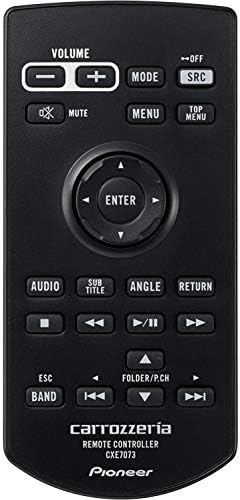
Image 5.2: The included remote control for the FH-8500DVS.
5.3 Apple CarPlay and Android Auto
Connect your iPhone or Android smartphone via USB to access Apple CarPlay or Android Auto. These platforms allow you to use compatible apps for navigation, music, messaging, and more directly on the unit's display.
- Apple CarPlay: Requires iPhone with iOS 7.1 or later.
- Android Auto: Requires Android smartphone with Android OS 5.0 or later and the Android Auto app installed.

Image 5.3: iPhone connected for Apple CarPlay functionality.

Image 5.4: Android smartphone connected for Android Auto functionality.
5.4 Media Playback
The FH-8500DVS supports various media sources:
- DVD/CD: Insert discs into the slot. Supports DVD-R/RW, CD-R/RW.
- USB: Connect USB devices (flash drives, portable HDDs) to the USB port. Supports various audio and video formats, including FLAC (up to 192kHz/24bit via USB).
- Bluetooth Audio: Stream music wirelessly from your smartphone or other Bluetooth-enabled devices. Supports A2DP/AVRCP profiles.
- AUX: Connect external audio players via the 3.5mm AUX input.
- Radio: Built-in FM/AM tuner.

Image 5.5: The FH-8500DVS supports diverse media formats for music and movies.
5.5 Audio Settings (DSP)
Utilize the integrated Digital Signal Processor (DSP) to fine-tune your audio experience. Access settings for equalizer, time alignment, and crossover adjustments.

Image 5.6: Time alignment settings screen for optimizing sound staging.

Image 5.7: Equalizer settings screen for custom sound profiles.
6. Maintenance
To ensure longevity and optimal performance of your FH-8500DVS unit:
- Cleaning the Screen: Use a soft, dry cloth to gently wipe the touchscreen. For stubborn smudges, slightly dampen the cloth with water or a screen cleaner designed for electronics. Avoid abrasive materials or harsh chemicals.
- Cleaning the Unit: Wipe the exterior of the unit with a soft, dry cloth. Do not allow liquids to enter the unit.
- Disc Care: Handle CDs and DVDs by their edges. Keep them clean and free of scratches.
- Firmware Updates: Periodically check the Pioneer website for available firmware updates to ensure the best performance and compatibility.
7. Troubleshooting
If you encounter issues, refer to the following common problems and solutions:
| Problem | Possible Cause | Solution |
|---|---|---|
| No power | Incorrect wiring, blown fuse | Check power connections, inspect vehicle's fuse box. |
| No sound | Volume too low, incorrect source selected, speaker wiring issue | Increase volume, select correct input source, check speaker connections. |
| Apple CarPlay/Android Auto not connecting | Faulty USB cable, incompatible phone OS, app not installed | Use a certified USB cable, ensure phone OS is up-to-date, install necessary apps. |
| Disc playback issues | Dirty or scratched disc, incompatible disc format | Clean disc, try a different disc, ensure format is supported. |
| Bluetooth connection unstable | Interference, device too far, device not paired correctly | Ensure no interference, keep device close, re-pair the Bluetooth device. |
If the problem persists after trying these solutions, please contact Pioneer customer support.
8. Specifications
| Feature | Specification |
|---|---|
| Model Name | FH-8500DVS |
| Manufacturer | Pioneer |
| Product Dimensions | 16.4 x 17.8 x 10 cm |
| Item Weight | 1.78 Kilograms |
| Operating Voltage | DC 14.4V (10.8V - 15.1V usable) |
| Max Current Consumption | 10A |
| Grounding Method | Negative Ground |
| Operating Temperature | -10℃ to +60℃ |
| Screen Size | 6.78-inch Wide VGA Monitor |
| Number of Pixels | 1,152,000 pixels (800 H × 480 V × 3 RGB) |
| Display Method | TFT Active Matrix |
| Backlight | LED Light Source |
| Max Audio Output | 50W × 4ch / 4Ω (or 50W × 2ch / 4Ω + 70W × 1ch / 2Ω with subwoofer) |
| Load Impedance | 4Ω (4Ω - 8Ω, 2Ω × 1 usable) |
| Connectivity Technology | Bluetooth, USB |
| Controller Type | Android |
| Connector Type | HDMI, 3.5mm Jack |
| Special Features | AM Tuner, Android Auto, Apple CarPlay, Built-in Bluetooth, DSP, FM Tuner, Hands-free calling |
| Compatible Devices | Smartphones |
| Number of Channels | 4 |
| Output Power | 200 Watts |
| Batteries | 1 CR2 battery (included) |
9. Warranty and Support
9.1 Warranty Information
The Pioneer FH-8500DVS comes with a 1-year manufacturer's warranty. Please retain your proof of purchase for warranty claims. The warranty covers defects in materials and workmanship under normal use. It does not cover damage caused by misuse, accident, unauthorized modification, or improper installation.
For detailed warranty terms and conditions, refer to the warranty card included in your product package.
9.2 Customer Support
If you require technical assistance, have questions about your product, or need to initiate a warranty claim, please contact Pioneer customer support through their official website or the contact information provided in your warranty documentation.
You can also visit the official Pioneer website for FAQs, software updates, and additional product information: Pioneer Car Audio