
Garmin 010-02120-22
Contents
Garmin Forerunner 245 Music User Manual
GPS Running Smartwatch with Music and Advanced Dynamics
Introduction
The Garmin Forerunner 245 Music is a sophisticated GPS running smartwatch designed to enhance your training experience. It offers advanced features to track your performance, monitor your health, and even store your favorite music directly on the device.

Image: Garmin Forerunner 245 Music Smartwatch, Aqua color variant.
Key Features:
- GPS running smartwatch with music advanced training features.
- Sync with music streaming services, such as Spotify, to easily store and play your favorite songs right from your watch.
- Evaluates your current training status to indicate if you’re undertraining or overdoing it; offers additional performance monitoring features.
- Get free adaptive training plans from Garmin Coach, or create your own custom workouts on our Garmin Connect online fitness community.
- Provides advanced running dynamics, including ground contact time balance, stride length, vertical ratio and more (When used with Running Dynamics Pod or HRM Run or HRM Tri monitors (sold separately)).
- Safety and tracking features include incident detection (during select activities) which sends your real time location to emergency contacts through your paired compatible smartphone.
- Battery life: up to 7 days in smartwatch mode; up to 6 hours in GPS mode with music.
Setup
What's in the Box:
- Forerunner 245 Music Smartwatch
- Charge/data cable
- Documentation
Initial Setup:
Upon first use, connect your Forerunner 245 Music to the charging cable and a power source to activate it. The watch will guide you through initial setup steps, including language selection and pairing with your smartphone via the Garmin Connect app.
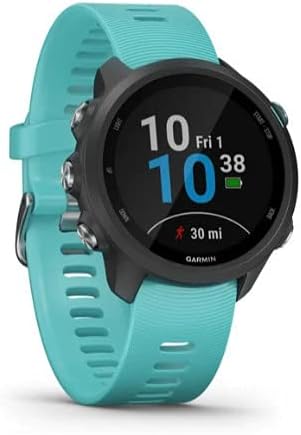
Image: Watch face showing current time, date, and battery status.
Charging the Device:
To charge your device, align the charging cable with the charging port on the back of the watch. Ensure the pins are securely connected. A full charge typically takes approximately 1.5 hours.

Image: Rear view of the watch showing the charging port.
Operating the Device
Button Functions:
- LIGHT: Press to turn the backlight on/off. Hold to view controls menu.
- UP: Press to scroll through widgets and menus. Hold to view menu options.
- DOWN: Press to scroll through widgets and menus. Hold to view music controls.
- START/STOP: Press to start or stop an activity. Press to select an option in a menu.
- BACK: Press to return to the previous screen. Press to record a lap during an activity.

Image: Side view of the watch highlighting the control buttons.
Starting an Activity:
From the watch face, press the START/STOP button. Select an activity from the list (e.g., Run, Bike, Pool Swim). Wait for the GPS signal to acquire (if applicable), then press START/STOP again to begin recording your activity.

Image: Watch screen showing 'Training Status' with productive, fitness, and load metrics.
Monitoring Health and Performance:
The Forerunner 245 Music continuously monitors various health and performance metrics. Swipe through widgets using the UP or DOWN buttons to view your heart rate, steps, Body Battery, stress level, and more.
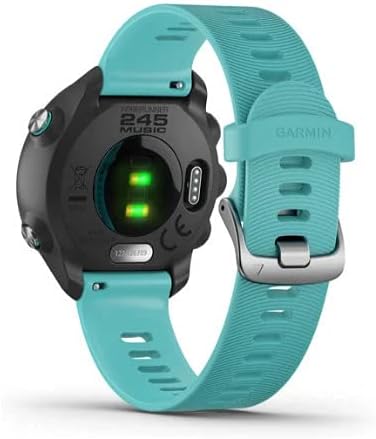
Image: Rear view of the watch showing the green light of the optical heart rate sensor.
Advanced Features
Music Playback:
Store up to 500 songs directly on your watch. Sync playlists from compatible music streaming services (subscription may be required). Connect Bluetooth headphones to listen to music on the go without your phone.

Image: Watch screen showing music playback interface.
Training Status & Load:
The watch analyzes your recent exercise history and performance indicators to let you know if you're training productively, peaking, or overreaching. It also tracks your training load to help you avoid overtraining.

Image: Watch screen showing 'Training Status' details.
Garmin Coach & Workouts:
Access free adaptive training plans from Garmin Coach or create custom workouts. Workouts sync directly to your watch, providing guidance during your runs.

Image: Watch screen showing a Garmin Coach suggested workout.
Safety and Tracking:
Features like incident detection (during select activities) and Assistance can send your real-time location to emergency contacts through your paired compatible smartphone.

Image: Person running at night, illustrating safety features.
Maintenance
Cleaning the Device:
Regularly clean your watch and strap to prevent buildup of sweat and debris. Rinse the watch with fresh water after each workout. For deeper cleaning, use a soft brush and mild soap, then rinse thoroughly and dry.
Software Updates:
Keep your device's software up to date by regularly syncing with the Garmin Connect app. Updates often include performance improvements and new features.
Troubleshooting
Common Issues:
- GPS not connecting: Ensure you are in an open area with a clear view of the sky. Syncing with Garmin Connect can also help update satellite data.
- Battery drain: Reduce backlight brightness, disable unnecessary smart notifications, or turn off continuous heart rate monitoring if not needed.
- Syncing issues: Ensure Bluetooth is enabled on your phone and watch. Try restarting both devices.
For more detailed troubleshooting, please refer to the official user manual.
Specifications
| Feature | Detail |
|---|---|
| Product Dimensions | 1.7 x 1.7 x 0.5 inches |
| Item Weight | 1.28 ounces |
| Item Model Number | 010-02120-22 |
| Batteries | 1 A batteries required. (included) |
| Operating System | Garmin OS |
| Connectivity Technologies | Bluetooth, Wi-Fi |
| Screen Size | 1.2 Inches |
| Memory Storage Capacity | 3.5 GB |
Documents and downloads
Ask a question about this manual
Ask about setup, troubleshooting, compatibility, parts, safety, or missing instructions. Manuals+ will review the question and use this page’s manual context to help answer it.