
Introduction
Thank you for choosing the ORNO GM-9002 Angled Power Strip. This product is designed to provide convenient power access in various environments such as kitchens, offices, and workshops. It features two Shuko sockets, an integrated switch for controlling an external device, and child safety shutters. Please read this manual carefully before installation and use to ensure safe and proper operation.

Image: ORNO GM-9002 Angled Power Strip, white, with two Shuko sockets and a switch, placed on a wooden surface in a modern setting.
Safety Information
Always observe basic safety precautions when installing and using electrical equipment to reduce the risk of fire, electric shock, and injury.
- Ensure the power supply is disconnected before any installation or maintenance.
- Installation should be performed by a qualified electrician if you are unsure about electrical wiring.
- Do not exceed the maximum load capacity of 3680 W.
- Do not expose the product to moisture or extreme temperatures.
- This product is designed for indoor use only.
Setup
1. Unpacking and Inspection
Carefully remove the power strip from its packaging. Inspect the unit for any signs of damage. Do not use if damaged.
2. Wiring and Plug Installation
The ORNO GM-9002 comes with a 0.6-meter cable but without a pre-installed plug. A suitable plug (e.g., Schuko type F) must be purchased and installed separately. It is crucial to understand the wiring configuration:
- The two Shuko sockets are designed to be continuously powered once the unit is connected to the mains.
- The integrated switch is not for controlling the power to the two Shuko sockets. It is intended for connecting and controlling an external device, such as an LED strip or other low-power appliance.
- Ensure all connections are secure and correctly insulated. If you are not experienced with electrical wiring, consult a qualified professional.

Image: Vertical view of ORNO GM-9002 power strip showing internal wiring connections and the included cable, highlighting the separate wiring for the switch.
3. Mounting
The 45° angled design allows for versatile mounting options:
- Surface Mounting: Place the unit on a flat surface, such as a desk or workbench.
- Corner Mounting: The angled design fits neatly into corners.
- Under-Cabinet Mounting: Ideal for installation beneath kitchen cabinets or shelves.
Secure the unit using appropriate screws (not included) through the designated mounting holes. Ensure the mounting surface is stable and can support the unit.

Image: ORNO GM-9002 Angled Power Strip installed in a kitchen corner, providing power outlets on a countertop.
4. Dimensions
Refer to the image below for detailed product dimensions to assist with installation planning.

Image: Dimensions of the ORNO GM-9002 Angled Power Strip, showing length of 21 cm (8.27 inches) and height/depth of 6.4 cm (2.52 inches).
Operating Instructions
1. Using the Shuko Sockets
Once the power strip is correctly wired and connected to a power source, the two Shuko sockets are continuously live. Simply plug your devices into the sockets. Ensure the total power consumption of all connected devices does not exceed 3680 W.
2. Using the Integrated Switch
The integrated switch is designed to control an external device that has been separately wired to it during installation. This switch acts as an ON/OFF control for that specific external device (e.g., an LED light strip). It does not affect the power supply to the two Shuko sockets.

Image: Close-up view of the ORNO GM-9002 power strip showing the two Shuko sockets with child safety shutters and the large white ON/OFF switch.
3. Child Safety
The Shuko sockets are equipped with child safety shutters to prevent accidental insertion of objects, enhancing safety in environments accessible to children.
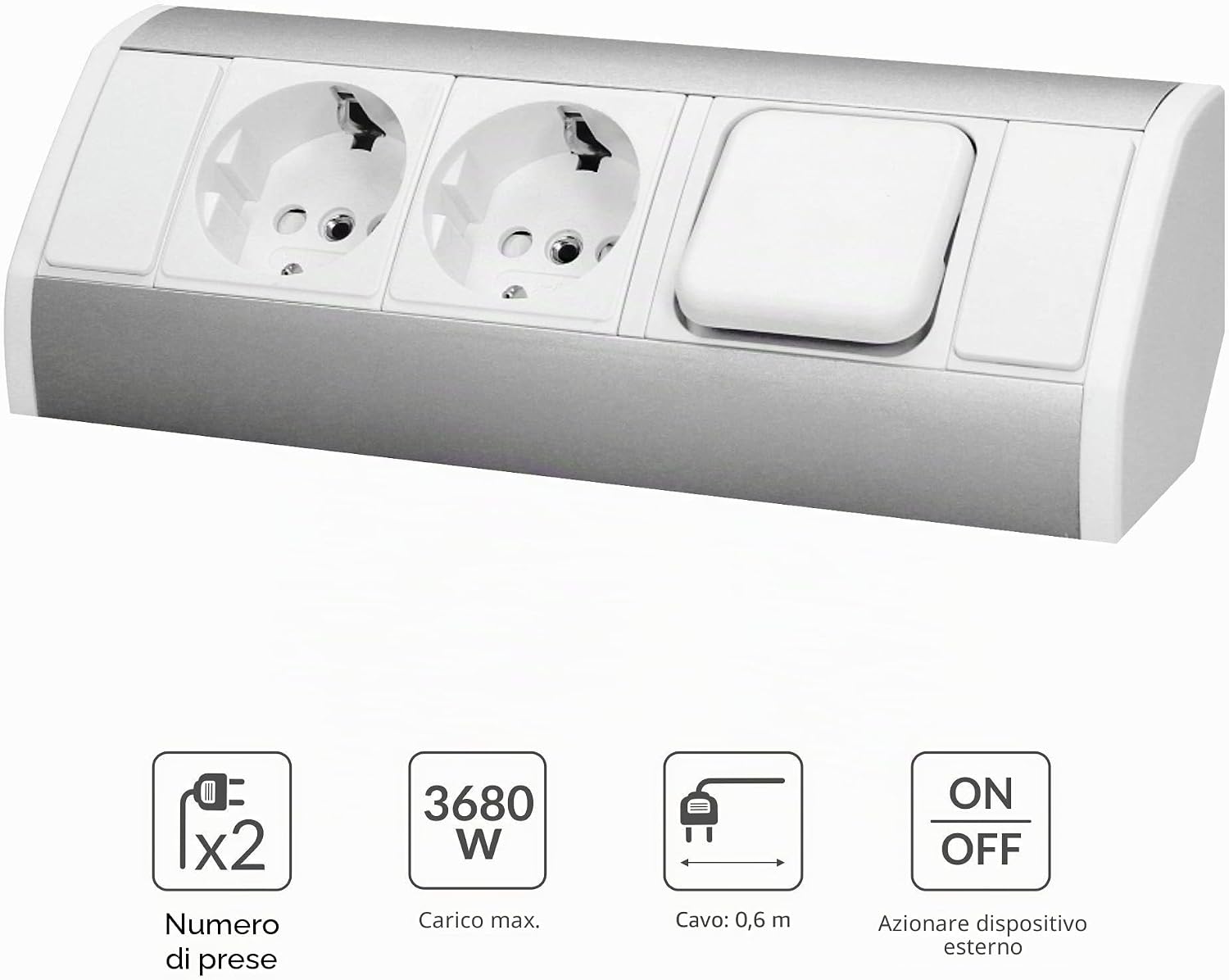
Image: Diagram showing key features of the ORNO GM-9002: 2 sockets, 3680W max load, 0.6m cable, and an ON/OFF switch for an external device.
Maintenance
- Cleaning: Disconnect the power strip from the mains before cleaning. Use a soft, dry cloth to wipe the surface. Do not use abrasive cleaners or solvents.
- Inspection: Periodically check the power strip and its cable for any signs of wear, damage, or loose connections. If any damage is found, discontinue use and replace the unit.
Troubleshooting
No Power to Sockets
- Check if the main power supply to the unit is active.
- Ensure the plug is correctly installed and fully inserted into the wall outlet.
- Verify that the connected device is functioning correctly by testing it in another outlet.
- If the issue persists, consult a qualified electrician.
External Device Not Switching ON/OFF
- Ensure the external device is correctly wired to the power strip's switch terminals.
- Verify that the external device itself is functional.
Specifications
| Feature | Specification |
|---|---|
| Model | GM-9002 |
| Power Supply Voltage | 230 V~, 50 Hz |
| Max. Load | 3680 W |
| Number of Sockets | 2 |
| Socket Type | 2P + Z (Schuko, Type F) |
| Cable Length | 0.6 m (without plug) |
| Material | Plastic + Lacquered Metal |
| Color | White (variant) |
| Mounting | Surface, Corner, Under-cabinet |
| Dimensions (L x W) | 21 cm x 6.4 cm |
| Special Feature | Integrated ON/OFF switch for external device |
| Safety | Child safety shutters |
| Recommended Use | Kitchen, Office |
Warranty Information
This product is covered by a standard manufacturer's warranty against defects in materials and workmanship. The warranty period typically begins from the date of purchase. Please retain your proof of purchase for warranty claims. For specific warranty terms and conditions, refer to the documentation provided with your purchase or contact the retailer.
Support
If you encounter any issues or have questions regarding the installation, operation, or maintenance of your ORNO GM-9002 Angled Power Strip that are not covered in this manual, please contact your retailer or the manufacturer's customer support for assistance. Always provide your product model number (GM-9002) when seeking support.

