
AODELAN WTR-2
AODELAN WTR-2 Wireless Timer Remote Control Instruction Manual
Model: WTR-2
Introduction
The AODELAN WTR-2 is a versatile wireless timer remote control and intervalometer designed for select Sony cameras. It provides both wired and wireless control over your camera's shutter functions, including single shot, continuous shooting, bulb exposure, and 2-second delay. Additionally, it features advanced timing functions such as self-timer, long exposure timer, interval timer, number of exposures, and auto bracketing timer, making it ideal for time-lapse photography, astrophotography, and other specialized shooting scenarios.
This manual provides detailed instructions for setting up, operating, and maintaining your WTR-2 remote control to ensure optimal performance.
What's Included
Please verify that all components are present in your package:
- WTR-2 Transmitter (Remote Control Unit)
- WTR-2 Receiver Unit
- Connection Cable(s) for Sony Cameras (specific type may vary based on camera model)
- User Manual
- Lanyard (for transmitter)

Image: The WTR-2 package contents, showing the transmitter, receiver, various connection cables, and the instruction manual.
Product Overview
Transmitter and Receiver
The AODELAN WTR-2 system consists of a transmitter (the remote control unit with an LCD screen) and a receiver unit. The transmitter allows you to configure shooting parameters and trigger the camera, while the receiver connects to your camera and receives signals from the transmitter.

Image: The AODELAN WTR-2 transmitter (left) with its LCD display and control buttons, and the receiver (right) with its power indicator, shown alongside two coiled connection cables.
Transmitter Controls and Display
The transmitter features an LCD screen for displaying settings and a set of buttons for navigation and control. The main shutter button supports both half-press for autofocus and full-press for shutter release.

Image: A detailed view of the transmitter's central button, illustrating its dual function: a half-press activates camera focus, and a full-press triggers the shutter.
Setup
1. Battery Installation
The WTR-2 transmitter and receiver each require 2 AAA batteries (not included). Open the battery compartment on the back of each unit and insert the batteries, ensuring correct polarity.
2. Connecting to Your Camera
The WTR-2 can operate in both wired and wireless modes. For wireless operation, the receiver must be connected to the camera. For wired operation, the transmitter can be directly connected to the camera.
- Wireless Connection: Attach the receiver to your camera's hot shoe (or cold shoe) and connect it to the camera's remote terminal using the appropriate connection cable. Ensure both the transmitter and receiver are powered on.
- Wired Connection: Connect the transmitter directly to your camera's remote terminal using the appropriate connection cable. The receiver is not needed for wired operation.

Image: Two cameras are shown. One demonstrates wireless operation with the receiver mounted on the hot shoe, and the other shows wired operation with the transmitter connected directly to the camera.
3. Camera Compatibility
The WTR-2 is compatible with a wide range of Sony cameras. Ensure you use the correct connection cable for your specific camera model. The product includes cables for various Sony models, replacing Sony RM-SPR1 and RM-VPR1 remote controls.
Compatible Sony Cameras (S6 Cable Type):
- ILCA-a77M2, a99M2, a99V, SLT-A33
- A35, A37, A55, A57, A65, A67, A77, A99
- DSLR-A100, A200, A300, A350, A400, A450, A500, A550, A560, A580, A700, A850, A900
- Konica Minolta DIMAGE A2, A1, 9, 7Hi, 7i, 7, 5, 4, 3, DYNAX 7D, 5D
Compatible Sony Cameras (S8 Cable Type):
- ILCE-a1, a9, a9M2, a7S, a7SM2, a7SM3, a7, a7M2, a7M3, a7M4, a7R, a7RM2, a7RM3, a7RM4
- a6600, a6100, a6400, a6500, a6300, a6000, a5000, a5100, a3000, a3500, QX1
- HX300, HX350, HX400, HX400V, HX50, HX50V, HX60, HX60V, HX99, HX95, HX90, HX90V, HX80
- QX30, RX0, RXOM2, RX100M2, RX100M3, RX100M4, RX100M5, RX100M5A, RX100M6, RX100M7
- RX10, RX10M2, RX10M3, RX10M4, RX1RM2, WX500, WX700, WX800
- a58, a68; NEX-3N, ZV-1

Image: A visual guide to the S6 and S8 connection cables, listing the extensive range of Sony camera models compatible with each cable type.
Operating Modes
The WTR-2 offers various shutter release and timing functions. Use the 'Mode' button on the transmitter to cycle through the main settings.
Shutter Release Functions
These modes control how the shutter is triggered when the main button is pressed:
- S (Single Shooting): Takes one photo with each full press of the shutter button.
- C (Continuous Shooting): Holds the shutter open as long as the button is pressed, taking multiple photos.
- B (Bulb Exposure): Keeps the shutter open for the duration the button is pressed, ideal for long exposures.
- 2S (2-Second Delay): Triggers the shutter after a 2-second delay, reducing camera shake.
Timing Functions (Intervalometer)
The WTR-2 provides advanced timing controls for automated shooting sequences:
- DELAY (Self Timer): Sets a delay before the first shot is taken.
- LONG (Long Exposure Timer): Specifies the duration of the shutter opening for each exposure (up to 99 hours, 59 minutes, 59 seconds).
- INTVL (Interval Timer): Sets the time between the start of one exposure and the start of the next (up to 99 hours, 59 minutes, 59 seconds).
- N (Number of Exposures): Defines how many photos will be taken in a sequence (up to 399 shots, or unlimited).
- BKLN (Auto Bracketing Timer): Used for shooting multiple exposure HDR images by automatically varying exposure times.

Image: The transmitter's LCD screen highlights the five timing functions (Delay, N-Number of exposures, Long-Exposure timer, BKLN-Auto bracketing time, Intvl-Interval timer) and four shutter functions (S-Single shooting, C-Continuous shooting, B-Bulb exposure, 2S-2 sec. delay).
Wireless Operation
The 2.4GHz wireless transmission allows for remote control up to 60 meters (200 feet). This is ideal for situations where you need to be away from the camera to avoid disturbing the shot or for self-portraits.

Image: A camera on a tripod in a mountain setting, with two people in the background, demonstrating the WTR-2's 2.4G wireless remote control range of up to 196.8 feet (60 meters).
Advanced Features
0.1 Second Accuracy
The WTR-2 allows for precise timing control, adjustable to 0.1-second increments. This level of accuracy is crucial for advanced time-lapse sequences and specific photographic techniques.

Image: The WTR-2 transmitter's display showing a timer setting with 0.1-second precision, highlighting its capability for accurate timing in photography.
Bulb Exposure and Time-Lapse
Utilize the Bulb mode for creative long exposure photography, capturing light trails or subtle movements. The intervalometer functions are perfect for creating time-lapse videos of natural phenomena like blooming flowers or changing skies.

Image: Three example photographs (a beach scene with smooth water, a starry night sky, and city lights with vehicle trails) demonstrating the effects possible with bulb exposure settings.
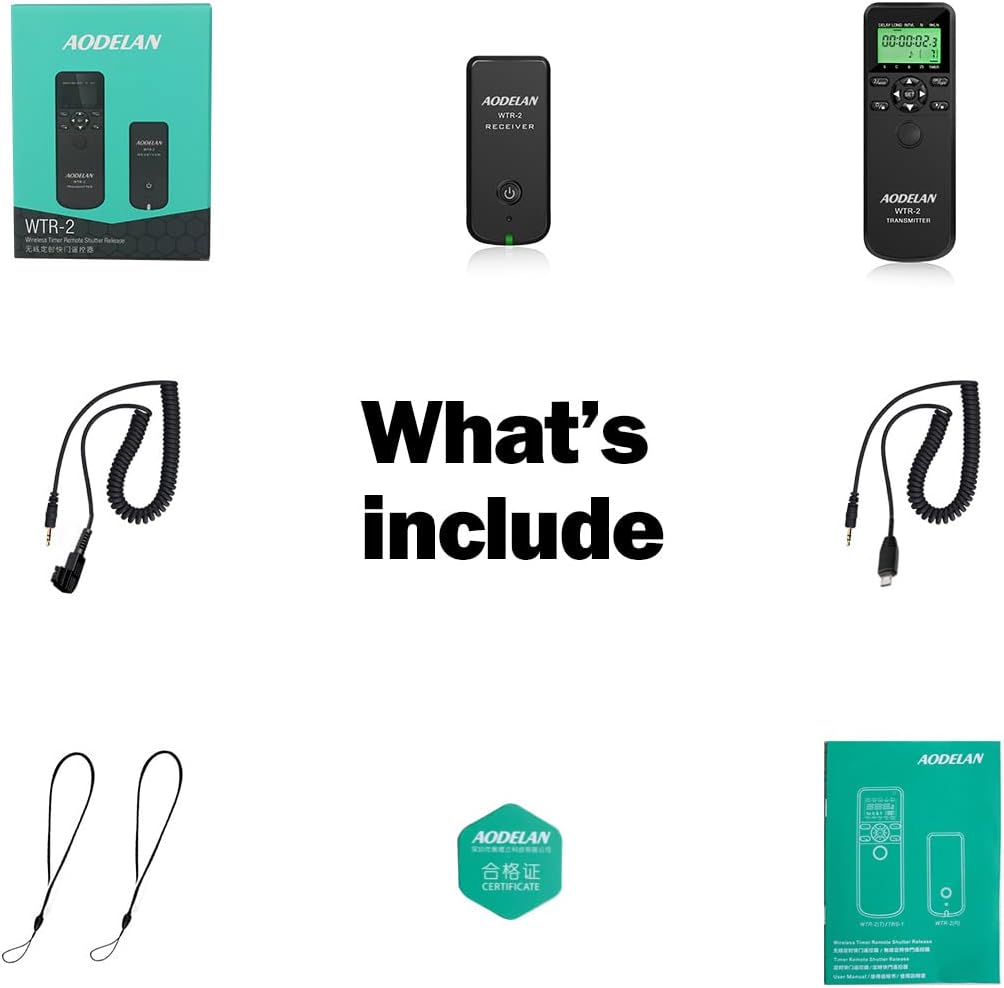
Image: A series of five photographs depicting a flower gradually opening, showcasing the continuous shooting or time-lapse function of the remote control.
Auto Bracketing (BKLN)
The BKLN setting allows the remote to automatically shoot a series of photos at exponentially changing exposure times. This is highly useful for creating High Dynamic Range (HDR) images, especially in challenging lighting conditions where a single exposure cannot capture the full range of tones.
Troubleshooting
- Remote not responding:
- Ensure both transmitter and receiver have fresh batteries and are powered on.
- Check the connection cable between the receiver and the camera. Ensure it is securely plugged in.
- Verify that the camera's remote control settings are enabled, if applicable.
- Reduce the distance between the transmitter and receiver, and ensure no major obstructions are present.
- Timer functions not working:
- Confirm that the correct timing mode (DELAY, LONG, INTVL, N, BKLN) is selected on the transmitter.
- Check that all parameters (time, number of shots) are set correctly and are within the allowed range.
- Ensure the camera is in a compatible shooting mode (e.g., Manual or Bulb for long exposures).
- Display is dim or blank:
- Replace the AAA batteries in the transmitter.
Specifications
| Model Number | WTR-2 |
| Product Dimensions | 3.15 x 5.51 x 1.18 inches |
| Item Weight | 7.1 ounces |
| Batteries Required | 2 AAA batteries (for transmitter), 2 AAA batteries (for receiver) |
| Wireless Frequency | 2.4 GHz |
| Wireless Range | Up to 60 meters (200 feet) |
| Special Feature | Digital Display, 0.1s Timing Accuracy |
| Compatible Devices | Various Sony Cameras (refer to compatibility list) |
Maintenance
- Keep the remote control and receiver clean and dry. Avoid exposure to moisture or extreme temperatures.
- Use a soft, dry cloth for cleaning. Do not use abrasive cleaners or solvents.
- Remove batteries if the device will not be used for an extended period to prevent leakage.
- Store in a protective case to prevent damage during transport.
Warranty and Support
AODELAN products are designed for reliability and performance. For warranty information or technical support, please refer to the contact details provided with your product packaging or visit the official AODELAN website. Please retain your proof of purchase for warranty claims.
Related Documents - WTR-2
 |
AODELAN WTR-2 TRS-1 Wireless Timer Remote Shutter Release User Manual Comprehensive user manual for the AODELAN WTR-2 and TRS-1 wireless and wired timer remote shutter release systems. Learn about features, setup, operation, safety, and technical specifications for photographers. |
 |
AODELAN WTR-2 & TRS-1 Wireless Timer Remote Shutter Release User Manual Comprehensive user manual for the AODELAN WTR-2(T), WTR-2(R), and TRS-1 wireless and wired timer remote shutter release systems. Learn about features, setup, operation, and technical specifications. |
 |
AODELAN WTR-2 II & TRS-1 II Wireless and Wired Timer Remote Shutter Release User Manual Comprehensive user manual for AODELAN WTR-2 II wireless timer remote shutter release and TRS-1 II wired timer remote shutter release. Covers setup, features, timer functions, manual release, specifications, and compliance information. |
 |
Tilta Camera Rig for Sony A7/A9 Series - Installation Guide Comprehensive guide for assembling and using the Tilta camera rig designed for Sony A7 and A9 series cameras. Learn about cage, handles, support systems, and accessories. |
 |
Newell Electronic Timer Remotes Operating Manual Comprehensive operating manual for Newell Electronic Timer Remotes, detailing safety instructions, device description, specifications, usage guidelines, and warranty information for photographers. |
 |
ZGCINE PD-FZ100 Dummy Battery Product Manual Product manual for the ZGCINE PD-FZ100 dummy battery, detailing its input/output voltage, current, cable length, and compatibility with compatible Sony cameras. Includes technical specifications and manufacturer information. |
Ask a question about this manual
Ask about setup, troubleshooting, compatibility, parts, safety, or missing instructions. Manuals+ will review the question and use this page’s manual context to help answer it.