
1. Introduction
Thank you for choosing the VocoPro COMMANDER-PR-12 UHF Dual Channel Plug-In Receiver. This receiver is designed to provide reliable wireless audio reception for your Commander-Play-4 system. This manual provides essential information for the safe and efficient operation of your device. Please read it thoroughly before use and retain it for future reference.
2. Important Safety Information
- Read Instructions: Carefully read and understand all safety and operating instructions before using this product.
- Retain Instructions: Keep these instructions for future reference.
- Heed Warnings: Adhere to all warnings on the product and in the operating instructions.
- Cleaning: Clean only with a dry cloth. Do not use liquid cleaners.
- Water and Moisture: Do not use this apparatus near water (e.g., bathtubs, sinks, swimming pools).
- Heat: Do not install near any heat sources such as radiators, heat registers, stoves, or other apparatus (including amplifiers) that produce heat.
- Servicing: Refer all servicing to qualified service personnel. Servicing is required when the apparatus has been damaged in any way.
3. Package Contents
Please check that your package contains the following items:
- VocoPro COMMANDER-PR-12 UHF Dual Channel Plug-In Receiver
- User Manual (this document)
If any items are missing or damaged, please contact your retailer immediately.
4. Product Overview
The COMMANDER-PR-12 is a compact, plug-in receiver designed for seamless integration with the VocoPro Commander-Play-4 system. It features dual-channel UHF reception for reliable wireless performance.
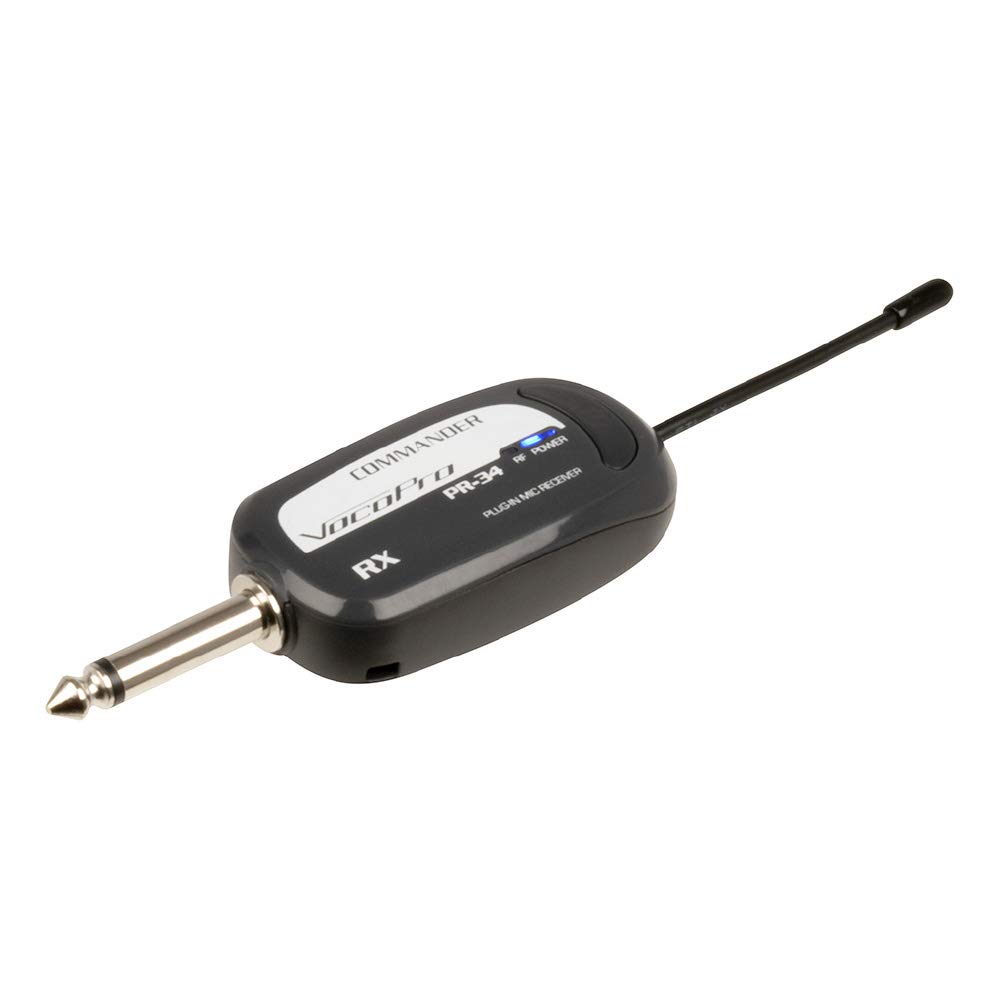
Figure 1: Front view of the VocoPro COMMANDER-PR-12 UHF Dual Channel Plug-In Receiver. This image shows the compact design of the receiver, highlighting its plug-in form factor and general appearance.
4.1 Key Features
- UHF Dual Channel Reception
- Plug-In Design for Commander-Play-4
- Rechargeable (Battery Powered)
- Compact and Portable
5. Setup
Follow these steps to set up your COMMANDER-PR-12 receiver:
- Charge the Receiver: Before initial use, ensure the receiver is fully charged. Connect the appropriate charging cable (not included, typically supplied with Commander-Play-4) to the receiver's charging port. The charging indicator will show the charging status.
- Identify the Receiver Port: Locate the dedicated receiver input port on your VocoPro Commander-Play-4 system. Refer to your Commander-Play-4 manual for its exact location.
- Plug In the Receiver: Carefully insert the COMMANDER-PR-12 receiver into the designated port on the Commander-Play-4. Ensure it is securely seated.
- Power On: Turn on your Commander-Play-4 system. The receiver will power on automatically with the system.
- Pair with Transmitters: If necessary, follow the pairing instructions provided with your VocoPro wireless microphones or transmitters to establish a connection with the COMMANDER-PR-12 receiver.
6. Operating Instructions
Once the COMMANDER-PR-12 receiver is properly set up and paired with your wireless transmitters, operation is straightforward:
- Power On Transmitters: Ensure your VocoPro wireless microphones or transmitters are powered on and have fresh batteries.
- Monitor Connection: Observe the indicator lights on the COMMANDER-PR-12 receiver. A stable light typically indicates a successful connection to a transmitter. Refer to the Commander-Play-4 manual for specific indicator meanings.
- Adjust Volume: Use the volume controls on your Commander-Play-4 system to adjust the audio output level from the wireless microphones.
- Range: Maintain a clear line of sight between the transmitters and the receiver for optimal performance. Avoid placing large metal objects or other wireless devices directly between them.
7. Maintenance
Proper maintenance ensures the longevity and optimal performance of your COMMANDER-PR-12 receiver:
- Cleaning: Use a soft, dry cloth to clean the exterior of the receiver. Do not use abrasive cleaners, solvents, or harsh chemicals.
- Storage: When not in use for extended periods, store the receiver in a cool, dry place, away from direct sunlight and extreme temperatures.
- Battery Care: If the receiver has an internal rechargeable battery, avoid completely draining it frequently. Recharge it periodically even if not in use to maintain battery health.
- Avoid Impact: Protect the receiver from drops and impacts, which can damage internal components.
8. Troubleshooting
If you encounter issues with your COMMANDER-PR-12 receiver, refer to the following common problems and solutions:
| Problem | Possible Cause | Solution |
|---|---|---|
| No audio output | Receiver not powered on Transmitter not powered on or out of range Volume too low on Commander-Play-4 Receiver not properly seated | Ensure Commander-Play-4 is on. Check transmitter power and battery. Move closer to receiver. Increase volume on Commander-Play-4. Re-insert receiver firmly into the port. |
| Intermittent audio or static | Interference from other devices Transmitter too far from receiver Low battery in transmitter | Move away from other wireless devices or sources of interference. Reduce distance between transmitter and receiver. Replace or recharge transmitter batteries. |
| Receiver not charging | Faulty charging cable or power source Charging port obstruction | Try a different charging cable and power adapter. Ensure the power source is active. Check the charging port for debris and clean carefully if necessary. |
If the problem persists after trying these solutions, please contact VocoPro customer support.
9. Specifications
The following are the technical specifications for the VocoPro COMMANDER-PR-12 UHF Dual Channel Plug-In Receiver:
| Feature | Detail |
|---|---|
| Model Number | COMMANDER-PR12 |
| Brand | VocoPro |
| Receiver Type | UHF Dual Channel Plug-In |
| Compatibility | VocoPro Commander-Play-4 |
| Power Source | Battery Powered (Rechargeable) |
| Color | Black |
| UPC | 692868771255 |
10. Warranty and Support
10.1 Manufacturer Warranty
This VocoPro COMMANDER-PR-12 receiver is covered by a manufacturer's warranty. Please refer to the warranty card included with your original Commander-Play-4 system or visit the official VocoPro website for detailed warranty terms and conditions. The warranty typically covers defects in materials and workmanship under normal use.
10.2 Customer Support
For technical assistance, troubleshooting beyond this manual, or warranty claims, please contact VocoPro customer support. You can find contact information on the official VocoPro website (www.vocopro.com) or through your authorized VocoPro dealer.
When contacting support, please have your product model number (COMMANDER-PR12) and proof of purchase readily available.
