
Introduction
This manual provides comprehensive instructions for the setup, operation, and maintenance of your USARMT TV Remote Control, model RC280 V2 HBO AB. Please read this manual thoroughly before using your remote control to ensure optimal performance and longevity.
Product Overview
The USARMT TV Remote Control is designed for seamless compatibility with TCL Roku TVs, featuring dedicated buttons for popular streaming services like Netflix, Amazon, HBOnow, and Sling. This remote is pre-programmed and requires no additional setup beyond battery installation.
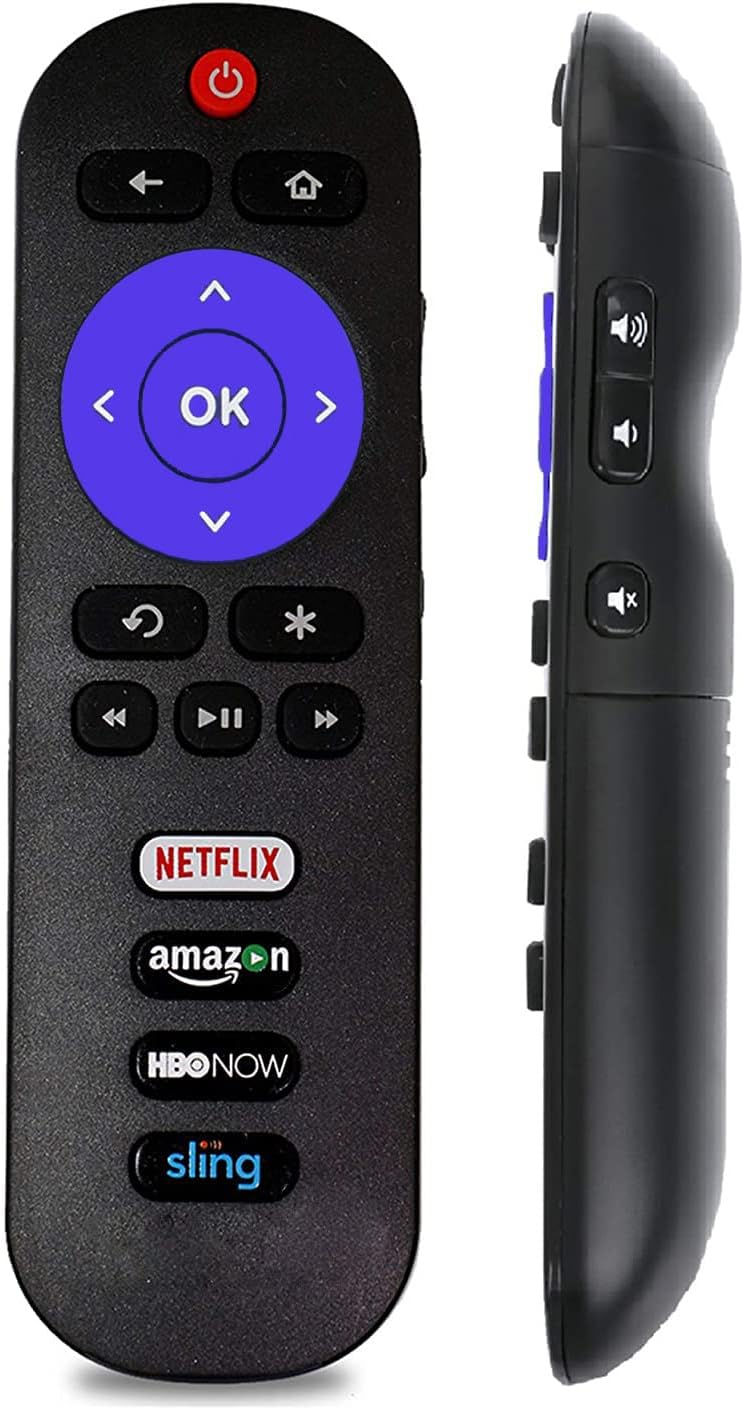
Figure 1: Front view of the USARMT TV Remote Control. This image displays the primary control layout, including the power button, directional pad with OK button, back, home, and instant access buttons for Netflix, Amazon, HBOnow, and Sling.

Figure 2: Alternative front view of the remote control. This perspective provides a clear look at the arrangement of all buttons, emphasizing the quick-access streaming service buttons at the bottom.

Figure 3: Back view of the USARMT TV Remote Control. This image shows the ergonomic design and the location of the battery compartment cover.
Setup
Your USARMT remote control is pre-programmed for immediate use with compatible TCL Roku TVs. No manual programming or code entry is required. Simply install the batteries, and the remote will be ready to operate your television.
Battery Installation
- Locate the battery compartment on the back of the remote control (refer to Figure 3).
- Slide the battery compartment cover downwards or in the direction indicated by an arrow to open it.
- Insert two (2) AAA batteries, ensuring the positive (+) and negative (-) terminals align correctly with the markings inside the compartment.
- Replace the battery compartment cover by sliding it back into place until it clicks securely.
Note: Batteries are not included with the remote control. Always use new AAA alkaline batteries for best performance.
Operating Instructions
This remote control provides full functionality for your TCL Roku TV. Ensure there is a clear line of sight between the remote control and the TV's infrared receiver.
Basic Functions
- Power Button (⏻): Turns the TV on or off.
- Directional Pad (▲ ◀ ▼ ▶): Navigates through menus and options.
- OK Button: Confirms selections.
- Back Button (↶): Returns to the previous screen or menu.
- Home Button (⌂): Returns to the Roku home screen.
- Volume Up/Down Buttons: Adjusts the TV volume.
- Mute Button: Mutes or unmutes the TV audio.
Streaming Service Buttons
The remote features dedicated buttons for quick access to popular streaming applications:
- Netflix: Launches the Netflix application.
- Amazon: Launches the Amazon Prime Video application.
- HBOnow: Launches the HBO Max (formerly HBOnow) application.
- Sling: Launches the Sling TV application.
Note: Access to streaming services requires an active internet connection and may require separate subscriptions.
Maintenance
Proper care and maintenance will ensure the longevity and reliable operation of your remote control.
Cleaning
- Wipe the remote control with a soft, dry cloth.
- For stubborn dirt, lightly dampen the cloth with water or a mild, non-abrasive cleaner.
- Do not use harsh chemicals, solvents, or abrasive cleaning pads, as these can damage the remote's surface or internal components.
Battery Replacement
Replace batteries when the remote's response becomes sluggish or stops working. Always replace both batteries at the same time with new AAA alkaline batteries. Do not mix old and new batteries, or different types of batteries.
Troubleshooting
If you encounter issues with your remote control, please refer to the following common problems and solutions:
| Problem | Possible Cause | Solution |
|---|---|---|
| Remote not responding. | Dead or incorrectly installed batteries. | Replace batteries with new AAA batteries, ensuring correct polarity. |
| Remote only works intermittently. | Weak batteries; Obstruction between remote and TV. | Replace batteries. Ensure a clear line of sight to the TV's IR sensor. |
| Specific buttons not working. | Button stuck or damaged; TV not compatible with all functions. | Check if the button is physically stuck. Ensure your TV model is listed as compatible. |
| Streaming app buttons not launching apps. | TV not connected to internet; App not installed or updated. | Verify your TV's internet connection. Check if the app is installed and up-to-date on your Roku TV. |
Specifications
- Model Number: RC280 V2 HBO AB
- ASIN: B07QHJ59YH
- Brand: USARMT
- Compatible Devices: TCL Roku Televisions (e.g., 28S3750, 32S3700, 32S3750, 32S3800, 32S3850, 32S3850(A/B/P), 32S4610R, 40FS3750, 40FS3800, 40FS3850, 40FS4610R, 48FS3700, 48FS3750, 48FS4610R, 50FS3800, 50FS3850, 55FS3700, 55FS3750, 55FS3850, 55FS4610R)
- Connectivity Technology: Infrared (IR)
- Controller Type: Button Control
- Special Feature: Ergonomic design
- Power Source: 2 x AAA Batteries (not included)
- Product Dimensions: 1.5 x 0.5 x 5 inches
- Item Weight: 3 ounces
Warranty and Support
Specific warranty information for this USARMT remote control is not provided in the product details. For warranty claims, technical support, or further assistance, please contact the manufacturer, USARMT, directly or refer to the retailer's return policy where the product was purchased.
Please retain your purchase receipt as proof of purchase for any warranty or support inquiries.