
1. Introduction
This manual provides essential information for the safe and efficient operation of your Panasonic AW-UE150 4K UHD PTZ Camera. Please read this manual thoroughly before using the product and retain it for future reference. The AW-UE150 is a professional-grade PTZ camera designed for high-quality video production, featuring 4K/UHD 60p video capabilities, a 1-inch MOS sensor, and 20x optical zoom.
2. Safety Information
Observe the following safety precautions to prevent injury, damage to the product, or loss of data.
- Do not expose the camera to rain or moisture.
- Do not disassemble or modify the camera. Refer all servicing to qualified personnel.
- Ensure proper ventilation around the camera to prevent overheating.
- Use only the specified power supply and cables.
- Avoid placing the camera in unstable locations where it could fall.
3. Package Contents
Verify that all items listed below are included in your package:
- Panasonic AW-UE150 4K UHD PTZ Camera
- User Manual (this document)
- SD Card
- SDI Cable
4. Product Overview
The Panasonic AW-UE150 is a high-performance PTZ camera designed for professional video applications. It features a 1-inch MOS sensor for superior image quality and a 20x optical zoom lens.


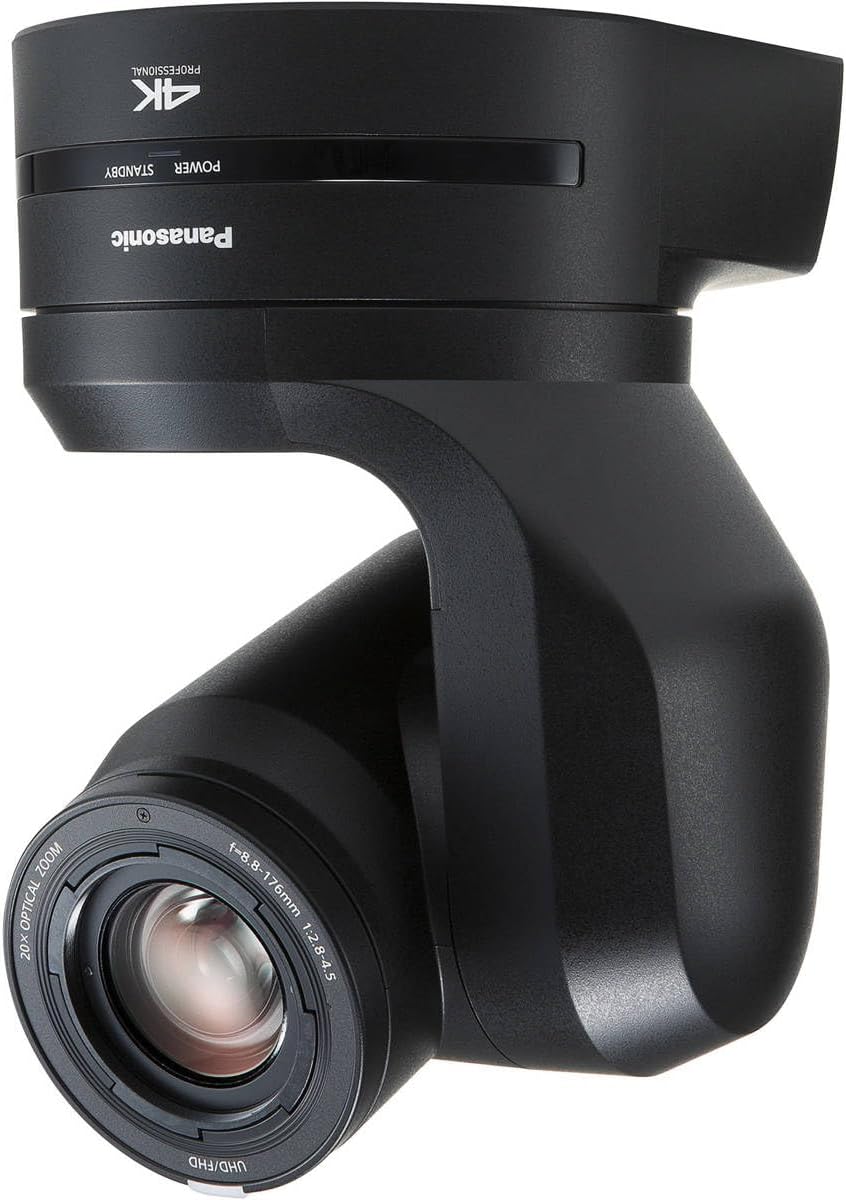

Key Features:
- UHD/4K 59.94p Integrated PTZ Camera
- Various 4K interfaces: 12G-SDI, HDMI, Optical Fiber, IP
- 20x Optical Zoom
- 4K/HD Simultaneous Output
- Large 1-inch MOS Sensor
5. Setup
5.1 Physical Connections
Before powering on the camera, ensure all necessary cables are securely connected.

- Power Connection: Connect the power adapter to the 12V IN port. Alternatively, use a Power over Ethernet (PoE++) compatible network switch or injector for power and IP control via the LAN port.
- Video Output:
- Connect a 12G-SDI cable to the 12G SDI OUT port for high-resolution video output.
- Connect an HDMI cable to the HDMI port for video output to a monitor or recorder.
- For long-distance transmission, connect an optical fiber cable to the OPTICAL port.
- IP video streaming is available via the LAN port.
- Control Connection:
- Connect an Ethernet cable to the LAN port for IP control and video streaming.
- Connect an RS-422 cable to the RS-422 port for serial control.
- Audio Input: Connect an audio source to the AUDIO IN port if external audio is required.
5.2 Initial Power On
- After all connections are made, apply power to the camera.
- The camera will perform a self-test, and the tally light will illuminate.
- Access the camera's web interface via its IP address (default IP or DHCP assigned) for initial configuration. Refer to the network setup guide for details on finding the camera's IP address.
6. Operating the Camera
6.1 Basic Pan, Tilt, and Zoom (PTZ) Control
The AW-UE150 can be controlled via a dedicated PTZ controller, a web browser interface, or compatible third-party control systems.
- Pan/Tilt: Use the joystick or directional controls on your chosen controller to move the camera horizontally (pan) and vertically (tilt).
- Zoom: Adjust the zoom using the zoom rocker or dedicated controls. The camera features a 20x optical zoom and Intelligent Zoom (iZoom) for extended reach without significant quality loss.
- Focus: The camera supports both auto-focus and manual focus modes. Adjust focus as needed for sharp images.
6.2 Video Output Settings
The AW-UE150 supports simultaneous 4K and HD output, allowing for flexible integration into various production workflows.
- Configure output resolutions and frame rates through the camera's web interface or control panel.
- Ensure your receiving devices (monitors, recorders, switchers) are compatible with the selected output format.
6.3 Image Quality Adjustments
Access the camera's menu system (via web interface or controller) to fine-tune image parameters such as white balance, exposure, gain, and color settings. The 1-inch MOS sensor provides excellent low-light performance and dynamic range.
7. Maintenance
7.1 Cleaning
- Camera Body: Use a soft, dry cloth to wipe the camera body. For stubborn dirt, slightly dampen the cloth with water and then wipe dry. Do not use strong detergents or solvents.
- Lens: Use a lens brush or a blower to remove dust. For smudges, use a lens cleaning solution and a microfiber cloth specifically designed for optical lenses.
7.2 Firmware Updates
Periodically check the Panasonic support website for firmware updates. Firmware updates can improve performance, add new features, and resolve issues. Follow the instructions provided with the firmware update package carefully.
8. Troubleshooting
If you encounter issues with your AW-UE150 camera, refer to the following common troubleshooting steps:
| Problem | Possible Cause | Solution |
|---|---|---|
| No Power | Power cable disconnected; PoE not active. | Check power cable connection. Ensure PoE++ is active on the network port. |
| No Video Output | Incorrect cable connection; incompatible resolution; monitor off. | Verify SDI/HDMI/Optical cable connections. Check monitor input. Ensure output resolution is supported by the display. |
| Camera Not Responding to Control | Network issue; incorrect IP settings; control cable disconnected. | Check network connection and IP address. Verify RS-422 cable connection. Restart camera and controller. |
| Image is Blurry | Out of focus; dirty lens. | Adjust focus manually or use auto-focus. Clean the lens as described in Section 7.1. |
If the problem persists, contact Panasonic customer support for assistance.
9. Specifications
| Feature | Detail |
|---|---|
| Brand | Panasonic |
| Model Name | AW-UE150 |
| Model Number | AW-UE150KPJ |
| Photo Sensor Technology | MOS (1-inch) |
| Video Capture Resolution | 4K (3840 Pixels Effective) |
| Optical Zoom | 20x |
| Digital Zoom | 20x |
| Maximum Focal Length | 176 Millimeters |
| Maximum Aperture | 2.8 f |
| Connectivity Technology | HDMI, 12G-SDI, Optical Fiber, IP (PoE++) |
| Video Capture Format | MPEG 4 (MP4 file format) |
| Supported Audio Format | AAC |
| Image Stabilization | Optical |
| Form Factor | Dome |
| Item Weight | 14.7 Pounds |
| Item Dimensions (D x W x H) | 19"D x 16"W x 15"H |
| Color | Black |
| UPC | 885170349797 |
10. Warranty Information
The Panasonic AW-UE150 4K UHD PTZ Camera comes with a 6 months Manufacturer's warranty. Please retain your proof of purchase for warranty claims. For detailed terms and conditions, refer to the warranty card included with your product or visit the official Panasonic website.
11. Support
For technical support, service, or additional product information, please visit the official Panasonic support website or contact their customer service department.
Panasonic Official Store: Visit the Panasonic Store on Amazon
Please have your model number (AW-UE150) and serial number ready when contacting support.