1. Introduction
This manual provides essential information for the safe and efficient operation of your Marsrock 2000W Wind Grid Tie Inverter with Limiter, Model WG2000AC240V. This device is designed to convert DC power from a wind turbine into AC power for your home grid, featuring a limiter function to prevent excess power feedback and an optional WiFi monitoring system.
Please read this manual thoroughly before installation and operation to ensure proper use and to prevent damage to the unit or connected systems.
2. Safety Information
- Electrical Hazard: Installation and maintenance should only be performed by qualified personnel. Ensure all power sources are disconnected before working on the inverter.
- Grid Connection: This inverter is designed for grid-tie applications. Do not attempt to charge batteries directly from the grid-tie connection. A wind turbine can serve as a power source, and the inverter can regulate battery capacity if used in a compatible setup.
- Over-temperature Protection: The inverter features an automatic high-temperature protection system. If the internal temperature reaches 75°C, the unit will stop operating. It will restart automatically once the temperature drops to a safe range. Ensure adequate ventilation around the inverter.
- Limiter Sensor: When the limiter sensor is active, excess current will not be fed back to the grid. It will limit the power generation from the wind turbine. In conditions of excessively strong wind, an unloading function will activate to protect the system.
- Protection Features: The inverter includes multiple protection mechanisms: over current protection, over temperature protection, reverse polarity protection, and anti-island protection.

Figure 1: Illustration of the inverter's multiple protection features and its normal operating temperature range (-20°C to +50°C).
3. Product Overview
The Marsrock 2000W Wind Grid Tie Inverter is a robust device designed for converting wind power into usable AC electricity for your home. Key features include Maximum Power Point Tracking (MPPT) for optimal power harvest, an optional WiFi module for remote monitoring, and an optional limiter sensor for grid feedback control.

Figure 2: The Marsrock 2000W Wind Grid Tie Inverter (blue unit) shown with its main components and standard accessories.
3.1. Components and Accessories
- Grid Tie Inverter Unit: The main blue unit with an LCD display.
- Limiter Sensor (Optional): A current transformer (CT clamp) with a cable, used to monitor household power consumption and prevent excess power export to the grid.
- WiFi Module (Optional): For remote monitoring via an application or PC platform.
- Mounting Brackets and Hardware: For secure installation.
- AC Output Cable: For connecting to the electrical grid.

Figure 3: A detailed view of the accessories included with the inverter, highlighting the optional WiFi module and limiter sensor.
3.2. Limiter Sensor Details
The limiter sensor is a crucial component for managing power flow. It measures the current in your main electrical line and signals the inverter to adjust its output, ensuring that only the power needed by your home is generated, preventing unwanted export to the grid.

Figure 4: The limiter sensor, showing its design and approximate dimensions (133 inches / 338 cm cable length).
4. Setup and Installation
Proper installation is critical for the safe and efficient operation of the inverter. Consult a qualified electrician if you are unsure about any steps.
4.1. Mounting the Inverter
- Choose a cool, dry, and well-ventilated location, away from direct sunlight and flammable materials.
- Ensure sufficient clearance around the inverter for airflow.
- Use the provided mounting brackets to securely attach the inverter to a sturdy wall or surface.
4.2. Wiring Connections
Follow the wiring diagram carefully. All connections must be secure and properly insulated.
- DC Input (Wind Turbine): Connect the DC output from your wind turbine to the DC input terminals on the inverter. Ensure correct polarity. The inverter accepts 45-90V DC input.
- AC Output (Grid Connection): Connect the AC output of the inverter to your home's electrical panel or a dedicated circuit, following local electrical codes. The inverter provides 240V AC output.
- Limiter Sensor Connection (Optional): If using the limiter function, install the CT clamp around the main live wire(s) of your household load. Connect the sensor cable to the designated port on the inverter.
- Grounding: Ensure the inverter is properly grounded according to local regulations.

Figure 5: A typical wiring diagram illustrating the connection of the wind turbine, inverter, limiter sensor, and household grid.
4.3. WiFi Module Installation (Optional)
If you have the optional WiFi module, connect it to the designated port on the inverter. Follow the instructions provided with the WiFi module for network configuration and app setup.

Figure 6: An example of the Marsrock Inverter integrated into a home energy system, demonstrating its application.
5. Operating Instructions
5.1. Initial Power-Up
- After all connections are verified, switch on the DC power from the wind turbine.
- Switch on the AC breaker connecting the inverter to the grid.
- The inverter's LCD display will illuminate, and the unit will begin its startup sequence.
5.2. LCD Display and Navigation
The LCD screen provides real-time operational data and allows for system configuration. Use the buttons adjacent to the screen to navigate menus and adjust settings.
- Setting and Confirm Button: Used to enter settings menus and confirm selections.
- Up/Down Buttons: Used to navigate through menu options or adjust values.
- Home Button: Returns to the main display or previous menu.
The display can show various parameters such as wind input voltage, current, grid voltage, current frequency, and current limiting module data. It also provides access to energy menus, clock, date, power view, and error reporting.
5.3. WiFi Monitoring (Optional)
With the optional WiFi module, you can monitor your system's performance in real-time via a dedicated application on your smartphone or a PC platform. This allows you to view power generation data, track historical statistics, and ensure optimal operation.
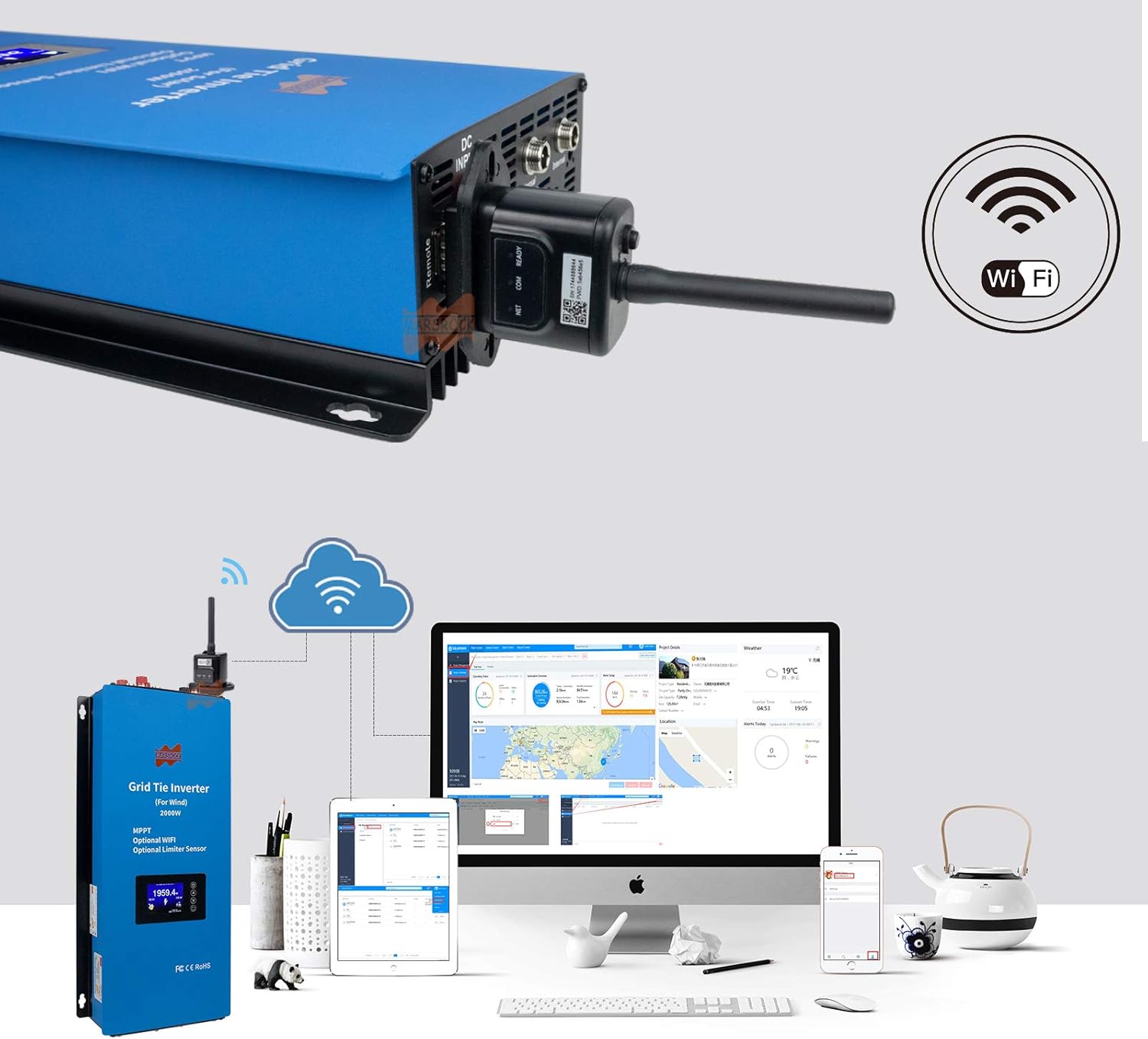
Figure 7: The optional WiFi module connected to the inverter, demonstrating remote monitoring capabilities via various devices.
6. Maintenance
Regular maintenance ensures the longevity and optimal performance of your inverter.
- Cleaning: Periodically clean the exterior of the inverter with a dry, soft cloth. Do not use liquid cleaners or solvents. Ensure ventilation openings are free from dust and debris.
- Connections: Annually inspect all electrical connections for tightness and signs of corrosion. Loose connections can lead to overheating and poor performance.
- Ventilation: Ensure the area around the inverter remains clear to allow for proper heat dissipation. The inverter's automatic temperature protection relies on effective cooling.
- Firmware Updates: If using the WiFi module, check for available firmware updates for the inverter or monitoring system to ensure the latest features and performance enhancements.
7. Troubleshooting
This section addresses common issues you might encounter. For problems not listed here, contact customer support.
| Problem | Possible Cause | Solution |
|---|---|---|
| Inverter not powering on. | No DC input from wind turbine; AC breaker off; loose connections. | Check wind turbine output; ensure AC breaker is on; inspect all wiring connections. |
| Low power output. | Insufficient wind speed; limiter sensor active; dirty ventilation. | Verify wind conditions; check limiter sensor settings; clean inverter ventilation. |
| Inverter shuts down unexpectedly. | Over-temperature protection activated; grid instability; internal fault. | Ensure proper ventilation; check grid status; if problem persists, contact support. |
| WiFi monitoring not working. | WiFi module not connected; network configuration error; router issue. | Verify module connection; reconfigure network settings; check router status. |
8. Specifications
| Feature | Detail |
|---|---|
| Model Name | WG2000AC240V |
| Wattage | 2000 watts |
| Power Source | Wind Turbine (DC Input) |
| DC Input Voltage Range | 45-90V DC |
| AC Output Voltage | 240V AC |
| Product Dimensions | 17 x 7.7 x 3.5 inches (43.4 x 19.6 x 8.8 cm) |
| Item Weight | 11.9 pounds (5.4 kg) |
| Operating Temperature | -20°C to +50°C |
| Features | MPPT, Optional WiFi, Optional Limiter Sensor, Multiple Protections (Over current, Over temperature, Reverse polarity, Anti-island) |

Figure 8: Physical dimensions of the Marsrock 2000W Wind Grid Tie Inverter.
9. Warranty and Support
Marsrock products are manufactured to high-quality standards. For warranty information, please refer to the documentation provided with your purchase or contact Marsrock customer support.
For technical assistance, troubleshooting, or parts inquiries, please contact Marsrock customer service through their official channels. When contacting support, please have your model number (WG2000AC240V) and purchase date available.
