Introduction
This manual provides essential information for setting up, operating, maintaining, and troubleshooting your Dell Optiplex 7060 Small Form Factor (SFF) Desktop. Please read this manual thoroughly before using your computer to ensure proper functionality and longevity.
Package Contents
Verify that all items listed below are included in your package:
- Dell Optiplex 7060 SFF Desktop
- Dell KB216 Wired Keyboard
- Dell MS116 USB Optical Mouse
- Power Cable
- Documentation (this manual)
Product Overview
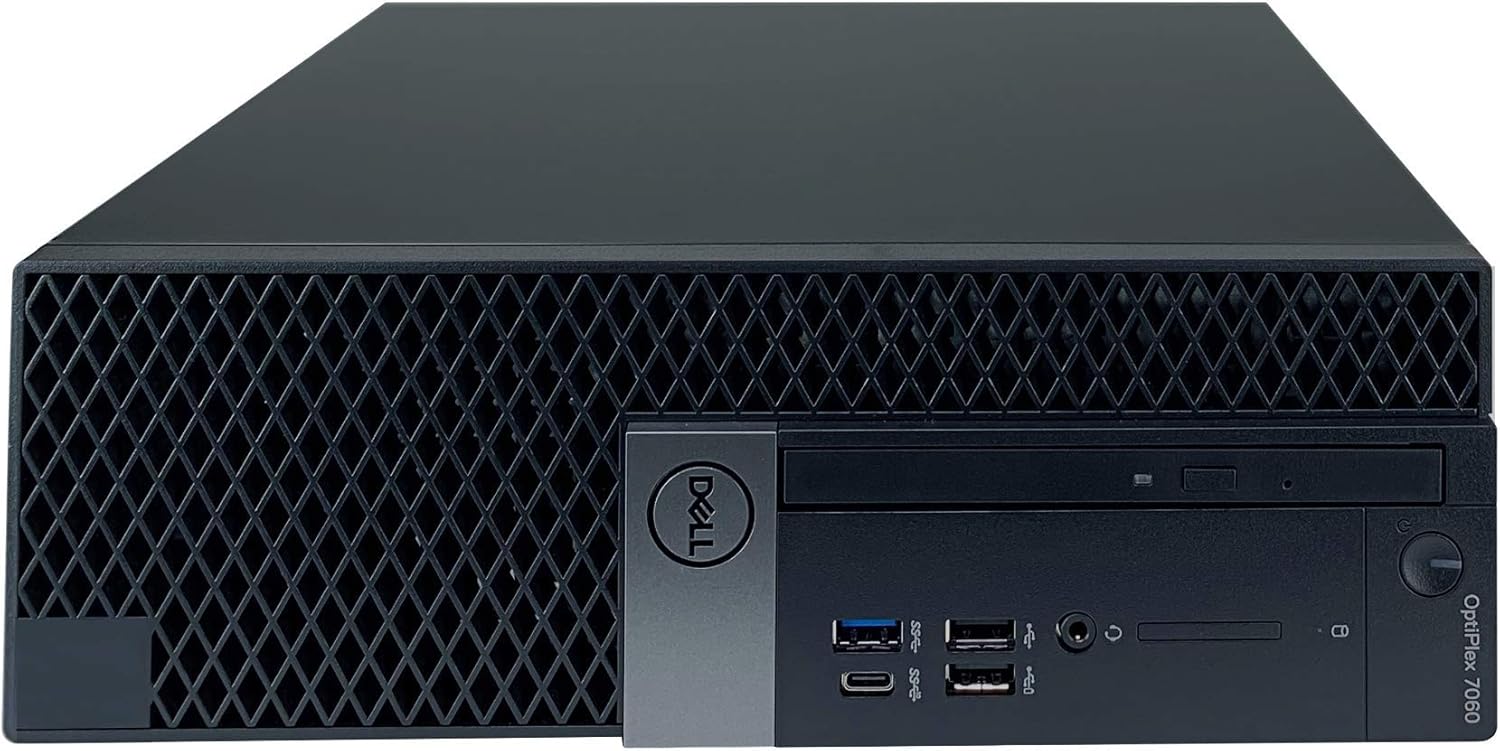
Front View

This image displays the front of the Dell Optiplex 7060 SFF Desktop, highlighting its compact design and front panel ports.
Front Panel Ports and Features

This diagram illustrates the various ports and features available on the front and rear panels of the Dell Optiplex 7060 SFF Desktop.
- Power Button: Used to turn the computer on or off.
- Optical Drive: Supports DVD reading and writing.
- Universal Audio Jack: For connecting headphones or a headset.
- USB 2.0 Ports (2): One port supports PowerShare for charging devices.
- USB 3.1 Gen 1 Port: For high-speed data transfer.
- USB 3.1 Gen 2 Type-C with PowerShare port: For high-speed data transfer and device charging.
Rear View
This image shows the rear panel of the Dell Optiplex 7060 SFF Desktop, detailing the various connectivity options.
Rear Panel Ports and Features
- Line-out: Audio output port.
- PS/2 Keyboard Port: For connecting a PS/2 keyboard.
- PS/2 Mouse Port: For connecting a PS/2 mouse.
- DisplayPorts (2): For connecting monitors.
- USB 3.1 Gen 1 Ports (4): For high-speed data transfer.
- USB 2.0 Gen 1 Ports (2): For connecting various USB devices.
- PCIe Card Slots (2): For expansion cards.
- Release Latch: For opening the chassis.
- Serial Port: For connecting legacy serial devices.
- RJ-45 (Ethernet): For wired network connection.
- Knock-out Slots for Wireless Antennas: For optional wireless antenna installation.
- Power Connection: For connecting the power cable.
Setup Instructions
1. Unpacking and Placement
- Carefully remove the computer and all accessories from the packaging.
- Place the desktop on a stable, flat surface with adequate ventilation around all sides to prevent overheating.
2. Connecting Peripherals
- Monitor: Connect your monitor to one of the DisplayPort 1.2 ports on the rear of the desktop. If your monitor uses a different connection type, an appropriate adapter may be required.
- Keyboard: Connect the Dell KB216 Wired Keyboard to an available USB port or the PS/2 keyboard port on the rear.
- Mouse: Connect the Dell MS116 USB Optical Mouse to an available USB port or the PS/2 mouse port on the rear.
- Network: For wired internet access, connect an Ethernet cable from your router or modem to the RJ-45 port on the rear.
3. Power Connection
- Connect the power cable to the power connector on the rear of the desktop, then plug the other end into a grounded electrical outlet.
4. Initial Power On
- Press the power button on the front of the desktop. The system will boot up, and Windows 11 Professional will load.
- Follow the on-screen instructions to complete the initial Windows setup, including language, region, and user account creation.
Operating Instructions
Using Windows 11 Professional
- Your Dell Optiplex 7060 comes pre-installed with Windows 11 Professional (64-bit). Familiarize yourself with the Windows 11 interface for optimal use.
- Regularly check for and install system updates to ensure security, performance, and access to the latest features.
Optical Drive Usage
- The integrated DVD Burner supports reading and writing CDs and DVDs. Gently insert discs into the drive slot with the label facing up.
USB Ports
- Utilize the various USB 3.1 and USB 2.0 ports for connecting external devices such as external hard drives, USB flash drives, printers, and other peripherals. The PowerShare ports can charge compatible devices even when the computer is off or in sleep mode.
Maintenance
Cleaning
- Keep the desktop clean by regularly wiping exterior surfaces with a soft, dry, lint-free cloth. Avoid using liquid cleaners directly on the computer.
- Ensure ventilation grilles are free from dust buildup to prevent overheating. Use compressed air to gently clear dust from vents.
Software Updates
- Periodically check for and install updates for Windows 11 and Dell drivers to maintain system stability, security, and optimal performance. Dell SupportAssist can help manage driver updates.
Data Backup
- Regularly back up important data to an external drive or cloud storage to prevent data loss in case of system failure.
Troubleshooting
Computer Does Not Power On
- Ensure the power cable is securely connected to both the desktop and a functional electrical outlet.
- Verify the electrical outlet is functional by plugging in another device.
- Check the power button for any obstruction or damage.
No Display on Monitor
- Confirm the monitor is powered on and its video cable is securely connected to one of the desktop's DisplayPort outputs.
- Ensure the correct input source (e.g., DisplayPort 1, DisplayPort 2) is selected on your monitor.
- Try connecting the monitor to a different DisplayPort on the desktop, if available.
Peripherals Not Responding (Keyboard/Mouse)
- Check that the keyboard and mouse cables are securely connected to the correct USB or PS/2 ports.
- Try connecting the peripherals to different USB ports.
- Restart the computer.
System Performance Issues
- Close unnecessary applications running in the background.
- Run a system scan for malware or viruses using reputable antivirus software.
- Check for available Windows and driver updates and install them.
- Ensure adequate ventilation around the desktop to prevent thermal throttling.
Specifications
| Feature | Detail |
|---|---|
| Processor | 8th Generation Intel Core i7-8700 (6-Core, 12MB Cache, up to 4.60 GHz) |
| Memory (RAM) | 16GB DDR4 2666MHz |
| Storage | 512GB Solid State Drive (SSD) |
| Graphics | Intel UHD Graphics 630 |
| Operating System | Windows 11 Professional (64-bit) |
| Optical Drive | DVD Burner (DVD-W) |
| Ethernet | Gigabit Ethernet LAN (Intel I219-LM Controller) |
| USB Ports | 5 x USB 3.1, 4 x USB 2.0, 1 x USB 3.1 Gen 2 Type-C with PowerShare |
| Video Ports | 2 x DisplayPort 1.2 |
| Dimensions (HxWxD) | 11.5 x 3.7 x 11.4 inches (29.2 x 9.26 x 29.0 cm) |
| Weight | 12 pounds (5.44 kg) |
| Wireless | 802.11ac (Note: Wireless capability may vary by specific configuration. Check your device for antennas.) |

This diagram illustrates the height, width, and depth of the Dell Optiplex 7060 SFF Desktop.
Warranty and Support
Warranty Information
Your Dell Optiplex 7060 SFF Desktop includes a 1-Year Limited Warranty. Please refer to the warranty documentation provided with your purchase for full terms and conditions regarding coverage and service.
Technical Support
For technical assistance, visit the official Dell support website or contact Dell customer service. Have your service tag or express service code ready for faster support. These codes are typically located on a label on the chassis of your desktop.


