
Introduction
This manual provides instructions for the safe and effective use of your Accessory USA AC Adapter Charger. This adapter is designed to provide power to compatible devices, specifically the Daiwa CN-103L HF/VHF Cross Needle SWR Meter RF Wattmeter. Please read this manual thoroughly before use and retain it for future reference.
Important Safety Information
To ensure safe operation and prevent damage, observe the following safety guidelines:
- Certification: This product is CE / FCC / RoHS certified, meeting international safety and environmental standards.
- Protection Features: Equipped with OVP (Over Voltage output Protection), OCP (Over Current output Protection), and SCP (Short Circuit output Protection) to safeguard your devices.
- Compatibility: Always verify that the adapter's specifications match the power requirements of your device before connecting. Refer to the "Compatibility" section for specific device models.
- Indoor Use Only: This adapter is intended for indoor use in dry locations. Do not expose to water, moisture, or extreme temperatures.
- Ventilation: Ensure adequate ventilation around the adapter during use. Do not cover it with cloths or place it in enclosed spaces.
- Handling: Do not drop, disassemble, or attempt to repair the adapter. Contact customer support if it is damaged.
- Power Outlet: Plug the adapter into an easily accessible power outlet.
Compatibility
This AC Adapter Charger is specifically designed for and compatible with the following device:
- Daiwa CN-103L HF/VHF Cross Needle SWR Meter RF Wattmeter
Note: Please ensure the model of your device before purchasing and using this adapter to prevent damage.
Setup Instructions
- Unpack the Adapter: Carefully remove the AC adapter from its packaging. Inspect it for any visible damage.
- Connect to Device: Locate the power input port on your Daiwa CN-103L SWR Meter. Insert the adapter's output connector firmly into the device's power input port. Ensure a snug fit.
- Connect to Power Outlet: Plug the adapter's AC plug into a standard electrical wall outlet.
- Verify Connection: Once connected, the device should receive power. Refer to your device's manual for specific power indicator lights or startup procedures.
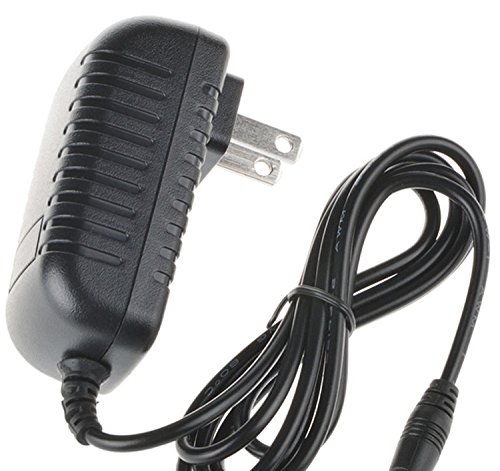
Image: The Accessory USA AC Adapter Charger. This image shows the adapter's main body and power prongs, ready for connection to a wall outlet and a compatible device.
Operating Instructions
Once the adapter is properly connected to both the power outlet and your Daiwa CN-103L SWR Meter, the device is ready for operation. The adapter provides continuous power to the device.
- Power On/Off: Use the power switch on your Daiwa CN-103L SWR Meter to turn the device on or off. The adapter itself does not have an on/off switch.
- Unplugging: To disconnect power, first turn off your device, then unplug the adapter from the wall outlet, and finally disconnect it from the device.
Care and Maintenance
Proper care will extend the life of your AC adapter:
- Cleaning: Disconnect the adapter from all power sources before cleaning. Use a soft, dry cloth to wipe the exterior. Do not use liquid cleaners or solvents.
- Storage: When not in use, store the adapter in a cool, dry place, away from direct sunlight and moisture. Avoid tightly winding the cable to prevent damage.
- Inspection: Periodically inspect the adapter and its cable for any signs of wear, cuts, or damage. If damage is observed, discontinue use immediately and replace the adapter.
Troubleshooting
If you encounter issues with your AC adapter, refer to the following common problems and solutions:
| Problem | Possible Cause | Solution |
|---|---|---|
| Device does not power on. |
|
|
| Adapter feels unusually hot. |
|
|
If troubleshooting steps do not resolve the issue, please contact Accessory USA customer support.
Product Specifications
| Feature | Detail |
|---|---|
| Brand | Accessory USA |
| Input Voltage | 240 Volts (compatible with standard outlets) |
| Wattage | 50 watts |
| Connector Type | Radio Frequency (for device connection) |
| Main Power Connector Type | 2 Pin (for wall outlet) |
| Special Feature | Travel-friendly design |
| Specification Met | CE Certified |
| Power Source | Corded Electric |
| Mounting Type | Wall Mount |
| UPC | 760207045340 |
| ASIN | B07QFVST3B |
Warranty and Support
Accessory USA stands behind its products with comprehensive warranty and support options:
- Money Back Guarantee: 30 Days Money Back Guarantee from the date of purchase.
- Free Exchange: 60 Days Free Exchange with a paid return label.
- Worry-Free Warranty: 365 Days Anytime Worry-Free Warranty.
For technical support, warranty claims, or any questions regarding your Accessory USA AC Adapter Charger, please contact the seller directly through the platform where the purchase was made or visit the official Accessory USA website for contact information.