
1. Introduction
This manual provides essential information for the safe and effective use of your Canon EOS Rebel SL3 DSLR Camera. Please read this manual thoroughly before using the camera and retain it for future reference. The Canon EOS Rebel SL3 is a compact and lightweight DSLR camera featuring a 24.1 Megapixel CMOS (APS-C) sensor, DIGIC 8 image processor, Dual Pixel CMOS AF with Eye Detection AF, 4K video recording, and a 3.0-inch vari-angle touch screen LCD.
2. Safety Information
- Do not disassemble or modify the camera. Unauthorized modifications can lead to electric shock or malfunction.
- Keep the camera away from water and moisture. Exposure to water can cause electric shock or damage.
- Avoid extreme temperatures. Do not expose the camera to direct sunlight for extended periods or use it in extremely hot or cold environments.
- Use only approved accessories. Using unapproved batteries, chargers, or other accessories may cause damage or injury.
- Handle with care. Dropping or subjecting the camera to strong impacts can cause damage.
3. Package Contents
Verify that all items listed below are included in your camera package:
- Canon EOS Rebel SL3 Camera Body
- Battery Pack LP-E17
- Battery Charger LC-E17
- Wide Strap EW-400D
- Eyecup Ef
- Body Cap R-F-3
- User Manual Kit
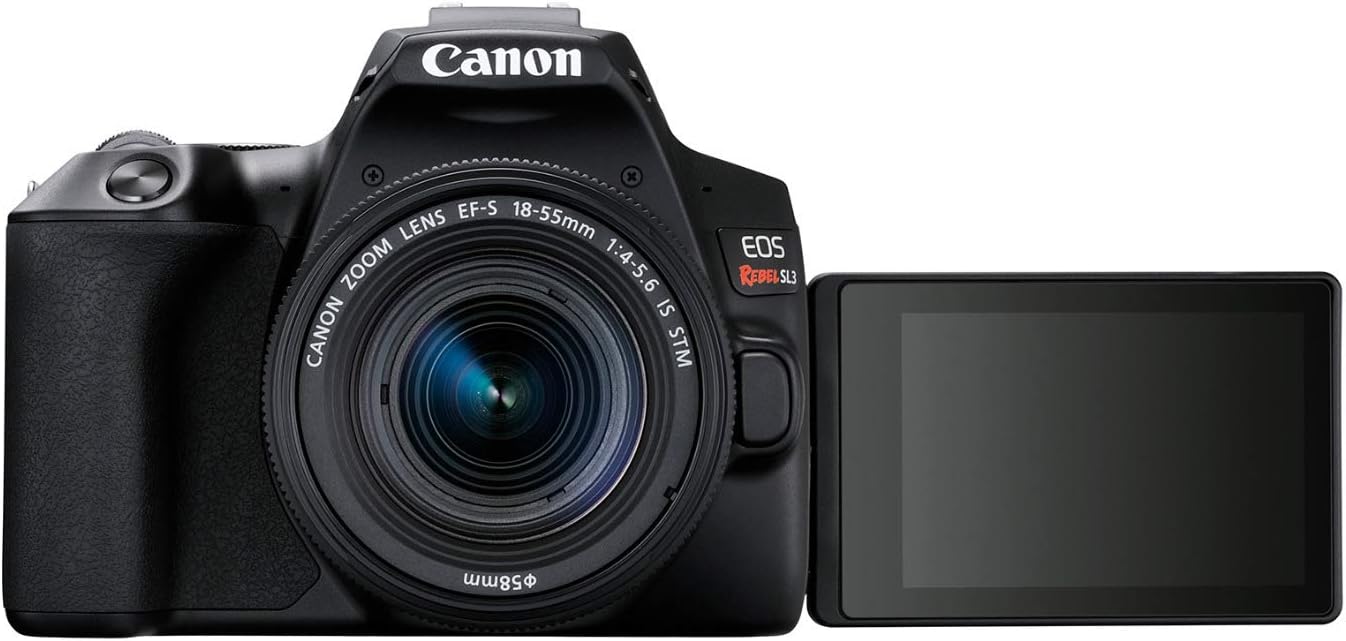
Figure 3.1: Canon EOS Rebel SL3 Package Contents
4. Camera Overview
Familiarize yourself with the main components and controls of your Canon EOS Rebel SL3 camera.
4.1. Front View

Figure 4.1: Front View of Camera Body
The front of the camera features the lens mount, lens release button, built-in flash, and remote control sensor.
4.2. Rear View

Figure 4.2: Rear View of Camera Body
The rear of the camera includes the vari-angle LCD touch screen, viewfinder, menu button, info button, playback controls, and various function buttons for settings adjustment.
4.3. Top View

Figure 4.3: Top View of Camera Body
The top of the camera features the mode dial, hot shoe for external flash, shutter button, and ISO/DISP buttons.
4.4. Side Views
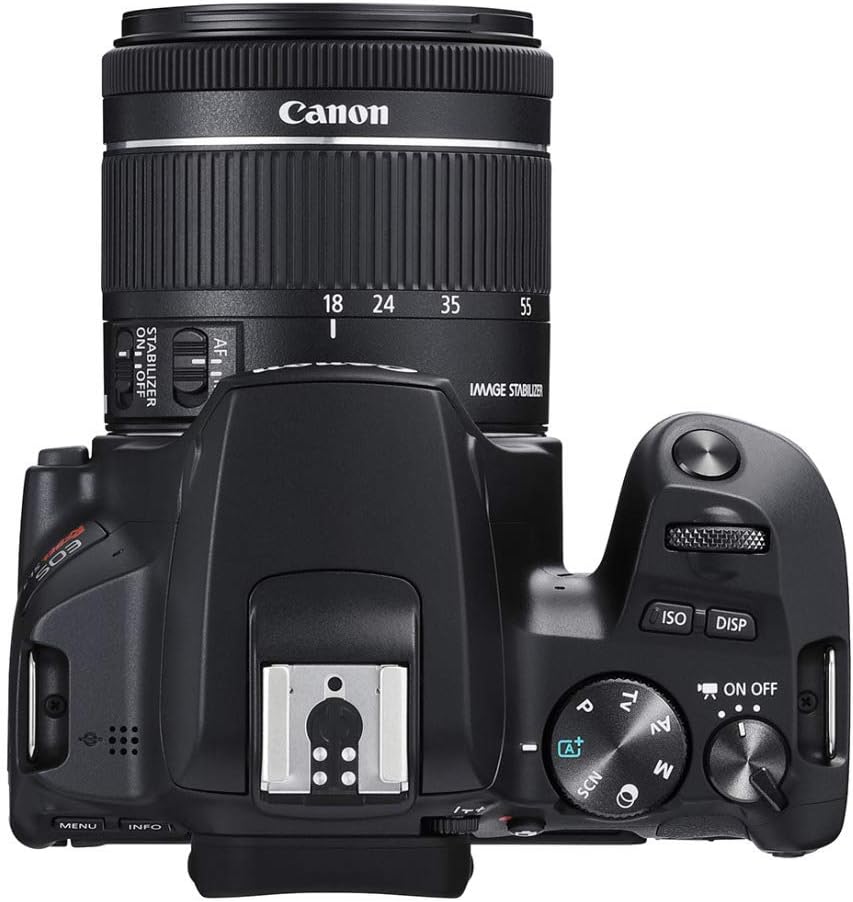

Figure 4.4: Right and Left Side Views of Camera Body
The sides of the camera house various ports including HDMI, USB, and microphone input, along with the SD card slot and battery compartment.
5. Setup
5.1. Inserting the Battery
- Open the battery compartment cover located at the bottom of the camera.
- Insert the battery pack (LP-E17) with the electrical contacts facing inward, ensuring it clicks into place.
- Close the battery compartment cover securely.
5.2. Inserting a Memory Card
- Open the card slot cover on the side of the camera.
- Insert an SD, SDHC, or SDXC memory card with the label facing the back of the camera until it clicks.
- Close the card slot cover.
5.3. Attaching a Lens
- Remove the body cap from the camera and the rear cap from the lens.
- Align the red dot on the lens with the red dot on the camera's lens mount.
- Rotate the lens clockwise until it clicks into place.
5.4. Initial Power On
- Set the power switch to ON.
- The camera will display the initial setup screen. Follow the on-screen instructions to set the date, time, and time zone.
6. Operating the Camera
6.1. Basic Shooting Modes
The mode dial on top of the camera allows you to select various shooting modes:
- Scene Intelligent Auto (A+): Fully automatic mode for easy shooting.
- Program AE (P): Camera sets aperture and shutter speed, but you can adjust other settings.
- Shutter-Priority AE (Tv): You set the shutter speed, camera sets aperture.
- Aperture-Priority AE (Av): You set the aperture, camera sets shutter speed.
- Manual Exposure (M): You control both aperture and shutter speed.
- Scene Modes (SCN): Optimized settings for specific scenes like Portrait, Landscape, Sports, etc.
6.2. Focusing
The EOS Rebel SL3 features Dual Pixel CMOS AF with Eye Detection AF for fast and accurate autofocus. In Live View mode, you can tap on the vari-angle touch screen to select your focus point.
6.3. Video Recording
The camera supports 4K UHD 2160p video recording. To start recording, set the mode dial to the movie shooting mode and press the movie shooting button.
6.4. Using the Vari-Angle Touch Screen

Figure 6.1: Vari-Angle LCD Touch Screen
The 3.0-inch vari-angle touch screen allows for flexible shooting angles, including selfies and vlogging. You can also use it to navigate menus, change settings, and review images by touch.
6.5. Connectivity (Wi-Fi & Bluetooth)
The camera includes built-in Wi-Fi and Bluetooth for wireless communication. You can connect to a smartphone or tablet using the Canon Camera Connect app to transfer images, shoot remotely, or use your device as a remote control.
- To enable Wi-Fi/Bluetooth, go to the Wireless settings in the camera menu.
- Follow the on-screen instructions to pair with your device.
7. Maintenance
7.1. Cleaning
- Camera Body: Use a soft, dry cloth to wipe the camera body. For stubborn dirt, use a cloth lightly dampened with water.
- Lens: Use a lens blower to remove dust, then gently wipe with a lens cleaning cloth.
- Sensor: The camera has an automatic sensor cleaning function. For manual cleaning, refer to the camera's menu for the 'Sensor cleaning' option or consult a professional.
- LCD Screen: Use a soft cloth to wipe the screen. Avoid harsh chemicals.
7.2. Battery Care
- Charge the battery fully before first use.
- Store batteries in a cool, dry place when not in use.
- Avoid fully discharging the battery frequently to prolong its lifespan.
7.3. Storage
- Store the camera in a dry, well-ventilated area, away from dust and direct sunlight.
- Remove the battery if the camera will not be used for an extended period.
- Attach the body cap and lens caps to protect the sensor and lens elements.
8. Troubleshooting
If you encounter issues with your camera, try the following basic troubleshooting steps:
- Camera does not power on: Check if the battery is charged and correctly inserted.
- Images are blurry: Ensure the lens is properly attached, autofocus is engaged, and shutter speed is appropriate for the lighting conditions.
- Memory card error: Reinsert the memory card, try a different card, or format the card (this will erase all data).
- Wi-Fi/Bluetooth connection issues: Ensure wireless settings are enabled on the camera and your mobile device. Try restarting both devices.
- Flash not firing: Check flash mode settings and ensure the flash is raised if using the built-in flash.
For more detailed troubleshooting, refer to the comprehensive user manual provided with your camera or visit the Canon support website.
9. Specifications
| Feature | Specification |
|---|---|
| Model Name | CANON EOS REBEL SL3 DSLR Camera, Built-in Wi-Fi, Dual Pixel CMOS AF and 3.0 inch Vari-angle Touch Screen, Body, Black |
| Model Number | 3453C001 |
| Photo Sensor Resolution | 24.1 MP |
| Photo Sensor Size | APS-C |
| Video Resolution | 4K UHD 2160p |
| Display Type | LCD, Articulating, Touch Screen (Capacitive) |
| Screen Size | 3 Inches |
| Connectivity Technology | Bluetooth, Wi-Fi |
| Compatible Mountings | Canon EF |
| Image Stabilization | Digital |
| Supported File Format | JPEG, Raw |
| Expanded ISO Minimum | 100 |
| Maximum Shutter Speed | 30 seconds |
| Minimum Shutter Speed | 30 Seconds |
| Item Weight | 1.5 Pounds |
10. Warranty and Support
Your Canon EOS Rebel SL3 DSLR Camera comes with a 1-year manufacturer's warranty. For warranty claims, technical support, or service, please contact Canon customer service or visit the official Canon support website. Keep your proof of purchase for warranty validation.


