
Makita DX08
Makita DX08 Dust Extractor Attachment User Manual
Model: DX08
Introduction
This manual provides essential information for the safe and effective use of the Makita DX08 Dust Extractor Attachment. The DX08 is designed for use with the 18V LXT® Lithium-Ion cordless Brushless 1" Rotary Hammer (XRH08, sold separately). It features a HEPA filter system for efficient dust collection, ensuring compliance with OSHA Table 1 standards.
The attachment operates with its own motor, preventing any reduction in the rotary hammer's drilling performance. Its transparent, high-capacity dust container allows for easy monitoring of collected material. The system automatically activates with the tool and includes a 3-second delay to capture residual dust. The dust container is designed for quick and easy detachment for emptying.
Product Features
- OSHA Table 1 Compliance: Integrated filter cleaning mechanism helps maintain optimal suction efficiency.
- Independent Power: Powered by a separate motor to ensure the rotary hammer maintains peak drilling performance.
- Automated Dust Capture: Activates with the tool and includes a 3-second delay for comprehensive dust collection.
- HEPA Filtration: Efficiently captures 99.97% of particulates 0.3 microns and larger.
- Adjustable Extension: Two-stage extractor extension supports drilling depths up to 7-1/2 inches and hole diameters up to 1-1/8 inches.
Setup and Installation
Proper installation of the DX08 Dust Extractor Attachment is crucial for its performance and safety. Ensure the rotary hammer is disconnected from its power source before beginning installation.
- Prepare the Rotary Hammer: Ensure the 18V LXT® Lithium-Ion cordless Brushless 1" Rotary Hammer (XRH08) is clean and free of debris around the attachment points.
- Attach the Extractor: Align the DX08 attachment with the designated mounting points on the rotary hammer. Securely slide the attachment into place until it clicks or locks firmly. Refer to the rotary hammer's manual for specific attachment procedures if necessary.
- Verify Connection: Gently tug on the dust extractor to ensure it is securely fastened and will not detach during operation.
- Check Dust Container: Ensure the transparent dust container is properly seated and locked onto the extractor body.
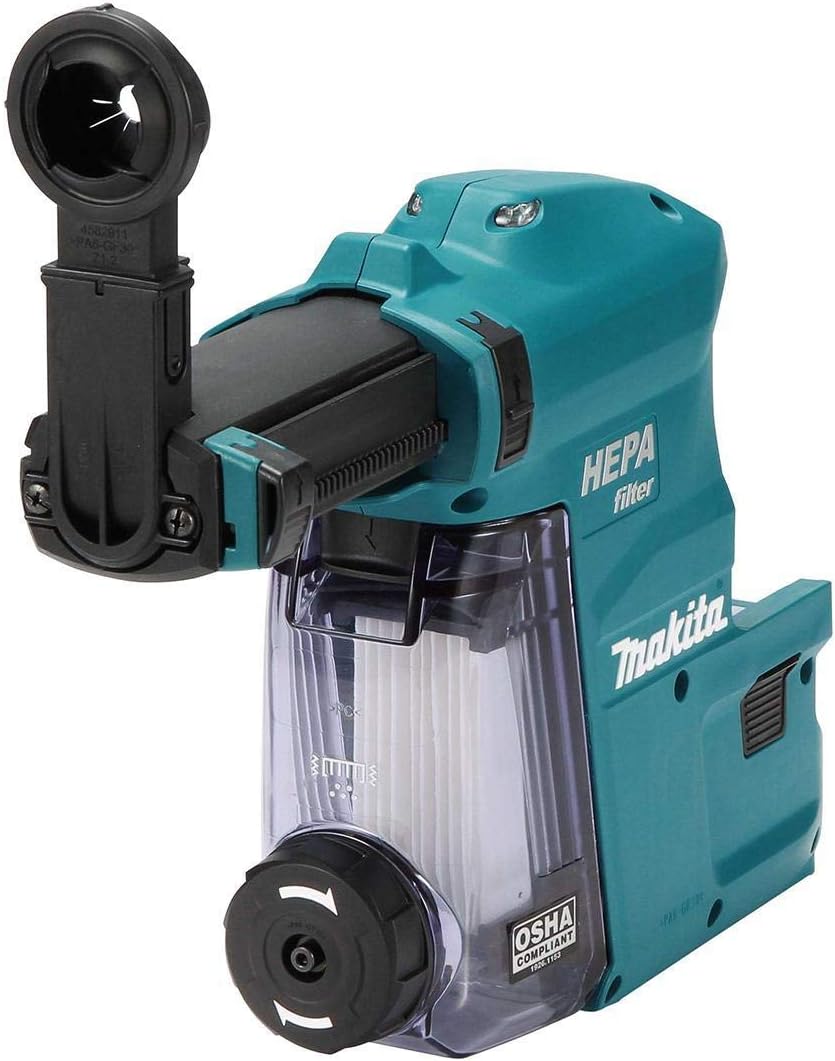
Image: The Makita DX08 Dust Extractor Attachment securely mounted on a rotary hammer, ready for operation.
Operating Instructions
Follow these steps for effective operation of the DX08 Dust Extractor Attachment.
- Power On: Once the attachment is securely installed and the rotary hammer is ready, power on the rotary hammer. The dust extractor will activate automatically when drilling begins.
- Drilling Operation: Begin drilling as usual. The dust extractor will capture concrete dust as it is generated.
- Post-Drilling Delay: After drilling stops, the dust extractor will continue to operate for approximately 3 seconds to ensure all remaining dust is collected.
- Monitor Dust Level: Periodically check the transparent dust container to monitor the level of collected material.
- Adjust Extension (if needed): For deeper holes, extend the two-stage extractor extension as required. Ensure it is locked in place before drilling.

Image: The DX08 Dust Extractor Attachment in operation, demonstrating the extended dust collection tube for deeper drilling applications.
Maintenance
Regular maintenance ensures the longevity and optimal performance of your DX08 Dust Extractor Attachment.
Emptying the Dust Container
- Detach Container: Locate the quick-release mechanism on the dust container. Press or slide the release to detach the container from the main unit.
- Dispose of Dust: Empty the collected dust into an appropriate waste receptacle.
- Reattach Container: Align the empty dust container with the attachment points and push it firmly until it locks back into place.

Image: The transparent dust container of the DX08, illustrating the visible level of collected dust, indicating when emptying is required.
HEPA Filter Cleaning
The DX08 features an integrated filter cleaning mechanism. Activate this mechanism periodically or when suction performance decreases.
- Refer to the specific instructions provided with the attachment for activating the filter cleaning mechanism. This typically involves a lever or button that shakes the filter to dislodge dust.
- For thorough cleaning, the HEPA filter may need to be removed and gently tapped or brushed. Do not wash the HEPA filter with water unless explicitly stated in the product's detailed manual.
General Cleaning
- Wipe down the exterior of the attachment with a clean, damp cloth. Do not use harsh chemicals or abrasive cleaners.
- Ensure all air vents are clear of obstructions.
Troubleshooting
This section addresses common issues you might encounter with your DX08 Dust Extractor Attachment.
| Problem | Possible Cause | Solution |
|---|---|---|
| Low suction power | Full dust container | Empty the dust container. |
| Low suction power | Clogged HEPA filter | Activate the filter cleaning mechanism. If necessary, remove and clean the filter. |
| Low suction power | Obstruction in suction path | Check the suction nozzle and extension for blockages and clear them. |
| Attachment not activating | Not properly attached to rotary hammer | Ensure the attachment is securely fastened and locked onto the rotary hammer. |
| Attachment not activating | Rotary hammer not powered on or operating | The DX08 activates with the rotary hammer. Ensure the rotary hammer is functioning correctly. |
Specifications
| Feature | Detail |
|---|---|
| Model Name | Makita DX08 Dust Extractor Attachment with HEPA Filter Cleaning Mechanism |
| Part Number | DX08 |
| Compatibility | 18V LXT® Lithium-Ion cordless Brushless 1" Rotary Hammer (XRH08) |
| Filter Type | HEPA Filter |
| Filtration Efficiency | Captures 99.97% of particulates 0.3 microns and larger |
| Power Source | Independent motor (powered by rotary hammer's battery) |
| Max Drilling Depth | Up to 7-1/2 inches (with two-stage extension) |
| Max Drilling Diameter | Up to 1-1/8 inches |
| Item Weight | 4.11 pounds |
| Product Dimensions | 13.6 x 15.1 x 4.1 inches |
| Included Components | Dust Case with HEPA Filter Cleaning Mechanism (199588-6) |
Warranty and Support
Specific warranty details for the Makita DX08 Dust Extractor Attachment are not provided within this manual. For comprehensive warranty information, service, or technical support, please refer to the official Makita website or contact Makita customer service directly.
You can typically find contact information and warranty policies on the manufacturer's official product support pages or within the original product packaging.
Related documentsDX08


Ask a question about this manual
Ask about setup, troubleshooting, compatibility, parts, safety, or missing instructions. Manuals+ will review the question and use this page’s manual context to help answer it.